Cloud-based LLMs such as Claude and ChatGPT may be impressive, but your prompts are all processed on someone else's servers.Local LLMs offer privacy, but the more capable models require powerful hardware to run.Even if you can only run small LLMs at home, you can make them much more accurate by giving them offline access to Wikipedia and other data.
Add How-To Geek on Google Add as Preferred Source Follow on Google Discover Local LLMs are limited by your hardware Don't expect a local version of ChatGPT running on your old laptop As you must surely have noticed, the prices of computers, smartphones, and more have risen significantly in recent times.This is in part due to the price of RAM having gone through the roof, in what many are calling the RAMpocalypse, although RAMageddon is a far more satisfying name to my mind.RAM has become so expensive because the AI models that power services such as Gemini, Claude, and ChatGPT need a lot of computing power to perform their miraculous feats.
AI data centers have bought insane numbers of GPUs, and memory makers have switched focus to producing the high-bandwidth memory those GPUs need, leaving less available for consumers.You can run local AI models on your own hardware, but the same problem exists.You need a powerful computer with a lot of RAM and a powerful GPU to run models that are comparable to cloud-based LLMs.
If you only have modest hardware, you can still run local LLMs, but you'll have to stick to much smaller models.These are far less capable, but are small enough to run on weaker computers.Related 5 ways I'm using local AI to make the most of my old PC hardware Anything with 8GB of RAM or more is enough to start.
Posts By Nick Lewis Small models can run but have a much smaller knowledge base A local LLM may simply make things up if it doesn't know Small local models can do a lot of things reasonably well, but they are inferior in many ways.They're not remotely as good at handling complex reasoning as larger models, and their smaller size also means that these small LLMs have far less built-in knowledge than large models.A small LLM might know what the capital of France is or how to boil an egg.
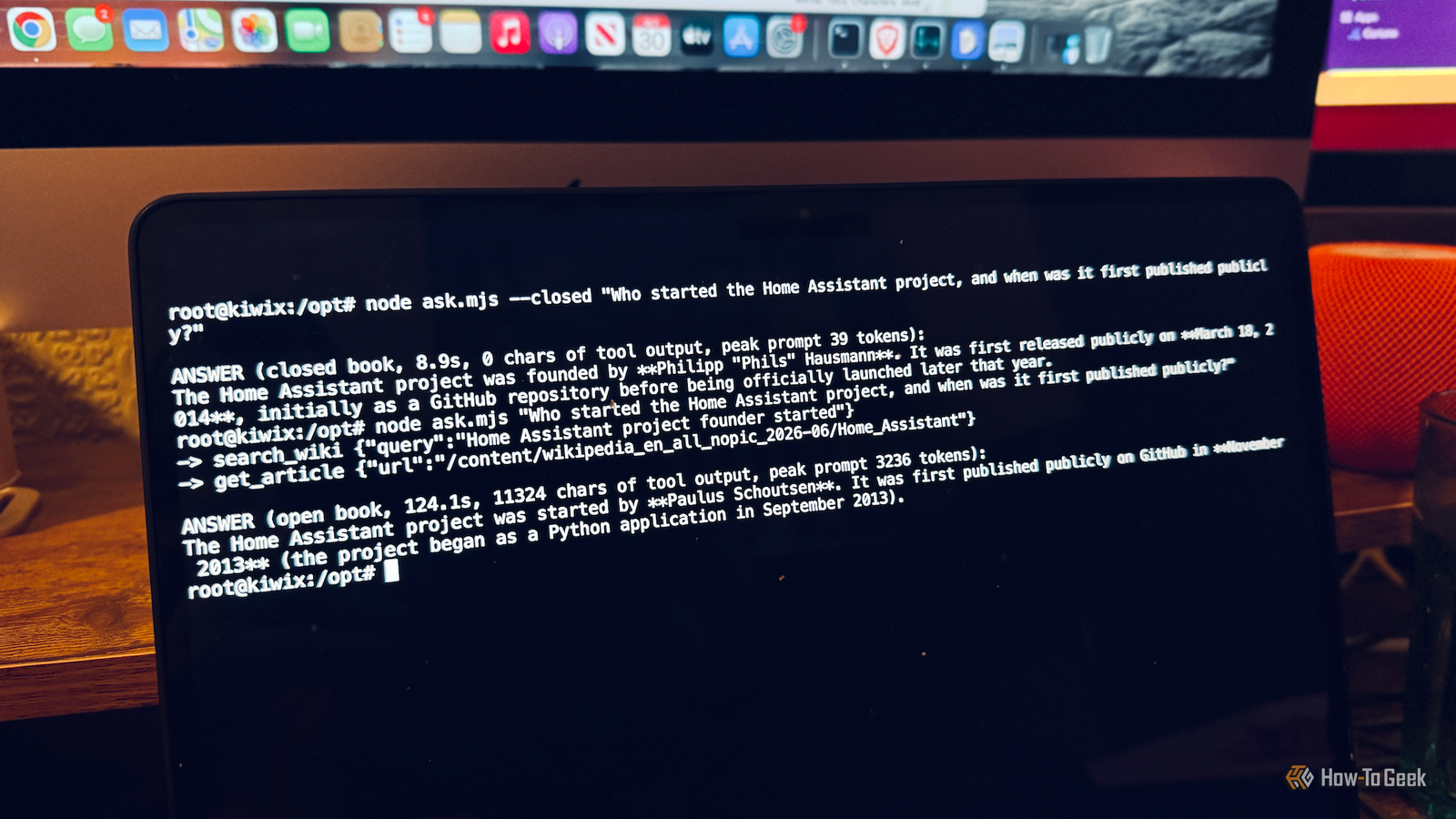
It might not have access to less common facts, such as who the founder of Home Assistant is.One problem with this lack of knowledge is that LLMs aren't great at admitting that they don't know something.Instead, they can hallucinate and just make up convincing-sounding facts, and if you don't know the answer yourself, these hallucinations can be as convincing as accurate answers.
This is far from ideal if you're using an LLM to get factual information.Kiwix Wiki MCP Server gives your LLM access to Wikipedia A server hosts the information and the LLM can access it when needed Kiwix Wiki MCP Server is a clever solution to this problem.Since a small local LLM can't hold a huge amount of data, you can store knowledge on your own hardware instead.
Kiwix is a free app for reading offline websites, and it can serve an entire offline copy of Wikipedia from your computer.Kiwix Wiki MCP Server uses the Model Context Protocol (MCP) to connect Kiwix to your LLM and allows the LLM to search Wikipedia.Effectively, you're hosting a library of facts that the LLM can access to help it answer prompts.
The data is stored in ZIM files, a compressed archive format designed to store offline website content from sites such as Wikipedia.You store the files on your local hardware, and a local LLM can access them when needed.You can download Wikipedia files as well as other data such as Project Gutenberg libraries on subjects including law and technology, iFixit repair guides, or data from Stack Exchange.
Using these offline files, you can make your LLM better informed by giving it access to general knowledge or specialized knowledge on specific topics.Your LLM doesn't store the information; it simply pulls the relevant knowledge from the server.A 4B model got less than half of my test questions right With Kiwix Wiki MCP Server, the results were dramatically better Close I decided to test out a small local LLM running on my Dell OptiPlex, a PC that's more than a decade old and has only 16 GB of RAM and no dedicated GPU.
I used the Qwen 3.5 4B model running in Ollama and gave it a set of 13 general knowledge questions.I then set up Kiwix Wiki MCP Server with a text-only file containing the whole of Wikipedia in English, which is around 50 GB.I pointed the LLM at the server and asked the same questions again.
The results were very clear.Relying on its own knowledge, the LLM got only 4 of the 13 questions right, confidently making up plausible-sounding facts that were completely false.For example, when asked who wrote , the LLM replied that it was Iain Sinclair in 1983, instead of the actual answer of Iain Banks in 1984.
The founder of Home Assistant was given as Philipp "Phils" Hausmann, instead of the legendary Paulus Schoutsen.When using the data from Wikipedia, the same LLM got 11 answers correct, with one partially correct, and it refused to answer one question about the winner of the 2026 Six Nations rugby tournament, because it said that the current year was 2024.None of the answers contained any made-up information; all of the responses used real data pulled from the Wikipedia server.
The responses did take longer, at around two minutes compared to about nine seconds, but the output was far more accurate.Make your small LLMs better informed If you're using small local LLMs, the lack of world knowledge can be frustrating.By using Kiwix Wiki MCP Server, you can give your local LLM access to a huge amount of information that will help you get far more accurate responses.
Read More