It may be one of the most commonly requested types of task, but it’s also one of the more awkward ones.Monitoring a folder to watch for file changes has plenty of practical applications, from image processing to disk management and more complex API programming.While your OS may have some level of provision for this feature, it’s unlikely to be very flexible.
With the power of a full programming language like Python in your toolkit, however, you can tailor a drop folder to your exact needs.A library named Watchdog makes this process even simpler.The Watchdog library does the heavy lifting for you An efficient and portable approach gives the best of all worlds The brute-force approach to this problem would involve a program that continually polls a directory, listing its contents and acting accordingly.
But with Watchdog, and the underlying technologies it uses, that’s unnecessary.Watchdog uses native, platform-specific APIs like inotify on Linux and FSEvents on macOS.Start by creating a virtual environment—you’ll regret it later on if you don’t! mkdir my-project cd my-project python3 -m venv venv source venv/bin/activate Make sure you’re using the appropriate commands for your system when creating a virtual environment.
Then install the Watchdog library in your project directory with this command: python -m pip install watchdog You can now check everything’s working as expected with a simple test program: import time import logging from watchdog.observers import Observer from watchdog.events import LoggingEventHandler if __name__ == "__main__": logging.basicConfig(level=logging.INFO), event_handler = LoggingEventHandler() observer = Observer() observer.schedule(event_handler, '.', recursive=True) observer.start() try: while True: time.sleep(1) except KeyboardInterrupt: observer.stop() observer.join() Don’t worry about the details at this point, just focus on running and testing this program.When you run it, it will monitor your current directory, so create a blank file there, or rename an existing one, and you should see logging info for relevant events: Using Watchdog for a real-world application How to monitor activity, read filenames, and process files Some of the most common “drop folder” tasks involve image files.You download a bunch of photos from your camera or extract a zip file of images, and want something to deal with them in the background.
For me, one such task involves Nintendo Switch screenshots.I take a lot of these, but the transfer process keeps them all strictly in one folder; even if there are hundreds, they’re an unorganized mess.Thankfully, the file naming convention gives me just about enough info to organize them a bit better.
Here’s an example: 2025010409204300-D796833F72011BDFC9868896D061B51F.jpg.This divides into the following components: "2025": year "01": month "04": day "09": hour "20": minute "43": seconds "00": I think this aims to differentiate multiple screenshots taken at the same second "-": a separator (useful, although technically unnecessary since everything here has a fixed length) "D796833F72011BDFC9868896D061B51F": a unique, 32-long, hexadecimal identifier that represents the specific software title (e.g.game) ".jpg": screenshots are always JPEGs, but the set of files can also include ".mp4" videos, which I’ll just ignore Using the date/time data, these files can be nicely organized in a hierarchy rather than one giant folder.
The main thing to decide is how granular to go; I think it doesn’t make much sense to go any further than day-level, so the task is simply to move files from the drop folder to another folder, in the form {year}/{month}/{day}/{remaining-time-parts}-{id}.jpg.The final program is similar at the top level to the earlier test.Beginning with the imports, it no longer uses logging, but it does use os, re, and Path: import os import time import re from pathlib import Path from watchdog.observers import Observer from watchdog.events import FileSystemEventHandler For now, the watch folder and target are hard-coded; you could read these as arguments in a more complete version: WATCH_FOLDER = Path("/tmp") TARGET_FOLDER = Path("/Users/bobby/Pictures/switch-screenshots") PATTERN = r"^([0-9]{4})([0-9]{2})([0-9]{2})([0-9]{8}-[A-F0-9]{32}\.jpg)$" The pattern defined here is a regular expression, used to match the desired file pattern.
It uses capture groups—in parentheses—to separate the required parts: year, month, day, and the rest.The remaining top-level code is as follows: if __name__ == "__main__": event_handler = FileDropHandler() observer = Observer() observer.schedule(event_handler, path=str(WATCH_FOLDER), recursive=True) print(f" Watching for dropped files in: {WATCH_FOLDER.resolve()}") observer.start() try: while True: time.sleep(1) # Keeps the main execution thread alive except KeyboardInterrupt: print("\nStopping folder monitor...") observer.stop() observer.join() The FileDropHandler class, which will be defined later, is attached to the watch folder using observer.schedule().You can override any relevant methods of the parent class (FileSystemEventHandler), like on_deleted or, in this case, on_created: class FileDropHandler(FileSystemEventHandler): def on_created(self, event): if event.is_directory: return file_path = Path(event.src_path) if not re.match(PATTERN, file_path.name): return self._wait_for_file_copy(file_path) self.process_file(file_path) Notice how the event argument, supplied to on_created, contains a src_path property which we can use to identify the new file.
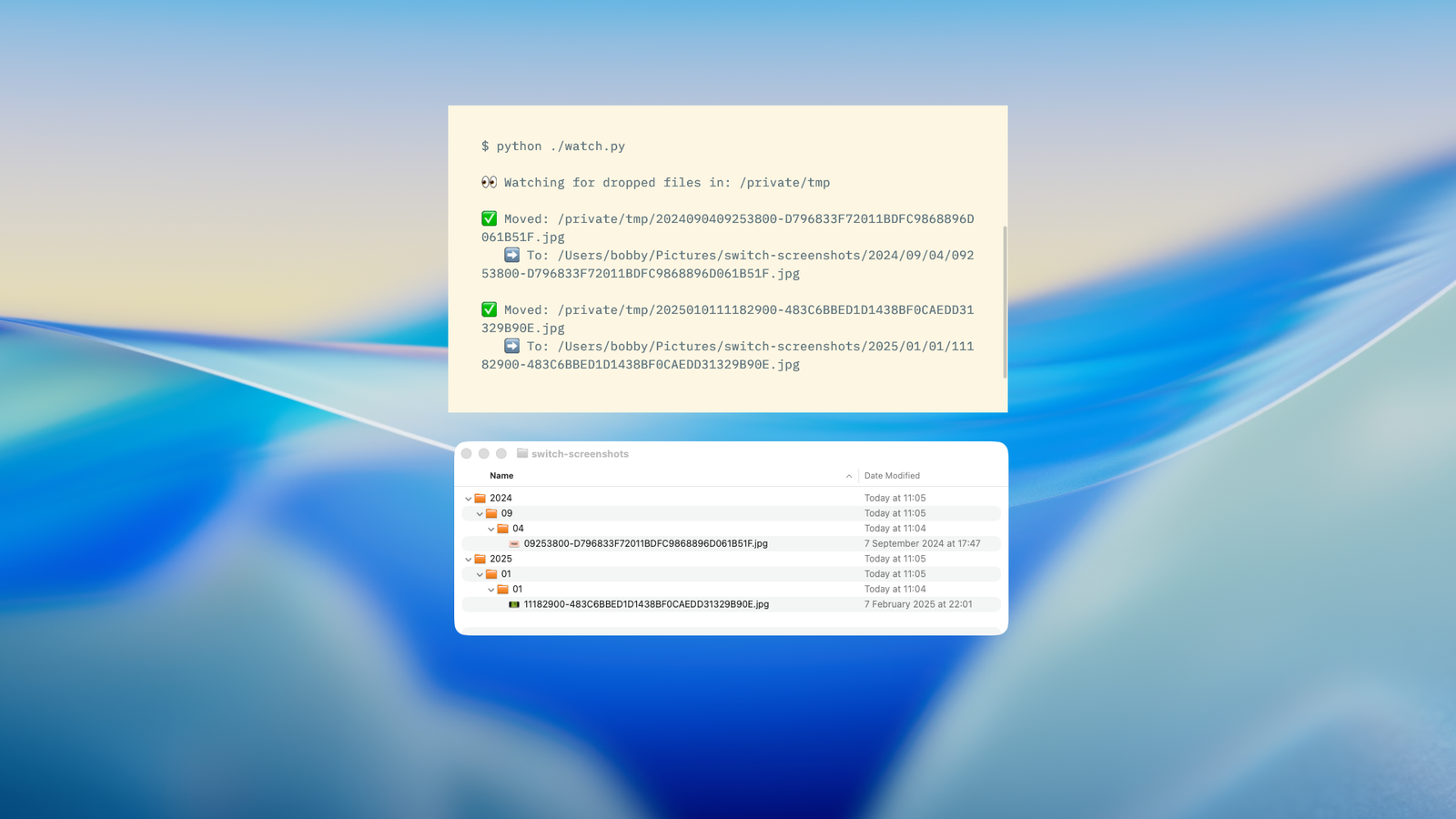
I won’t cover _wait_for_file_copy here; it’s boilerplate sanity-checking code, and you can see it in the full source.The remaining method is process_file: def process_file(self, file_path): try: search = re.search(PATTERN, file_path.name) if not search: return target = TARGET_FOLDER / search.group(1) target = target / search.group(2) target = target / search.group(3) target.mkdir(parents=True, exist_ok=True) file_path.move(target / search.group(4)) print(f" Moved: {file_path.name}\n") except Exception as e: print(f" Error processing {file_path.name}: {e}") This extracts the year, month, and day from the name of the file that was created in the drop folder.It constructs a new path using these, creates any directories that don’t already exist, and moves the original file to its new location, renaming it to the rest of the string following the day.
Close This approach is hugely extensible to meet all sorts of requirements Identifying dropped files and working with them is a big step forward.Once you can do this, you can implement a selection of useful tools with just a little extra programming.You could combine individual notes into a larger file, organize documents based on their contents, or resize images to fit desired dimensions.
Read More