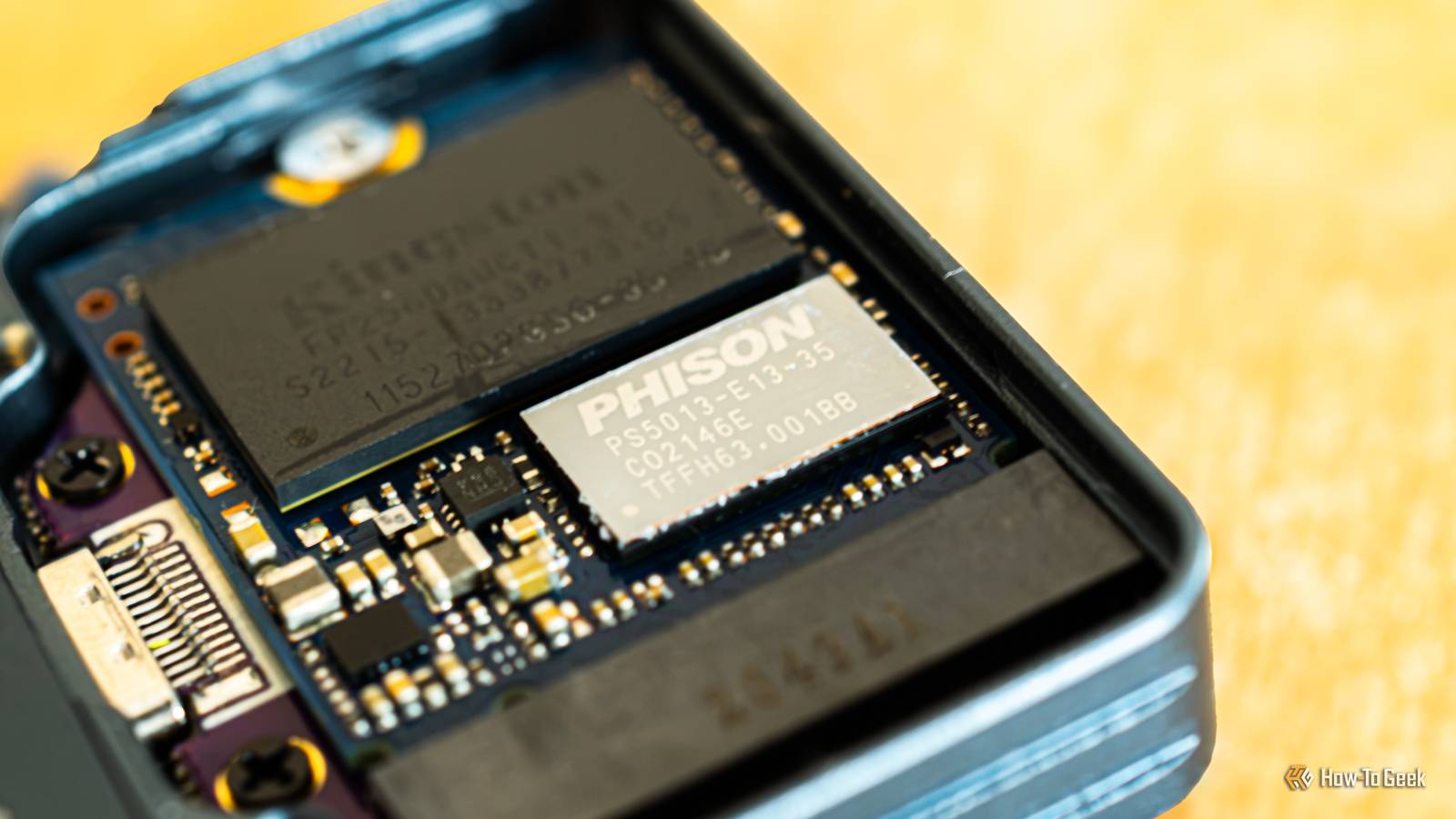
SSDs are more than just flash memory chips soldered to a PCB.They’re still relatively simple designs, but they can’t function without a small chip next to the flash that manages how and where data is written, moved, and erased, along with a plethora of other responsibilities.Every SSD comes with a controller And the controller really is a tiny computer Close Both hard drives and flash memory-based storage media, including SSDs, have a small chip inside called a controller.
The controller is the most important part of every SSD because without it, the SSD in your PC wouldn’t work.In fact, if the flash memory chips on it work flawlessly but the controller gives out, the drive is dead in the water.Because it has to fulfill a number of roles I’ll explain later, each modern SSD controller is a specialized chip with its own processor cores, usually based on the Arm architecture, plus dedicated hardware for tasks like error correction and encryption.
SSD controllers also run their own firmware, which is just as important for the SSD’s performance as the controller’s hardware.Think of the firmware as a tiny OS for the controller; it can even get updates that improve performance and fix bugs.Each controller also needs memory to work, mostly for the mapping table that tracks where data is stored on the flash chips.
The mapping table is saved in the flash memory, but many SSDs keep a copy of it in a DRAM chip, so the controller can access it quickly.Cheaper DRAM-less SSDs instead keep part of it in a small slice of your PC’s RAM, thanks to a feature called Host Memory Buffer (HMB).Naturally, not every controller is equally good at its job.
The best ones pair with flagship SSDs, while more affordable drives use less capable controllers.That is why you can have two SSDs with the same NAND flash, with one faster than the other simply because it has a better controller.So if you’re in the market for a new SSD, don’t just focus on the PCIe generation and the speeds on the box.
Also, check which controller powers it.The controller is responsible for writing and fetching data to and from the flash memory Think of it as a parking lot manager for your data If you imagine the flash memory on an SSD as a parking lot, the controller is the parking lot manager, telling drivers where to park and where to find their cars later.Depending on how well and how fast the manager does their job, drivers find a parking space, or their car, faster or slower.
For instance, when you download a file to your PC from the web, all the bytes of data that make up the file arrive at the SSD’s controller before it writes them to flash memory.As they come through the gate, the controller checks the mapping table, which tracks the flash memory down to blocks (usually several megabytes) and pages (usually 16KB).It then finds free pages and directs the data to them.
On the other hand, when you open a file, the operating system asks the SSD for it, and the controller looks up the mapping table, finds where the file's parts are stored, reads them from the flash memory, and sends them back to the operating system.The faster the controller does its job, the faster the SSD is, as long as the flash memory can keep up.The quickest consumer controllers are found in PCIe 5.0 SSDs, helping them hit breakneck sequential speeds that can surpass 14GB/s, but only if the drive on the other end of the transfer is just as fast.
Most workloads, though, will see the SSD run at much lower speeds, since the other side usually caps it, whether that’s another SSD or your internet plan.But controllers do much more than just move data in and out of the flash memory.They’re actually working around the clock as long as your computer is turned on, managing all kinds of stuff.
SSD controllers juggle a ton of other tasks as well Huge responsibility coupled with intense workloads Even when you’re doing nothing on your computer, several background processes constantly access the boot drive.Every time they do, they go through the controller, which has the back-breaking job of constantly reading and writing data to the flash chips.But the controller is busy as a bee even on an SSD used only for storage and sitting idle.
For instance, it handles garbage collection and TRIM operations.Since flash memory can only be erased in whole blocks, garbage collection moves needed data from a block to new pages, then erases the whole block so it can be reused.TRIM, on the other hand, tells the SSD which pages hold deleted data, so the controller doesn’t waste time moving them during garbage collection.
Another key role of the controller is managing bad blocks, which can be faulty from the factory or wear out over time.It does this through over-provisioning: a bit of extra space on every SSD that only the controller can access.The controller uses this space to replace bad blocks with fresh ones, as well as for garbage collection and wear leveling.
Wear leveling is needed because each NAND cell can only handle a limited number of write and erase cycles before it wears out and becomes unusable.The controller spreads writes evenly across the drive so all cells wear out at the same rate and no part of the SSD dies prematurely.The controller also monitors the drive’s overall health, manages power consumption, and slows down if it or the flash chips get too hot (thermal throttling).
On many SSDs, it encrypts the data written to the NAND as well.On top of that, it scrambles the data before writing it so 0s and 1s are evenly spread across the pages, which helps keep data intact.And that’s not all.
SSD controllers also have to perform error correction, without which NAND flash would be pretty much unusable.They also handle data refresh, rewriting data to new pages before small changes in the NAND cells’ charge cause errors to pile up and make the data unreadable.Last but not least, most SSDs use part of their flash as a fast SLC cache, and the controller manages it by writing incoming data there first and moving it to its final spot later, usually when the drive is idle.
Related PCIe Gen 5 SSDs are so fast they're melting themselves (Gen 6 will be worse) Why liquid-cooled NVMe SSDs are no longer a joke—and what it means for the future of storage Posts By Arol Wright SSD controllers are more complex than meets the eye As you can see, the controller’s roles are extensive, so it’s no surprise it’s, hands down, the most complex component of every SSD.You wouldn’t be wrong to call it a tiny computer, because that’s really what it is, only instead of Windows or macOS, it runs firmware that lets it do its job and communicate with your computer's operating system.So the next time you’re shopping for an SSD, remember that the tiny chip doing all this work matters as much as, if not more than, the flash memory it manages.
Read More