A local library of music is almost always cheaper than paying for a subscription, which is why home media servers have become so popular.In a weird way, Google Play Music was the first taste of this concept for many people.Despite what you may think, it still lives on today.
The rise and fall of Google Play Music We didn’t know how lucky we were Google Play Music launched all the way back in November 2011 (then called “Google Music”).This was an interesting year for the digital music industry.Rdio had gained some popularity, Rhapsody acquired Napster, and Spotify hit 2.5 million Premium subscribers (nearly 300 million now).
Up until 2011, CDs were far and away the most popular music format—at one point, accounting for an incredible 95% of all music sold in the U.S.Streaming eventually took over, but people were still very interested in owning their own music when Play Music launched.That’s why free music storage was a headlining feature.
All Google Play Music users were given up to 50,000 files of storage for free, but this was much more than a cloud storage folder.Uploaded music files were matched to tracks in Google’s catalog, and then they could be streamed over the internet with the Play Music app.All the hard work of labeling tracks and finding album artwork was handled by Google.
Songs purchased from Google did not count toward the 50,000 files.This was, frankly, awesome.Like many people, I was in the process of moving from physical to digital media, so I had a large library of MP3s.
Play Music made it effortless to listen to all my songs without eating into my phone’s storage.Google even offered a desktop app that would automatically scan folders on your PC.It truly was like having your own home music server with Google handling the boring stuff.
Over the years, Google made many attempts to improve Play Music with features like an “All Access” streaming pass and a “Listen Now” feature from Songza.However, it never cracked the top 10 music streaming services.So, in 2018, Google decided to retire Play Music in favor of its revamped service called YouTube Music, which had actually been around since 2015.
YouTube Music has a rocky start Play Music fans feel burned by the change The transition from Play Music to YouTube Music was tumultuous to say the least.Google got serious about moving people to the new service in 2020 when it added a transfer tool for Play Music users.The problem was that this tool didn’t work very well.
Many people couldn’t move their music libraries, playlists, and taste preferences.On top of the technical problems, many people simply didn’t like how YouTube Music worked.At first, it literally had a smaller catalog of music due to licensing.
If you used the same Google account for YouTube and YouTube Music, your history was all mixed up and combined.This has been improved, but it’s still a bit weird.Assuming the transfer tool worked correctly, there was also a massive difference in how the two services handled uploads.
Play Music seamlessly integrates your own files with everything else, whereas YouTube Music shoves them into a corner and keeps them sequestered away from mixes and recommendations.It was a jarring change for many people.YouTube Music local uploading today It’s quietly gotten a lot better Personally, I never could get used to YouTube Music.
After loving Play Music for several years, I ended up ditching Google altogether, left my music files behind, and made the switch to Spotify (which I used until making my own music server).However, I recently was reminiscing about Play Music, and it got me curious about YouTube Music today.It’s wild to think that Google was essentially running free music servers for us back then—surely the uploading functionality is a shell of itself now, right? Wrong! While there are still some big differences in how it works compared to Play Music, uploads are alive and well on YouTube Music.
In fact, you get up to 100,000 songs now—doubling what Play Music offered for free.Subscribe to the newsletter for smarter music libraries Join the newsletter for practical, hands-on guides about personal music libraries—upload workflows, home media server basics, metadata fixes, and techniques for getting the most out of services like YouTube Music, and more.Get Updates By subscribing, you agree to receive newsletter and marketing emails, and accept our Terms of Use and Privacy Policy.
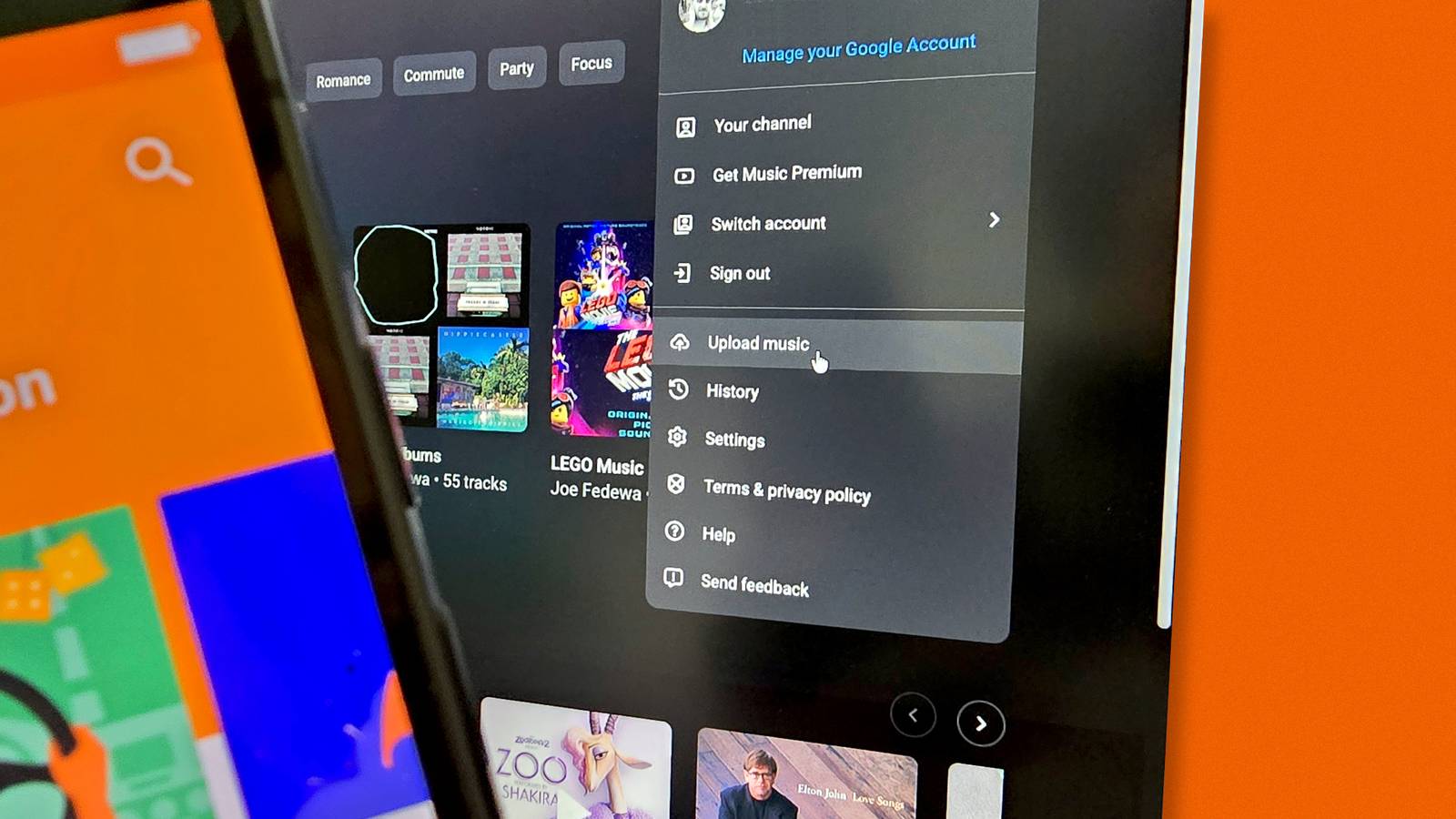
You can unsubscribe anytime.The basic concept of music uploads is the same as it was in Google Play Music.From music.youtube.com, you can click your profile photo and select “Upload music.” Select MP3, FLAC, M4A, OGG, or WMA files from your computer.
It’s also possible to drag and drop the files on the music.youtube.com webpage to start uploading.As I said, the big differences from 2020 are still present today.Music uploads on YouTube Music don’t mingle with the streaming side of the service.
That means they don’t influence your music recommendations at all, for better or worse.Unlike Play Music, uploaded songs are not matched to tracks in the YouTube Music library.A file named “chaise_lounge_wetleg.mp3” with no metadata or artwork will appear in your library titled “chaise_lounge_wetleg.” On the plus side, uploaded music can be listened to in the background ad-free and without a YouTube Premium subscription.
So, if all you want is a place to stream your own music without the hassle of home servers, YouTube Music is actually a pretty nice option.It’s not quite as nice as Play Music was, but as a free service, the spirit still lives on in some capacity.
Read More