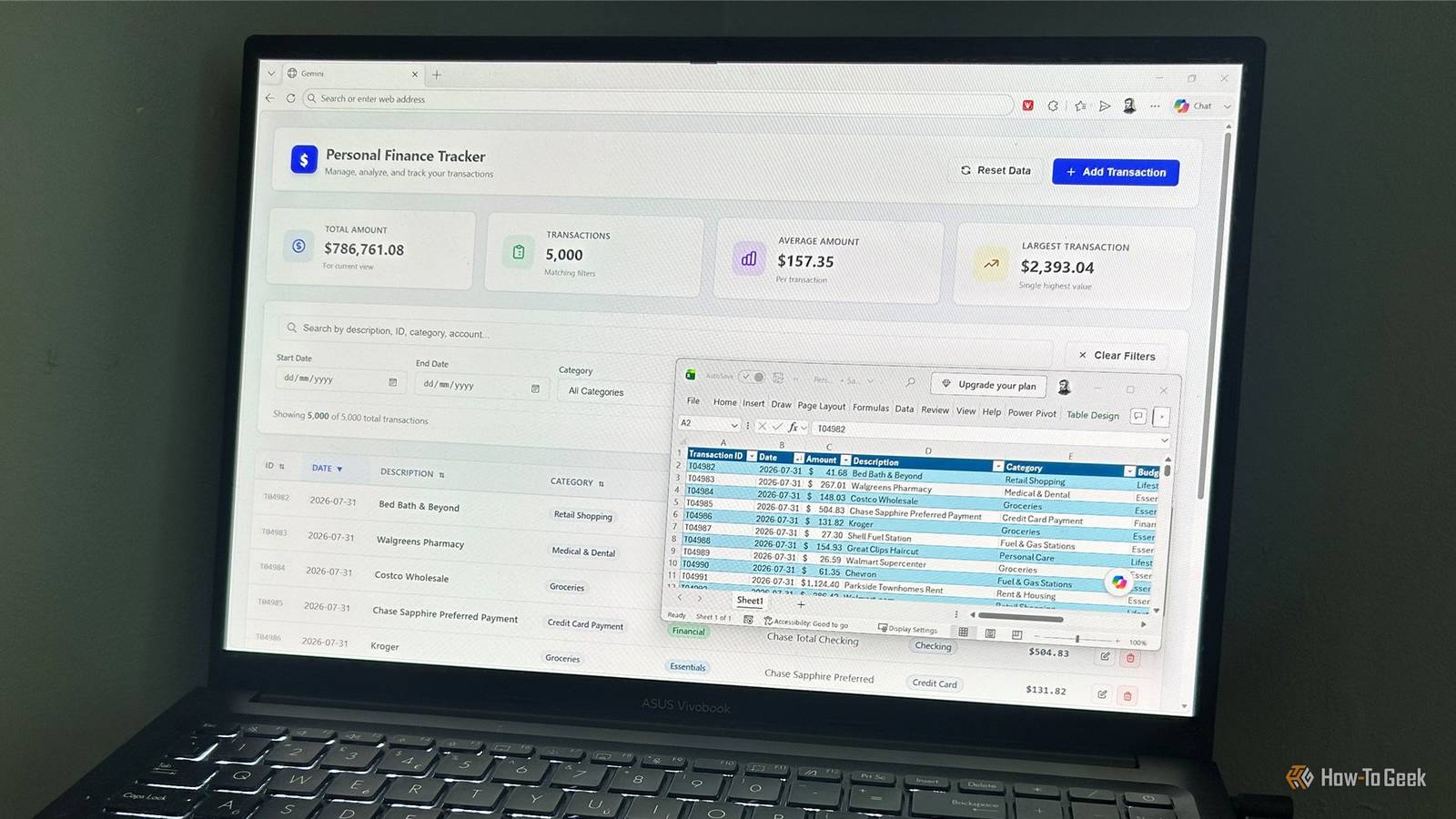
HTG regulars will know I do pretty much everything in Excel, but sometimes I feel like I'm spending more time maintaining, navigating, and updating spreadsheets than any sane person should.So I wondered whether I could turn my personal finance spreadsheet into a proper app without learning how to code.I gave the same task to Gemini, Claude, and Copilot, asking each to turn my 5,000-transaction spreadsheet into a standalone finance app.
The results weren't identical, but I ended up with something I could actually use—and I didn't write a line of code to make it.What I asked AI to build A proper app, not a spreadsheet Close When I've given AI assistants fully built XLSX files with formulas, formatting, and tables in the past, they've sometimes struggled to get past the interpretation stage.So for this test, I saved the data as a CSV to strip out all the Excel-specific baggage.
The CSV contained 5,000 transactions, including the dates, descriptions, categories, accounts, and amounts.I then asked each AI assistant to turn that data into a standalone finance app with the features I actually needed: searching, filtering, sorting, pagination, adding, editing, and deleting transactions, plus summary figures.I also specified that the finished app should work offline, use only HTML, CSS, and JavaScript in a single file, and save changes locally.
I've included the full prompt at the end of this article.You can copy it, edit it to suit your own spreadsheet, and give it to whichever AI platform you prefer.Apparently, not every AI can do this Copilot couldn't produce a usable app Surprisingly, Copilot didn't even produce an app I could test.
I tried the same task multiple times in Copilot's web interface, the desktop app, and within Excel, but none of the attempts produced a usable offline app.I also checked Downdetector and my Copilot subscription status to rule out an outage or usage limit, but neither appeared to be the problem.After several attempts, I stopped.
The Gemini and Claude apps imported all 5,000 transactions, produced the required summary figures and functionality, opened as standalone HTML files, and looked like deliberately designed finance tools, so these were the two apps I could actually test properly.Close Searching and filtering Claude had one small advantage One of the biggest advantages of turning the spreadsheet into an app is that I no longer have to think about how to manipulate the underlying data.Both apps let me search by description, account, category, or amount, and both produce sensible results when nothing matches.
Their filters also work correctly, with each additional selection narrowing the results.Neither dynamically changes the available options in one filter based on another selection, though.That's a small limitation I'd probably only notice with more complicated filtering.
Claude has a tiny advantage here: its search box displays an "X" for clearing the search.With Gemini, I have to remove the text manually.Related I asked Claude to build 3 Excel automations—and it saved me hours of manual work From creating spreadsheets to generating PDF reports, Claude handled far more of the workbook development than I expected.
Posts 3 By Tony Phillips Adding, editing, and deleting Both apps felt surprisingly complete Close This is where I started to trust these apps as more than demos.Both let me add, edit, and delete individual transactions, with the changes immediately reflected in the table and summary figures.Both also let me enter dates in 2027 and beyond, while rejecting genuinely invalid dates.
They correctly prevent incomplete transactions from being saved and require confirmation before deletion.Most importantly, the changes persist after I close and reopen both HTML files.Handling 5,000 transactions Gemini dealt with the large dataset better This is where the two apps differ most noticeably.
Gemini displays 50 transactions by default and lets me choose 25, 100, 250, 500, or all transactions.Its page-number navigation lets me jump to the first or last page, and its table has its own scroll bar that helps to keep the column headings visible as I scroll.Close Claude also handles pagination well, giving me the option to see 25, 50 (default), 100, 200, or all transactions at the same time, but navigation is limited to only the previous and next pages.
There's also no dedicated table scroll bar, so when I scroll, the header, filters, and table headings disappear.Close Claude isn't difficult to use, but Gemini gives me more useful ways to navigate a dataset this large.The transaction table Claude keeps the table cleaner For me, Claude's transactions table is neater.
Dates are usefully displayed as "Jul 31, 2026" (rather than replicating the spreadsheet's "2026-07-31"), categories appear as green pill-shaped labels, and it didn't feel the need to include the transaction IDs in the display, giving more room and attention to the other columns in my dataset.One UX feature I particularly like is that long descriptions are truncated rather than forcing the column to expand.Then, when I hover over them, the full text is revealed.
That's a small but genuinely useful touch.Close Gemini is more visually expressive, with subdued transaction IDs and color-coded Budget Groups, but I think this makes it more cluttered as opposed to improving readability.It also expands column widths with longer entries, meaning I have to scroll across to see the rightmost columns.
Close Gemini is better at navigating the dataset, but I prefer Claude's actual presentation of the data.App appearance Gemini feels more like a personal app Close As is usually the case with AI, the same prompt produced two very different interpretations of a personal finance app.Gemini feels much more personal with a sans-serif design, icons in its summary cards, more color, and animated cards that move slightly when I hover over them.
Claude feels more corporate.Its main title uses a serif italic style, the background has a light green tint, and the summary cards have decorative patterns.It looks polished and restrained, but also feels more akin to an internal company app than a feature for personal use.
So, for my context, I prefer the personality of Gemini's app.Related I asked Gemini to automate an Excel reporting task—now a single click does all the work Gemini automated my Excel reports, but simplifying the workflow was the key to making it reliable.Posts 1 By Tony Phillips The smaller usability details Both have thoughtful UX touches Claude has a few usability advantages that are easy to miss.
Both apps are fully keyboard navigable, but Claude goes a step further by automatically moving focus into the "Add Transaction" form once opened.Gemini also has a couple of small wins.Its "X" button makes it immediately obvious how to close the "Add Transaction" form, and it avoids Claude's slightly surprising behavior of dismissing the form when I click elsewhere in the same window.
Both apps handle invalid input gracefully, too.Invalid dates can't be submitted, letters can't be entered into the "Amount" field, and incomplete transactions are blocked from being saved.In both cases, editing a transaction on a later page doesn't send me back to page 1, and resetting the filters doesn't undo any changes I've made to the data.
Given that I hadn't written any of the code myself, the results were impressive.I might actually replace my spreadsheet Overall, I prefer Gemini's app.Claude's might be my choice if I wanted something more restrained and corporate, and its table design is arguably cleaner.
But Gemini's interface feels more appropriate for a personal finance app, and its approach to navigating 5,000 transactions is more practical.Most importantly, it made me think, "I'd actually use this instead of my spreadsheet." And I did it without writing a line of code.My prompt in full Build a polished standalone personal finance transaction tracker as a single self-contained HTML file.
Use the attached CSV file as the app's initial transaction data.The app must work completely offline after the HTML file has been created.Data The CSV contains these fields: Transaction ID Date Amount Description Category Budget Group Account Name Account Type Import all transactions from the CSV accurately.
Treat Amount as numeric monetary data and display all monetary amounts in US dollars (USD).Treat Date as a date rather than text.Transaction management The app must allow me to: View all transactions in a clear table.
Search transactions across relevant fields.Sort the transaction table by clicking column headers.Filter transactions by date, Category, Budget Group, Account Name, and Account Type.
Add a new transaction.Edit an existing transaction.Delete a transaction.
Have the transaction list update immediately after adding, editing, or deleting a transaction.Have all totals and filtered results update immediately after changes.Dashboard Include a simple dashboard showing: Total amount Number of transactions Average transaction amount Largest transaction The dashboard should update automatically whenever the underlying transaction data changes or filters are applied.
Persistence Store the transaction data locally in the browser so that transactions I add, edit, or delete remain when I close and reopen the HTML file.Design and technical requirements Make the interface polished, clear, and easy to use on a desktop.Keep the design focused on managing transactions rather than adding unnecessary features.
Use only HTML, CSS, and JavaScript contained within the single HTML file.Do not use external libraries, CDNs, APIs, servers, or online resources.The finished HTML file must function without an internet connection.
Do not ask me follow-up questions.Make reasonable implementation decisions yourself.Before returning the finished application, test every interactive feature.
Do not include controls that are non-functional.In particular, verify that sorting, searching, filtering, adding, editing, deleting, calculations, and local persistence all work correctly.Return the completed application as a single HTML file that I can save and open locally in a browser.
read more
Read More