I have a lot of video files scattered between my Plex library and shared folders full of family videos.Some have subtitles, plenty don't, and I wanted an easy way to transcribe them without uploading personal footage to a third-party cloud service.While looking for something that could handle the job locally, I came across Whisperer on GitHub.
I was really just looking for a transcription tool, but Whisperer turned out to be much more useful than I anticipated.It can generate standard subtitle files and process an entire folder of videos in one batch, which makes a lot more sense for someone like me with a large library.It definitely beats going through files one at a time.
I could point it at a folder, let it do the work locally, and end up with subtitle files that I could use in Plex and other media players.I tested Whisperer on three very different types of videos Before using it on a larger library, I wanted to see where it struggled Before pointing Whisperer at a much larger collection, I wanted to give it a small test with videos that weren't all equally easy to transcribe.I used a NASA interview with clean speech, The Memphis Belle from the Library of Congress with older archival audio, and a personal demo video of me creating a sunburst finish on a guitar body.
That gave me a decent mix of source material without turning the test into a huge project.The NASA interview looked like the easy one, The Memphis Belle was the tougher archival test, and the guitar video was closer to the kind of personal footage I actually wanted subtitles for.If Whisperer could handle all three reasonably well, I'd feel better about using it on much larger video folders.
Whisperer handled the whole folder without sending my videos anywhere Setup was simple, and the batch process did most of the work Close Privacy was one of the main reasons I started looking for a local transcription tool in the first place.I didn't want to upload personal videos to a third-party service just to get subtitles.Whisperer keeps the processing on your own PC, so the video files stay where they are while the app creates the subtitle files locally.
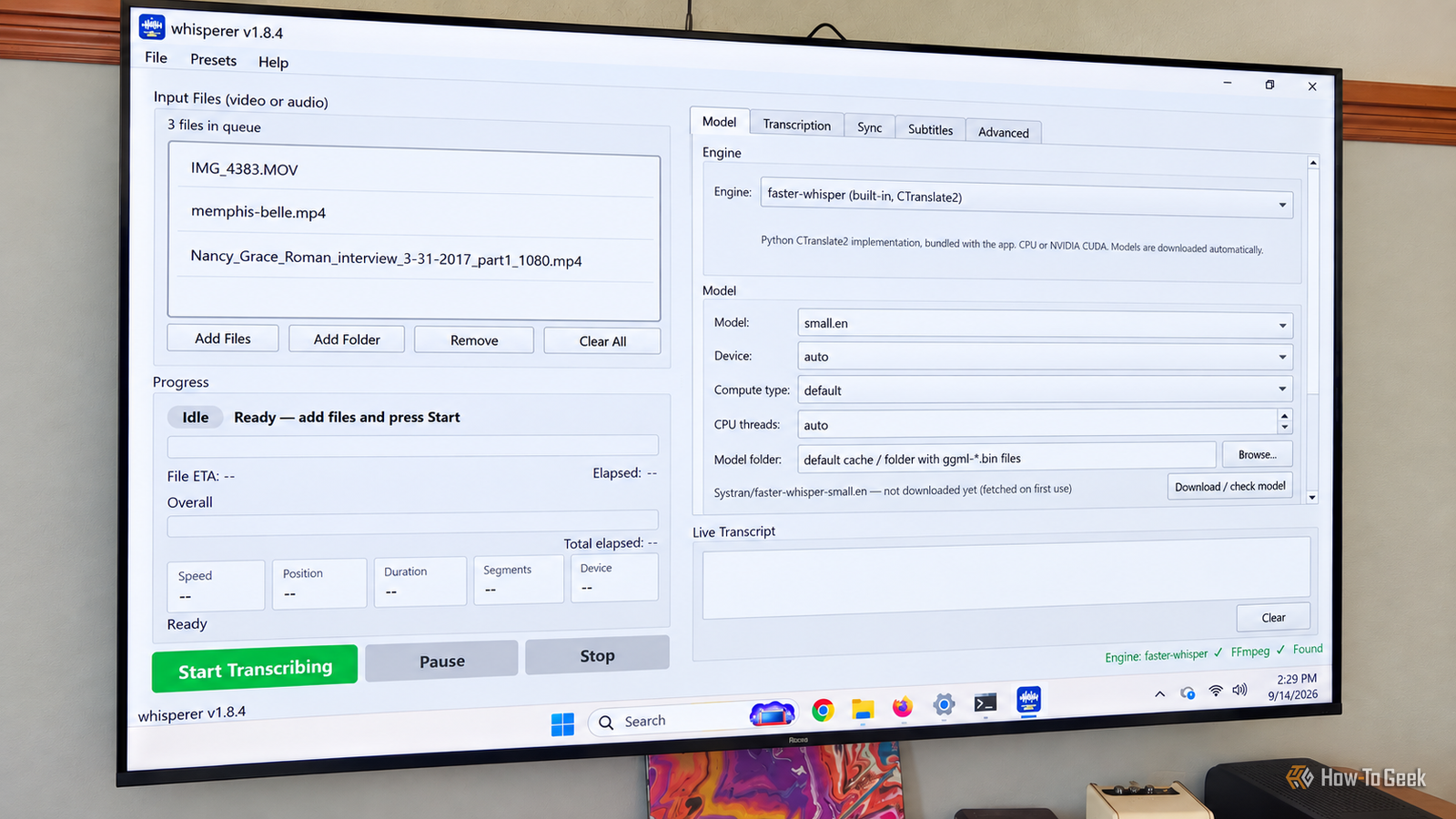
The setup was pretty straightforward.I used the default settings, added the folder containing my three test videos, and let Whisperer build the queue.From there, I could see all three files waiting to be processed before starting the batch.
The app also lets you adjust things like the transcription engine, language, and output format.Related I stopped using the official Plex client after trying this open-source, third-party alternative Plezy might just give the official Plex app a run for its money.Posts 13 By Arol Wright Once I clicked Start Transcribing, Whisperer worked through the folder one video file at a time.
My three videos added up to about 90 minutes of footage, and the full batch finished in roughly 36 minutes on my PC.While it was running, I could watch the progress, see the live transcript as it was generated, and keep an eye on how quickly each file was being processed.When it finished, each video had its own SRT subtitle file sitting alongside the original.
I didn't have to upload each file, wait for a cloud service, download the result, and repeat the process for the next one.The subtitle files worked outside Whisperer Plex picked them up without much fuss Whisperer saves the finished subtitles as standard SRT files, which is important because they aren't tied to the app that created them.Whisperer also named the SRT files correctly for Plex, so once they were sitting next to the matching videos, Plex recognized them as external subtitles.
I didn't have to rename anything, re-encode the videos, or create new copies just to get the captions working.That also means the subtitles aren't limited to Plex.SRT is a common subtitle format, so the same files also work with VLC and plenty of other players that support external subtitles.
For me, that makes Whisperer more useful than a Plex-specific tool.I can generate the subtitles once and keep them with the video, regardless of where I decide to play it later.The subtitles were good enough that I'd keep using them They weren't perfect, but the mistakes were minor The finished subtitles weren't flawless.
I saw a few small errors where Whisperer confused similar-sounding words, such as using "an" instead of "and." There were a handful of similar mistakes, but nothing that made the subtitles hard to follow or changed the meaning of what was being said.For what I wanted, that was good enough.I'm not trying to create broadcast-ready captions.
I wanted usable subtitles for videos that didn't have any, especially personal footage and older files that I'm unlikely to find captions for elsewhere.Based on this test, Whisperer gets close enough that I'd keep using it on the rest of my collection.This is one app I'll keep using Whisperer worked well enough that I'm going to keep it around.
It made quick work of a folder full of very different videos, and the subtitle files dropped straight into the players I already use.I noticed a few small transcription mistakes, but not enough to make me want to go back and fix them by hand.For older footage and personal videos that don't already have subtitles, that's enough for me.
Read More