If this post looks familiar.That’s because it’s very similar to the one I’ve just finished on the new Sonoff Basic-1ZBGSP din-rail breaker – bit this one runs on WiFi over MATTER.This arrived from me a couple oif hours ago and I’ve just plugged it in now, no messing about.
It’s not Zigbee but as you’ll see it was easy to set up without using the eWeLink app – though that works too.I just plugged the two top connections, live and neutral, into the mains to test – and simply went to Home Assistant, setting – MATTER – add device.As I only have one of them, I then called it Basic-1GSP and that was it.
Well, not quite – I had to turn off my normal VPN which sites on my phone – and make sure the phone sa connected to a 2.4Ghz WiFi.This device has a blue LED for Wi-Fi signal (I’m assuming that as it is currently off though I have the device connected via WiFi) and a red LED to show output coming out of the bottom two connectors.This is dual-pole switching, totally safe when disconnected (the outputs are totally safe anyway).
The device handles 32 A maximum and when you touch the orange button on the front to switch the output on, as well as the red light coming on, the relay makes a satisfyingly loud click.Being DIN rail, it will of course fit into a standard mains breaker box without any screws or other fixings.I should of course mention that you should always have a qualified electrician fit this ands other mains smart devices – but as I have no electrical qualifications that would be hypocritical.
In my defence, I’m 72 and I’ve yet to blow myself apart despite my first experience of high voltage being, what, well over half a century ago (valve TVs and 180v-DC battery radios using two cumbersome 90v batteries in series – nasty).I will however warn to be careful with both the incoming and outgoing connectors – they can feel secure despite not being entirely tightened up and you can end up with wires dropping out.Ok, so I had to set it up in Home Assistant on my phone to get the MATTER setup and camera scanning.
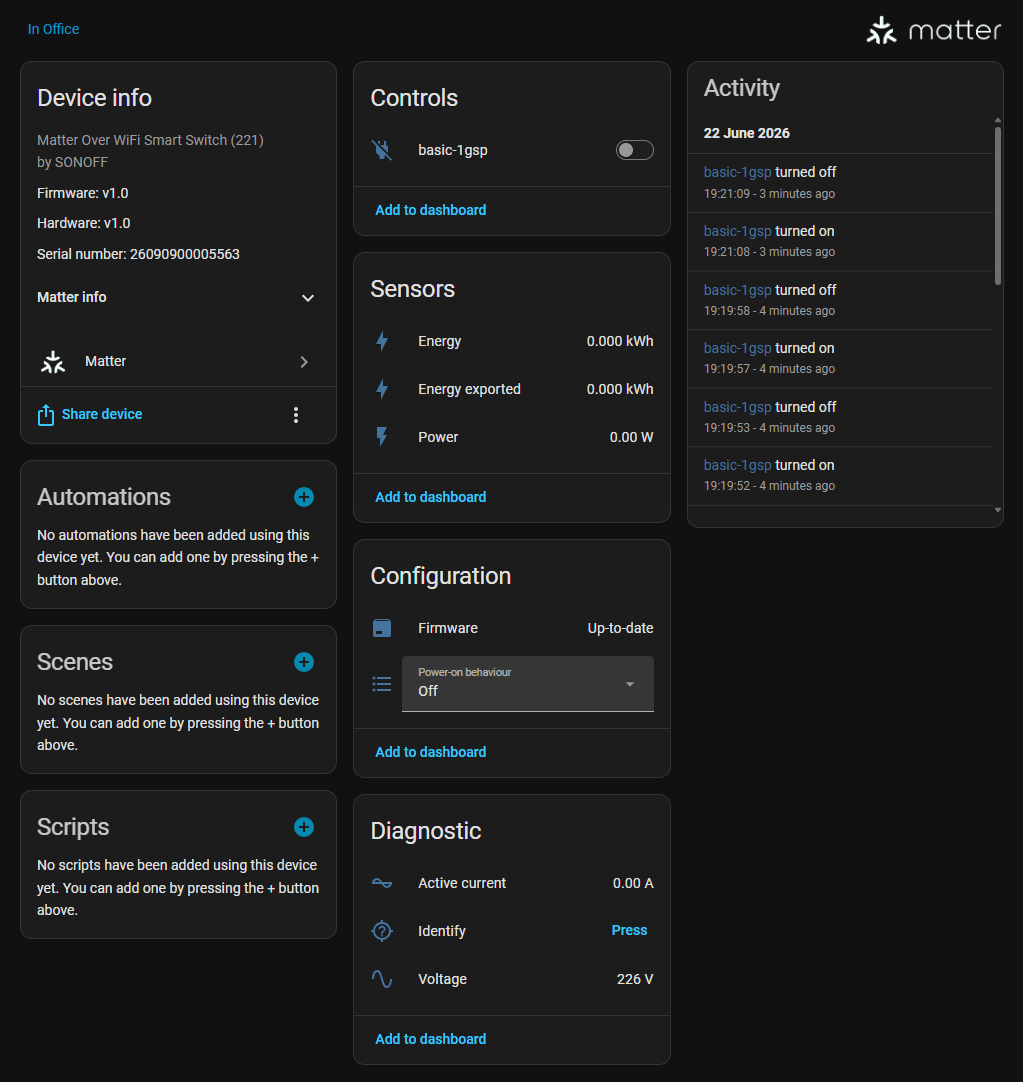
I made sure the device had been turned on for only a minute or so and told Home Assistant MATTER to ADD a new device.And in less than a minute that was it – connected.In Home Assistant – Integrations, I noted a new device had been added, selected the device and here it is..
Notice basic on-off control – that works – still no blue WiFi light however.We have under sensors – energy – energy exported and power – far less than the previous Zigbee device showed… but then under diagnostic – current and voltage – no idea why they didn’t show up under sensors – but good enough..One thing I could query – even in the eWeLink APP there seems to be no way to get the blue light to default to ON… apparently that is by design.
Always worth noting – not a good idea to fit these into METAL breaker boxes as the metal will interfere with the WiFi signal.
Read More