Proxmox VE has earned its reputation by bringing enterprise virtualization features into the homelab.You get KVM virtual machines, LXC containers, snapshots, clustering, and support for filesystems like ZFS.On paper, it looks like the perfect foundation for every self-hosted setup.
The reality is that many homelabs begin with one mini PC, an old workstation, or a spare desktop (let’s be honest, it’s probably that Dell OptiPlex you rescued from the e-waste bin at work).That server usually runs a handful of services, such as Jellyfin, Home Assistant, Pi-hole, Immich, or Nextcloud.At this stage, the hardware is doing everything on its own.
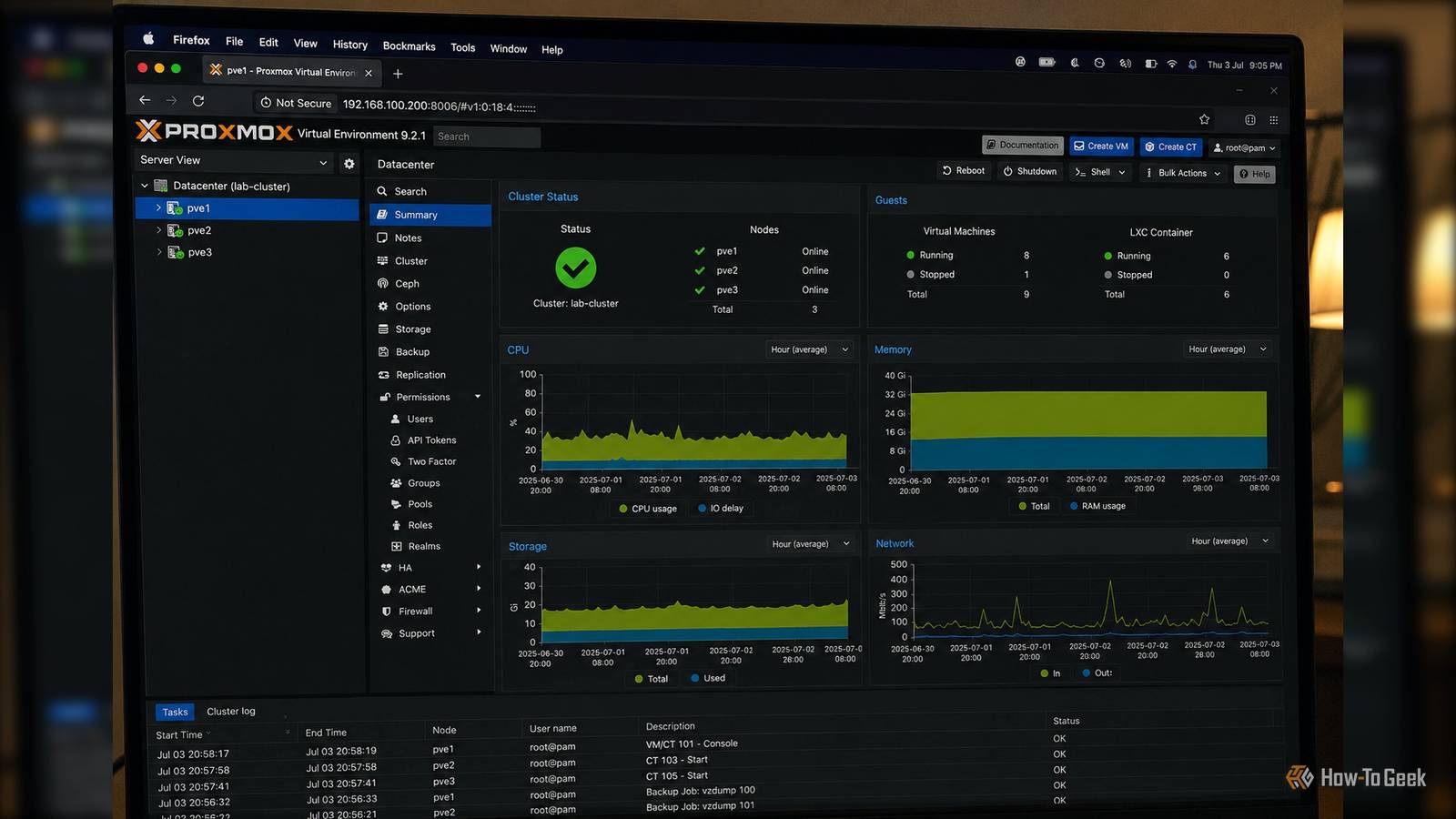
Most of Proxmox’s advanced capabilities are designed to coordinate multiple systems rather than make one machine dramatically better.If you only own one server, you may spend more time learning features that provide little immediate benefit.The biggest advantages depend on multiple nodes Clustering unlocks what Proxmox was built for Close Proxmox becomes much more compelling when you introduce a second or a third (or a fourth...) physical machine.
Clustering allows several servers to appear as a single virtualization platform, making it possible to manage workloads from one interface.Related 6 self-hosted apps that are better with Proxmox The "just use Docker" crowd isn't going to like this one.Posts 2 By Umair Khurshid Virtual machines can move between nodes with minimal disruption when shared storage is available.
Maintenance becomes easier because workloads no longer have to remain tied to one piece of hardware.If you need to replace memory, install new drives, or perform firmware updates, another node can temporarily host your services.Adding another server also creates room for gradual expansion.
Instead of replacing your existing hardware with something larger, you can add another node with different specifications and distribute workloads according to available CPU cores, memory, or storage.This is where Proxmox begins to deliver capabilities that are difficult to reproduce with a traditional Linux installation.High availability requires a quorum, not just a second box One server cannot protect itself High availability is one of Proxmox’s most recognized features, but it requires careful infrastructure planning.
If your only server loses power, suffers motherboard failure, or develops storage problems, every virtual machine and container stops.The management interface also becomes unavailable because it lives on the same hardware (Surprise! The thing you are trying to fix is the thing that broke).Related Community scripts are the secret sauce that make Proxmox the perfect homelab OS I finally understand why Proxmox dominates homelab communities.
Posts By Faisal Rasool With two or more nodes, Proxmox can coordinate failover, but you have to account for Corosync’s underlying math: a standard two-node cluster cannot achieve a voting majority if one host drops offline.To prevent split-brain scenarios, true automated high availability either demands a third node or an external QDevice (qnetd) acting as a lightweight tiebreaker.Without proper quorum infrastructure or a secondary host to catch the fall, high availability remains a menu option rather than a practical safety net.
Shared storage becomes worth the effort Storage flexibility grows with additional hardware On a single server, local NVMe drives or a ZFS pool often provide excellent performance with minimal complexity.Virtual machines live on local storage, backups go to another disk or NAS, and administration remains straightforward.As more nodes join the cluster, shared storage becomes useful.
Technologies such as NFS, iSCSI, or automated ZFS dataset replication allow workloads to move between servers without copying entire disk images every time.Advanced distributed block storage solutions like Ceph require a minimum of three nodes to function safely, making them ill-suited for initial multi-node steps.The storage architecture becomes more sophisticated because the environment has reached a scale where the added complexity produces measurable benefits.
Resource management becomes more meaningful Multiple hosts give the scheduler choices A single server has fixed CPU cores, memory, and storage bandwidth.Every virtual machine competes for the same hardware resources.Adding another node changes resource management completely.
CPU-intensive applications can live on one machine while storage-heavy workloads remain on another.Development environments can stay separate from production services without requiring a larger single server.Different hardware can also serve different purposes.
A low-power mini PC may host lightweight infrastructure services around the clock, while a workstation with many cores handles media transcoding, build jobs, or testing environments.Instead of upgrading to increasingly expensive hardware, you can expand capacity incrementally by introducing another system when you need it.Backup and recovery become more resilient Separate hardware strengthens recovery plans Backups are important regardless of your virtualization platform, but keeping everything on one machine introduces a single point of failure.
Proxmox Backup Server works with one node, yet its benefits increase when backup infrastructure lives on separate hardware.A dedicated backup server continues to exist even if a virtualization host experiences a complete failure.Related Proxmox solves Plex's biggest backup problem, but most people don't know it Your Plex backups are protecting the wrong thing and Proxmox fixes the part that actually matters.
Posts 2 By Umair Khurshid With multiple Proxmox nodes, recovery options also improve.Restoring workloads to another server becomes much faster because suitable hardware is already available.Multiple machines change how you think about the homelab Once multiple physical servers enter your homelab, Proxmox stops being a convenient hypervisor and starts functioning as a virtualization platform.
Clustering, workload migration, quorum-backed high availability, shared storage replication, and distributed resource management all become practical tools instead of features that exist only in documentation (or YouTube tutorials you watched but never actually used).That does not mean Proxmox is a poor choice for one machine.The difference is that much of what makes Proxmox unique is designed around cooperation between hosts rather than the capabilities of a single one.
Read More