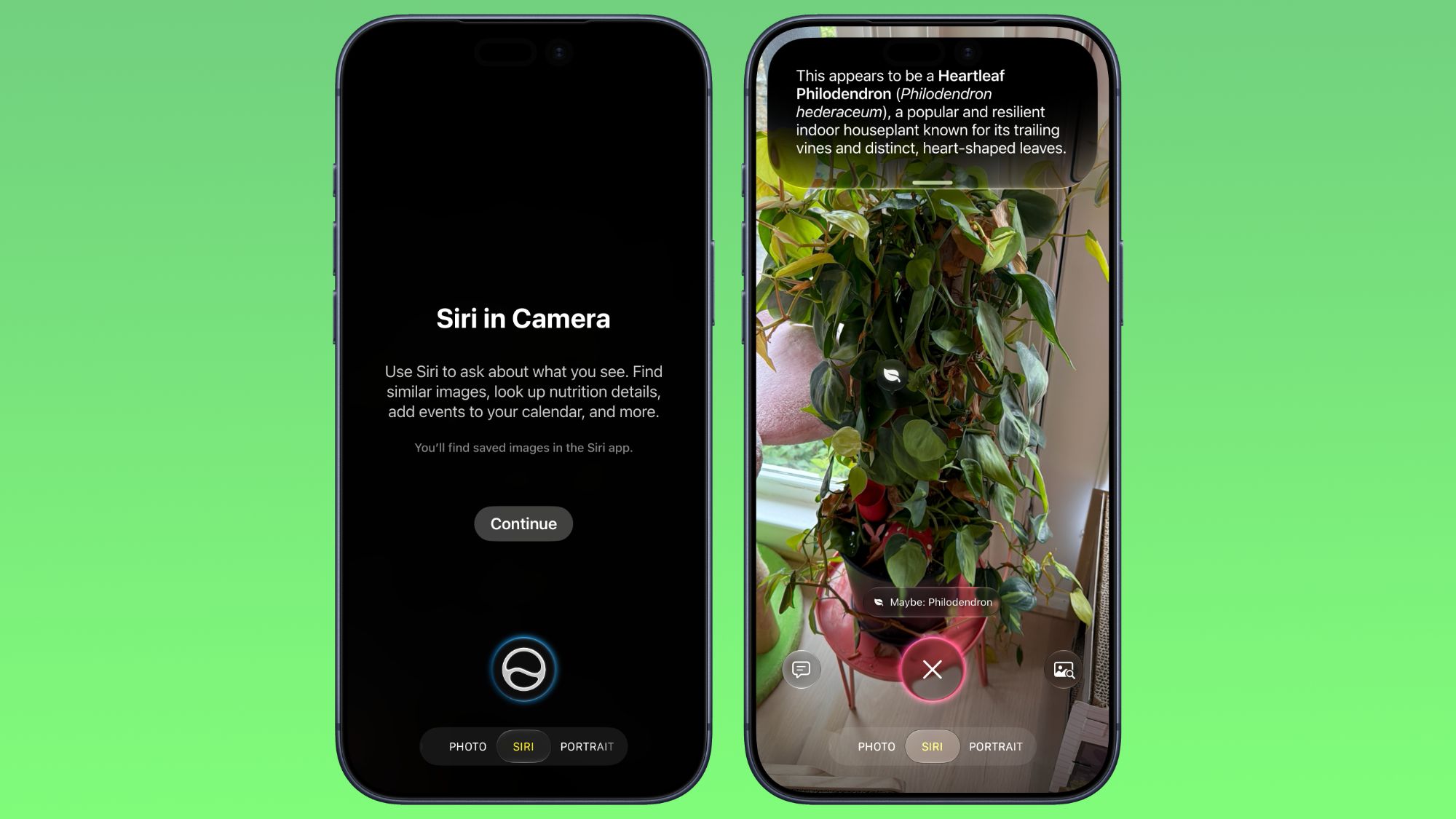
The iOS 27 Camera app has a new "Siri" mode that is available in addition to the video, photo, and other camera modes.You can get to Siri mode by swiping over to it at the bottom of the Camera app in the iOS 27 developer beta.Siri mode integrates Visual Intelligence, so you can take a photo of something and ask Siri about it.
Siri can answer questions about whatever you're taking a photo of, identifying plants, animals, landmarks, and more.Visual Intelligence is expanding to new categories in iOS 27, and it can help you determine the calories in a plate of food or split a bill with friends by calculating what each person owes.In Siri mode, the main Camera button captures an image and Siri will give information about what's in the shot.
A button on the right lets you search Google Images, and a button on the left lets you ask a specific question.In other Camera modes, there are minor interface updates.Quick access tools for turning on Night Mode, turning off Live Photo, and activating Flash are at the top center of the interface, and the full set of tools can be accessed from the bottom right instead of the top right.
While there were rumors of a Camera app widget section for customizing the available camera controls, that's not a feature that's available yet.Using Siri mode in the Camera app requires access to the Siri waitlist.The iOS 27 beta is only available to developers right now, but Apple plans to make a public beta available in July.
iOS 27 will launch this fall.
Read More