Clippy is one of those software mascots that never really disappeared.Long after Microsoft retired the animated paperclip, it remained a punchline, a meme, and a reminder of a very different era of computing when software seemed determined to help whether you wanted it to or not.Add How-To Geek on Google Add as Preferred Source Follow on Google Discover Now Clippy is back.
An open-source project called Clippy GPT puts Microsoft's famous assistant on a modern Windows desktop and connects it to AI models, creating a version of the paperclip that's capable of far more than the assistant Microsoft shipped in the late 1990s.Clippy is back It looks exactly how I remember it As soon as I launched Clippy GPT, I was greeted by the familiar paperclip and the sound effects that immediately took me back to using Microsoft Office years ago.Before I'd asked a single question, I was already grinning at my screen.
Related In Defense of Clippy, Microsoft's Unwanted Office Assistant We were all wrong to hate on that poor, defenseless paperclip.Posts 1 By Ben Stockton I started with the downloadable version before eventually switching to the project files so I could connect it to the AI model I wanted to use.A few minutes later, Clippy was wandering around my Windows 11 desktop as if the last three decades had never happened.
Between the sound effects, animations, and iconic paperclip bouncing around my screen, it felt remarkably close to 1998.The only difference was that this version felt far more capable.Before long, I'd seen Clippy cycle through several classic animations I remembered from years ago.
Close The moment that really sold the illusion came when I started exploring the menus.At first glance, everything looks like a relic from the Office era.Then you open the settings and discover options for connecting modern AI models.
It's a strange but entertaining contrast: a paperclip from the 1990s sitting in front of technology that would've sounded like science fiction when Clippy first appeared.By that point, Clippy had already won me over, but I still wanted to know whether the AI side of things was any good.AI gives Clippy a purpose I asked it to write a business letter One of Clippy's most famous associations was helping people write letters.
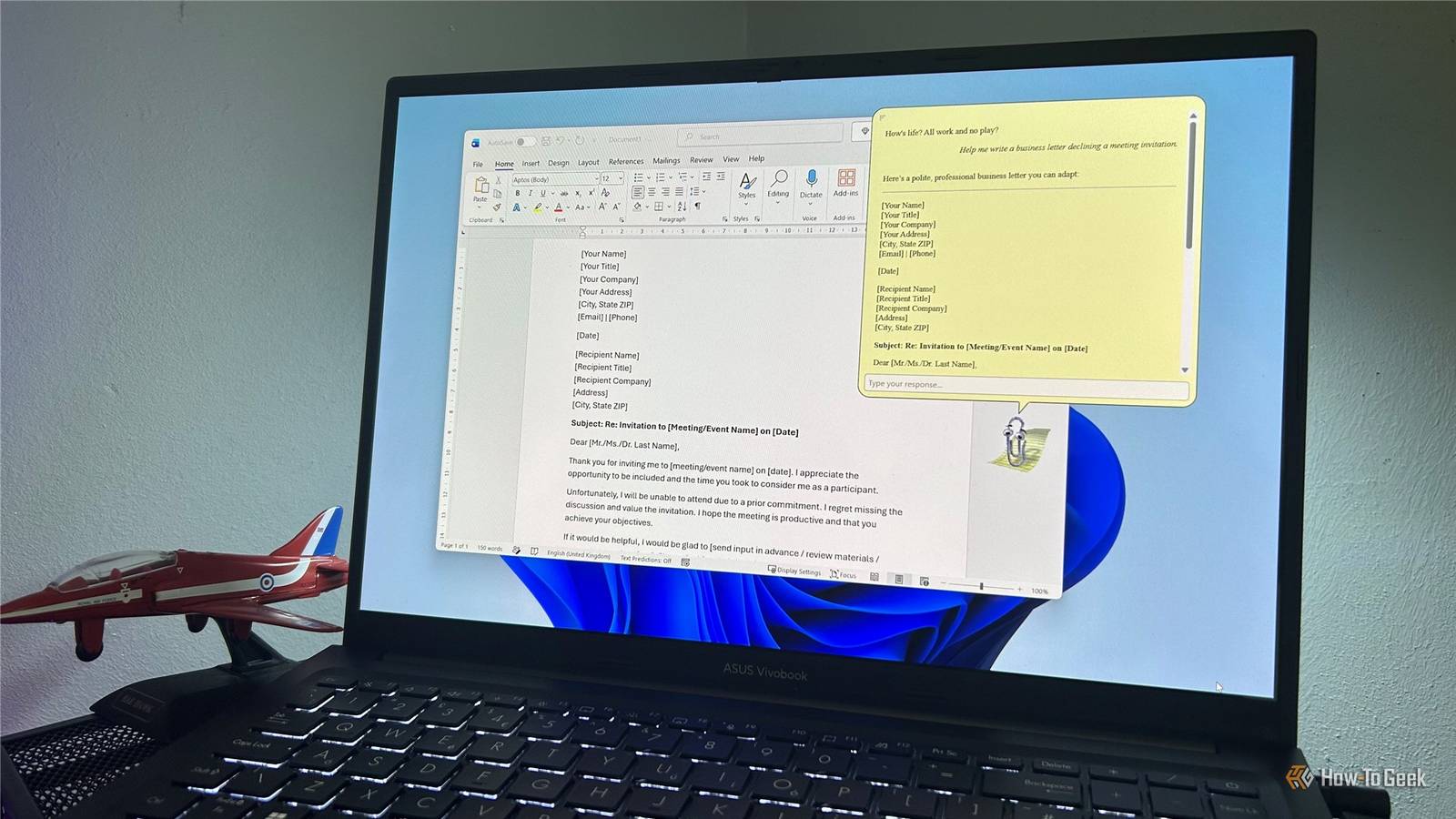
Whether you loved or hated the assistant, there's a good chance you've seen the classic "It looks like you're writing a letter" prompt.So I asked it to draft a business letter declining a meeting invitation.A few seconds later, it produced a complete draft that was polite, professional, and ready to use with only minor edits.
The original Clippy would've pointed me toward a template or wizard.This version simply writes the letter.Seeing Clippy draft the sort of letter it once offered to help me write felt strangely fitting.
Related 5 Ways Clippy Was Better Than Copilot Microsoft, It looks like you're trying to create an office assistant.Do you need help with that? Select Yes or No.Posts 2 By Margaret Samuels Further down the rabbit hole, I started asking broader questions.
One of them was what it was like being back on Windows 11.Clippy responded with a surprisingly detailed answer, touching on everything from snap layouts and widgets to Windows 11's visual design.After that, I started testing how well it could maintain context across multiple prompts.
I asked when it's sunny in Texas and then followed up with "When rainy?" without mentioning the state again.Clippy correctly understood that I was still talking about Texas.Behind the familiar paperclip is an AI model doing the heavy lifting.
That's what allows Clippy to answer questions, generate text, and carry on conversations.Getting those answers from a talking paperclip somehow makes the experience more entertaining.It's still Clippy It has limitations, but that's fine Next, I asked Clippy for the current weather in New York.
The model I was using explained that it didn't have access to real-time data and suggested checking a weather website instead.Like any AI assistant, its capabilities ultimately depend on the model connected behind it.None of that really bothered me.
The real appeal is seeing Clippy do things that would've felt impossible during its original heyday.Watching it answer questions is entertaining.Watching it draft a business letter is genuinely impressive.
Watching it float over a modern Word document while doing those things is where the nostalgia really kicks in.For a moment, it felt uncannily close to the version of Clippy I remembered, even if the technology behind it was completely different.Related 5 Retired Microsoft Programs and Features I Miss the Most I sometimes wish I could turn back time.
Posts 27 By Tony Phillips Maybe Clippy was ahead of its time The original Clippy wasn't a bad idea.Microsoft was genuinely trying to create software that anticipated what users needed and offered helpful assistance using the tools available at the time.Watching the revived version draft the sort of business letter it once offered to help me create, I was struck by how natural the whole thing felt.
The paperclip still waves, still interrupts, and still feels slightly absurd.The difference is that now it can actually help.The paperclip wasn't the problem.
The technology just needed another three decades to catch up.
Read More