Claude users often fall into two camps: those who use it as a chatbot, and those who use it for coding.Claude Cowork can easily end up getting overlooked by both camps.There are plenty of ways you can use Claude Cowork that aren't for coding or typical chatbot conversations.
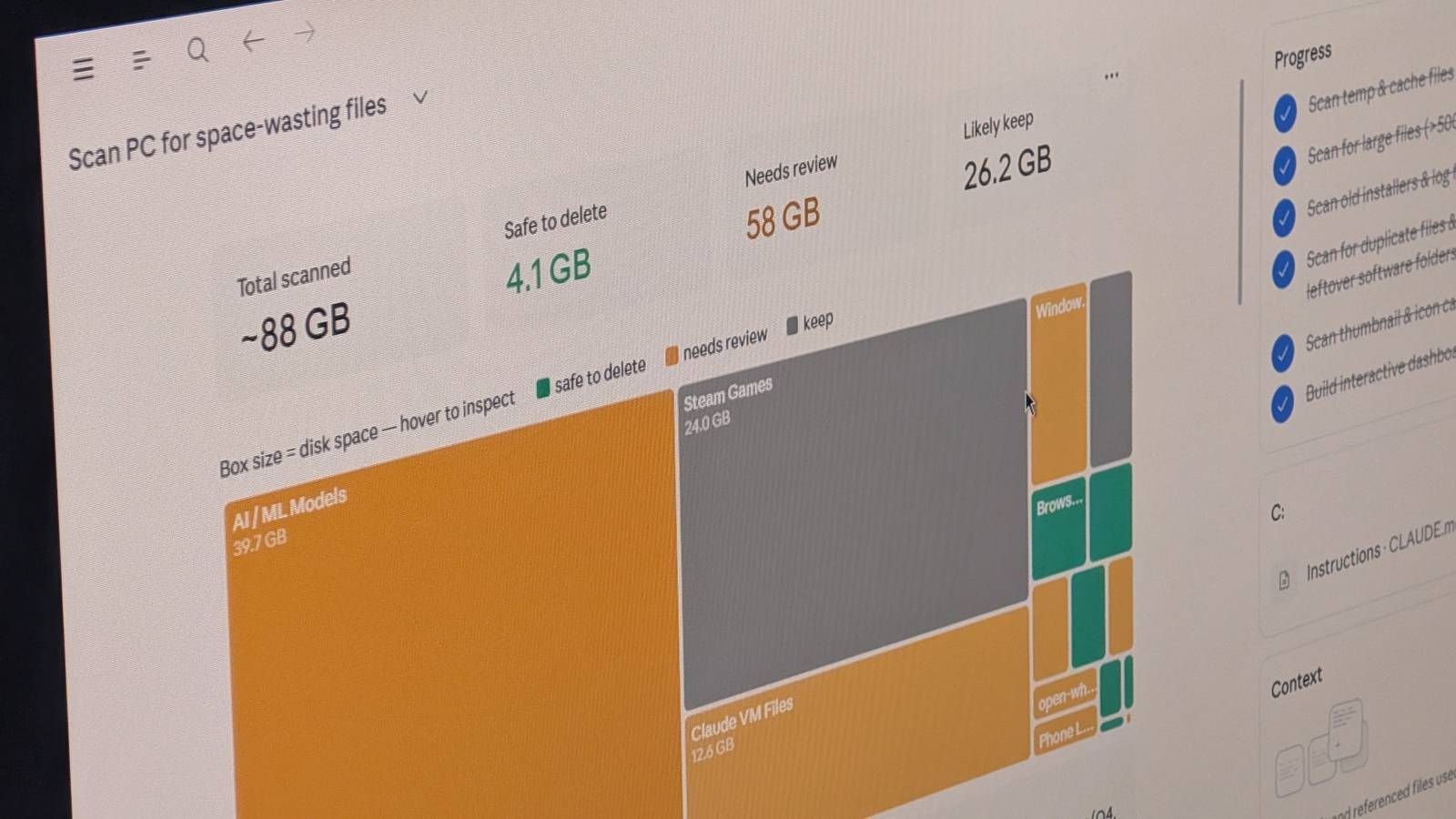
Sorting out your computer's folders Declutter your downloads and desktop This is one of the first things I did when I tried Claude Cowork, and it immediately had me hooked.You can connect Claude Cowork to specific folders on your computer, such as your downloads folder or your desktop.You can then ask Claude to sort them out for you.
With access to your files and the right instructions, Cowork can scan folders, look for duplicate files, group similar types of files into subfolders, suggest better folder structures, and move files to more appropriate locations.For example, it was able to take my mess of downloads and sort them into folders, which immediately exposed quite a few installers that I'd downloaded and never removed.It also moved all my screenshots into separate folders.
This is the kind of tedious organizing that Claude Cowork can take off your hands.Claude Price $20 Claude is an AI assistant made by Anthropic. It can assist with a wide range of tasks—writing, coding, analysis, research, and more. Unlike a search engine, Claude reasons through problems conversationally, making it useful as a thinking partner rather than just an information retrieval tool.See at Claude Expand Collapse Recording expenses from receipts Drop the images in a folder and let Cowork do the rest Another really useful way to use Claude Cowork is for tracking expenses.
Scanning receipts and manually entering the data into spreadsheets is boring and repetitive, which is exactly the type of task that's perfect for Claude Cowork to do.You can dump the photos and scans of receipts into a folder and Claude can use OCR to extract the raw text from each file and identify the key information.It can then assign the expenses to different categories and create an expenses spreadsheet with minimal effort on your part.
Writing alt text for images Cowork can help you do a better job This is something that I use Claude Cowork for on a regular basis.I have to take a lot of screenshots for work, and adding the alt text for these images is a tedious process.Good alt text is important for making content accessible to people with visual impairments, but too often it ends up being short and vague.
I drop screenshots into a specific folder, and Claude Cowork analyzes the content of the images and produces clear and accurate alt text that describes the screenshots in detail.The results are usually much better than what I would write myself.Related Claude Code on my Google Pixel is the best portable agent—no PC or laptop required Your Google Pixel can run one of the most powerful AI agents locally, with surprisingly deep access to the system.
Posts 1 By Dibakar Ghosh Let Cowork research your next vacation Cowork can use Chrome to save you the effort Research is another time-consuming process that Claude Cowork can take off your hands.Cowork has the ability to use Chrome to search for and interact with websites on your behalf, performing much of the same research that you might do yourself.For example, you can ask it to research your vacation, and Cowork can compare destinations, look at reviews for specific attractions, check opening times and prices, work out travel times, and build you an entire itinerary.
You can set it off and come back to a solid first draft of a vacation plan.Create a daily briefing Cowork can search your email, calendar, and documents I often waste a good proportion of the start of my working day figuring out what I actually need to do.I read Slack messages, look through emails, and go through my Notion tracker that lists all the work-related tasks I need to complete.
This is something else Claude Cowork can do for you.It can read your emails, access Slack messages, search through Notion, and put together a morning briefing that breaks down exactly what you need to do for the day.It means you can get started on the real work much sooner.
Surfacing deals or breaking news Cowork can keep you informed This is one of my favorite things that I do with Claude Cowork.I have a script on my mini PC that generates a list of all the best current video game deals from a popular deals website.Another script searches for news on my favorite authors, musicians, TV shows, and movies.
Claude Cowork runs a scheduled task each morning that pulls this information together and generates a summary that's specific to my needs.For example, it looks through the long list of game deals and only tells me about games I am most likely to be interested in, or popular games that are at much lower prices than usual.I've found some absolute bargains using this briefing and managed to bag tickets to see one of my favorite musicians after getting a heads-up about presale tickets.
Turn Cowork into a personalized teacher Create lessons, quizzes, flashcards, and more If you want to learn something new, Claude Cowork can be an excellent companion.It can generate personalized learning materials for you based on your specific goals.You can dump a bunch of information into a folder, and Cowork can use it to create lessons, build quizzes, or produce flashcards to help you learn the material at your own pace.
The beauty is that instead of just trying to learn a topic by yourself, Cowork can act as your tutor, helping you through the process in a way that a search engine just can't.Claude Cowork can do more than you think However you use Claude, if you're neglecting Cowork, you're missing out.There's a lot that you can do much more easily using Cowork than you can with either the main chatbot or with Claude Code.
Read More