A website usually lives in a browser, where I navigate between pages, open images, and download files individually.On Linux, HTTPDirFS offers another way to access web content by mounting an HTTP server as a filesystem through FUSE.You can then browse the exposed resources through a file manager, much as you would browse files stored on your computer.
Add How-To Geek on Google Add as Preferred Source Follow on Google Discover I tried HTTPDirFS with a website filled with book listings, cover images, and category pages.Here is how I set it up and what I found: How to get started with HTTPDirFS Why use HTTPDirFS? Close HTTPDirFS is not a replacement for tools such as wget, curl, or dedicated scraping utilities.I have even built a scraping tool myself, so I understand why mounting a website as a filesystem might seem unnecessary at first.
Its value becomes clearer when you want to browse remote files and retrieve selected items without downloading an entire directory.HTTPDirFS is particularly useful for browsing the open directories shared on the r/OpenDirectories subreddit.These directories can contain thousands of images, documents, videos, and other files.
Instead of downloading everything to get a few items, you can mount a remote directory, browse its contents as if they were local files, and access individual items as needed.The same approach can help when HTML pages link to remote media and documents.Instead of writing a script to fetch a page, parse its links, and download every resource, you can use HTTPDirFS to expose the resources it discovers through filesystem paths.
Shell commands and file-oriented applications can then work with those paths.Scripts may still need to account for how the resources are named and organized.Related This tool turns any Git repo into a private, offline “GitHub” website Build pgit once, then generate a browsable, syntax-highlighted “Code” view for any repo you can host locally or anywhere.
Posts 3 By Bobby Jack I used the development version because the packaged version does not provide the website-mode behavior I wanted to try.First, install the build tools and development libraries required by the project.sudo apt updatesudo apt install git build-essential meson ninja-build \ libfuse3-dev libcurl4-openssl-dev libgumbo-dev Dependencies can vary between repository versions, so check the project instructions if Meson reports a missing library.
Clone the HTTPDirFS repository and enter its source directory.git clone https://github.com/fangfufu/httpdirfs.gitcd httpdirfs If you already have a source checkout, you can use that directory instead.Next, configure and compile the project.
meson setup buildmeson compile -C build The compiled executable is available at build/httpdirfs.Check the version and available command-line options before mounting the website../build/httpdirfs --version./build/httpdirfs --help My development build reported HTTPDirFS version 1.3.3.
The key option for this experiment was --website-mode.It presents resources with a text/html content type as directories and makes linked media and other assets available through the filesystem.Website mode is disabled by default, so you must enable it explicitly.
Mount a website with HTTPDirFS Enable website mode and browse its resources I chose Books to Scrape because its pages contain book titles, category links, cover images, and other web assets.This gave me a convenient way to test how HTTPDirFS handles HTML pages and the resources they reference.Related How to Mount and Unmount Storage Devices from the Linux Terminal Here's everything you ever wanted to know about file systems and the Linux terminal.
Posts 2 By Dave McKay First, I created a dedicated mount point in my home directory.mkdir -p "$HOME/HTG-Test" From the HTTPDirFS source directory, I started the development executable with website mode enabled../build/httpdirfs --website-mode -f \ https://books.toscrape.com/ "$HOME/HTG-Test" The -f option keeps HTTPDirFS running in the foreground, allowing me to inspect its terminal output while testing.
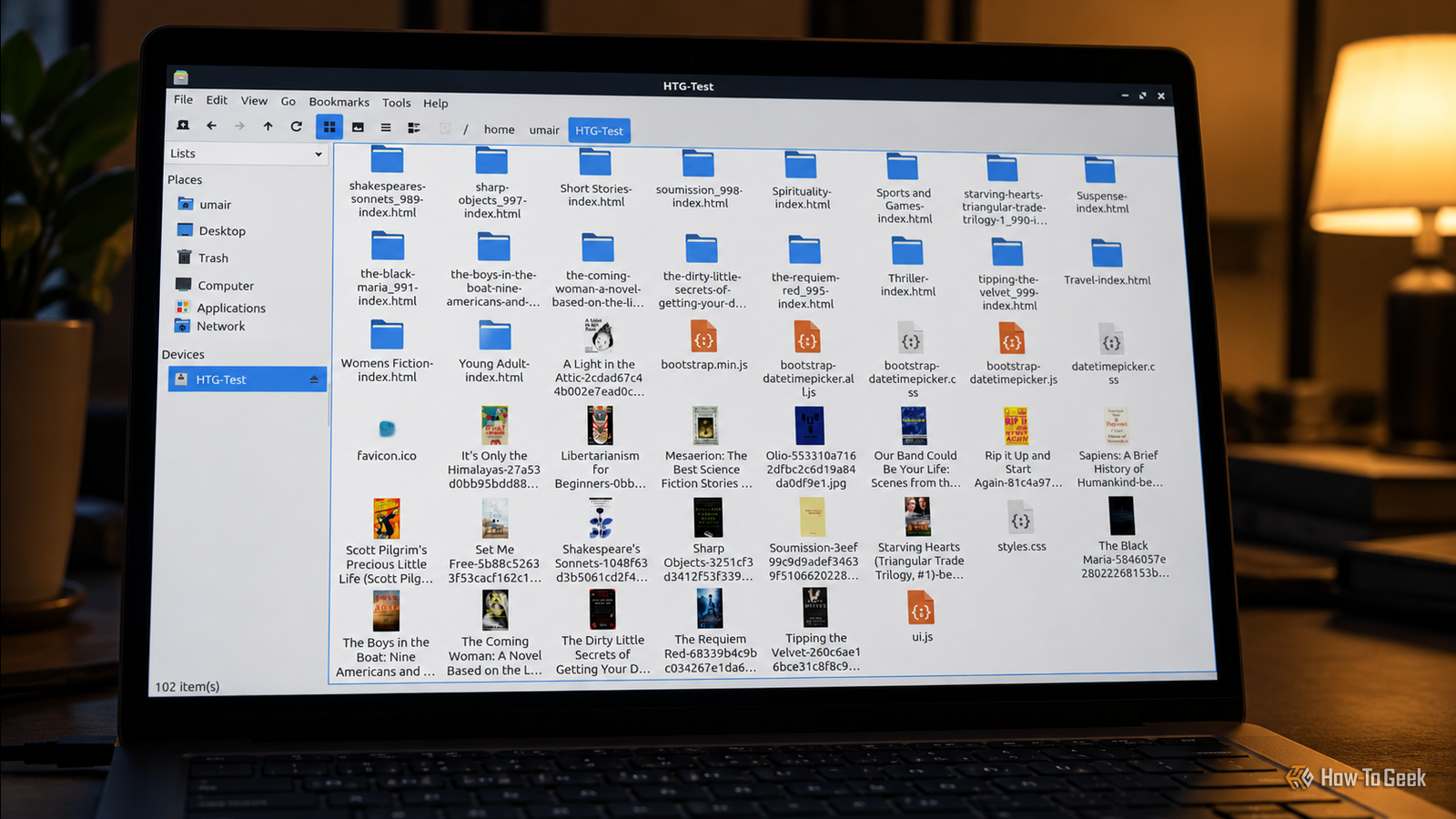
After HTTPDirFS processed the initial page, I opened the HTG-Test mount point in my file manager.The mounted filesystem exposed HTML pages for book categories and individual listings, alongside cover images and other assets referenced by the website.Some HTML pages appeared as directories, allowing me to browse the resources associated with each page.
I could browse categories, inspect individual book listings, and open cover images without downloading the entire website first.This is the main advantage of HTTPDirFS: applications can access the resources it discovers through ordinary filesystem paths.The results depend on the website and the resources HTTPDirFS discovers.
Websites that rely on JavaScript-generated content or complex interactions may not expose everything a browser can access.Authentication options may help with protected resources, but HTTPDirFS does not provide a full browser engine.Its filesystem view also depends on the structure of the HTML and the resources referenced by each page.
Related GoboLinux: A Distro With a Different Approach to Files Is different really better? Posts 1 By David Delony Access remote files without downloading everything Dedicated scraping tools remain better suited to structured data extraction and complex websites, while wget and HTTrack are more appropriate for mirroring sites for offline use.HTTPDirFS serves a narrower purpose by making discovered remote resources accessible through paths that ordinary filesystem applications can use.HTTPDirFS is worth trying if you regularly browse public file listings or want to access selected images and documents from remote websites.
It also provides a practical way to experiment with FUSE and build workflows around remote content using familiar Linux tools.
Read More