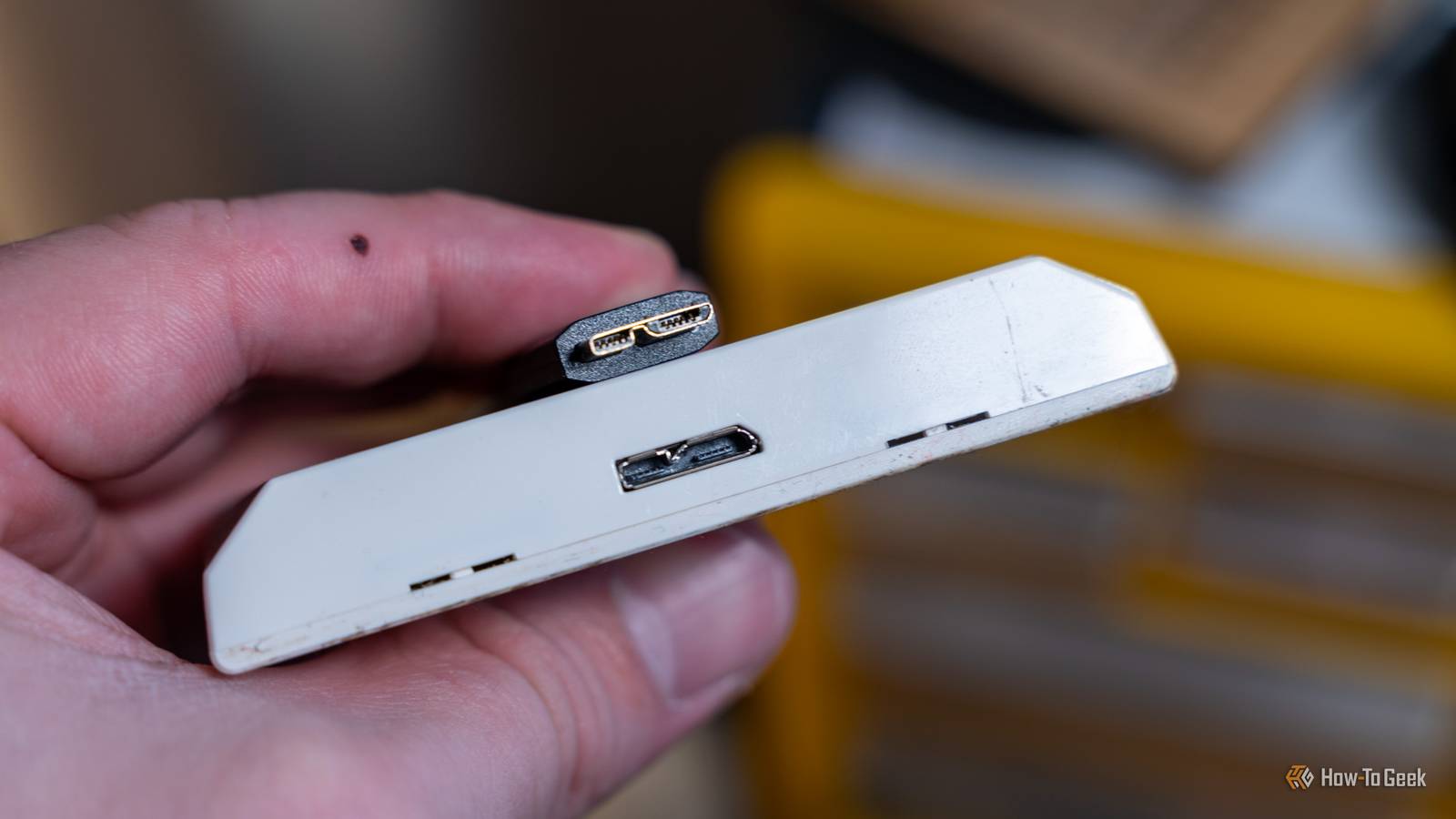
You probably assumed Micro USB was dead—quietly retired sometime around 2024 after the EU mandate.But then you bought something recently—maybe a fitness tracker or an IoT device—and there it was: that familiar flat little port staring back at you.It’s not a manufacturing error or leftover clearance stock.
Micro USB is still very much in production, and there’s a surprisingly logical reason why.What made Micro-USB so popular? To understand Micro-USB, you first need to understand Mini-USB When USB was introduced in 1996, every cable was designed with two distinct ends.One side used USB-A—the flat, rectangular connector that plugs into a computer or charger.
The other side used USB-B—a larger, squarish connector that plugs into the peripheral.USB-A acted as the host, supplying power, while USB-B served as the device side, receiving it.The setup worked well for large, stationary devices like printers and audio interfaces.
But USB-B was physically too large for smaller portable devices.That’s partly why keyboards and mice of that era typically came with attached USB cables instead of detachable ports.As pocket cameras and early smartphones gained popularity, the industry needed a smaller connector for charging and data transfers.
The Mini-B (a.k.a.Mini-USB) was introduced in 2000—a more compact version of the device-side connector.It worked well enough, but there was one major issue: durability.
Quiz 8 Questions · Test Your KnowledgeUSB standards & connectorsTrivia ChallengeFrom clunky Type-A plugs to lightning-fast USB4 — test your knowledge of the universal serial bus revolution.HistoryConnectorsSpeedsStandardsHardwareBegin 01 / 8HistoryIn what year was the original USB 1.0 specification officially released?A1993B1998C1996D2000Correct! USB 1.0 was released in January 1996 by a consortium led by Intel, Compaq, Microsoft, and others.It aimed to replace the chaotic mix of serial ports, parallel ports, and PS/2 connectors that plagued early PCs.Not quite — USB 1.0 launched in January 1996.It was developed by a consortium including Intel and Microsoft to simplify the frustrating tangle of legacy ports on personal computers at the time.Continue 02 / 8SpeedsWhat is the maximum data transfer rate of USB 2.0, also known as 'Hi-Speed' USB?A12 MbpsB480 MbpsC960 MbpsD5 GbpsCorrect! USB 2.0 tops out at 480 Mbps, which is why it earned the 'Hi-Speed' label when it launched in 2000.
That was a massive leap over USB 1.1's 12 Mbps Full Speed ceiling, making it practical for external hard drives and cameras.Not quite — the correct answer is 480 Mbps.USB 2.0 is branded 'Hi-Speed' and launched in 2000, offering a 40x improvement over USB 1.1's Full Speed 12 Mbps mode, which made external storage far more viable.Continue 03 / 8ConnectorsWhich USB connector type was specifically designed for use with mobile phones and cameras, featuring a distinctive 5-pin trapezoidal shape?AUSB Type-BBUSB Micro-BCUSB Mini-BDUSB Type-CCorrect! USB Mini-B was the go-to connector for early digital cameras and mobile phones before being largely replaced.It features a recognizable five-pin trapezoidal design and was formally specified in USB 2.0, though it has since been superseded by Micro-B and USB-C.The correct answer is USB Mini-B.
It was the standard connector for early digital cameras and many mobile phones, featuring a 5-pin trapezoidal shape.It was eventually displaced by the slimmer Micro-B connector, which allowed for thinner device designs.Continue 04 / 8StandardsUSB 3.0 was later rebranded by the USB Implementers Forum.What is its current official name?AUSB 3.1 Gen 2BUSB 3.2 Gen 2x2CUSB 3.2 Gen 1DUSB 3.1 Gen 1Correct! The USB-IF rebranded USB 3.0 as USB 3.2 Gen 1 to fit into a unified naming scheme.
It still delivers the same 5 Gbps 'SuperSpeed' transfer rate — the confusing renaming was meant to streamline the standard's versioning but arguably made it more complicated.Not quite — USB 3.0 is now officially called USB 3.2 Gen 1.The USB Implementers Forum rebranded the entire USB 3.x family to create a unified naming structure, though the 5 Gbps SuperSpeed performance of the original USB 3.0 remains unchanged.Continue 05 / 8ConnectorsWhat key physical feature makes USB Type-C different from all previous USB connector types?AIt uses gold-plated contacts for better conductivityBIt is fully reversible and can be inserted either way upCIt is the smallest USB connector ever madeDIt supports only digital audio signalsCorrect! USB Type-C's most celebrated feature is its symmetrical, reversible design — you can plug it in either way without fumbling.Introduced in 2014, it also supports far higher power delivery and data speeds than older connectors, making it a true universal solution.The standout feature is its fully reversible design — you can insert a USB-C plug either way up, ending the frustration of guessing the correct orientation.
Introduced in 2014, USB-C also supports higher power delivery and data speeds than its predecessors.Continue 06 / 8HistoryWhich organization is responsible for developing and publishing the USB specification?AIEEE (Institute of Electrical and Electronics Engineers)BISO (International Organization for Standardization)CUSB-IF (USB Implementers Forum)DANSI (American National Standards Institute)Correct! The USB Implementers Forum (USB-IF) is the non-profit organization formed by the original USB developers to maintain and promote the USB specification.Founded in 1995, it certifies compliant products and grants the right to use the official USB logo.The correct answer is the USB-IF, or USB Implementers Forum.This non-profit was founded in 1995 by the companies that originally developed USB, including Intel and Microsoft.
It maintains the specification, runs compliance programs, and certifies products to carry the USB logo.Continue 07 / 8HardwareWhat maximum power output did USB Power Delivery 3.1 introduce, enabling charging of high-performance laptops?A60 wattsB100 wattsC140 wattsD240 wattsCorrect! USB Power Delivery 3.1, released in 2021, dramatically raised the ceiling to 240 watts using Extended Power Range (EPR) mode.This is enough to charge even power-hungry gaming laptops and workstations over a single USB-C cable, replacing bulky proprietary chargers.The answer is 240 watts.USB Power Delivery 3.1, introduced in 2021, added an Extended Power Range (EPR) mode that maxes out at 240W over a USB-C cable.
Earlier PD versions were capped at 100W, which was insufficient for many high-performance laptops.Continue 08 / 8StandardsUSB4, released in 2019, is based on which company's proprietary technology that was donated to the USB-IF?AApple's Lightning protocolBIntel's Thunderbolt 3 protocolCGoogle's USB-C Audio standardDAMD's SuperSpeed architectureCorrect! Intel donated the Thunderbolt 3 specification to the USB-IF, which became the foundation for USB4.This means USB4 at its fastest tier (40 Gbps) is technically compatible with Thunderbolt 3 devices, blurring the line between the two standards significantly.The correct answer is Intel's Thunderbolt 3.Intel donated its Thunderbolt 3 spec to the USB Implementers Forum, and it became the basis for USB4.
The top USB4 speed tier of 40 Gbps mirrors Thunderbolt 3, and the two standards share a high degree of compatibility.See My Score Challenge CompleteYour Score/ 8Thanks for playing!Try Again The Mini-USB flaw that paved the way for the rise of Micro-USB Mini-B connectors had a thin plastic tongue with pins inside the device port, which absorbed most of the mechanical stress during repeated connect–disconnect cycles.Over time, plugging and unplugging—or even slight sideways force—could bend or snap that internal piece, damaging the port itself.This wasn’t a problem for stationary devices or typical PC peripherals, where the cable stayed plugged in.
But on cameras and smartphones, the ports saw frequent use and often failed within a year or two.And because the failure occurred on the device side, it usually meant repairing or replacing the entire device.Combined with the trend toward thinner hardware, this eventually led to the development of Micro-USB, officially announced in 2007.
This time around, the Micro-USB connector was rated for 10,000 connect–disconnect cycles.For context, at five plugs per day, that translates to roughly 5.5 years of use.The spring contacts were also moved to the cable side, reducing wear on the device port.
Micro-USB was also significantly flatter than Mini-USB.While it retained a similar width, its height was nearly cut in half, making it far better suited for increasingly thin smartphones.Overall, Micro-USB was a more durable and practical connector, which led to the eventual discontinuation of Mini-B.
Related USB Explained: All the Different Types (and What They're Used for) Most of our electronic devices require USB cables, so take a moment to learn about each of them.Posts 3 Micro-USB was everywhere—so what happened? The EU was team Micro-USB—before they were team USB-C In 2009, the European Commission drafted a memorandum of understanding known as the Common External Power Supply (Common EPS) initiative.14 major manufacturers—including Nokia, Samsung, and Motorola—signed on to standardize Micro-USB for mobile devices.
With both improved durability and regulatory backing, Micro-USB dominated the 2010s.It showed up everywhere—smartphones, cameras, Bluetooth headphones, e-readers, gaming controllers, and portable speakers—quickly becoming the default charging cable.However, even at its peak, the USB Implementers Forum (USB-IF) was already working on the next iteration.
In 2014, it published the specification for USB Type-C (USB-C for short).A true ‘universal’ cable USB-C wasn’t just an incremental upgrade—it was a fundamental redesign of the USB connector.In fact, it’s so perfect, I’m pretty sure we’re not getting a USB-D anytime soon, if ever.
The most immediate change was physical.USB-C made it possible to use the same connector on both the host and the device.While USB-A to USB-C cables still exist, they’re no longer a technical requirement.
A USB-C to USB-C cable works on both ends, eliminating the need to figure out which side goes where.It also retained a compact form factor similar to Micro-USB, but introduced a fully symmetrical design, meaning there’s no wrong orientation.Anyone who has spent years flipping Micro-USB or USB-A connectors will recognize how significant this change was.
The more important improvements, however, were internal.USB-C uses a 24-pin configuration, enabling support for newer standards like USB 3.x, with data transfer speeds ranging from 5 to 20 Gbps.The connector also supports newer standards like USB4 and Thunderbolt, enabling speeds of up to 80 Gbps.
In contrast, Micro-USB has just five pins and is limited to USB 2.0 speeds, which cap out at only 480 Mbps.Micro-USB did technically support USB 3.0, but the implementation was far from elegant—it required an additional block of pins bolted onto the side, creating a wide, ungainly connector.You've probably seen it on portable Seagate or Western Digital hard drives.
USB-C also introduced robust power capabilities.With USB Power Delivery (PD), it can supply enough power to charge laptops.Through alternate modes, the same cable can transmit video (such as a 4K display signal), data, and power simultaneously.
Finally, we have one cable that can effectively replace several specialized ones—it’s arguably the most “universal” cable we have.Related USB-C was supposed to unify everything, but desktop PCs are stuck in the past Your PC motherboard has terrible USB-C support, and it's not getting better anytime soon Posts 36 By Sydney Butler The inevitable takeover of USB-C USB-C was superior to Micro-USB in nearly every measurable way, and manufacturers quickly began transitioning.It first appeared in flagship smartphones, then gradually moved into mid-range devices.
By 2018–2019, USB-C had become standard across most Android flagships.Peripheral manufacturers followed.As USB-C became standard on laptops and phones, peripherals that still relied on Micro-USB began to feel inconvenient.
Over time, the cable ecosystem in most households quietly shifted.The European Union reinforced this transition in 2022 through the Radio Equipment Directive, which mandates USB-C as the standard charging port for a wide range of devices—including phones, tablets, cameras, headphones, handheld consoles, portable speakers, e-readers, keyboards, mice, and earbuds—sold in the EU by the end of 2024.Laptops were required to follow by spring 2026.
Subscribe to the newsletter for USB-connector clarity Want more context on connector choices and their buyer impact? Subscribe to the newsletter for clear breakdowns of design trade-offs, manufacturing and cost pressures, and compatibility implications, plus thoughtful coverage of other tech trends.Get Updates By subscribing, you agree to receive newsletter and marketing emails, and accept our Terms of Use and Privacy Policy.You can unsubscribe anytime.
It's almost poetic—the same institution that standardized Micro-USB's rise was now legislating its retirement.Anker 4-Port USB Hub Brand Anker Ports 4 Whether you need more ports on your desktop, something handy to plug laptop accessories into, or you've run out of ports on your Xbox Series X|S console, everybody loves a good USB hub.$14.99 at Anker Expand Collapse Micro-USB is not dead yet And it won’t be disappearing like the Mini-B did Here’s the part most people get wrong: when we talk about USB-C becoming the new standard, we’re really only talking about smartphones and mainstream consumer electronics.
You can still find Micro-USB on things like an electric shaver or a digital weight scale.In fact, back in 2022, Android Authority conducted a poll of over 11,000 readers and found that 46% still owned accessories with Micro-USB ports.The primary reason Micro-USB persists is cost.
While I can’t tell you the exact figures—pricing varies based on order volume and other factors—most estimates suggest that Micro-USB components cost roughly $0.50 less than USB-C.That might sound trivial, but across a production run of a million units, it translates to savings of around half a million dollars—simply by sticking with an older standard.There’s also a less obvious barrier that’s arguably more significant: R&D costs.
Redesigning a product for USB-C isn’t just a matter of swapping one connector for another.If the circuit board inside the device is designed around Micro-USB’s five-pin footprint, switching will require paying an engineer to redesign the board, retooling the manufacturing line, and potentially updating the firmware that manages charging.For low-margin products—like rechargeable camping lanterns or electric toothbrushes—that investment often doesn’t make financial sense, especially when it offers no meaningful benefit to the buyer.
The EU mandate pushing USB-C as a universal standard doesn’t apply to all consumer devices.Many low-power electronics, IoT gadgets, and simple digital tools are exempt, which gives Micro-USB a clear runway in those categories regardless of regulation.Related USB-C was supposed to be simple—it's actually a total nightmare You can "C" the issues clearly.
Posts 15 By Sydney Butler
Read More