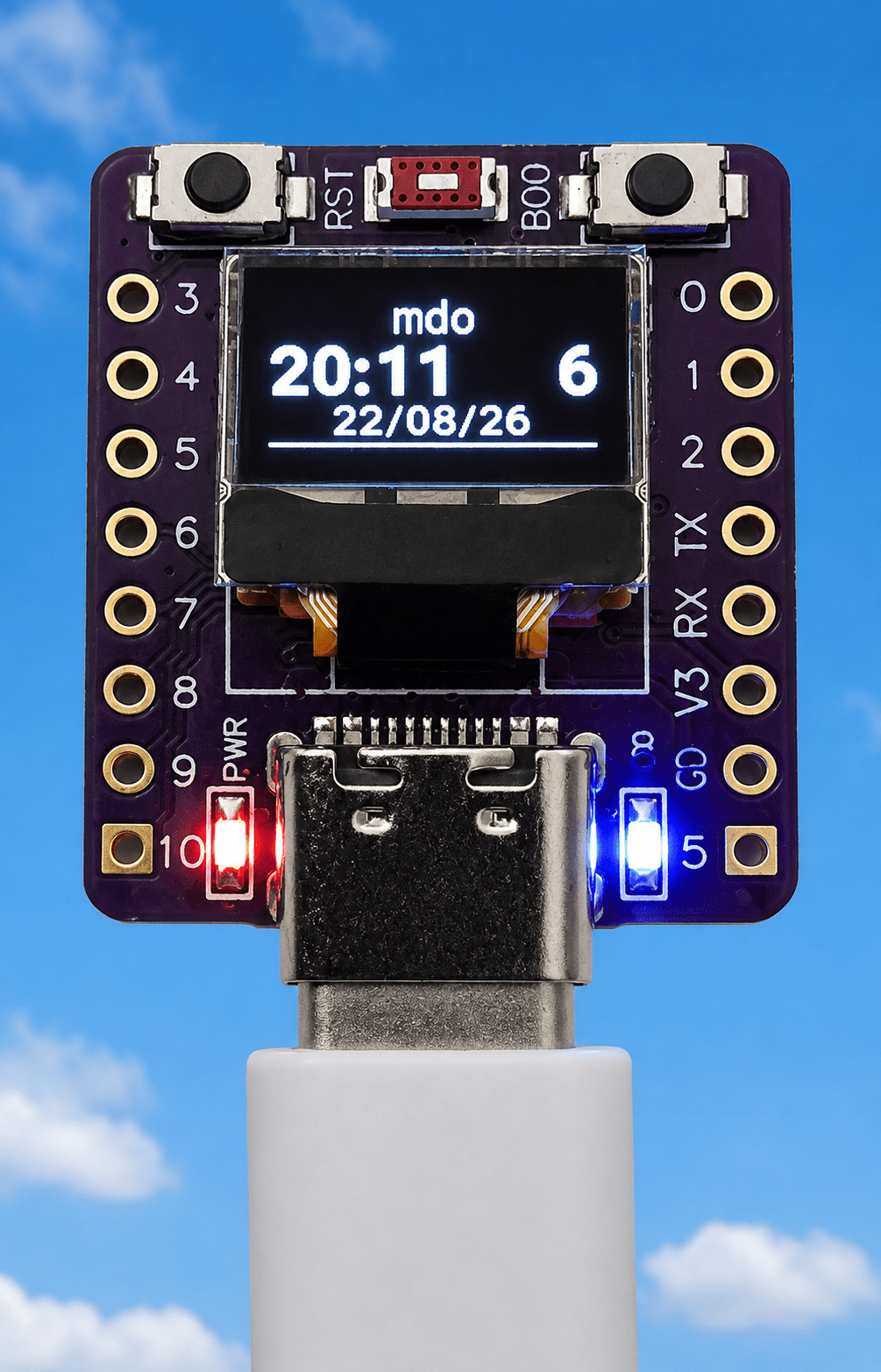
Just a few days ago this little project was the poor brother of the two projects that succeed it.But hey – things change and this is now a VERY useful tool – I hope you enjoy.The Abrobot is a cheap ESP32 board with tiny display, widely available on Aliexpress.
The latter is described in the code as SSD1306 but only has a 72*40px display.My project now called abrobot-based-ble-proxy uses this board in ESPHOME and is a normal ESPHOME Bluetooth proxy… and far more… This means it can relay Bluetooth devices that would normally be out of range of Home Assistant.bluetooth_proxy: active: true connection_slots: 3 It is also a BLE activity counter The OLED shows the number of devices heard during the preceding 120 seconds.
An MQTT BLE event reporter It publishes: abrobot/ble with JSON output such as: { "event": "new", "mac": "5C:53:10:AB:60:99", "name": "IoTorero Sensor", "rssi": -83 } or: { "event": "rejoined", "mac": "AA:BB:CC:DD:EE:FF", "name": "", "rssi": -57 } Note: rejoined doesn’t mean the physical device was switched off and back on.It means that the Abrobot had previously seen the MAC, subsequently heard nothing from it for 120 seconds, removed it from the active cache, and then saw it again There’s a WebUI display and also a LED.The WebUI gives you: Display Brightness, Display toggle (to show the nearest WiFi, current time, number of BLE devices seen in the last 120 seconds and date or OFF – and product version.
The WebUI also has some diagnostic info such as which SSID the board is hooked into, the IP address of the Abrobot, up time and more.I’ve crammed a lot into the little display on this cheap ESP32-C3-based board.The board is able to jump from WIFI to WiFi thanks to ESPHome and keeps track of the current WiFi SSID at the top of the screen.
There’s a blue LED bottom right of the board which shows solid blue unless you turn both it and the screen off to save power.When search between WiFi access points – the blue light flashes.For maximum power saving you can physically (carefullly) cut that RED LED on the left – it is, sadly, not programmable, it’s just a power indicator.
If you want to see new and rejoined BLE devices in detail – an MQTT subscription to abrobat/ble will do the job.Here is a sample version 1.4.3 output from the WebUI… Below is the complete ESPHOME code.Just a point here – I used to put directly passwords in my code – I still could as no-one else in my home would know what to do with them – but honestly – just having a secrets file in ESPHOME keeps the lot in one place.
If using ESPHOME within Home Assistant, don’t confuse that secrets file with the one in Home Assistant itself.If anyone has already tackled this project, note that today (August 30, 2026) I’ve updated the code and version – as while being utterly compatible with the original, it is WAY better.You could likely make this with a vastly superior (RAM-wise) ESP32-S3 and one of those common mini-OLED displays with only tiny changes – but this is a wiring-free version – straight out-of-the-box hardware needing only a USB-C supply:-) If you can’t get an Abrobot board – use an ESP32-S3 mini board and one of these cheap SSD1306 display boards – respect the I2c pins I’m using in the code.
As the SSD1306 boards have a different number of pixels to work with – you’ll need some minor changes.HEY, actually that’s not a bad idea, I have some of those – WHEEE.Oh yes, the board controls also appear within Home Assistant – but I digress.
Caviat here, this is NOT like a Zigbee router (several of which can mesh together).The Abrobot’s own BLE radio can only hear devices that are within its Bluetooth range.A second proxy doesn’t relay BLE advertisements backwards into another ESP32’s scanner.
Each ESP32 sees what its own radio can hear.Home assistant hears the lot.Of course you could miss off the little display altogether but it’s awfully handy for making sure everything is working.
Before you start The code below is incredible for such a small device – and I went on to develop larger BLE trackers detailed elsewhere.However this SHOULD work on your router and did work on my GL-iNET Flint (WiFi 6) router until a few days ago after I made some changes to the router… the end of a long story is — I ended up factory resetting the router as this code would not connect (or rather I saw an error in the logs “Could not reconnect”)… despite every other board and project connecting – including another ESP32-C3.It turns out that the antenna on this little board is not that great and I realised it was failing due to the immense amount of unshielded USB 3 cabling in my office.
In the end (long story) I hooked up a cheap repeater and then finally a much better (if old) router I had lying around, actually in the office – and that made all the difference.Most of my problems (though I didn’t realise it at the time) were down to a duff router – more on that elsewhere.A couple of things anyone looking at this project code may notice – the code contains references for 5 different web connections (SSIDs) in the WiFi section below.
I live in a “cave-home” in rural Spain and it is notoriously difficult to get WiFi to work from room to room, given the thick stone walls not common to modern thin breezeblock (or wooden) housing, so I currently have 5 access points.You can put fewer or more as needed into ESPHOME – unlike Tasmota which I seem to recall will accept up to 2 SSIDs, ESPHOME doesn’t have that limit.# ======================================================== # Abrobot-based BLE Proxy with display # August 2026 Peter Scargill and credit to ChatGPT # v1.4.2 - BLE proxy + WebUI + Multi-WiFi, SSID display # and more # ======================================================== substitutions: product_version: "1.4.3" esphome: name: abrobot-based-ble-proxy friendly_name: Abrobot-based BLE Proxy includes: - <esp_sntp.h> on_boot: priority: 600 then: - delay: 5s - globals.set: id: ble_startup value: 'false' - component.update: id: ssd1306_display esp32: board: esp32-c3-devkitm-1 framework: type: esp-idf debug: logger: level: INFO api: ota: - platform: esphome password: !secret abrobot_ota_password wifi: networks: - ssid: !secret wifi_ssid password: !secret wifi_password - ssid: !secret wifi_ssid2 password: !secret wifi_password - ssid: !secret wifi_ssid3 password: !secret wifi_password - ssid: !secret wifi_ssid4 password: !secret wifi_password - ssid: !secret wifi_ssid5 password: !secret wifi_password power_save_mode: none post_connect_roaming: true on_connect: then: - globals.set: id: wifi_connected value: 'true' - if: condition: lambda: 'return id(display_on);' then: - light.turn_on: id: onboard_led on_disconnect: then: - globals.set: id: wifi_connected value: 'false' ap: ssid: "Abrobot Fallback Hotspot" password: "ih2TLODxSA25" captive_portal: sensor: - platform: wifi_signal name: "WiFi Signal" id: wifi_signal_sensor update_interval: 30s web_server: sorting_weight: 3 - platform: uptime name: "Uptime (updated every 60 seconds)" update_interval: 60s web_server: sorting_weight: 10 - platform: debug free: name: "Free Heap" web_server: sorting_weight: 9 text_sensor: - platform: template name: "Abrobat Time" id: ttgo_time icon: "mdi:clock" lambda: |- auto now = id(current_time).now(); if (!now.is_valid()) return {"Not synchronised"}; return now.strftime("%H:%M:%S"); update_interval: 1s web_server: sorting_weight: 1 - platform: template name: "Version" lambda: |- return {"${product_version}"}; - platform: wifi_info ssid: name: "WiFi SSID" id: wifi_ssid web_server: sorting_weight: 3 ip_address: name: "IP Address" id: wifi_ip web_server: sorting_weight: 2 bssid: name: "WiFi AP MAC" web_server: sorting_weight: 5 - platform: template name: "Gateway" id: wifi_gateway icon: "mdi:router-network" entity_category: diagnostic update_interval: 10s web_server: sorting_weight: 6 lambda: |- esp_netif_t *netif = esp_netif_get_handle_from_ifkey("WIFI_STA_DEF"); if (netif == nullptr) { return {"----"}; } esp_netif_ip_info_t ip_info; if (esp_netif_get_ip_info(netif, &ip_info) != ESP_OK) { return {"----"}; } char gateway[16]; snprintf(gateway, sizeof(gateway), IPSTR, IP2STR(&ip_info.gw)); return {gateway}; web_server: port: 80 version: 3 local: true time: - platform: sntp id: current_time timezone: Europe/Brussels update_interval: 15min i2c: id: bus_i2c sda: GPIO5 scl: GPIO6 scan: true frequency: 800kHz globals: # OLED on/off - id: display_on type: bool restore_value: yes initial_value: 'true' # Number of BLE devices currently heard - id: ble_device_count type: int restore_value: no initial_value: '0' # BLE startup screen - id: ble_startup type: bool restore_value: no initial_value: 'true' # BLE / normal display mode - id: ble_mode type: bool restore_value: no initial_value: 'false' # Full / half OLED contrast - id: display_full_brightness type: bool restore_value: yes initial_value: 'true' # Current WiFi connection state - id: wifi_connected type: bool restore_value: no initial_value: 'false' binary_sensor: # ------------------------------------------------ # PHYSICAL BOOT BUTTON # ------------------------------------------------ - platform: gpio pin: number: GPIO9 mode: input: true pullup: true inverted: true name: "Display Button" id: display_button internal: true on_press: - switch.toggle: display_toggle display: - platform: ssd1306_i2c id: ssd1306_display model: "SSD1306 72x40" rotation: 0 update_interval: 1s contrast: 100% lambda: |- // ------------------------------------------------ // APPLY SELECTED CONTRAST // ------------------------------------------------ if (id(display_full_brightness)) { id(ssd1306_display).set_contrast(1.0f); } else { id(ssd1306_display).set_contrast(0.20f); } // ------------------------------------------------ // DISPLAY OFF // ------------------------------------------------ if (!id(display_on)) { return; } // ------------------------------------------------ // BLE STARTUP / BLE MODE // ------------------------------------------------ if (id(ble_startup)) { // Startup screen it.printf( 36, 0, id(font3), TextAlign::TOP_CENTER, "BLE" ); it.printf( 36, 19, id(font3), TextAlign::TOP_CENTER, "Proxy" ); } else if (id(ble_mode)) { // Product version screen it.printf( 36, 0, id(font2), TextAlign::TOP_CENTER, "Firmware" ); it.printf( 36, 19, id(font3), TextAlign::TOP_CENTER, "v%s", "${product_version}" ); } else { // ------------------------------------------------ // NORMAL SCREEN // // SSID // TIME COUNT // DATE // ------------------------------------------------ char ssid_buf[33]; const char *ssid = wifi::global_wifi_component->wifi_ssid_to(ssid_buf); if (ssid[0] == '\0') { ssid = "------"; } // Centre SSID it.printf( 36, 0, id(font4), TextAlign::TOP_CENTER, "%.14s", ssid ); // Time - left //it.strftime( // 0, 12, // id(font1), // TextAlign::TOP_LEFT, // "%H:%M", // id(current_time).now() //); if (id(current_time).now().is_valid()) { it.strftime(0, 12, id(font1), TextAlign::TOP_LEFT, "%H:%M", id(current_time).now()); } else { it.print(0, 12, id(font1), TextAlign::TOP_LEFT, "--:--"); } // BLE count - right it.printf( 72, 12, id(font1), TextAlign::TOP_RIGHT, "%d", id(ble_device_count) ); // Date - centred it.strftime( 36, 27, id(font2), TextAlign::TOP_CENTER, "%d/%m/%y", id(current_time).now() ); } // ------------------------------------------------ // FLASHING UNDERLINE // ------------------------------------------------ if (id(current_time).now().second % 2 == 0) { it.horizontal_line(0, 39, 72); } font: # Time / BLE count - id: font1 file: "fonts/Roboto-Black.ttf" size: 16 # Date and word Firmware - id: font2 file: "fonts/Roboto-Black.ttf" size: 10 # BLE Proxy startup - id: font3 file: "fonts/Roboto-Black.ttf" size: 18 # SSID - id: font4 file: "fonts/Roboto-Black.ttf" size: 12 output: - platform: gpio pin: number: GPIO8 inverted: true id: gpio_8 light: # Internal only - no separate WebUI control - platform: binary id: onboard_led internal: true output: gpio_8 restore_mode: RESTORE_DEFAULT_ON switch: # ================================================== # DISPLAY + BLUE LED TOGETHER # ================================================== - platform: template name: "Display Toggle" id: display_toggle restore_mode: RESTORE_DEFAULT_ON lambda: |- return id(display_on); turn_on_action: - globals.set: id: display_on value: 'true' - if: condition: lambda: 'return id(wifi_connected);' then: - light.turn_on: id: onboard_led - component.update: id: ssd1306_display turn_off_action: - globals.set: id: display_on value: 'false' - light.turn_off: id: onboard_led - component.update: id: ssd1306_display # ================================================== # BLE / NORMAL DISPLAY MODE # # ON = BLE screen # OFF = SSID / TIME / DATE # ================================================== - platform: template name: "Product Version Display" id: display_mode optimistic: true restore_mode: ALWAYS_OFF turn_on_action: - globals.set: id: ble_mode value: 'true' - component.update: id: ssd1306_display turn_off_action: - globals.set: id: ble_mode value: 'false' - component.update: id: ssd1306_display # ================================================== # OLED FULL / HALF CONTRAST # # ON = FULL # OFF = DIM # ================================================== - platform: template name: "Display Brightness" id: display_brightness optimistic: true restore_mode: RESTORE_DEFAULT_ON turn_on_action: - globals.set: id: display_full_brightness value: 'true' - lambda: |- id(ssd1306_display).set_contrast(1.0f); - component.update: id: ssd1306_display turn_off_action: - globals.set: id: display_full_brightness value: 'false' - lambda: |- id(ssd1306_display).set_contrast(0.20f); - component.update: id: ssd1306_display # ================================================== # BLUE LED WIFI STATUS # # WiFi connected = solid ON # WiFi disconnected = flashing # Display OFF = OFF # ================================================== interval: - interval: 500ms then: - if: condition: lambda: 'return id(display_on);' then: - if: condition: lambda: 'return id(wifi_connected);' then: - light.turn_on: id: onboard_led else: - light.toggle: id: onboard_led else: - light.turn_off: id: onboard_led esp32_ble_tracker: scan_parameters: interval: 1100ms window: 1100ms active: true on_ble_advertise: then: - lambda: |- // ------------------------------------------------ // ACTIVE BLE DEVICES // Devices heard within the last 120 seconds // ------------------------------------------------ static std::map<std::string, unsigned long> devices_seen; unsigned long now = millis(); // ------------------------------------------------ // CURRENT BLE MAC ADDRESS // ------------------------------------------------ char mac_buf[18]; const char *mac = x.address_str_to(mac_buf); // ------------------------------------------------ // UPDATE ACTIVE DEVICE CACHE // ------------------------------------------------ devices_seen[mac] = now; // ------------------------------------------------ // REMOVE DEVICES NOT HEARD FOR 120 SECONDS // ------------------------------------------------ for (auto it = devices_seen.begin(); it != devices_seen.end(); ) { if (now - it->second >= 120000) { it = devices_seen.erase(it); } else { ++it; } } // ------------------------------------------------ // UPDATE BLE DEVICE COUNT // ------------------------------------------------ int new_count = devices_seen.size(); if (new_count != id(ble_device_count)) { id(ble_device_count) = new_count; ESP_LOGI( "ble_count", "BLE devices in last 120 seconds: %d", new_count ); } bluetooth_proxy: active: true connection_slots: 3
Read More