I am not a professional red teamer or security researcher, but my background is in systems engineering and DevOps, so I spend a lot of time working with Linux, networking, firewalls, virtualization, and infrastructure security.I already knew the obvious security rules.What I wanted to find out was whether my actual network still matched the network I thought I had.
I had several port-forwarding rules on my router for services I occasionally needed to reach remotely.I knew what most of them were for, and I considered the setup reasonably controlled.Then I scanned my public IP from outside the network and found a few things I had forgotten were there.
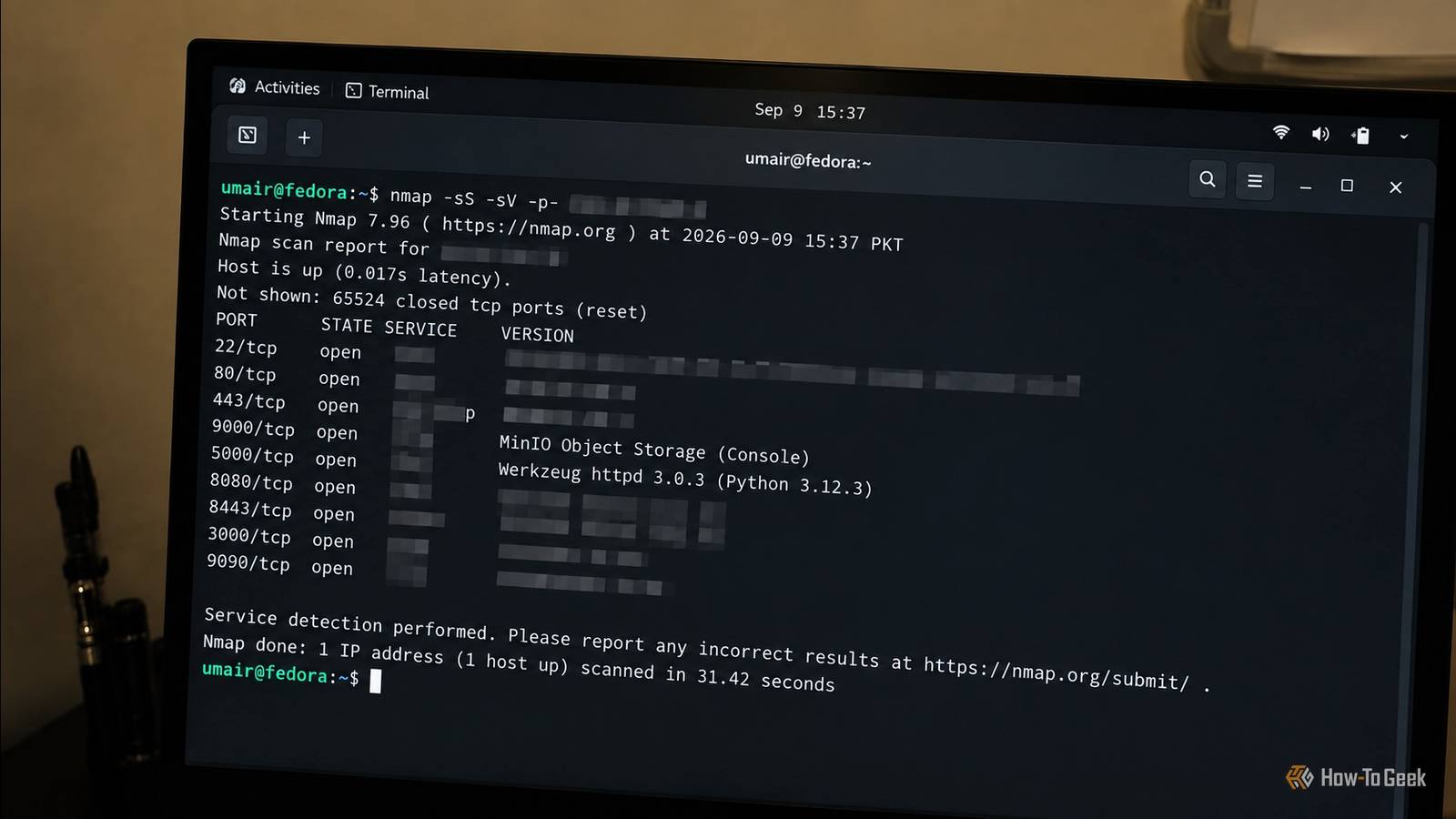
Nmap showed me more than I expected I found services I no longer used Close I started with a straightforward Nmap scan against my public IP address.The first few open ports were exactly what I expected, and I recognized the services and knew why they were exposed.Then Nmap started finding ports that I had not thought about in a very long time.
There were quite a few.One of them was MinIO on port 9000.I no longer use MinIO because I have since moved to SeaweedFS, so that deployment had effectively become abandoned.
Related These 5 Linux distros finally got DNS privacy right—most others don't Conceal your tracks and protect against attacks with these distros that put DNS privacy at the forefront.Posts By Bobby Jack I had simply forgotten about it.The service was still running, and the forwarding rule was still active.
That was exactly the kind of thing I wanted the external scan to find.I knew which services I intentionally exposed, but I had not kept the same mental inventory of older experiments and services I had stopped using.That is an easy thing to miss in a homelab.
You remember what you actively use and what you are currently maintaining.The forgotten service from an experiment months ago is much easier to overlook.After identifying the unexpected ports, I used Nmap’s service detection to determine what was actually listening behind them.
This gave me a much clearer picture of what an external system could identify without authentication.I could see the protocols being offered and, where the services revealed enough information, identify the applications behind them.At that point, I stopped treating the scan as a list of forgotten forwarding rules.
I started investigating each exposed service individually.That was where the more interesting findings appeared.I started looking at the exposed applications Port 5000 had a problem I had overlooked Close One of the services I investigated was listening on port 5000.
The Flask application was familiar to me, and that was probably part of the reason it had escaped my attention in the first place.I opened the service from outside the network and found that it was still serving its login page over HTTP.There was no redirect to HTTPS.
I then used curl to inspect the page and found this in the HTML: <input type="hidden" id="prefer_https" name="prefer_https" value="false"> The application was explicitly configured not to prefer HTTPS.That meant anyone authenticating through the HTTP endpoint would send their credentials without transport encryption.An attacker capable of observing that traffic could potentially capture those credentials.
The issue was not some exotic vulnerability.It was a small configuration detail that had survived because the service worked normally.Inside my network, I had never had much reason to think about it.
From the internet, the situation looked very different.Related 4 reasons your networking gear should never be plugged straight into the wall (and what to do instead) Networking gear isn't cheap, but that's not even the biggest problem Posts By Monica J.White The more I investigated, the more obvious the underlying problem became.
The individual services were not necessarily disastrous.The bigger issue was that some of them should not have been public anymore.I had created forwarding rules for legitimate reasons.
Some were for experiments, some were for temporary remote access, and some had simply remained because removing them had never become urgent.Experience does not eliminate configuration drift.I knew what I was doing when I created those forwarding rules.
I also knew the risks involved in exposing services.What I did not know was that some of those old decisions were still active.That is why an external view is valuable.
It tests the environment that actually exists rather than the environment I remember configuring.Headscale gave me a way to reduce the exposure I only needed remote access to some of these services Once I had finished investigating the exposed services, I started asking whether each one needed to be public at all.For several of them, the answer was no.
I already use Headscale for my private network, so I could solve that problem without exposing every application through the router.I cleaned up the old services, removed forwarding rules that were no longer necessary, and moved private services behind my Headscale network.Stop port forwarding your NAS: The safer way to access files remotely This is the one NAS security feature most people still ignore That reduced the number of applications directly exposed to the internet while preserving the remote access I actually needed.
I kept public exposure where there was a genuine reason for it, but the rules were now much easier to account for.I could explain why each remaining public port existed.That was a much better position to be in than simply knowing that the ports were there.
You should still not fear port forwarding Port forwarding is not inherently insecure.There are plenty of legitimate reasons to make a service publicly accessible.The problem is that a forwarding rule is easy to create and remarkably easy to forget.
The MinIO instance on port 9000 was a perfect example.I had moved on from MinIO months earlier, but the service and its forwarding rule were still sitting there, waiting to be discovered.That is the sort of thing even experienced admins can miss.
Now I have set up a periodic external test of my network to make sure the public attack surface still matches what I think it is.It is a small addition to my maintenance routine, but it gives me something my configuration files cannot: an independent view of what the internet can actually reach.
Read More