Most people think of a NAS as a box that stores backups, media, documents but undersells what a NAS can do when it is already sitting on your network all day.A NAS is one of the few machines in a home lab that is usually powered on, connected by Ethernet, and stable enough to trust with small infrastructure jobs.That makes it a good place to run a private DNS server.The useful part is that DNS is not some abstract enterprise service.
Every phone, laptop, TV, container, and random smart device on your network depends on it before anything else can happen.When DNS is handled by the router or an ISP by default, you usually get very little control and almost no visibility.Moving it to your NAS changes that without turning your home lab into a full-time job, and you can also block obvious junk, see which devices are talking too much and create local names for internal services.
For a machine already running quietly in the corner, that is a practical use of hardware you already own.Why a NAS is a good place for DNS It is already running when the rest of the network needs it DNS should run on a machine that runs and runs and runs...a desktop is not ideal because it sleeps, reboots, or gets used for all sorts of things.
A laptop moves around, and the Raspberry Pi works well, but not everyone wants another device and power adapter.A NAS is usually different as it sits near the router, stays online, and already has a fixed role in the network.If it is running OpenMediaVault, TrueNAS, Unraid, or a plain Linux install, it can usually run a lightweight DNS service without noticing the extra load.
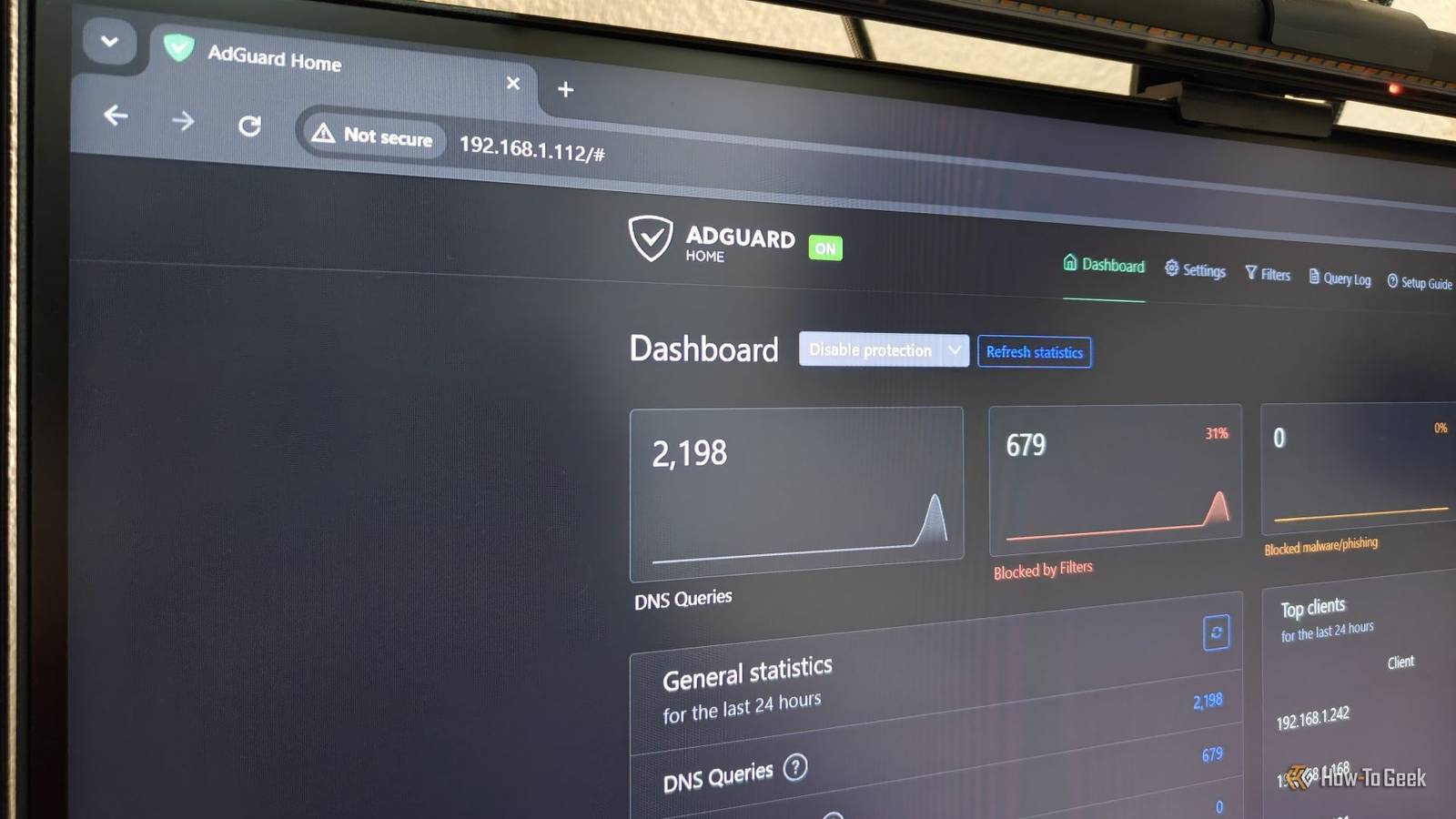
AdGuard Home, Pi-hole, and Technitium DNS are all good choices.AdGuard Home is often the easiest for a simple home setup because the interface is clean, and the first setup does not ask too much from you.You get dashboards, query logs, blocklists, upstream settings, and client statistics without having to build the whole thing from scratch.
On OpenMediaVault, running it in a container makes the setup easy to keep separate from the rest of the NAS.You can use their Podman plugin, but Docker would work similarly.Quiz8 Questions · Test Your KnowledgeRunning a private DNS server on your NASTrivia challengeThink you know DNS, NAS, and home networking? Put your skills to the test with these 8 questions.NetworkingDNSNASPrivacyHome LabBegin01 / 8DNS BasicsWhat does DNS stand for?AData Network ServiceBDomain Name SystemCDirect Name ServerDDynamic Network SecurityCorrect! DNS stands for Domain Name System.
It acts like the internet's phone book, translating human-readable domain names like 'google.com' into IP addresses that computers use to communicate.Not quite — DNS stands for Domain Name System.Without it, you'd have to memorize numeric IP addresses for every website you wanted to visit instead of convenient domain names.Continue02 / 8NetworkingWhat is a primary advantage of running your own private DNS server at home?AIt increases your internet download speeds significantlyBIt allows you to block ads and trackers network-wideCIt replaces the need for a router on your networkDIt gives you a static public IP address automaticallyCorrect! A private DNS server like Pi-hole or AdGuard Home lets you block ads, trackers, and malicious domains for every device on your network — no per-device app required.It's one of the most powerful home networking upgrades you can make.Not quite.
The big win with a private DNS server is network-wide ad and tracker blocking.Every device — including smart TVs and phones — benefits automatically without needing individual apps installed.Continue03 / 8NASWhat does NAS stand for in home networking?ANetwork Attached StorageBNetwork Access ServerCNode Administration SystemDNetworked Application SuiteCorrect! NAS stands for Network Attached Storage.It's a dedicated file storage device connected to your home network, allowing multiple devices to access and share files centrally — and since it runs 24/7, it's perfect for hosting services like DNS.Not quite.
NAS stands for Network Attached Storage.These always-on devices are ideal for running background services like a DNS server because they're already consuming power around the clock.Continue04 / 8DNS ToolsWhich of the following is a popular open-source DNS sinkhole application commonly used on home networks?ANginxBPi-holeCPlexDWireGuardCorrect! Pi-hole is one of the most well-known network-wide ad blockers that functions as a private DNS server.Originally designed for Raspberry Pi devices, it runs on virtually any Linux-based system — including most NAS operating systems.Not quite.
Pi-hole is the popular open-source DNS sinkhole used on home networks.Nginx is a web server, Plex is a media server, and WireGuard is a VPN protocol — all great tools, but none of them handle DNS filtering.Continue05 / 8DNS BasicsWhat is the IP address of Google's well-known public DNS server?A192.168.1.1B8.8.8.8C1.0.0.1D10.0.0.1Correct! Google's primary public DNS server is 8.8.8.8, with 8.8.4.4 as its secondary.These are among the most widely used public DNS servers in the world, though using your own private server keeps your DNS queries off Google's infrastructure.Not quite.
Google's famous public DNS address is 8.8.8.8.The address 1.0.0.1 belongs to Cloudflare, while 192.168.1.1 and 10.0.0.1 are common private router gateway addresses — not public DNS servers.Continue06 / 8PrivacyWhy might privacy-conscious users prefer a self-hosted DNS server over a public one like Google DNS?APublic DNS servers are slower than any self-hosted alternativeBSelf-hosted DNS prevents your query logs from being stored on third-party serversCPublic DNS servers require a paid subscription to use reliablyDSelf-hosted DNS automatically encrypts all your internet trafficCorrect! When you use a public DNS provider, every domain you look up can be logged and potentially used for analytics or advertising.A self-hosted server keeps those query logs on your own hardware, under your own control.Not quite.
The core privacy benefit of self-hosting DNS is that your browsing queries stay on your own hardware rather than being logged by a third party like Google or your ISP.Note that DNS encryption alone doesn't encrypt all your internet traffic.Continue07 / 8Home LabWhat port does standard DNS traffic use by default?APort 80BPort 443CPort 53DPort 8080Correct! DNS uses port 53 by default, for both UDP and TCP traffic.UDP is used for most standard queries due to its speed, while TCP is used for larger responses or zone transfers.
Knowing this port is essential when configuring firewalls on your NAS.Not quite.DNS operates on port 53.Port 80 is for HTTP web traffic, port 443 is for HTTPS, and port 8080 is a common alternative HTTP port.
When setting up a DNS server on your NAS, you'll need to ensure port 53 is open and not blocked by another service.Continue08 / 8NAS SoftwareWhich NAS operating system from Synology allows users to install containerized apps like AdGuard Home via Docker?ATrueNASBUnraidCDSMDOpenMediaVaultCorrect! DSM, which stands for DiskStation Manager, is Synology's proprietary NAS operating system.It supports Docker containers through its Container Manager app, making it straightforward to deploy DNS server software like AdGuard Home or Pi-hole on a Synology device.Not quite.DSM (DiskStation Manager) is the operating system made by Synology for its NAS devices.
TrueNAS, Unraid, and OpenMediaVault are all legitimate NAS platforms, but they come from different vendors — TrueNAS from iXsystems, Unraid from Lime Technology, and OpenMediaVault as a community project.See My ScoreChallenge CompleteYour Score/ 8Thanks for playing!Try Again The setup is simpler than it sounds A container and two folders are enough to begin For OpenMediaVault, the basic idea is to create persistent folders for AdGuard Home, then run the container.The persistent folders matter because you want settings and logs to survive container updates.A minimal Podman setup looks like this: mkdir -p /srv/containers/adguardhome/work /srv/containers/adguardhome/conf Then run AdGuard Home with Podman.
In a real setup, you should bind DNS to the actual NAS IP, especially if systemd-resolved already listens on local port 53.podman run -d --name adguardhome --restart=always \ -v /srv/containers/adguardhome/work:/opt/adguardhome/work \ -v /srv/containers/adguardhome/conf:/opt/adguardhome/conf \ -p NAS_IP:53:53/tcp -p NAS_IP:53:53/udp \ -p 3000:3000/tcp -p 8080:80/tcp \ docker.io/adguard/adguardhome:latest After that, open the setup page at: http://NAS_IP:3000 During setup, keep the web interface on port 80 inside the container and DNS on port 53.Since the host maps container port 80 to port 8080, the dashboard becomes available at That is the basic installation, but the important thing is not memorizing the command but understanding the shape of the setup: persistent data, DNS port 53, web UI on a safe port, and the NAS IP used by clients.
ASUS RT-BE92U BE9700 Tri-Band WiFi 7 Router Brand ASUS Wi-Fi Bands 6 GHz, 5 GHz, 2.4 GHz Ethernet Ports 1x 10G, 4x 2.5G Mesh Network Compatible Yes Expand Collapse Use plain upstream DNS first Fancy DNS can wait until the basics work AdGuard Home supports DNS-over-HTTPS and other encrypted upstream options.They are useful, but I would not suggest enabling them first during debugging.Related Stop blaming your router for slow internet, blame your DNS instead Moving the DNS off my router solved my home network’s biggest headaches Posts 1 By Ismar Hrnjicevic Start with plain upstream resolvers such as 1.1.1.1, 9.9.9.9, or 8.8.8.8.
Once basic DNS works, you can move to DNS-over-HTTPS if you want.This makes troubleshooting easier because you know the first problem is not certificate validation, bootstrap DNS, or an HTTPS issue inside the container.The simplest test is to ask your NAS DNS server directly using dig or nslookup: dig @NAS_IP google.com If it returns a normal answer, AdGuard responds and the DNS server is up.
Then test a commonly blocked domain and check the AdGuard query log from the dashboard.If the log shows the query and marks it as blocked, the system is doing its job.You can also use the dig command to test it.
For example, you check something like doubleclick: It resolves to 0.0.0.0which means it is getting blocked, and the server is working properly.Installing AdGuard Home is only half the job.Your devices must use it and the cleanest method is to open your router’s DHCP settings and set the DNS server to the NAS IP.
After devices renew their DHCP lease, they should receive the NAS as their DNS server automatically.If your router does not allow custom DNS in DHCP settings, you can set DNS manually on each device.Related Don't Upgrade Your NAS for Plex, Do This Instead New computer > new NAS.
Posts 16 By Patrick Campanale A small upgrade that makes NAS part of the network’s control plane Running private DNS on a NAS is not glamorous, but it is one of the most practical home lab upgrades.It gives you visibility into network behavior, reduces unwanted requests, and centralizes DNS control in a machine that is already running.That is the kind of self-hosting I personally like.
Not a complicated stack that needs constant care, but a useful service that quietly improves daily use, and you can set it up once, point your router to it, and then check the dashboard when you need to understand what is happening.Your NAS already sits there, powered on and waiting.Let it do one more job! Related You probably don't need a NAS: Why a DAS is better for most people Not sold on a NAS? Get a DAS instead Posts 73 By Arol Wright
Read More