One of the downsides of being an incessant tinkerer is that I regularly break things.Messing with my homelab or smart home can often cause things in my home to stop working.When the internet stops working, my family immediately blames me, so I set up an internet status page so they could see that it isn't always my fault.
My family tolerates my smart home tinkering for the most part They've become used to things breaking unexpectedly I've been messing around with smart home stuff for well over a decade.It was only about a day after I set up my first smart home device (a cheap smart bulb) that my wife experienced her first problem.She went to turn on the light using the wall switch, and nothing happened because the switch was already on while the smart bulb was off.
This was the first of a long line of issues that my family has had to put up with over the years.I've tried to keep everything in the home as controllable as possible by the methods my family already knows, but there have been a lot of teething problems along the way.Mostly, my family puts up with my tinkering, because some of the things I set up are genuinely useful to them.
There are some problems, however, that can get me into real trouble.Related I stopped rebooting my router to fix Wi-Fi, and these 7 tricks worked instead Rebooting your router won't fix your Wi-Fi: 7 tricks that actually work Posts 2 By Monica J.White Access to the internet is non-negotiable I can break what I want as long as it's not the Wi-Fi If a light stops working properly or the morning briefing gives events for the wrong day, it's annoying, but it's not the end of the world.
If the internet goes down when my kids are gaming, or my wife is trying to watch a documentary about some gruesome murder, then there's all hell to pay.They've gotten used to smart home devices not working properly while I set up new automations or just break things accidentally.They'll calmly let me know when they've discovered an issue, but they don't get too upset about it.
When the internet goes down, it's a different story.Robbing them of access to the internet is tantamount to starving them of oxygen.Without the internet, they're forced to do horrific things such as talking to each other, doing something that doesn't involve gadgets, or even going outside and touching grass.
Sometimes network problems are not my fault There are plenty of ways for the internet to break The problem is that while sometimes my tinkering can cause network issues, the internet going down isn't always my fault.The router might have issues, or there might be a problem with the ISP's network, but as soon as the internet stops working, the assumption is that I must have broken it somehow.Admittedly, the chances are that I'm far more likely to be the cause than anything else.
I've robbed my family of internet access in numerous ways over the years, from accidentally disconnecting the mesh router from power to shutting down the container that's running Pi-hole.It's not completely unreasonable to see me as the most likely cause.There are rare times when it's not my fault, and it's totally out of my hands.
Sometimes it's even a case of user error, and it's my family who are to blame, not me.At times like these, I've always wished there was a simple way to deflect the blame.My dedicated dashboard helps take some of the heat off me Now they know who to blame Close That's why I decided to build my self-hosted internet status page.
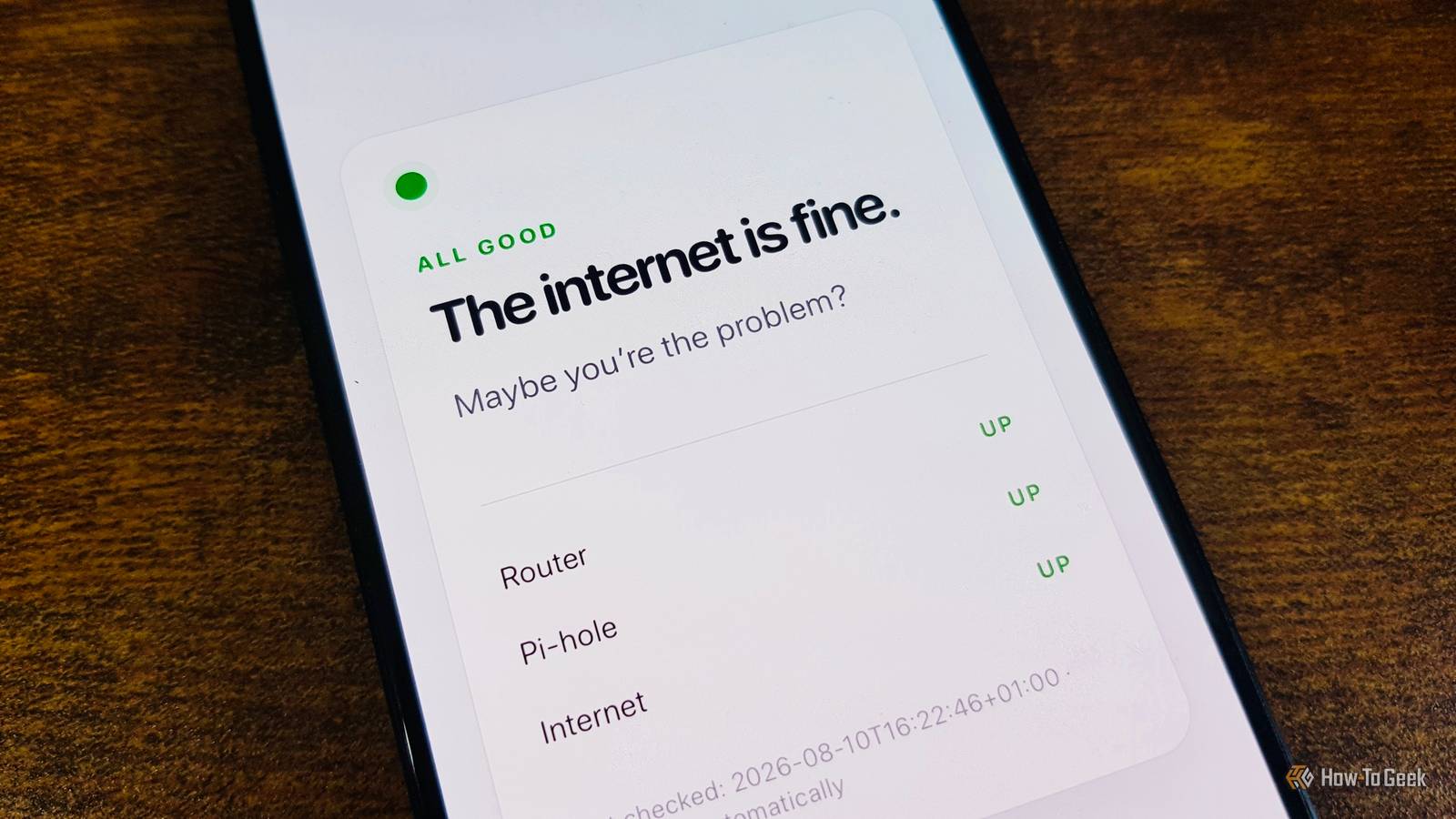
It's a simple web page that shows the current status of my home network and the most likely reason for any current problems.A small Python program performs a series of checks every 30 seconds.First, it confirms that it can reach the router.
It then asks my Pi-hole server to look up a website address.If this works, it confirms that Pi-hole is probably working, but if it fails, then there's a problem with DNS resolution through Pi-hole.Finally, it tries to reach test pages operated by Google and Cloudflare.
If either responds, access to the internet is confirmed.Using two separate services makes it less likely that an outage affecting only parts of the internet will be mistaken for a problem with my entire connection.The results of these tests determine what message the Python program displays on the small web page it serves.
If all the tests come back fine, the page suggests that maybe the user is the problem.If there's an issue with Pi-hole, it tells them that it's probably my fault, but if the issue is with accessing the internet, it tells them that it might not be my fault after all.The final possibility is that the web page won't open.
Since the page is hosted locally, if only the internet connection is down, we should still be able to access the page over the local network.If we can't, then either the internet status setup is broken, there's a problem with the router or Wi-Fi, or there's an issue with the device we're using.At this point, they can decide whether to blame me or not, because it's probably a toss-up.
Quiz8 Questions · Test Your KnowledgeDNS servers & how the internet finds its wayTrivia challengeFrom 8.8.8.8 to how your browser finds cat videos — find out how much you really know about DNS.DNS BasicsIP AddressesSecurityProvidersHistoryBegin01 / 8DNS BasicsWhat does DNS stand for?ADigital Network SecurityBDomain Name SystemCDistributed Node ServiceDDynamic Naming StandardCorrect! DNS stands for Domain Name System — the internet's giant phone book that translates human-friendly domain names like 'howtogeek.com' into IP addresses computers can actually use.Without it, you'd need to memorize a string of numbers every time you wanted to visit a website.Not quite — DNS stands for Domain Name System.It acts like the internet's phone book, converting easy-to-remember domain names into the numerical IP addresses that computers use to route traffic.
It's one of the most fundamental building blocks of the modern web.Continue02 / 8HistoryBefore DNS was invented, how did computers resolve hostnames on the early internet (ARPANET)?AEach router kept its own lookup tableBUsers typed IP addresses directly every timeCA single text file called HOSTS.TXT was downloaded from a central serverDA broadcast message was sent across the network asking for the addressThat's right! Before DNS, every computer on ARPANET relied on a file called HOSTS.TXT maintained by the Stanford Research Institute.Admins had to manually download the updated file to get new hostname mappings — not exactly scalable once the network started growing rapidly.The answer is HOSTS.TXT.Before DNS existed, a single text file maintained at the Stanford Research Institute mapped all hostnames to addresses, and every machine had to download it periodically.
As the internet grew, this system became completely unmanageable, which is exactly what motivated the creation of DNS in 1983.Continue03 / 8ProvidersThe famous DNS server at IP address 8.8.8.8 is operated by which company?ACloudflareBOpenDNSCGoogleDMicrosoftCorrect! 8.8.8.8 (and its companion 8.8.4.4) is Google's Public DNS service, launched in 2009.It was one of the first major free public DNS resolvers and became incredibly popular as a fast, reliable alternative to ISP-provided DNS servers.The 8.8.8.8 address belongs to Google's Public DNS, launched in 2009.Google made 8.8.8.8 easy to remember on purpose.
Cloudflare runs 1.1.1.1, OpenDNS uses 208.67.222.222, and Microsoft's Azure DNS exists but isn't the same service — each provider pitches slightly different benefits like speed, privacy, or filtering.Continue04 / 8ProvidersCloudflare's DNS resolver at 1.1.1.1 launched in 2018 with a strong emphasis on what selling point?ABuilt-in ad blocking for all usersBUser privacy and not logging IP addressesCFaster speeds guaranteed by a global CDNDParental controls enabled by defaultSpot on! Cloudflare launched 1.1.1.1 on April 1, 2018 (yes, really) with privacy as its headline feature, promising never to log users' IP addresses or sell browsing data.It was independently audited by KPMG to back up those claims, which set it apart from many competitors.Cloudflare's big pitch for 1.1.1.1 was privacy — specifically the promise to never log users' IP addresses or sell their data.While 1.1.1.1 is also very fast (often ranking #1 in independent speed tests), privacy was the headline claim at launch, backed by a third-party audit from KPMG.
Ad blocking is available via a separate 1.1.1.2 address, but it's not on by default.Continue05 / 8DNS BasicsWhat is a DNS 'resolver' (also called a recursive resolver)?AThe server that stores the original authoritative records for a domainBA piece of hardware inside your router that caches all domain names locallyCThe server that does the legwork of querying other DNS servers on your behalfDA security certificate that verifies a domain name is legitimateExactly right! A recursive resolver (like 8.8.8.8 or 1.1.1.1) is the middleman that takes your query and chases down the answer by contacting root servers, TLD servers, and authoritative nameservers — then delivers the final IP address back to you.It does all the heavy lifting so you don't have to.A recursive resolver is the server that does the legwork on your behalf — it contacts root nameservers, top-level domain servers, and authoritative nameservers in sequence until it finds the IP address you need.The authoritative nameserver is the one that actually holds the official records.
Your resolver is essentially the internet's investigator, tracking down answers one clue at a time.Continue06 / 8SecurityWhat type of attack involves poisoning a DNS cache with false records to redirect users to malicious websites?ADNS spoofing (cache poisoning)BDDoS amplificationCBGP hijackingDARP floodingCorrect! DNS spoofing, also known as cache poisoning, tricks a DNS resolver into storing a fraudulent IP address for a legitimate domain.When users then request that domain, they're silently redirected to a malicious server — which is exactly why DNSSEC was developed to cryptographically sign DNS records.The attack you're thinking of is DNS spoofing or cache poisoning.An attacker injects fake DNS records into a resolver's cache, causing anyone who queries that resolver to be directed to the wrong — often malicious — IP address.
DNSSEC (DNS Security Extensions) was designed specifically to fight this by adding cryptographic signatures to DNS records.Continue07 / 8DNS BasicsWhich DNS record type is responsible for mapping a domain name to an IPv4 address?AMX recordBCNAME recordCA recordDTXT recordRight on! The 'A' record (short for Address record) is the most fundamental DNS record type, mapping a hostname directly to a 32-bit IPv4 address.Its cousin, the AAAA record, does the same job for 128-bit IPv6 addresses — you'll sometimes see both configured for the same domain.The correct answer is the A record (Address record), which maps a domain to an IPv4 address.An MX record handles mail routing, a CNAME is an alias pointing one domain name to another, and TXT records store arbitrary text — often used for things like SPF email verification or domain ownership confirmation.
The A record is the bread-and-butter of DNS.Continue08 / 8SecurityDNS-over-HTTPS (DoH) and DNS-over-TLS (DoT) both aim to solve the same core problem.What is it?ADNS queries are too slow over long distancesBTraditional DNS queries are sent in plain text, making them visible to eavesdroppersCISPs charge extra for unencrypted DNS trafficDIPv6 addresses are too long for standard DNS packets to carryAbsolutely correct! Traditional DNS queries travel as plain, unencrypted text — meaning your ISP, network admin, or anyone monitoring traffic can see every domain you look up.DoH wraps DNS in HTTPS (using port 443), while DoT uses a dedicated TLS connection (port 853), both making your browsing queries much harder to snoop on.The core problem that DoH and DoT solve is that standard DNS queries are completely unencrypted and readable by anyone watching your network traffic — your ISP, a coffee shop Wi-Fi operator, or a government.
DNS-over-HTTPS hides queries inside normal HTTPS traffic, while DNS-over-TLS uses a dedicated encrypted channel.Both approaches protect your privacy at the DNS layer, which is surprisingly often overlooked.See My ScoreChallenge CompleteYour Score/ 8Thanks for playing!Try Again I no longer get all the blame for networking issues My dashboard is very simple, but it does its job surprisingly well.If the internet stops working, the dashboard is usually the first thing they check before they come and start yelling at me, just in case the problem really does turn out to be them.
Read More