Wi-Fi is convenient and it's .Maybe it's because I grew up with only wired networks for my early years of computing, but I've always felt that Wi-Fi is a big compromise.The best Wi-Fi technology is, of course, pretty great, and in day-to-day use I have no complaints.
However, there are still many things that the humble Ethernet cable is just so much better at doing.In my home, using a mesh network with wireless and wired backhaul, I use Ethernet for most of my stationary devices, like our living room TV and my Plex server.However, for mobile devices, that doesn't seem like an option, right? Well, I decided to set up a spot where I can come and plug in any mobile device when I feel the need for speed.
A permanent Ethernet drop changes how you use your devices I connected a CAT 6 cable to my primary mesh unit, the one directly connected to my Gigabit fiber outlet.This allows me, on a good day, to pull about 950Mbps from the internet.I need to come up with a neater solution, and perhaps my 3D printers will help with that, but for now I've used some under-counter hooks we installed to hang backpacks as a place to spool the cable.
Before I did anything more permanent, I wanted to see how much use I'd actually get out of this.Close Now I can simply grab the cable and then connect it to a device placed on the kitchen counter.It's also long enough to reach over to my downstairs desk where my gaming laptop lives.
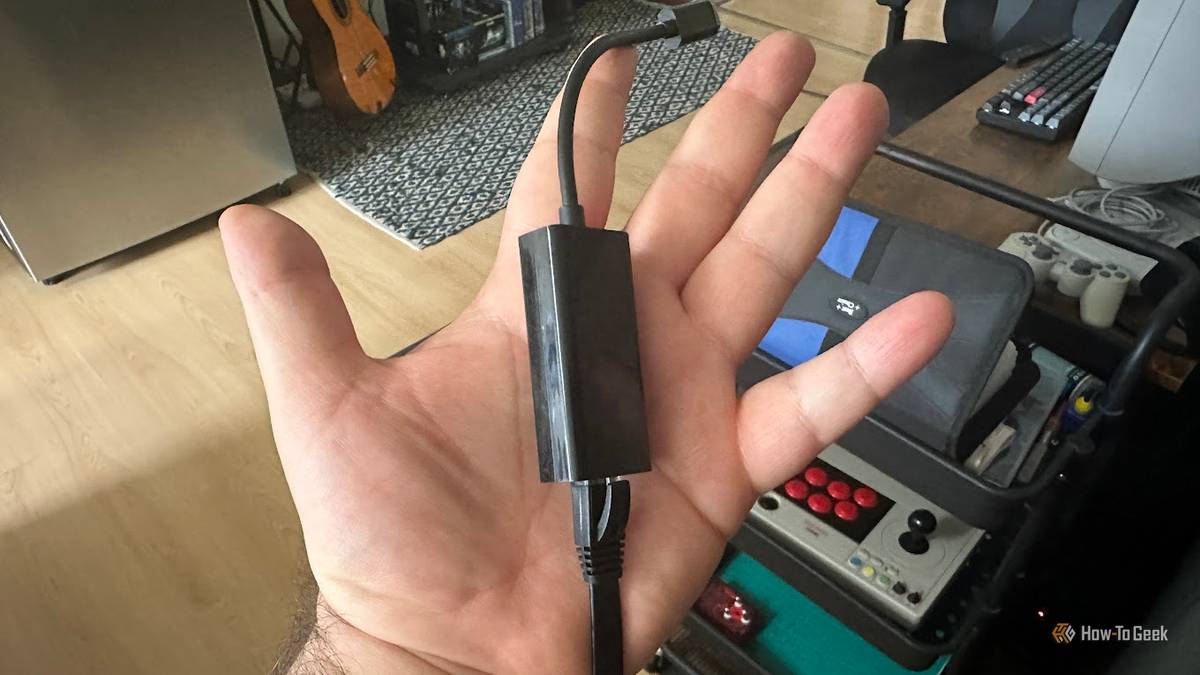
Though I usually do this overnight when I want to download 500GB of data by the time I wake up, since I don't want anyone to trip over the cable.USB Ethernet works on more devices than people realize You'll notice that I leave a Gigabit Ethernet USB-C adapter connected to the cable, and that's because most of the devices I'd use with this don't have an Ethernet port.The only exception is my Windows gaming laptop.
The rest, my handheld PC, my MacBook, and my iPad all work with the USB dongle.You might be surprised to hear that an iPad will work with an Ethernet adapter, but plenty of USB-C devices, including Android ones, will just work out of the box.Just ensure you turn off the Wi-Fi! How much of a difference does this make? Here's my iPad Pro doing a speed test seconds apart with and without Ethernet.
It goes from around 250Mbps to almost 800Mbps! Close With apps like video games and offline video downloads ballooning in size, I've really started to just plug this cable in and see my downloads fly while I make a cup of coffee or do something else for a few minutes.All of my big Steam downloads now happen using this cable, on an as-needed basis.One cable serves everything with a simple adapter I've used simple Ethernet switches to add more ports to some of my other mesh router pods to hook up multiple devices for low-latency and high-bandwidth applications, but in this case I want to keep it as simple as possible.
Instead of trying to serve multiple devices at once and sharing bandwidth between them, this download "station" is meant to open my broadband firehose as wide as it will go and absolutely downloads.Make wired downloads painless; subscribe to the newsletter Subscribe to the newsletter to unlock practical home-networking guidance: hands-on how-tos for adding Ethernet drops, USB-C adapter compatibility tips, simple cable-and-switch setups, and clear troubleshooting steps so wired setups actually work for your Subscribe By subscribing, you agree to receive newsletter and marketing emails, and accept our Terms of Use and Privacy Policy.You can unsubscribe anytime.
I've also found that on the rare occasion I want to play online multiplayer games, it's handy for a temporary hookup so that my ping goes down to single digits and I can't blame the Wi-Fi if I get fragged.Yes, I still say "fragged." This setup quietly fixes problems you didn’t know you had If those Ethernet ports on the back of your router are empty, why not do what I did here? Most people have their primary router setup up on a little table or some other suitable surface where a laptop, tablet, or even smartphone could go.Ethernet cables are dirt cheap, and USB-C Ethernet adapter are usually well below twenty bucks in price.
Whenever you have to download a massive update on your phone (I'm looking at you, gacha game players) or even when your laptop OS wants to update, and you're in a hurry, you'll be eternally grateful that you have a convenient spot set up to get the full benefit of your broadband connection.All that's left now is to make it more presentable (or hide it better) and of course if I ever get faster internet, this download hose will also need an upgrade.Amazon Basics Cat 6 Ethernet Cable $4 at Amazon Expand Collapse
Read More