Apple wanted its original iMac to look like the future, and even the mouse got the translucent-plastic treatment.The trouble was that the mouse was a circle, and hands aren't particularly circular.What followed was a small but fascinating collection of products designed to make Apple's distinctive little puck more comfortable, more familiar, or entirely unnecessary.
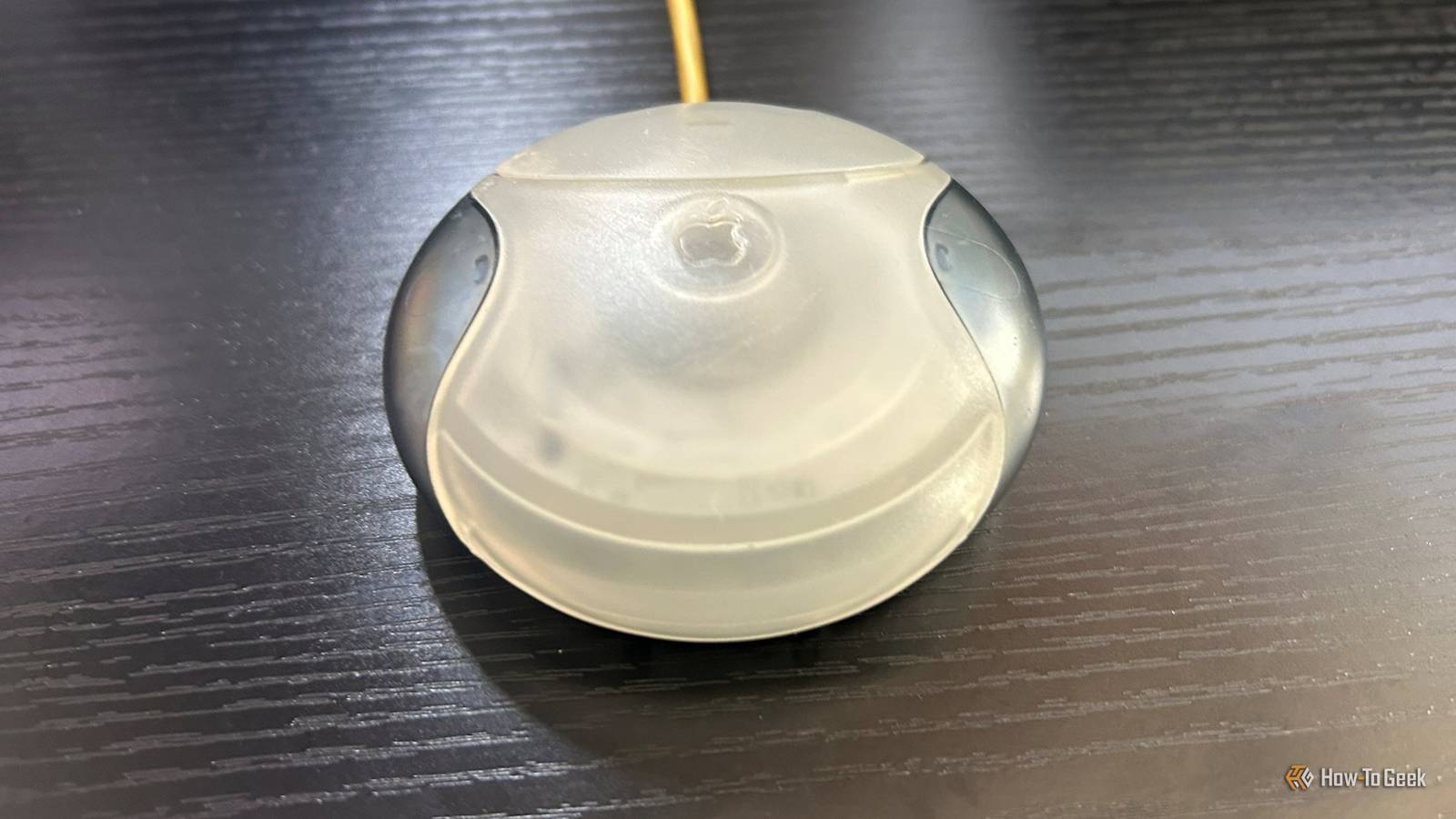
Having tried the original myself, I'm not surprised that people were willing to spend extra money to fix something that came in the box.I tried Apple's infamous USB mouse for myself I wanted to find out if the hate was deserved Close The Apple USB Mouse, model M4848, is one of those pieces of tech history that's instantly recognizable, even if you've never used one.Launched alongside the futuristic Bondi Blue iMac in 1998, it swapped the familiar elongated shape of a conventional mouse for a translucent circle.
Its hockey-puck appearance earned it a nickname that's stuck ever since.I bought one to see whether its reputation was deserved.And while it works perfectly well, I can see why people had a problem with it.
I have large hands, and clicking the mouse means bending my fingers into an awkward position before I settle into moving it with my thumb and little finger.It also feels surprisingly heavy for something so small.Apple stuck with its traditional one-button approach, so there's no dedicated right-click.
The button is easy to press, though, and its loud, satisfying click is something I quite like.The translucent casing looks almost like a prototype, but it also has that late-'90s feeling of looking into the future.The cable is a problem: it's annoyingly short.
My computer sits to my left, but I'm right-handed, so using the mouse means rearranging my setup.That said, a standard USB extension cable would solve that easily enough.Even more irritatingly, the mouse doesn't always stay facing the way I left it.
You don't normally have to look at a mouse before putting your hand on it.With this one, you do.For all its quirks, my mouse still works perfectly well today.
Whether that's down to Apple's original design or how well this particular example has been looked after, I can't say.But one thing is for sure: I couldn't get back to my conventional Arteck mouse quickly enough.Apple wanted the mouse to look like the future The strange shape made more sense in context It's easy to look at Apple's hockey-puck mouse today and wonder what on earth its designer, Jony Ive, was thinking.
But the mouse made more sense as part of the original Bondi Blue iMac, which was designed to stand out in a world of beige computer boxes.Ive was also responsible for the iMac's translucent casing and curved shape, giving it a personality computers rarely had at the time.As The Henry Ford Museum explains, the design challenged the idea that computers had to be "encased in opaque beige boxes." Apple carried that look into its accessories.
The keyboard, mouse, and power cord all used translucent materials, with colors coordinated to match the computer.In 1998, Macworld praised how "Every piece of this system, from cables to key caps, uses translucence, curves, and light to great effect." And I can see the appeal.My mouse has that retro-futuristic charm.
The problem is that a mouse has a job to do, not just a look to maintain.Apple succeeded in making it distinctive, but whether it succeeded in making it comfortable is another matter.Then people started fixing Apple's mouse An awkward design created an unusual little market The complaints weren't just modern internet nostalgia.
By October 1999, About This Particular Macintosh (ATPM) was already describing the mouse as a recurring thorn in the side.Its iCatch review opened with "One complaint keeps resurfacing: the mouse," before delivering a particularly damning verdict: "I have yet to meet a single person (other than Steve Jobs) who really likes it." The Macsense iCatch offered a simple solution: a plastic shell that snapped over Apple's mouse and gave it a more conventional, elongated shape.It let you keep the original mouse mechanism while making the mouse feel more familiar in your hand.
At $9.99, it was also a relatively cheap fix.Contour Design took the idea further with its UniTrap, announced in February 1999 for around $15 and marketed as a way to transform Apple's puck into "a sleek, comfortable, full-sized mouse." Rather than simply snapping a cover over the puck, you removed its colored side panels and fitted it into a purpose-built casing made up of separate top, bottom, and button pieces.Unlike some competing products, the UniTrap was designed to improve the mouse's shape without increasing its 3-inch diameter.
Contemporary reviews were just as blunt about Apple's mouse.Low End Mac observed that "Even more often than PC reviewers decry the iMac's lack of a floppy drive, iMac owners complain about the round mouse." Its review of Contour's UniTrap concluded that, for $15 and a few minutes' work, users could turn "one of the world's least ergonomic mice into something much, much nicer." Of course, you didn't have to keep Apple's mouse at all.Contour also sold the UniMouse, a conventional replacement USB mouse.
There was also a way to bypass Apple's new mouse and keep using an older one.The original iMac's move to USB meant owners couldn't simply plug in their existing Apple Desktop Bus (ADB) peripherals.Griffin Technology announced its $29 iMate adapter in July 1998, promising to open up "an entire world of standard ADB devices to iMac users." Interestingly, Griffin announced the adapter almost a month before the iMac and its puck-shaped mouse launched on August 15.
Maybe the company anticipated that Apple's new mouse might not win everyone over, or perhaps it was simply responding to the wider transition from ADB to USB.Either way, the adapter let buyers keep using a familiar mouse instead of having to embrace Apple's radical redesign.There was more than one way to reinvent the mouse Apple tried to make its mouse look futuristic, even if the shape left plenty to be desired.
Microsoft took a different path, refining a more conventional design and then rethinking how it tracked movement with the Optical IntelliMouse.The late '90s were full of these competing approaches to innovation, and not all of them aged well.
Read More