I’ve just finished another little ESP8266 project, and although the result isn’t particularly complicated, the development experience was interesting enough to be worth writing about.The hardware is about as simple as it gets: an inexpensive ESP8266 NodeMCU board, a small (again inexpensive) 128×64 SSD1306 OLED display and a single WS2812B RGB LED.The job of the device is to sit there continuously pinging an IP address and give me an immediate indication of what’s happening.
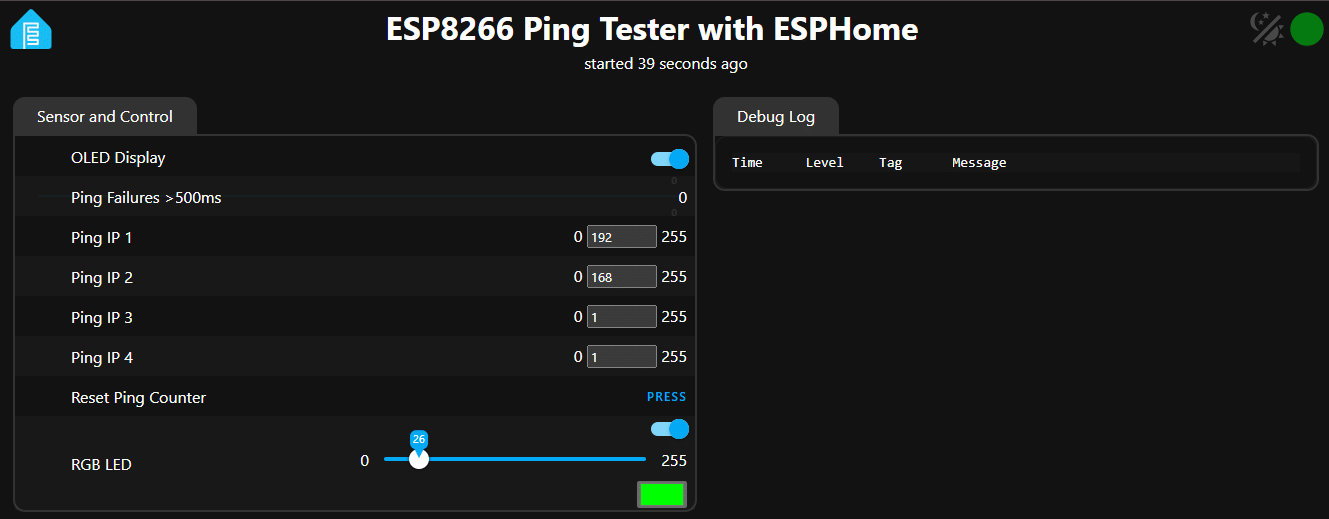
The OLED displays the target IP address, the current ping result and latency, while the RGB LED gives a quick visual indication of performance.There’s also a heartbeat indicator, a persistent count of pings taking more than 500ms, a reset button and a Web interface for changing the target IP address.And here’s the bit I found most interesting: The ESP8266 is using only about 41% of its RAM and 43% of its flash.
That is after adding all of this functionality.What the little tester does The finished unit currently provides: Continuous ping testing every five seconds User-selectable IP address OLED display showing the current result Ping latency in milliseconds Different RGB colours according to latency A heartbeat indicator A persistent count of pings taking more than 500ms A Web UI Persistent IP address settings A persistent OLED on/off setting A Web UI button to reset the failure counter Startup indication so the first failed ping isn’t incorrectly reported as a failure Proper handling of complete ping failures Non-volatile storage of the important settings The OLED is deliberately updated every two seconds rather than every second.I discovered during development that hammering the little ESP8266 with display updates could interfere with Wi-Fi authentication.
Two seconds proved to be a good compromise.The RGB LED is also useful because I can glance at the device without looking at the display.Green means the ping is good, moving through yellow-green and yellow as latency increases, with orange for poor latency and red for a complete failure.
The ESPHome advantage This is where things got interesting: I’ve done plenty of work with Tasmota over several years (it’s all in the blog), and I still use it extensively though I’ve recently done projects with just about every variation of ESP23 out there.Tasmota is an excellent piece of software, particularly when you want to turn an ESP into a network-connected switch, sensor or other conventional IoT device but I’ve also found myself running into its limitations when trying to make a small device do something outside the standard Tasmota model.In particular, I have previously found myself running out of Rules.
You can get an extraordinary amount out of Tasmota Rules, but once a project becomes reasonably complicated, the rule language starts becoming a project in itself.Then there is Berry: Berry is powerful and can solve problems that are difficult or impossible with ordinary Tasmota Rules.But at that point I’m no longer simply configuring a device.
I’m effectively programming another language inside Tasmota and for some jobs I’ve also ended up needing a special Tasmota build containing additional functionality — including ping support.That all works, but it becomes rather more complicated than I really wanted for a small network tester.Take a look at my earlier attempts at ping testing useing Tasmota and both ESP8266 (custom build) and ESP32.
ESPHome felt much more natural With ESPHome, I could describe most of the device in YAML and then use ordinary C++ where I actually needed something custom.The ping library is included as an Arduino library: libraries: - [email protected] and the actual ping operation is ordinary C++: IPAddress target( id(ip1), id(ip2), id(ip3), id(ip4) ); if (Ping.ping(target, 3)) { id(ping_ms) = (int) Ping.averageTime(); } That’s a big difference in mindset: I’m not trying to persuade a device designed around a predefined feature set to do something it wasn’t really intended to do… I’m building an ESPHome device and adding a small amount of C++ to give it the functionality I want.The OLED is similarly straightforward.
ESPHome already knows how to drive the SSD1306, so the custom part is simply what gets drawn on the screen.The same applies to the WS2812B.And the Web interface, API, OTA updates, Wi-Fi configuration and Home Assistant integration all come along with ESPHome.
The persistent settings were particularly useful I wanted the ping target to survive a power failure so rather than having to write a complete configuration system, I used persistent ESPHome globals for the four IP address octets.So I can change: 192.168.1.1 to something like: 8.8.4.4 from the Web UI and the setting survives a reboot.The failure counter is persistent too.
That means the little board can be left running for days or weeks (ptrf on UPS) and I can see how many measured pings have exceeded my 500ms threshold.This isn’t just a ping display One thing I deliberately built into the tester was a distinction between different types of failure: A failed ping during startup doesn’t immediately result in a big red FAILED indication.The device first shows: SETTING UP.
Once it has successfully established that pinging is working, subsequent failures are treated as genuine failures.There’s also an important distinction between: PING FAILED and: PING TOOK >500ms The persistent counter only records the latter.That’s useful because a completely lost ping and a very slow but successful ping are different things when you’re trying to diagnose a network.
And the memory usage? Are you ready? This is probably the part that surprised me most: After adding all of this functionality, the ESP8266 build is sitting at approximately: 41% RAM used and 43% Flash used That’s remarkably comfortable for an ESP8266.I was expecting this little project to push the old chip much harder once the Web UI, OLED, RGB LED, ping library, persistent storage and Home Assistant API were all involved.It hasn’t.
There’s still plenty of headroom.What about an ESP32-C3? An ESP32-C3 would obviously be more capable hardware.You get a considerably more modern MCU architecture, substantially more processing capability, more RAM and generally a much larger amount of breathing room for a project like this.
If I were starting a new design and already had ESP32-C3 boards available, I would have no hesitation using one… but that’s actually part of the point of this experiment.I didn’t need one.The humble ESP8266 is doing the job perfectly well.
For a device whose primary job is: Wi-Fi → ping something → display the result → flash an LED the ESP8266 is still entirely adequate.An ESP32-C3 would give me more headroom for future additions — perhaps more sensors, a more sophisticated display, additional network tests or other functionality — but it wouldn’t make the current ping tester noticeably better.The ESP8266 is already comfortably within its limits and I coudl add a lot moer.
ESP8266 versus ESP32-C3 For this particular application I’d put it roughly like this: So if you have an old NodeMCU-type ESP8266 sitting in the drawer, don’t throw it away.It can still do quite a lot.The bigger lesson For me, the interesting part of this project isn’t the ping tester.
It’s that ESPHome has blurred the boundary between configuration and programming in a very useful way.I can use YAML for all the things ESPHome already understands: Wi-Fi Web UI API OTA GPIO LEDs displays sensors persistent values And when I need something ESPHome doesn’t provide directly, I can drop into ordinary C++.That is considerably more comfortable than trying to squeeze an increasingly complicated application into Tasmota Rules, then moving into Berry, and occasionally discovering that I need a specially compiled Tasmota build to get the functionality I want.
Tasmota remains an excellent tool – and the timespan of it’s continued development says a lot, and for many ESP projects I would still choose it but for this particular job, ESPHome was simply the more comfortable development environment.And the fact that the finished application is sitting at roughly 41% RAM and 43% flash on an ESP8266 suggests that there’s still plenty of life left in these old boards.Final Notes Why have an on-off switch for the OLED? Unlike the RGB LED which should run for years, these little OLEDs have an on-life measured in months (bitter experience).
Also a final comment about the NodeMCU board – it makes a handy base for the OLED display and I just happen to have a number of single ws2812 LEDs on little boards that also glue easily to the remaining space on the NodeMCU.My only gripe is the old-style microUSB connectors but you can’t have everything… before today’s ridiculous EU duty on small packages from AliExpress – I think I paid 1.50 euros for the NodeMCUs.Also – note that rather than the single set of secrets for IP address in the code below -or the two IP addresses max for Tasmota, I’ve included all my SSIDs (big house – common password as it happens).
Note also that in the code I’ve added a version number which appears in the WebUI and I’m still at 41% and 43% usage respectively – I could keep expanding this forever.
Read More