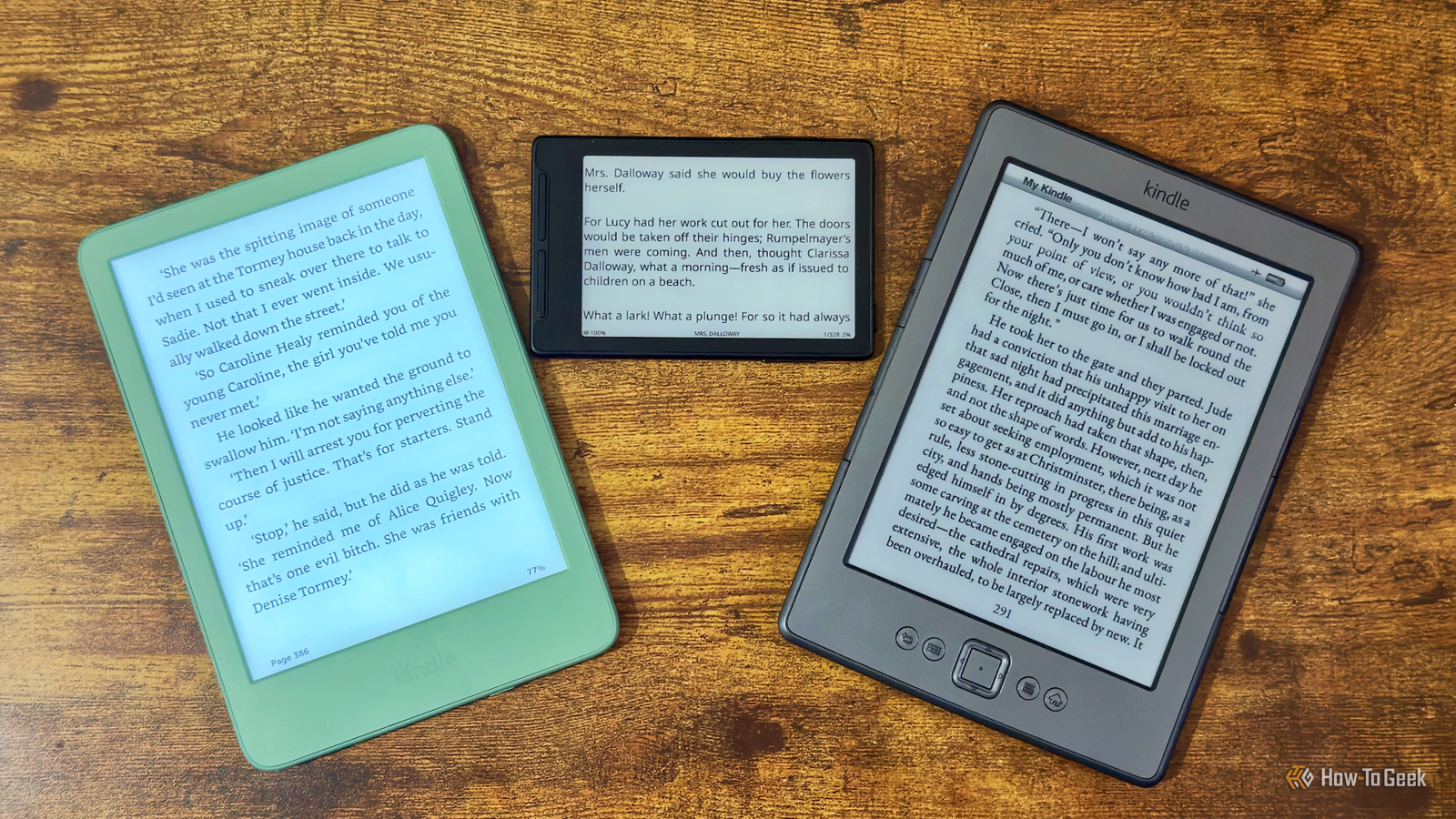
My oldest and my newest eReaders both have something in common: physical page-turn buttons.They may have been released more than a decade apart, but both have buttons built into the device that you can press to turn pages forward and backward.After using my wife's 2024 Kindle, I realized how much I'd miss these buttons if they were gone.
Add How-To Geek on Google Add as Preferred Source Follow on Google Discover Physical page-turn buttons make reading effortless My old Kindle shows how it should be done Close My fourth-generation Kindle has been serving me well for over 12 years.After Amazon dropped support for the device, I decided to jailbreak it and install KOReader, but doing so has made it even better than it was before.Reading on the device is a joy.
There are two large buttons built into both sides of the Kindle, with a very large button to turn to the next page, and a smaller one above to move back a page.If I'm holding it in either hand, my thumb naturally rests on one of the buttons to turn to the next page.I don't have to think about turning the page; just a small amount of pressure from either thumb makes it happen.
If I want to turn back a page, I just move my thumb a little higher, and the button to move back a page is right there.Using my wife's Kindle, the process is so much worse.To turn the page, you need to physically tap the screen itself, and you can't just leave your thumb resting in place as this will select some text.
If I'm holding the device left-handed for a while, I have to swipe instead of tapping, which is even more annoying; I don't want to have to rub my dirty thumbs all over the screen of my eReader.Related 7 things my jailbroken Kindle can do better than an Android tablet or iPad Sometimes a Kindle is all you need.Posts 5 By Adam Davidson My tiny eReader proves that page-turn buttons still matter Even minimalist eReaders need physical buttons Physical page-turn buttons aren't a relic of the ancient past.
There are plenty of modern eReaders that still have them, including my most recent eReader.The Xteink X3 is possibly my favorite eReader I've ever owned, not because it has the best features, but because it makes reading way more accessible.It's a tiny device that's small enough to fit into your pocket or even snap to the back of your phone, but still plenty big enough to read comfortably.
Now, when I have a few moments to spare, instead of pulling out my phone and doomscrolling through Reddit, I pull out my X3 and read a little more of my current book.Despite the tiny size of the eReader, it's covered with buttons.The front buttons are used for navigating the menus, but once you're reading, they can work as page-turn buttons.
There are also additional page-turn buttons on the left and right sides that are within easy reach when you're holding the device in one hand.Even this tiny device makes turning the pages a far nicer experience than a modern Kindle.Amazon knows people want page-turn buttons They're selling the feature back to you for $80 Amazon used to include page-turn buttons on its Kindles, as my Kindle 4 proves, but none of the current Kindle models have built-in physical page-turn buttons.
The last model that did was the Kindle Oasis way back in 2019.That's not to say that Amazon isn't aware that many people still want to turn pages using physical buttons.In October 2026, Amazon introduced the All-New Kindle Page Turn Cover, which is an accessory for Kindle Paperwhite and Colorsoft models that has physical page-turn buttons built into the cover itself.
Amazon is effectively selling you a feature that used to come with your Kindle and charging you $80 for the privilege.Even then, the cover still isn't as good as my fourth-generation Kindle, since it only has buttons on one side.If you're holding the Kindle in your left hand, those buttons are on the wrong side, so you have to flip the entire device upside down to use them, which is far more hassle than just swapping hands.
Touchscreens have benefits, but not when you're reading You're trading a rare inconvenience for one that happens thousands of times That's not to say that there aren't rare occasions when I wish that my Kindle 4 or my Xteink X3 had a touchscreen.Entering text on these devices is painful to do; if I have to enter a long Wi-Fi password, typing it out by selecting one character at a time using the physical buttons is a frustrating process.On a touchscreen device, this is a breeze; you can just type on the screen, which is so much faster to do.
However, I rarely have to enter large amounts of text on my eReaders.What I do have to do a lot is turn the page, especially on my Xteink X3.I would much rather put up with the occasional inconvenience of entering a Wi-Fi password than have to tap the screen every time I want to turn the page.
Some devices do offer the best of both worlds.The Xteink X4 Pro, for example, has both a touchscreen and physical page-turn buttons, although it has fewer buttons than the X3.I'm really not fussed about having a touchscreen, however; give me physical buttons all day long.
I don't want an eReader without physical buttons If you want a Kindle with physical page-turn buttons, your only options are to buy an older used model or fork out even more for a page-turn case.Thankfully, there are plenty of other eReader brands such as Xteink, Kobo, and PocketBook that do offer new eReaders with physical buttons.
Read More