In the early 2000s, school computer labs were filled with kids stealthily playing games and watching videos on Newgrounds.But when Flash became obsolete, many of these nostalgic games were no longer playable—especially on phones.Thankfully, there’s an app for that.
Android carried the Flash torch longer than the iPhone, but it’s been well over a decade since it was officially supported.Before that, some of the most popular websites on the internet relied on Adobe Flash.Newgrounds, Addicting Games, Miniclip, and Homestar Runner, to name a few.
Many of these websites still exist, and a handy app called “Swiff” allows you to play them on Android.What is Swiff? Your portal to the golden era of Flash games Swiff is a Flash game player with gaming controls.It has built-in support for Flashpoint's library of over 100,000 Flash games, as well as deep integration with Newgrounds.
You can simply search for a game inside the app, tap download, and start playing right there.It's currently available to sideload from GitHub.Flash was the foundation for many iconic web games, but some of them eventually upgraded to newer standards.
So, Swiff handles more than just the SWF files associated with Flash games—it also supports modern web content like HTML5, Scratch, and old mobile J2ME games.Close To add games, you’ll first want to download the Flashpoint database.Go into the app settings > Library > Flashpoint database.
While you’re there, go ahead and download the “Kahvibreak database” as well.After they’ve downloaded, you’ll see a bunch of titles on the “Library” tab.Search to find specific games, and simply tap “Download” to play.
In addition, you can manually add games as well—tap the “+” icon on the “Library” tab.You’ll need the actual file of the game or a URL where it lives.Swiff is not always able to add games from URLs, but it’s worked most of the time for me.
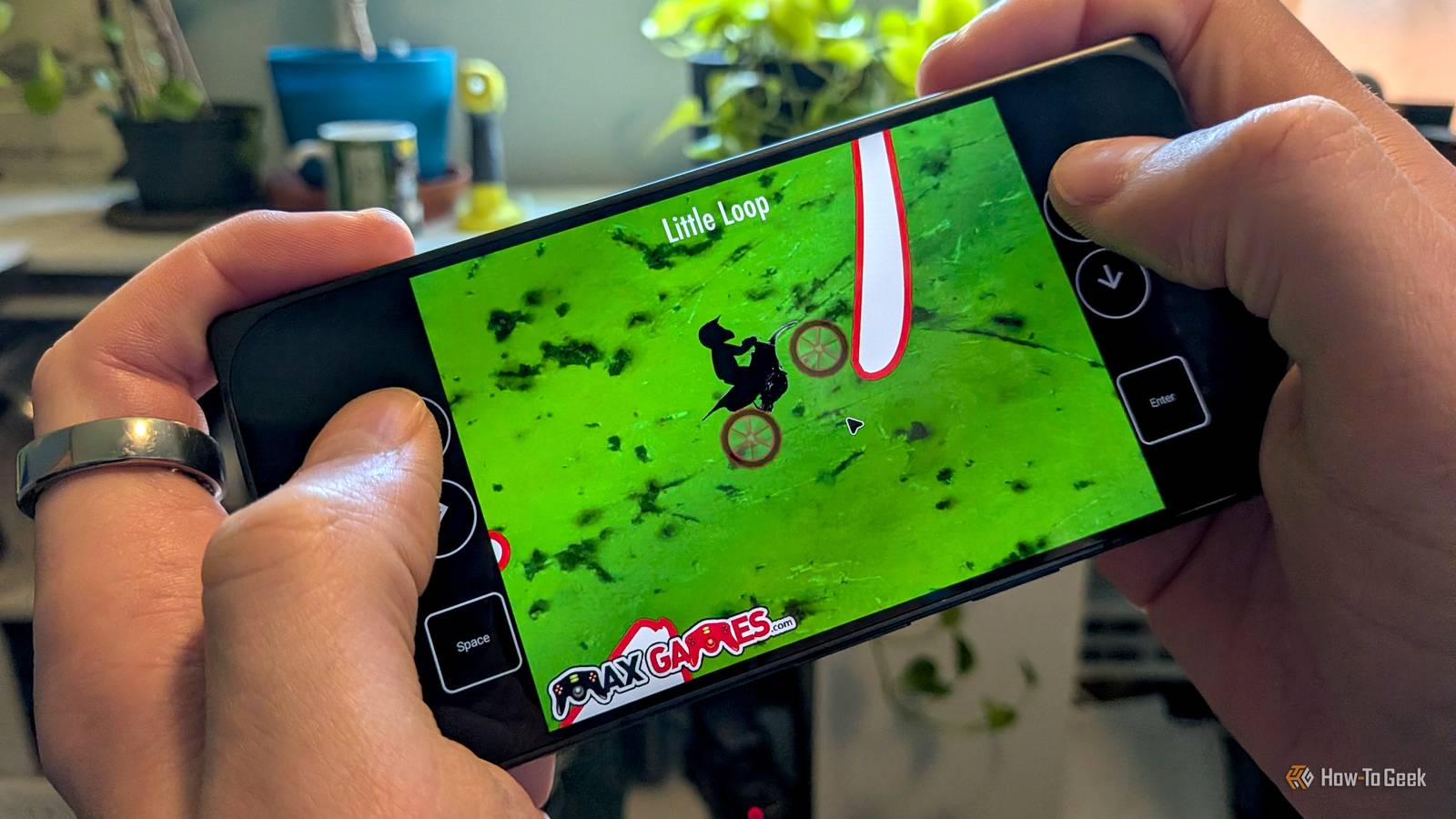
Nostalgic gaming for modern devices It’s no good if you can’t play the games Providing access to Flash games is all well and good, but actually playing them on a phone is another story.Many of these games were made to be played on a desktop PC with a mouse and keyboard.Translating that to a touchscreen can be difficult, but Swiff handles it nicely.
The app includes fully customizable on-screen controls, complete with virtual touchpads and mouse inputs designed specifically for games that rely on precise cursor movement.Not only can you customize the existing controls, but you can also create your own for specific games.For example, one of my favorites, Max Dirt Bike, only uses arrow keys, so I made simple controls for it.
Close If you prefer physical buttons, you can map a Bluetooth controller or handheld controls directly to keyboard and mouse actions.The app automatically creates offline proxies, so legacy games run seamlessly, believing they are still hosted on their original websites.Gaming controls can be accessed while you’re playing a game.
Go “Back” to bring out the side menu with options for the mouse, on-screen controls, gamepad layout, and to open the keyboard.To create custom on-screen controls, go to “Select on-screen layout” and tap the “+” icon.You’ll be taken to a screen with a grid on top of the game.
Use “+” and pencil buttons in the top toolbar to add and edit controls on the screen.Buttons can be mapped to any keyboard key, mouse action, or in-app control.Deep integration with Newgrounds Supporting an internet veteran It’s possible to play Flash games from a variety of sources, but one of the best things about Swiff is how it works with Newgrounds.
The app offers deep integration, including the ability to log into your account to track achievements and unlock medals while you play.Swiff can also download official gamepad layouts for some games, which is pretty cool.Close Even if you don’t care about that stuff—I haven’t earned a medal in over 20 years—you need to be signed in to add games from Newgrounds.
It’s a bit annoying, but they do tend to work the best, anyway.To sign in and toggle the achievements, gamepad layouts, and background updates, head to Settings > Newgrounds.Nostalgia isn't perfect It should go without saying, but this is not a perfect, 100% reliable solution.
I ran into several games that I simply couldn’t figure out how to play with the on-screen controls.A few games that I tried to add from the URL also wouldn’t work.The best option is to download the Flashpoint library and add games from there.
With some tweaking of the controls, it’s a great way to take yourself back to those computer lab days.Related How to Play Games on Your Smartphone Without Downloading Any Apps Explore 3 easy, no-download gaming options—perfect for travelers and casual gamers looking for quick fun on the go.Posts 1 By Ray Malik
Read More