The Raspberry Pi is a fun little computer, but I have a habit of collecting accessories that turn out to be more useful than the device they were designed for.Some of them stay connected to the Pi, while others find their way onto my desk and become part of my regular setup.The official Raspberry Pi USB 3 Hub is one such accessory.
Add How-To Geek on Google Add as Preferred Source Follow on Google Discover I bought it about a year ago as a simple way to connect more peripherals to a Raspberry Pi.However, the more I used it, the more I appreciated having a compact USB hub that I could plug into practically any computer with a USB-A port.It is a small accessory, but it solves a problem I encounter regularly, even when I am nowhere near my Raspberry Pi.
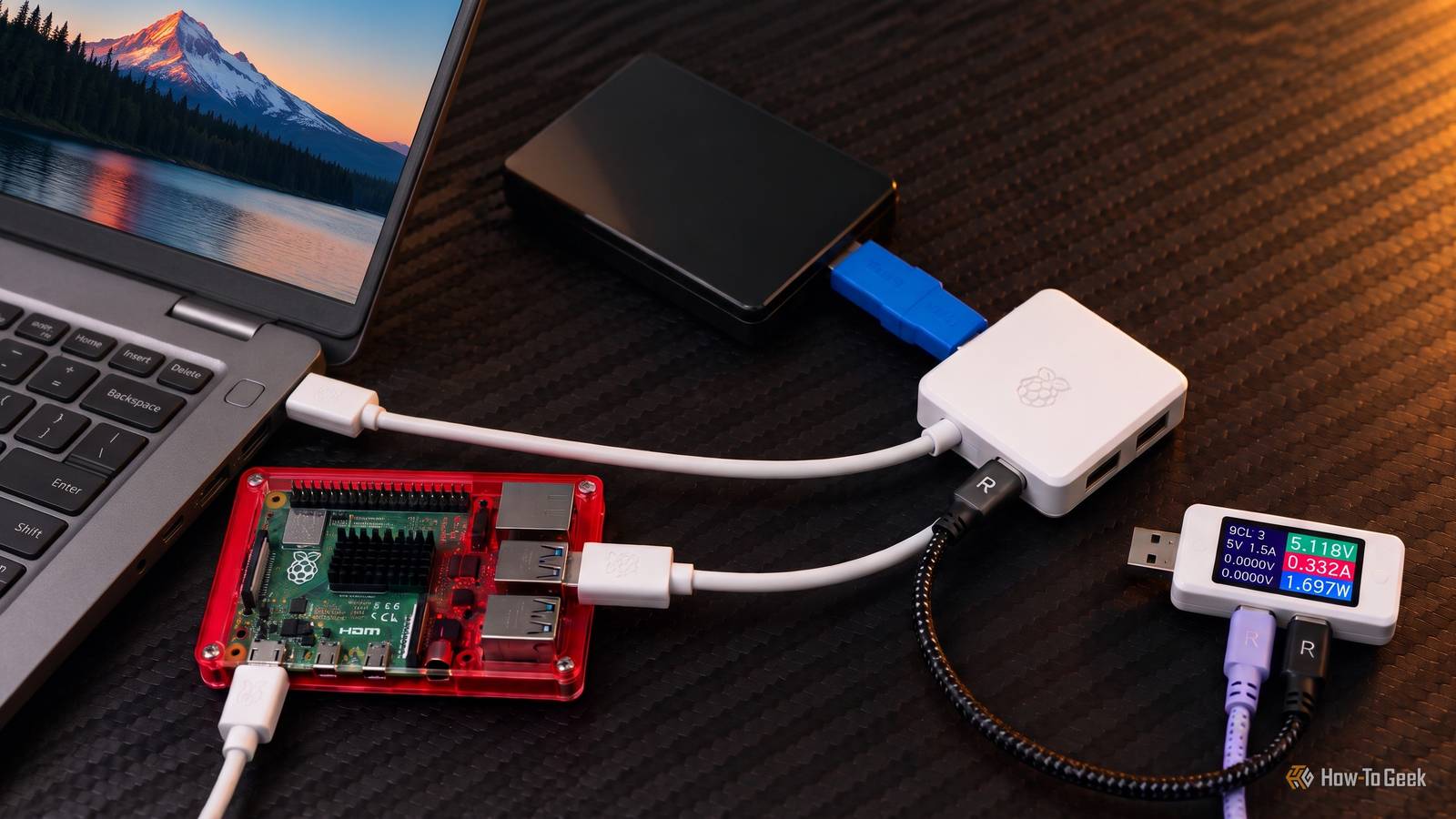
The official Raspberry Pi USB 3 Hub is useful beyond the Pi Four USB ports without the usual desk clutter The official Raspberry Pi USB 3 Hub turns a single USB-A port into four USB 3.0 Type-A ports.It has a short, captive cable with a USB-A connector on one end and four downstream ports on the hub itself.The design is straightforward: a white enclosure with Raspberry Pi branding on top.
Close What I appreciate about this layout is how little space the hub takes up.It can sit next to my laptop, stay tucked behind a monitor, or live alongside other accessories without taking over my desk.The short cable also keeps the hub close to the computer, which is convenient when I want to connect a flash drive or another peripheral temporarily.
Four ports are enough for most of my everyday USB accessories.I can connect a keyboard, a mouse, a USB flash drive, and another peripheral without repeatedly unplugging something to make room.This is particularly useful with laptops, where the available USB ports can disappear quickly once you start connecting external storage and other accessories.
The hub supports USB 3 data transfer speeds of up to 5Gbps, so it is suitable for transferring files to and from compatible USB storage devices.Actual speeds depend on the connected device, the host computer, and the workload.It will not turn a slow flash drive into a fast SSD, but it provides the necessary bandwidth for devices that can take advantage of USB 3.
Related Raspberry Pi's USB gadget mode is now much less complicated It's now just one command to turn on and off.Posts 2 By Corbin Davenport The fact that it works with regular computers is also worth highlighting.You do not need a Raspberry Pi to use it.
Connect it to any mainstream system with a USB-A port, and the operating system can recognize the attached peripherals as though they were connected through the computer’s USB interface directly.That versatility gives the hub a longer useful life than an accessory tied to one specific board.Even if I stop using my Raspberry Pi for a while, the hub still has a place on my desk.
Its power options make it more practical Connect everyday peripherals without an extra power adapter One reason I like this hub is that it does not require a separate power supply for ordinary, low-power peripherals.When connected to a computer, it can draw power through its upstream USB connection.That is enough for many keyboards, mice, flash drives, and similar accessories.
The hub also has a USB-C power input for an optional external power supply.This is useful when connecting peripherals that need more power than the host computer can provide through the USB connection.Raspberry Pi specifies a 5V, 3A input for this purpose, although the power adapter is sold separately.
Related Need a good flash drive? Raspberry Pi made one for you The official Raspberry Pi Flash Drive has decent performance and a sleek design.Posts 1 By Corbin Davenport I would consider the additional power supply when using several power-hungry devices or connecting external storage that draws significant current.A hub can expand the number of available ports, but the devices still need sufficient power to operate reliably.
Adding external power can help avoid problems caused by an overloaded USB connection.One limitation worth mentioning, although it isn't specific to this hub, is shared bandwidth, a common constraint with NVMe drives, Ethernet ports, Wi-Fi and other high-speed interfaces.The hub shares its available bandwidth across connected devices, and the advertised 5Gbps is the USB link’s maximum transfer rate rather than a guaranteed speed for every port simultaneously.
Connecting several fast storage devices and transferring large files between them will not give each device a dedicated 5Gbps connection.For my everyday peripherals, however, this is rarely a concern.The hub provides a convenient way to keep frequently used accessories connected without filling my desk with adapters and cables.
When I need additional ports on another computer, I can unplug the hub and move it rather than rearranging my entire setup.I keep reaching for the hub even when the Raspberry Pi is switched off The Raspberry Pi USB 3 Hub is a fairly simple accessory, and that is precisely why I continue to find uses for it.I wouldn’t suggest buying it expecting advanced docking-station features, HDMI output, Ethernet, or a collection of USB-C ports.
It is a USB hub, and its job is to provide additional USB-A connectivity.If that is what you need, the official Raspberry Pi model covers the basics without requiring a complicated setup.Related PSA: Your USB Hub Might Be Hurting Your Laptop's Battery Don't think that hub gives you extra USB ports without any cost.
Posts 4 By Jorge A.Aguilar For someone who regularly switches between computers, connects to external storage, or needs more USB ports on a laptop, it is a practical accessory to keep nearby.Its design for a Raspberry Pi is almost incidental once it becomes part of your everyday workstation.
Read More