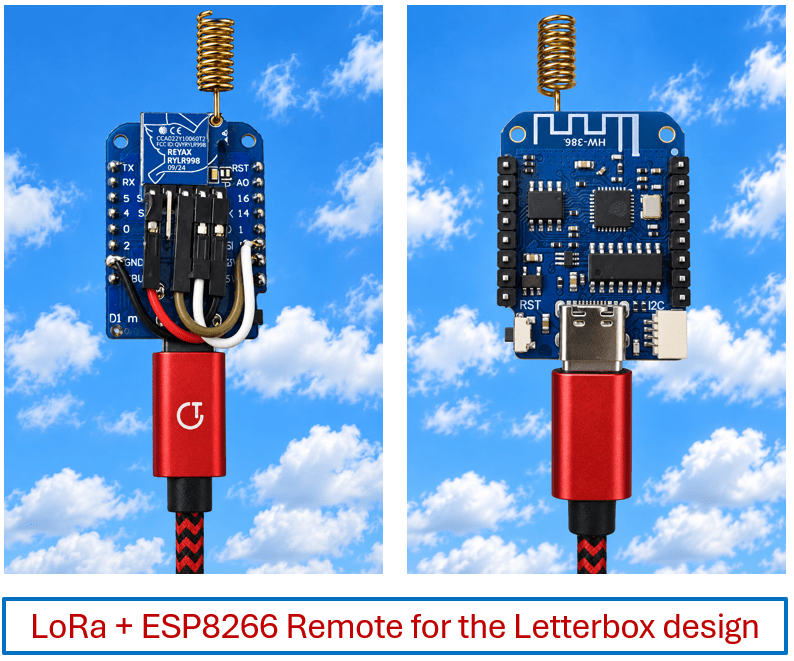
No, Pete’s not regressing to a bygone age.I happen to have a bunch of LOLIN Mini D1 ESP8266 boards lying around, abandoned when I discovered the all-singing ESP32 – and I HATE to see waste – so I’ve had an idea forming for the LoRa Letterbox Alert for the last couple of days – and now working on multiple remotes (it’s now in the code) – please see part 1 before you continue – I had NO IDEA it would go this far….Firstly , after reducing the software-serial-driven comms for the Reyax RYLR998 LoRa modules from default 115k baud to a more sensible 9600 baud (I’m only sending simple text commands back and forth – ESP8266 – Reyax LoRa board – and only as I was being cautious with the software UART on the ESP8266) – see code below – and testing it to death, today I took my fully functioning but unfeasibly power hungry original NodeMCU ESP8266 + LoRa module (REMOTE END) apart and replaced the remote end with a Lolin D1 Mini board instead.
Why this board? Well, one thing you’ll hear out there is “you need a board with no regulators as they take power regardless” – no such problems here when connecting to 3v3 and GND (NOT USB) on this board once programmed up.Small, neat, cheap (AliExpress for example) – and remembering again that WiFi on the ESP8266 (remote unit only) has in this case been turned off, no problems with the 2 antenna being close together.The design requires a connection (microswitch?) from GPIO16 to RST to wake the unit up from sleep.
That’s the hardware sorted – and bearing in mind that the ESP8266 can be put to sleep to save power – and with a test button in the base unit WebUI to tell the remote to sleep, the idea being that the instruction hits the remote ESP8266 which puts the LoRa module to sleep – then the ESP8266 itself – and they all sleep happily ever after until someone opens the letter box flap.When that happens, the ESP8266 wakes up, sends an AT message to the LoRa module which auto-wakes it up – and off we go.That’s the idea, let’s see how that works in practice and whether the power-saving makes this incredibly cheap and simple idea work.
I’m not now using the Arduino IDE for development, the remote unit can be programmed in ESPHOME – albeit by serial as we’ve turned the WiFi OFF in the remote unit… But before I start – we have set the LoRa unit to work at 9600 baud (non-volatile).This used a simple Arduino sketch ChatGPT made for me – there are other ways but this is what we used.Why a bunch of characters in the code below? Because the LoRa board is picky about exact CRLF.
#include <SoftwareSerial.h> SoftwareSerial loraSerial(D6, D7); // RX, TX void setup() { Serial.begin(115200); // RYLR998 is initially at 115200 loraSerial.begin(115200); delay(1000); // AT+IPR=9600\r\n const uint8_t command[] = { 0x41, 0x54, 0x2B, 0x49, 0x50, 0x52, 0x3D, 0x39, 0x36, 0x30, 0x30, 0x0D, 0x0A }; loraSerial.write(command, sizeof(command)); delay(1000); Serial.println("AT+IPR=9600 sent"); } void loop() { } So reading this on conjunction with part 1 for data pins..with my base unit set up with a WebUI for testing (the ultimate control will be in Home Assistant in my case), I can turn the builtin LED on the D1 on and off remotely, originally I’d watch and report on the the status of D5 input on the remote unit (my ultimate microswitch on the letterbox) and put the remote D1 and it’s LoRa board to sleep – then I realosed taht even D5 was redundant – the act of waking up is enough to know the letterbox (or gate) has been opened.I referred earlier to the obvious – the board combo has to sit OUTSIDE the letterbox as the latter is made of metal… so I was really looking for a setup with a small battery… and a plastic enclosure fastened to the side.
Ok, down to business – as of part 1, this all fell apart (we’d not worked on sleep at that point) because the combined ESP8266/Lora power was 32mA – WAY too high for a battery gadget that has to stay on constantly.That’s when I went off on a tangent to try the D1 Mini.“Wisdom” has it that the ESP8266 isn’t that good at low power but what I discoverered was that the LoRa module was just as bad – 17mA each for a total of 34mA.
Why the LOLIN D1 Mini? I just happen to have some and as it happens I could not have made a better choice.Total current with both (remote) boards awake 34mA.Total current with both boards asleep – a staggering 0.06mA.
Now, I don’t really want 3v as my starting point as down to 2.8v could be troublesome (I later discovered the pair work just fine on 2.8v but that may not be repeatable from batch to batch)..but a pair of non-rechargeable, Lithium 1.5v batteries should start a lot neared to 3.2 or 3.3v and a CR2477 round Lithium battery will definitely start nearer 3.2v..AND I’ve JUST tested down to 2.9v – but read on.
I have the base unit on my messy desk talking to it’s ESPHOME WebUI over WiFi – and the remote board combo hanging off my (currently 3V) adjustable power supply – with an accurate 6-digit meter in-between the D1 (I’m using the D1 3v3 and gnd lines – not the USB) and power supply – but bear in mind, in first tests I put the two units 160 BIG steps apart – all detailed in part 1.Thats not line of sight – that’s my home office around several corners and down a sloping, tree-lined dirt track to the letterbox.In essense – THIS IS WORKING – do the math – we could be looking at well over a year battery life- Wheee..
The video subtitles aren’t mine – keep up, YouTube… Also the video refers to the now defunct D5 input button/switch press.Update – batteries – we are indeed looking at almost nothing in sleep mode but 34mA when running for the receiver (combined ESP and the LoRa module – split evenly).That all looked like it was heading towards a CR2450 or similar plenty of capacity to get a year or so out of the unit.
Ah, well that’s how it SEEMED but a miserly 34mA KILLS the voltage on those batteries and I found that as they dropped from their original well over 3v down to 2.8v (temporarily) in a matter of seconds – it’s just not going to work… HOWEVER I happened to have a standard utility pack of AAA batteries from our big retail store here in Southern Spain – Obramat – read that as like B&Q in the UK or Home Depot in the USA… not even Lithium non-rechargeables… and they hardly drop voltage AT ALL after several seconds of full-on time so I think a pair of those have got the job..Meanwhile the circuit for the actual letterbox switch turned out to be surprisingly simple (can’t just use the switch to ground – the posty could leave the letterbox half way open with a big envelope).With GPIO16 tied to RST, I needed a path to ground for the microswitch.
I inserted 0.2uf capacitor in series with the switch and ground, and a 100k resistor across the capacitor to leak charge so the unit could be brought out of sleep in practice every minute or two (real use – once a day more likely).Then we realised a fatal flaw – it was possible to forget to either have the unit flash, then automatically sleep or just sleep.I went off chatting to friends for a few hours – and the poor remote unit was consuming 34mA all that time – no good for the batteries, now sitting at a verified 2.88v (internal sensor says 2.95v) but as all is still working reliably – I’ll keep the batteries in to push this as far as I can.
Update – the batteries recovered – days later sitting at 3v.Meanwhile I have a Home Assistant dashboard item to display – as well as the webUI in the base unit.The entities appeared automagically in Home Assistant but had to add a tile to my control system….
way better wording than the WebUI.Here is the Home Assistant tile: type: vertical-stack cards: - type: custom:button-card name: LORA LETTERBOX ALERT show_icon: false show_name: true styles: card: - background: '#002200' - border: 1px solid darkcyan - border-radius: 12px - padding: 12px name: - color: cyan - font-size: 18px - font-weight: 500 - text-align: center - justify-self: center - type: grid columns: 2 square: false cards: - type: custom:button-card name: Flash Remote LED icon: mdi:flash show_name: true show_icon: true show_state: true state_display: | [[[ const connection = states['sensor.lora_transmitter_lora_remote_connection']?.state; return connection === 'ONLINE' ? 'Press to flash' : 'N/A'; ]]] tap_action: action: javascript javascript: | [[[ const connection = states['sensor.lora_transmitter_lora_remote_connection']?.state; if (connection === 'ONLINE') { hass.callService( 'button', 'press', { entity_id: 'button.lora_transmitter_flash_remote_led' } ); } ]]] styles: card: - background: '#002200' - border: 1px solid darkcyan - border-radius: 12px - padding: 12px grid: - grid-template-areas: '"i n" "i s"' - grid-template-columns: 40px 1fr - grid-template-rows: min-content min-content icon: - color: | [[[ const connection = states['sensor.lora_transmitter_lora_remote_connection']?.state; return connection === 'ONLINE' ? 'amber' : 'grey'; ]]] - width: 28px name: - justify-self: start - color: | [[[ const connection = states['sensor.lora_transmitter_lora_remote_connection']?.state; return connection === 'ONLINE' ? 'cyan' : 'grey'; ]]] - font-size: 14px - font-weight: 500 state: - justify-self: start - color: | [[[ const connection = states['sensor.lora_transmitter_lora_remote_connection']?.state; return connection === 'ONLINE' ? 'yellow' : 'grey'; ]]] - font-size: 12px - type: custom:mushroom-legacy-template-card primary: Sleep Remote secondary: > {% if is_state('sensor.lora_transmitter_lora_remote_connection', 'ONLINE') %} Press to sleep {% else %} SLEEPING {% endif %} icon: mdi:sleep icon_color: blue tap_action: action: call-service service: button.press target: entity_id: button.lora_transmitter_sleep_remote card_mod: style: | ha-card { background: #002200; border: 1px solid darkcyan; border-radius: 12px; --card-primary-color: cyan; --card-secondary-color: yellow; } - type: custom:button-card name: Remote Status icon: mdi:information-outline show_name: true show_icon: true show_state: false custom_fields: connection: | [[[ const v = states['sensor.lora_transmitter_lora_remote_connection']?.state; const value = v === 'ONLINE' ? 'ONLINE' : 'SLEEPING'; return `<div class="status-line"><span>Connection</span><b>${value}</b></div>`; ]]] battery: | [[[ const connection = states['sensor.lora_transmitter_lora_remote_connection']?.state; const v = states['sensor.lora_transmitter_remote_battery_voltage']?.state; let value = 'N/A'; if ( connection === 'ONLINE' && v && v !== 'unknown' && v !== 'unavailable' ) { value = Number(v).toFixed(2) + ' V'; } return `<div class="status-line"><span>Battery</span><b>${value}</b></div>`; ]]] led: | [[[ const connection = states['sensor.lora_transmitter_lora_remote_connection']?.state; let value = 'OFF'; if ( connection === 'ONLINE' && states['sensor.lora_transmitter_remote_led_flashing']?.state === 'ON' ) { value = 'ON'; } return `<div class="status-line"><span>LED Flashing</span><b>${value}</b></div>`; ]]] styles: card: - background: '#002200' - border: 1px solid darkcyan - border-radius: 12px - padding: 12px 16px grid: - grid-template-areas: | "i n" "connection connection" "battery battery" "led led" - grid-template-columns: 24px 1fr - grid-template-rows: min-content min-content min-content min-content - column-gap: 8px - row-gap: 0px icon: - color: cyan - width: 32px - align-self: center name: - justify-self: start - align-self: center - color: cyan - font-size: 16px - font-weight: 500 custom_fields: connection: - width: 100% - justify-self: stretch - color: yellow - font-size: 14px battery: - width: 100% - justify-self: stretch - color: yellow - font-size: 14px led: - width: 100% - justify-self: stretch - color: yellow - font-size: 14px tap_action: action: none card_mod: style: | ha-card { background: #002200; border: 1px solid darkcyan; border-radius: 12px; } .status-line { display: flex; width: 100%; justify-content: space-between; align-items: center; line-height: 20px; } .status-line span { text-align: left; } .status-line b { text-align: right; font-weight: 500; margin-left: 20px; } - type: grid columns: 2 square: false cards: - type: custom:mushroom-legacy-template-card primary: Last Letterbox Event secondary: > {% set s = states('sensor.lora_transmitter_lora_remote_input_last_changed') %} {% if s in ['unknown', 'unavailable', ''] %} No event recorded {% else %} {{ s }} {% endif %} icon: mdi:clock-outline icon_color: cyan tap_action: action: none card_mod: style: | ha-card { background: #002200; border: 1px solid darkcyan; border-radius: 12px; --card-primary-color: cyan; --card-secondary-color: yellow; } - type: custom:mushroom-legacy-template-card primary: Firmware Version secondary: > {{ states('sensor.office_lora_base_station_lora_base_station_version') }} icon: mdi:chip icon_color: cyan tap_action: action: none card_mod: style: | ha-card { background: #002200; border: 1px solid darkcyan; border-radius: 12px; --card-primary-color: cyan; --card-secondary-color: yellow; } As for the remote and base source code for ESPHOME – below (if you didn’t follow the part about reducing the Lora speed from 115k to 960k, adjust the speed in the base and remote back to 115200 bps).To program the base after the first time (USB), use WiFi.
For the remote unit always use serial as WiFi is turned off – and you MUST leave RST/gpio16 link disconnected for programming.# LoRa Remote Unit - LOLIN D1 Mini # Letterbox wake-up is detected by the GPIO16/RST wake circuit.# No separate GPIO input is required.
# # DEVELOPMENT v0.3: # The letterbox microswitch wakes the ESP8266 through the capacitor/resistor # GPIO16-to-RST circuit.A wake therefore IS the letterbox event.# INPUT:ON is then transmitted up to five times, one second apart, # until the Base acknowledges it with ACK:INPUT.
If no ACK is received # after the fifth attempt, the Remote sends no further input messages # and then goes to sleep.The Base five-minute safety timeout remains # the final battery protection.substitutions: device_version: "0.3" esphome: name: lora-remote friendly_name: LoRa Remote on_boot: priority: 800 then: # Wake the RYLR998 from MODE=1 sleep.
The first UART activity wakes it.- delay: 500ms - uart.write: id: lora_uart data: "AT\r\n" - delay: 500ms - uart.write: id: lora_uart data: "AT+MODE=0\r\n" - delay: 500ms # Tell the Base that the remote has woken, including the unique ESP8266 ID.- uart.write: id: lora_uart data: !lambda |- char message[50]; snprintf(message, sizeof(message), "AT+SEND=2,14,WAKE,ID:%06X\r\n", ESP.getChipId()); return std::vector<uint8_t>(message, message + strlen(message)); - delay: 1s # Send the ESP8266 VDD voltage to the Base.
- uart.write: id: lora_uart data: !lambda |- char message[40]; snprintf(message, sizeof(message), "AT+SEND=2,13,BATTERY:%.3f\r\n", id(remote_vcc).state); return std::vector<uint8_t>(message, message + strlen(message)); - delay: 250ms # The wake itself is the letterbox event.Send the normal INPUT:ON # notification so the Base can acknowledge it and stop the retries.- lambda: |- id(input_ack_received) = false; - script.execute: send_input_on # The ESP8266 chip ID is used as the Remote's unique ID.
# It is hardware-derived, requires no WiFi, and is different for each ESP8266.esp8266: board: d1_mini deep_sleep: id: remote_deep_sleep logger: baud_rate: 115200 globals: - id: input_ack_received type: bool restore_value: no initial_value: 'false' output: - platform: gpio id: onboard_led_output pin: number: GPIO2 inverted: true light: - platform: binary name: "Remote LED" id: remote_led output: onboard_led_output restore_mode: ALWAYS_OFF script: # Send INPUT:ON, retrying once per second up to five times.# The loop stops sending as soon as ACK:INPUT is received.
- id: send_input_on mode: restart then: - repeat: count: 5 then: - if: condition: lambda: 'return !id(input_ack_received);' then: - logger.log: level: INFO format: "LoRa TX: INPUT:ON + ID" - uart.write: id: lora_uart data: !lambda |- char message[60]; snprintf(message, sizeof(message), "AT+SEND=2,18,INPUT:ON,ID:%06X\r\n", ESP.getChipId()); return std::vector<uint8_t>(message, message + strlen(message)); - delay: 1s - if: condition: lambda: 'return !id(input_ack_received);' then: - logger.log: level: WARN format: "No INPUT ACK after 5 attempts - going to sleep" - script.execute: put_remote_to_sleep - id: put_remote_to_sleep then: # Tell the Base we are going to sleep.- uart.write: id: lora_uart data: "AT+SEND=2,10,DONE:SLEEP\r\n" - delay: 250ms # Put the RYLR998 into its 10 uA sleep mode.- uart.write: id: lora_uart data: "AT+MODE=1\r\n" - delay: 250ms # Then put the ESP8266 into deep sleep until the next wake/reset.
- deep_sleep.enter: id: remote_deep_sleep - id: send_done_on then: - uart.write: id: lora_uart data: "AT+SEND=2,7,DONE:ON\r\n" - id: send_done_off then: - uart.write: id: lora_uart data: "AT+SEND=2,8,DONE:OFF\r\n" uart: id: lora_uart tx_pin: GPIO13 rx_pin: GPIO12 baud_rate: 9600 rx_buffer_size: 256 debug: direction: RX dummy_receiver: true after: delimiter: "\n" sequence: - lambda: |- std::string received(bytes.begin(), bytes.end()); if (received.find("ACK:INPUT") != std::string::npos) { // The Base has received INPUT:ON.Stop any further retries.id(input_ack_received) = true; } else if (received.find(",SLEEP,") != std::string::npos) { id(put_remote_to_sleep).execute(); } else if (received.find(",ON,") != std::string::npos) { id(onboard_led_output).turn_on(); id(send_done_on).execute(); } else if (received.find(",OFF,") != std::string::npos) { id(onboard_led_output).turn_off(); id(send_done_off).execute(); } sensor: - platform: adc pin: VCC name: "Remote VDD Voltage" id: remote_vcc unit_of_measurement: "V" accuracy_decimals: 3 update_interval: 1s And the code for the base: # LoRa/ESP8266-based Letterbox sensor # Base starts by turning the currently-awake Remote LED OFF, # then puts the Remote to sleep for a clean starting state.
# # SAFETY TIMEOUT: # If the Remote wakes but is accidentally left running, the Base # automatically sends SLEEP after 5 minutes.This is deliberately # handled here rather than in Home Assistant so the Remote is still # shut down even if Home Assistant is unavailable.substitutions: device_version: "0.91" esphome: name: lora-transmitter friendly_name: LoRa Base Station on_boot: priority: -100 then: - delay: 2s - logger.log: level: INFO format: "Startup: turning Remote LED OFF" - uart.write: id: lora_uart data: "AT+SEND=1,3,OFF\r\n" - delay: 2s - logger.log: level: INFO format: "Startup: putting Remote to sleep" - uart.write: id: lora_uart data: "AT+SEND=1,5,SLEEP\r\n" esp8266: board: nodemcuv2 wifi: networks: - ssid: !secret wifi_ssid password: !secret wifi_password - ssid: !secret wifi_ssid2 password: !secret wifi_password - ssid: !secret wifi_ssid3 password: !secret wifi_password - ssid: !secret wifi_ssid4 password: !secret wifi_password - ssid: !secret wifi_ssid5 password: !secret wifi_password power_save_mode: none post_connect_roaming: true api: ota: - platform: esphome web_server: port: 80 version: 3 local: true log: false sorting_groups: - id: controls name: "Controls" sorting_weight: 10 - id: remote_status name: "LoRa Remote Status" sorting_weight: 20 - id: lora_signal name: "LoRa Signal" sorting_weight: 30 - id: wifi_status name: "WiFi Status" sorting_weight: 40 - id: system name: "System" sorting_weight: 50 - id: debugging name: "Debugging" sorting_weight: 60 time: - platform: sntp id: sntp_time logger: baud_rate: 0 globals: - id: flash_active type: bool restore_value: no initial_value: 'false' - id: remote_awake type: bool restore_value: no initial_value: 'false' - id: ack_retry_count type: int restore_value: no initial_value: '0' script: # ============================================================ # SEND REMOTE TO SLEEP # ============================================================ - id: send_sleep mode: restart then: # Cancel the five-minute safety timeout because the Remote # is being deliberately put to sleep now.
- script.stop: remote_awake_timeout - lambda: |- id(flash_active) = false; id(lora_remote_connection).publish_state("OFFLINE"); id(remote_awake) = false; id(lora_led_flashing).publish_state("OFF"); id(remote_battery_voltage).publish_state(NAN); id(remote_id_sensor).publish_state(""); - logger.log: level: INFO format: "LoRa TX: AT+SEND=1,5,SLEEP" - uart.write: id: lora_uart data: "AT+SEND=1,5,SLEEP\r\n" # ============================================================ # FIVE-MINUTE REMOTE SAFETY TIMEOUT # ============================================================ # # This runs in the Base ESP8266, not Home Assistant.# Whenever the Remote wakes, the timer starts.If the Remote # has not already been put to sleep within five minutes, the # Base sends the normal SLEEP command automatically.
# # This prevents the battery-powered Remote being left awake # accidentally for a long period.- id: remote_awake_timeout mode: restart then: - delay: 5min - logger.log: level: WARN format: "Remote awake for 5 minutes - automatic safety sleep" - script.execute: send_sleep # ============================================================ # ACKNOWLEDGE REMOTE DELIVERY # ============================================================ - id: send_input_ack mode: queued then: - logger.log: level: INFO format: "LoRa TX: AT+SEND=1,9,ACK:INPUT" - uart.write: id: lora_uart data: "AT+SEND=1,9,ACK:INPUT\r\n" # ============================================================ # FLASH REMOTE LED # ============================================================ - id: flash_remote mode: restart then: - lambda: |- id(flash_active) = true; id(lora_led_flashing).publish_state("ON"); - logger.log: level: INFO format: "LoRa TX: FLASH cycle 1 ON" - uart.write: id: lora_uart data: "AT+SEND=1,2,ON\r\n" - delay: 500ms - logger.log: level: INFO format: "LoRa TX: FLASH cycle 1 OFF" - uart.write: id: lora_uart data: "AT+SEND=1,3,OFF\r\n" - delay: 500ms - logger.log: level: INFO format: "LoRa TX: FLASH cycle 2 ON" - uart.write: id: lora_uart data: "AT+SEND=1,2,ON\r\n" - delay: 500ms - logger.log: level: INFO format: "LoRa TX: FLASH cycle 2 OFF" - uart.write: id: lora_uart data: "AT+SEND=1,3,OFF\r\n" - delay: 500ms - logger.log: level: INFO format: "LoRa TX: FLASH cycle 3 ON" - uart.write: id: lora_uart data: "AT+SEND=1,2,ON\r\n" - delay: 500ms - logger.log: level: INFO format: "LoRa TX: FLASH cycle 3 OFF" - uart.write: id: lora_uart data: "AT+SEND=1,3,OFF\r\n" - delay: 500ms - logger.log: level: INFO format: "LoRa TX: FLASH cycle 4 ON" - uart.write: id: lora_uart data: "AT+SEND=1,2,ON\r\n" - delay: 500ms - logger.log: level: INFO format: "LoRa TX: FLASH cycle 4 OFF" - uart.write: id: lora_uart data: "AT+SEND=1,3,OFF\r\n" - delay: 500ms - logger.log: level: INFO format: "LoRa TX: FLASH cycle 5 ON" - uart.write: id: lora_uart data: "AT+SEND=1,2,ON\r\n" - delay: 500ms - logger.log: level: INFO format: "LoRa TX: FLASH cycle 5 OFF" - uart.write: id: lora_uart data: "AT+SEND=1,3,OFF\r\n" - delay: 500ms # Flashing is complete.send_sleep also cancels the # five-minute safety timeout.
- script.execute: send_sleep uart: id: lora_uart tx_pin: D7 rx_pin: D6 baud_rate: 9600 debug: direction: RX dummy_receiver: true after: delimiter: "\n" sequence: - lambda: |- std::string received(bytes.begin(), bytes.end()); ESP_LOGI("lora", "LoRa RX: %s", received.c_str()); // Extract the unique ESP8266 Remote ID when present.size_t id_pos = received.find("ID:"); if (id_pos != std::string::npos) { std::string remote_id = received.substr(id_pos + 3); size_t id_end = remote_id.find(','); if (id_end != std::string::npos) { remote_id = remote_id.substr(0, id_end); } id(remote_id_sensor).publish_state(remote_id); } if (received.find("WAKE") != std::string::npos) { id(lora_remote_connection).publish_state("ONLINE"); id(remote_awake) = true; if (id(sntp_time).now().is_valid()) { id(lora_input_last_changed).publish_state( id(sntp_time).now().strftime("%d/%m/%Y %H:%M:%S") ); } else { id(lora_input_last_changed).publish_state("Event received"); } // WAKE is the letterbox event.The Remote stays awake.
// The Base now shows the event and waits for a decision.// // Start the five-minute safety timer.If nothing else // puts the Remote to sleep first, the timer will do it.
id(remote_awake_timeout).execute(); } else if (received.find("DONE:ON") != std::string::npos) { id(lora_remote_connection).publish_state("ONLINE"); } else if (received.find("DONE:OFF") != std::string::npos) { id(lora_remote_connection).publish_state("ONLINE"); } else if (received.find("DONE:SLEEP") != std::string::npos) { // Remote has confirmed that it is now going to sleep.// Cancel any remaining safety timeout.id(remote_awake_timeout).stop(); id(flash_active) = false; id(lora_led_flashing).publish_state("OFF"); id(lora_remote_connection).publish_state("OFFLINE"); id(remote_battery_voltage).publish_state(NAN); } else if (received.find("INPUT:ON") != std::string::npos) { // INPUT:ON is now only the Remote's retry/ACK mechanism.
// WAKE is the letterbox event and has already updated the status.// Acknowledge every INPUT:ON, including retries.id(send_input_ack).execute(); id(ack_status).publish_state("ACK RECEIVED"); if (id(sntp_time).now().is_valid()) { id(last_ack).publish_state( id(sntp_time).now().strftime("%d/%m/%Y %H:%M:%S") ); } else { id(last_ack).publish_state("ACK received"); } } else if (received.find("INPUT:OFF") != std::string::npos) { // Do not clear the event indicator here.
// It remains active until the Base sends SLEEP.} else if (received.find("BATTERY:") != std::string::npos) { size_t battery_pos = received.find("BATTERY:"); std::string battery_string = received.substr(battery_pos + 8); float battery_voltage = atof(battery_string.c_str()); // Calibrated against a meter: 2.522 V reported = 2.880 V measured.// Correction factor = 2.880 / 2.522 = 1.14195.
// Current practical correction chosen for the 10-bit ESP8266 ADC.//battery_voltage *= 1.23686f; battery_voltage *= 1.12f; id(remote_battery_voltage).publish_state(battery_voltage); } // RSSI and SNR extraction size_t last_comma = received.rfind(','); size_t previous_comma = received.rfind(',', last_comma - 1); if (last_comma != std::string::npos && previous_comma != std::string::npos) { std::string rssi_string = received.substr(previous_comma + 1, last_comma - previous_comma - 1); std::string snr_string = received.substr(last_comma + 1); int rssi = atoi(rssi_string.c_str()); int snr = atoi(snr_string.c_str()); id(lora_rssi).publish_state(rssi); id(lora_snr).publish_state(snr); if (rssi >= -60) { id(lora_quality).publish_state("Excellent"); } else if (rssi >= -80) { id(lora_quality).publish_state("Good"); } else if (rssi >= -100) { id(lora_quality).publish_state("OK"); } else if (rssi >= -115) { id(lora_quality).publish_state("Poor"); } else { id(lora_quality).publish_state("Rubbish"); } } text_sensor: - platform: template name: "ACK Status" id: ack_status icon: "mdi:check-network" web_server: sorting_group_id: debugging sorting_weight: 10 - platform: template name: "Last ACK" id: last_ack icon: "mdi:clock-check-outline" web_server: sorting_group_id: debugging sorting_weight: 20 - platform: template name: "Remote ID" id: remote_id_sensor icon: "mdi:identifier" web_server: sorting_group_id: debugging sorting_weight: 25 - platform: template name: "LoRa Signal Quality" id: lora_quality icon: "mdi:signal" web_server: sorting_group_id: lora_signal sorting_weight: 30 - platform: wifi_info ip_address: name: "LoRa WiFi IP Address" icon: "mdi:ip-network" web_server: sorting_group_id: wifi_status sorting_weight: 20 ssid: name: "LoRa WiFi SSID" icon: "mdi:wifi" web_server: sorting_group_id: wifi_status sorting_weight: 10 - platform: template name: "LoRa Base Station Version" id: lora_transmitter_version lambda: |- return {"${device_version}"}; update_interval: 60s web_server: sorting_group_id: system sorting_weight: 10 - platform: template name: "LoRa Remote Input Last Changed" id: lora_input_last_changed icon: "mdi:clock-outline" web_server: sorting_group_id: remote_status sorting_weight: 50 - platform: template name: "LoRa Remote Connection" id: lora_remote_connection icon: "mdi:radio-tower" web_server: sorting_group_id: remote_status sorting_weight: 10 - platform: template name: "Remote LED Flashing" id: lora_led_flashing icon: "mdi:flash" web_server: sorting_group_id: remote_status sorting_weight: 35 sensor: - platform: template name: "ACK Retries" id: ack_retries icon: "mdi:counter" accuracy_decimals: 0 lambda: |- return id(ack_retry_count); update_interval: 1s web_server: sorting_group_id: debugging sorting_weight: 30 - platform: template name: "LoRa Signal Strength" id: lora_rssi unit_of_measurement: "dBm" icon: "mdi:signal" web_server: sorting_group_id: lora_signal sorting_weight: 10 - platform: template name: "LoRa Signal SNR" id: lora_snr unit_of_measurement: "dB" icon: "mdi:signal" web_server: sorting_group_id: lora_signal sorting_weight: 20 - platform: template name: "Remote Battery Voltage" id: remote_battery_voltage unit_of_measurement: "V" accuracy_decimals: 3 icon: "mdi:battery-medium" web_server: sorting_group_id: remote_status sorting_weight: 60 - platform: wifi_signal name: "LoRa WiFi Signal Strength" update_interval: 60s icon: "mdi:wifi" web_server: sorting_group_id: wifi_status sorting_weight: 30 button: - platform: template name: "Flash Remote LED" id: flash_remote_button web_server: sorting_group_id: controls sorting_weight: 10 on_press: - if: condition: lambda: 'return id(lora_remote_connection).state == "ONLINE";' then: - script.execute: flash_remote else: - logger.log: level: INFO format: "Flash requested but Remote is not ONLINE" - platform: template name: "Sleep Remote" id: sleep_remote web_server: sorting_group_id: controls sorting_weight: 20 on_press: - script.execute: send_sleep Think that’s it – we’ve added ACK and now I get better range – WAY past my letterbox.This morning it occurred to me if we added a unique ID for the remote unit – which we have done here – and it turns out that the ESP8266 unique 24-bit ID is the easiest way to do that… we could have more than one remote – a tiny change to the remote to send that ID and a change to the base station to associate that with the “button pressed” event would let me monitor gate opening (out gate is also out of WiFi/Zigbee range).
This could go on forever – I think the ID was a good idea – someone opening the gate in the dark of night and seeing that light flashing might think twice before going any further.In Summary I’ve tried to give you an honest description of how and why we ended up where we are now and this has been great fun – I’m just waiting for the last eureka moment to get this thing in a box by the sidee of our letterbox.The ESP8266, well, pretty much any AliExpress ESP8266 module will do.
As for Lora… I’ve investigated inexpensive alternatives to the modules we used – possibly to improve range and in order to use the code for more exotic ideas – but there I feel I’m banging my head against a brick wall.Taking AliExpress as an example, there are countless LoRa modules out there but I immediately discounted those with an external antenna as that starts to get unnecessarily messy.Most of the AliExpress descriptions for different modules are “AI GENERATED” – the latest in a long line of cop-outs used by sales companies.
“Disclaimer: This content is generated by AI and does not represent the merchants opinion.The platform and merchants assume no related legal liability.” That probably implies the merchant hasn’t a CLUE and outright specifies ZERO responsibility if the product works but doesn’t meet your needs.Worse, many of the ads feature multiple options and the description might say for example “up to 10km range” – for WHICH option you might ask – and under what conditions – outer space? In other words such descriptions are utterly useless.
How many times have we EVER seen items claiming UP TO whatever speed or range ever actually achieve the headline figure.
Read More