E-ink used to be reserved for eReaders, but now it’s being used for full-blown smartphones.Still, reading and “minimalism” seem to be the main selling points.However, I recently got an e-ink Android phone, and I think that’s a very narrow way to use these devices.
The recent popularity of e-ink has primarily been thanks to the DIY community.People are repurposing old Kindles and creating their very own smart displays from scratch.There’s tons of value in low-power, always-on displays, and an e-ink Android phone is one of the most accessible ways to take advantage of it.
eReaders shouldn’t be smart Android is not a distraction-free platform The Android phone with an e-ink screen that I have is the Viwoods AiPaper, and while the hardware is nice, it was immediately clear to me that I would not be using it as a “minimal phone” or mini eReader.The AiPaper has a SIM slot, but without a camera, it’s really not intended to be a phone.The problem with using an Android phone for an eReader is, well, .
That makes it too easy to start loading up on apps, get distracted by notifications, and do all of the things that I don't want to be doing while reading.However, as I said, e-ink screens are constantly being put to good use for cool projects.They generally require some sort of semi-complicated setup, like a Raspberry Pi or ESP32.
Having an e-ink screen on an Android device allows you to bypass all the setup that comes with single-board computers and microcontrollers.You already have all of the internals and hardware that you need built into the display.It's just a matter of installing apps from the Play Store or loading websites in the browser and leaving it right there on the screen.
Viwoods AiPaper Reader The Viwoods AiPaper Reader is a portable, 6.7mm slim device featuring a 300 PPI Carta 1300 E-Ink display.It includes a programmable side button, smart screenshot analysis, and a personal knowledge library—all in a lightweight, pocket-sized frame perfect for reading anywhere.$279 at Amazon $279 at Viwoods Expand Collapse An Android phone is just a computer So treat it like one This may seem like an obvious statement, but an Android device is not that different than a Raspberry Pi.
The difference is that someone else has gone ahead and installed an OS and wired up all the ports and sensors for you.One extremely simple thing you could do with an e-ink phone is simply use it as a weather station.For starters, load up your favorite Android weather app and just leave it on the screen—it doesn’t get much easier than that.
The other option is to use a website dedicated to being a “weather dashboard.” Ambient Weather is a good example of this.Customize the page to your liking, then open it in the browser on your e-ink device.As nifty as that is, you're probably not going to buy a full-fledged Android phone with an e-ink screen just so you can put a weather app on it.
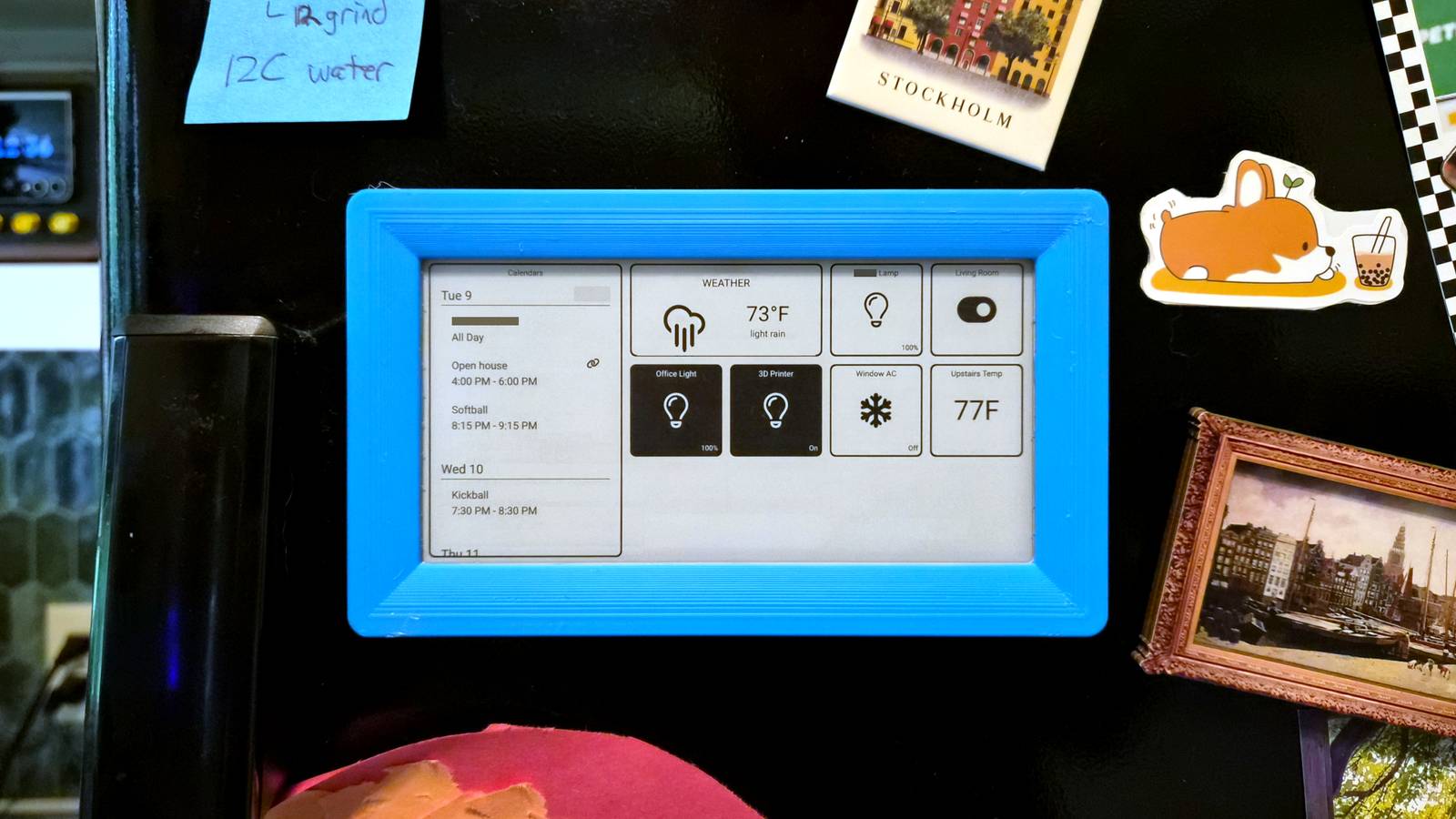
A more useful thing to do is create a personalized dashboard for more than just weather.The one that I'm using is called SharpTools.I like it because it integrates with SmartThings, but it also works with Home Assistant and a bunch of other platforms and services.
SharpTools allows me to create my own smart home dashboard with some other useful stuff on the screen.For example, I can have a scrollable Google Calendar widget, the current weather, the temperature inside my house, and a few buttons for common smart home devices.They're immediately accessible to turn things on and off without having to open an app.
Plus, I can edit my dashboard from any browser, and it will immediately update on my e-ink phone, wherever it is.If you’re willing to pay for SharpTools, you can also create your own custom tiles for a wide variety of things.If you’re looking for a dashboard that more easily integrates with apps you already use, Android has you covered.
The Android home screen is already essentially a dashboard.Install a third-party launcher, remove all the app icons, get rid of the dock, and simply load it up with widgets from your favorite Android apps.Just like that, you’ve got your own custom dashboard.
There’s so much more you can do I’ve only had my e-ink Android phone for a few weeks, so I’m still just scratching the surface of what it can do.That’s really the beauty of having Android attached to an e-ink display.It’s a powerful and easy-to-use operating system just waiting to do whatever you need.
Use it as a media controller, a mini picture frame, a smart home dashboard, a family calendar, and so much more.Related Forget Kindle, here's why I use an Android eReader You can't take away my freedom.Posts 9 By Andrew Heinzman
Read More