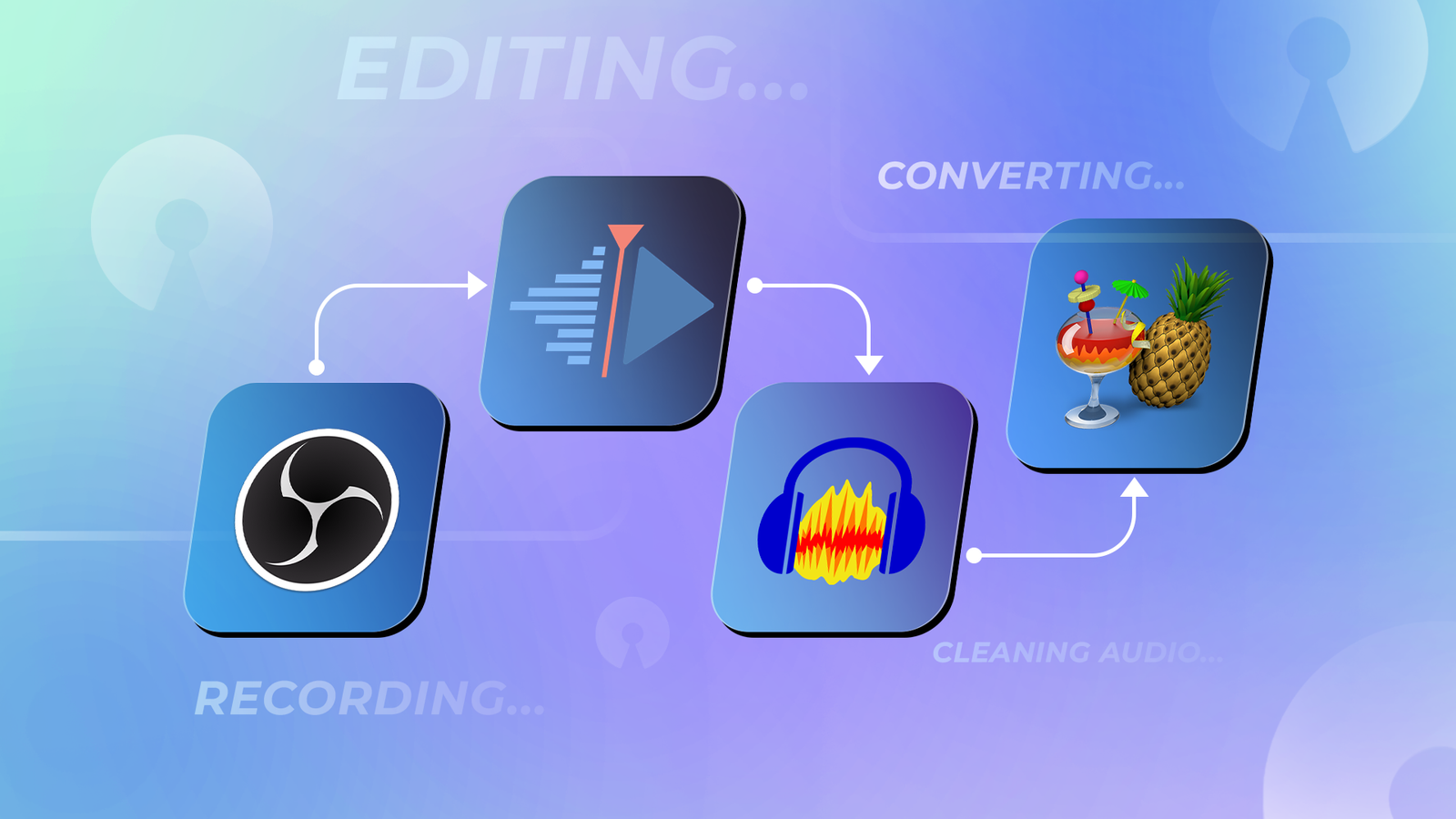
I've been creating content for more than 20 years, and the tools have changed a lot in that time.In many ways, they're better than ever.It's easier to record a screen, capture video, clean up a rough audio track, cut together a simple edit, and get a file into the format I need.
The problem is that many of the tools built for that work have also gotten more expensive, especially as more companies have moved toward subscriptions.I'm not against paying for software when it earns its place, but I'm always looking for ways to trim the pile of monthly charges.What surprised me is how much of my everyday creator workflow I can now cover without adding another bill.
Recording, editing, audio cleanup, and file conversion aren't one-off tasks.They come up all the time.The good news is that you don't have to be locked into one operating system to handle them with free, open-source tools that work across Windows, macOS, and Linux.
OBS Studio is more than a streaming app It can replace a paid screen recorder if you're willing to learn the workflow OBS Studio is easy to write off as something for Twitch streamers, but that sells it short.At its core, OBS is built for capturing, mixing, recording, and streaming video, which makes it just as useful for everyday creator work as it is for live broadcasts.The difference is that OBS works more like a small video control room than a simple record button.
Instead of opening an app, choosing a window, and hitting capture, you build scenes out of sources such as screen captures, windows, webcams, images, browser windows, microphones, and system audio.That takes a little more setup, but it also gives you more control than many basic screen recorders.That control is what OBS does best.
I can set up a screen recording with a webcam overlay, capture audio from the right input, switch between layouts, or use the virtual camera to send a polished scene into apps that normally just expect a webcam.That makes it a potential replacement for paid tools such as Camtasia, ScreenFlow, Loom, or other screen-recording and presentation-capture apps, depending on what you need.The trade-off is that OBS has a steeper learning curve than many paid screen recorders.
New users often bump into the interface, the audio routing, and the export settings before it really clicks. Quiz 8 Questions · Test Your Knowledge The content creator essential knowledge quizTrivia challenge From editing software to social media algorithms — find out how much you really know about the creator world. EditingPlatformsGearMonetizationSocial Media Begin 01 / 8 Platforms What is the minimum number of subscribers a YouTube channel needs to qualify for the YouTube Partner Program (YPP)? A500B5,000C1,000D10,000 Correct! YouTube requires at least 1,000 subscribers along with 4,000 watch hours in the past 12 months to qualify for the Partner Program.Once accepted, creators can earn revenue through ads, memberships, and Super Chats. Not quite — the magic number is 1,000 subscribers, paired with 4,000 public watch hours in the past 12 months.
YouTube introduced these thresholds in 2018 to reduce spam and ensure only active channels could monetize. Continue 02 / 8 Editing Which video editing software is widely considered the industry standard for professional film and TV post-production? ADaVinci ResolveBAdobe Premiere ProCFinal Cut ProDiMovie Correct! Adobe Premiere Pro is used on some of the biggest productions in Hollywood and is deeply integrated into the Adobe Creative Cloud ecosystem.Its compatibility with After Effects and Audition makes it a powerhouse for professional editors. The answer is Adobe Premiere Pro, which dominates professional film and TV workflows worldwide.While DaVinci Resolve is beloved for color grading and Final Cut Pro is popular among Mac-based creators, Premiere Pro holds the crown for broad industry adoption. Continue 03 / 8 Gear What does the acronym 'ND filter' stand for in camera and videography gear? ANatural depth filterBNeutral density filterCNoise diffusion filterDNarrow dynamic filter Correct! A neutral density filter reduces the amount of light entering the lens without affecting color balance.
This lets videographers maintain a cinematic shutter speed in bright conditions, achieving that smooth motion blur look. The correct answer is neutral density filter.ND filters are essentially sunglasses for your camera lens — they cut down light evenly so you can shoot at wider apertures or slower shutter speeds without overexposing your footage. Continue 04 / 8 Social Media Which platform introduced the 'Stories' format first, before it was widely copied by Instagram, Facebook, and others? AVineBSnapchatCTwitterDTikTok Correct! Snapchat launched its Stories feature in October 2013, allowing users to string together snaps into a 24-hour narrative.Instagram famously copied the format in 2016, and it has since become a staple across nearly every major social platform. That would be Snapchat, which debuted Stories back in 2013.
Instagram adopted the format in 2016, prompting widespread criticism that it was copying Snapchat — but the feature became so popular that almost every platform followed suit shortly after. Continue 05 / 8 Monetization What does 'CPM' stand for in the context of creator ad revenue? ACost per minuteBContent performance metricCCost per milleDCreator payment model Correct! CPM stands for 'cost per mille,' with mille being the Latin word for thousand.It represents how much advertisers pay per 1,000 ad impressions, and it's one of the key metrics creators use to understand their earning potential. The correct answer is 'cost per mille' — mille meaning one thousand in Latin.CPM tells you how much advertisers are paying for every 1,000 views of their ad, and it varies wildly by niche, audience location, and time of year. Continue 06 / 8 Editing In audio editing, what does the term 'DAW' stand for? ADigital audio workstationBDynamic audio waveformCDirect audio writingDDigital audio wrapper Correct! A digital audio workstation (DAW) is software used to record, edit, mix, and produce audio.
Popular DAWs among content creators include Adobe Audition, GarageBand, Logic Pro, and Audacity. The answer is digital audio workstation.DAWs are the backbone of any creator's audio production setup, allowing you to record voiceovers, layer music, reduce background noise, and master your final audio track before publishing. Continue 07 / 8 Platforms What is the maximum length of a standard TikTok video as of 2024? A3 minutesB5 minutesC10 minutesD15 minutes Correct! TikTok expanded its video limit to 10 minutes in 2022, a significant jump from its original 15-second cap.This move was aimed at attracting longer-form creators and competing more directly with YouTube. As of 2024, TikTok allows videos up to 10 minutes long.
The platform has dramatically extended its limits since its early days of 15-second clips, reflecting a broader push toward longer content to compete with YouTube and Instagram Reels. Continue 08 / 8 Gear Which microphone pickup pattern captures sound from all directions equally, making it ideal for recording group conversations or ambient sound? ACardioidBSupercardioidCBidirectionalDOmnidirectional Correct! An omnidirectional microphone picks up sound equally from all directions, making it great for interviews, podcasts with multiple people, or capturing room ambience. The trade-off is that it also picks up more background noise than a cardioid mic. The correct answer is omnidirectional.Unlike cardioid mics that focus on sound in front of them, omnidirectional mics capture audio from every angle — useful for roundtable discussions, but less ideal when you need to isolate a single speaker in a noisy environment. See My Score Challenge Complete Your Score / 8 Thanks for playing! Try Again It’s also not a full post-production editor, so if you want built-in trimming, annotations, callouts, transcript editing, or easy sharing links, a paid app may still be more convenient.But if the job is capturing clean video from a screen, camera, microphone, or a mix of all three, OBS is one of the most capable free tools around.
Related How to Create High-Quality AI Images: Tips for Prompt Crafting Crafting AI prompts for image generation is easier than you think.Posts 5 By Ray Malik Kdenlive gives you video editing without another subscription It feels like a real timeline editor, not a stripped-down clip trimmer Kdenlive is the part of the workflow that handles the actual editing.Recording a clean clip is only the start.
Most projects still need trimming, sequencing, titles, audio adjustments, transitions, and an export that looks good enough to publish or share.What separates Kdenlive from many lightweight editing tools is that it doesn't feel like a template tool or a quick clip trimmer.It's a traditional non-linear editor, with tracks, clips, effects, transitions, and export settings you control.
That control is also where the trade-off comes in.Kdenlive can replace paid tools such as Adobe Premiere Pro, Final Cut Pro, Camtasia, or Filmora for straightforward creator projects, especially if most of what you need is cutting clips together, adding titles, adjusting audio levels, and exporting a finished video.Like other apps on this list, it has more of a learning curve than simpler editors, and some users may find the interface less polished than commercial software.
Depending on the project and the system, performance and stability may not always feel as smooth as some paid alternatives.That said, if you need a capable timeline editor without adding another monthly subscription, Kdenlive covers a lot of ground.Audacity is still one of the easiest ways to fix audio It’s better for quick cleanup than full production work Audacity has been around long enough that it’s easy to take for granted, but it still solves one of the most common creator problems: fixing audio that is almost good enough.
A screen recording, interview clip, voiceover, or quick narration track may not need a full digital audio workstation (DAW).It may just need a trim, a volume boost, a noise reduction pass, a fade, or an export to a format that is easier to use somewhere else.That is where Audacity still makes a lot of sense.
I still use Logic Pro for music recording, so I'm not suggesting that Audacity replaces a full production setup.But for smaller audio projects, quick voice cleanup, trimming clips, boosting levels, or exporting a file in the format I need, Audacity is often the faster tool.What separates it from more polished audio apps is that it’s direct: you open a file, see the waveform, make the edit, apply the effect, and export the result.
That makes it a potential replacement for paid tools such as Adobe Audition, Sound Forge, or subscription-based audio cleanup apps if your needs are mostly voice cleanup and basic editing.The trade-off is that Audacity can feel dated compared with modern commercial tools, and some users may not love its interface, effect workflow, or the way it handles multitrack projects.But for cleaning up rough audio before it goes into a video or another project, it's still one of the fastest free tools for getting the job done.
HandBrake solves the boring video-file problems It helps shrink and convert video files without another monthly bill HandBrake isn't the flashiest tool on this list, but it solves the kind of problem that shows up once you start working with a lot of video: files are too large, saved in the wrong format, awkward to upload or share, or taking up more storage than they should.I recently replaced the media PC that runs my Plex server, and HandBrake has helped me tame some of that storage creep by converting videos into more efficient formats.That’s what HandBrake does best.
It is not a timeline editor, a screen recorder, or a template-based video app.It takes an existing video file and turns it into something more useful, whether that means a smaller file, a more compatible format, or a version that works better on a phone, TV, tablet, or media server.That makes it a good alternative to paid video-conversion tools such as Wondershare UniConverter, Movavi Video Converter, or other commercial utilities if most of what you need is conversion and compression.
The trade-off is that HandBrake can look technical at first.Codecs, containers, presets, bitrates, and quality settings aren't exactly user-friendly words if you just want to make a file smaller.Some paid tools wrap that process in a friendlier interface or bundle in extra editing features, but for the basic job of shrinking, converting, and making video files easier to store and play, HandBrake earns its place.
Free tools are worth trying before another subscription None of these tools is perfect, and they won't replace every paid creator app for every job.But that's not really the point.A lot of everyday creator work doesn’t require another subscription, especially when the right tool is matched to the right task.
For recording, editing, audio cleanup, and video conversion, these open-source apps cover enough ground to earn a permanent spot in a creator workflow.
Read More