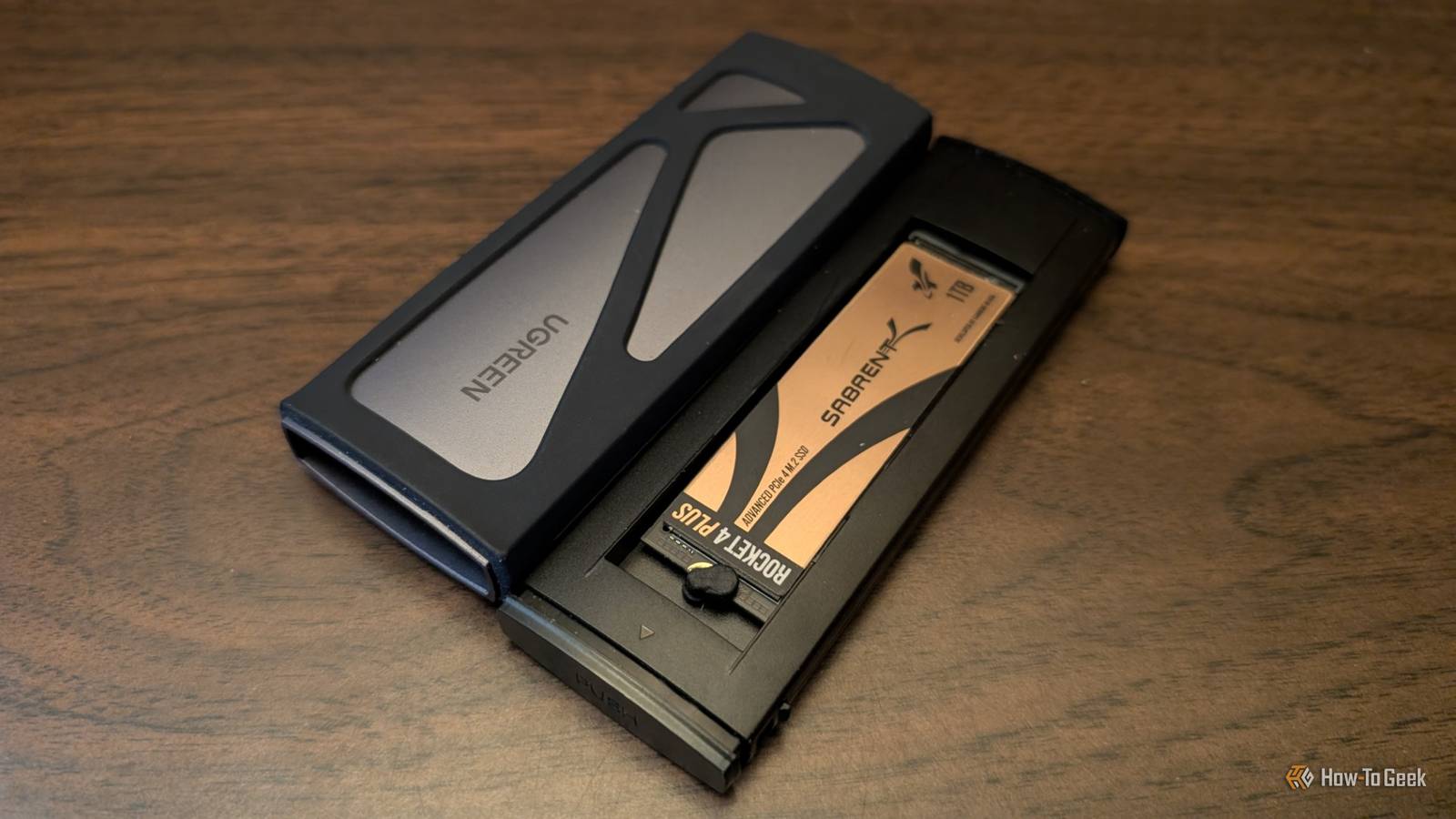
A few years ago, I built a custom external SSD by putting an NVMe drive into a single-bay USB enclosure.It actually performs exactly how I expected it to—the speeds are good and it fits into my pocket.However, as it has become more and more important to my routine (especially when I'm working with my laptop) I've come to regret one aspect of its design: the single bay.
A -bay enclosure costs a bit more initially, but it would have given me more flexibility in a few important areas.What in the world is a dual enclosure? Double the storage in a tiny footprint Close A two-bay enclosure (sometimes called a dual enclosure) has M.2 slots connected to a USB or Thunderbolt controller.That allows you to plug an NVMe drive directly into a PC without actually exposing an M.2 slot on the outside of a PC.
The two-bay enclosures are a bit more complex than their single-bay counterparts.They sometimes have a mode switch that determines how your PC will treat them.PM will force them to list as two separate volumes, as if you plugged in two different drives.
RAID 0 forces your PC to "stripe" data across both drives, which could functionally increase your bandwidth (if the drives are the bottleneck, anyway), and RAID 1 mirrors the data across both drives, providing important redundancy.JBOD, sometimes called LARGE or SPAN, will force your PC to treat the two drives as a single drive.Related RAID 0 is a data-loss nightmare: Here is the only reason I still run it in my homelab RAID 0 isn't worth it—unless you're backing it up every night Posts By Patrick Campanale Others are less fancy and just have a button that clones the data from one drive to the other, a bit like a manual copy-paste button that works a computer in the mix.
Like with most USB enclosures, you'll run into a few different tiers.Some use USB 3.2 Gen 2x2, while more expensive options will use USB4 or Thunderbolt, both of which offer higher bandwidth.Two are essential for my data integrity My external SSD houses an array of different partitions.
A few of them are dedicated to specific repair tools for Windows and Linux so I can play PC doctor when necessary, while another holds ISOs for temporarily booting into a guest OS when plugged into a new machine, and yet another holds a portable Windows partition that I use to access Windows on my laptop.UGREEN M.2 NVMe SSD Enclosure 10Gbps USB 3.2 Gen 2 $14 $22 Save $8 Speed 10Gbit Connection USB-C Portable Yes The UGREEN M.2 NVMe SSD Enclosure is perfect for assembling your own USB SSD at home.It offers 10Gbps transfer rates over USB 3.2 Gen 2, and accepts both M and M&B key M.2 PCIe SSDs.
With a USB-C interface, it'll easily hook into your desktop or laptop to provide you with fast portable storage anywhere you go.$14 at Amazon Expand Collapse All of it works on a single bay enclosure without too many issues, but it always makes me apprehensive.If one drive dies, and I'm in the middle of something, I could be in trouble.
At a minimum, I'm going to have to move to my desktop PC.It is also possible that I may lose something important if I'm in the middle of something.A two-bay enclosure goes a long way to relieving that risk, and it is something I wish I'd considered when throwing it together the first time.
RAID 1 (or a software equivalent) ensures that my important data is stored in two different locations.It wouldn't help if my enclosure were to get run over by a car, but it provides protection against more mundane risks, like a drive spontaneously failing.Beyond redundancy, the second bay would also add flexibility that could be situationally helpful.
If I ever decided I needed more storage, I'd prefer to swap out one of two 1TB drives for a 2TB drive for a total of 3TB than I would have to buy a 4TB drive.Mismatched drive sizes complicate RAID a bit, but there are ways to circumvent that problem without compromising its ability to function as a fully redundant backup.Quiz 8 Questions · Test Your KnowledgeSSDs, NAND memory, and interfacesTrivia challengeFrom flash cells to PCIe lanes — see how much you really know about modern solid-state storage.NANDInterfacesHardwarePerformanceStandardsBegin 01 / 8NANDWhich type of NAND flash stores exactly one bit of data per cell?AMLCBTLCCSLCDQLCCorrect! SLC stands for Single-Level Cell, meaning each cell holds just one bit — either a 0 or a 1.
This makes SLC the fastest and most durable NAND type, but also the most expensive per gigabyte, so it's mainly found in enterprise and industrial storage.Not quite — the answer is SLC, which stands for Single-Level Cell.MLC stores 2 bits, TLC stores 3, and QLC stores 4 bits per cell.The more bits per cell, the cheaper but slower and less durable the NAND becomes.Continue 02 / 8InterfacesWhat does NVMe stand for in the context of SSDs?ANon-Volatile Memory ExpressBNetwork Virtual Memory ExtensionCNext-gen Volatile Memory EngineDNon-Volatile Module ExtenderCorrect! NVMe stands for Non-Volatile Memory Express, a communication protocol designed specifically for flash-based storage.
Unlike AHCI, which was built for spinning hard drives, NVMe takes full advantage of PCIe's parallel lanes to deliver dramatically lower latency and higher throughput.Not quite — NVMe stands for Non-Volatile Memory Express.It's a host controller interface protocol designed to replace the older AHCI standard, which was originally built with spinning hard disk drives in mind rather than fast flash storage.Continue 03 / 8HardwareWhich physical form factor is most commonly used for NVMe SSDs in modern laptops and desktops?A2.5-inch SATABmSATACM.2DU.2Correct! The M.2 form factor has become the dominant standard for NVMe SSDs in consumer devices.It's a compact, card-style connector that fits directly onto the motherboard, eliminating the need for data and power cables and saving space inside the chassis.The correct answer is M.2.
While 2.5-inch SATA and mSATA were common in older systems, M.2 has taken over as the go-to slot for NVMe drives.U.2 is also used for NVMe but is mostly found in enterprise servers rather than consumer hardware.Continue 04 / 8PerformanceApproximately how fast can a high-end PCIe 4.0 NVMe SSD read data sequentially?A550 MB/sB1,200 MB/sC7,000 MB/sD20,000 MB/sCorrect! Top-tier PCIe 4.0 NVMe SSDs can achieve sequential read speeds of around 7,000 MB/s.This is a massive leap over SATA SSDs, which are capped near 550 MB/s due to interface bandwidth limitations, and even outpaces many PCIe 3.0 drives significantly.Not quite — the answer is approximately 7,000 MB/s.
Around 550 MB/s is the ceiling for SATA-based SSDs, while 1,200 MB/s is typical for older PCIe 3.0 drives.20,000 MB/s exceeds even PCIe 5.0 NVMe drives available at time of writing.Continue 05 / 8NANDWhat does 3D NAND refer to in modern SSD manufacturing?ANAND chips shaped into a three-dimensional cube for faster accessBStacking memory cells vertically in multiple layersCUsing three separate dies wired together on one chipDA three-bit-per-cell design that improves enduranceCorrect! 3D NAND, sometimes called V-NAND by Samsung, stacks memory cells vertically in dozens or even hundreds of layers rather than spreading them flat across a wafer.This dramatically increases storage density without shrinking individual cell sizes, which also helps preserve endurance and reliability.The correct answer is that 3D NAND stacks memory cells vertically in multiple layers.
Planar (2D) NAND arranges cells flat on a single layer, but manufacturers hit physical scaling limits, so the industry moved to vertical stacking to keep increasing capacity without sacrificing cell quality.Continue 06 / 8StandardsWhich interface protocol were most SATA SSDs designed to use before NVMe became mainstream?ANVMeBAHCICSCSIDIDECorrect! AHCI (Advanced Host Controller Interface) is the protocol that SATA SSDs communicate over.It was originally designed for mechanical hard drives and supports a single command queue of 32 commands — a major bottleneck compared to NVMe, which supports 65,535 queues each holding 65,535 commands.The answer is AHCI, which stands for Advanced Host Controller Interface.SCSI and IDE are much older standards largely retired from consumer use, while NVMe is the newer protocol used by PCIe-based drives.
AHCI's single command queue made it a poor fit for the parallelism flash storage can deliver.Continue 07 / 8NANDWhich NAND type offers the highest storage density per chip but typically has the lowest endurance?ASLCBMLCCTLCDQLCCorrect! QLC, or Quad-Level Cell NAND, packs four bits into every cell, giving it the highest density of common consumer NAND types.The trade-off is significantly reduced endurance — QLC cells wear out faster because of the precision needed to distinguish between 16 different voltage states per cell.The answer is QLC (Quad-Level Cell).It stores 4 bits per cell, making it the densest and most affordable NAND type, but it also has the lowest P/E (program/erase) cycle endurance.
SLC sits at the opposite end — fewest bits per cell but the longest lifespan.Continue 08 / 8InterfacesWhich PCIe generation, first adopted widely in consumer SSDs around 2020, doubled the bandwidth of its predecessor?APCIe 2.0BPCIe 3.0CPCIe 4.0DPCIe 6.0Correct! PCIe 4.0 arrived in consumer platforms around 2020, starting with AMD's Ryzen 3000 series and X570 motherboards.It doubles the per-lane bandwidth compared to PCIe 3.0, pushing NVMe SSD sequential speeds from roughly 3,500 MB/s up to around 7,000 MB/s.The correct answer is PCIe 4.0, which first appeared broadly in consumer hardware around 2020 with AMD's Zen 2 platform.PCIe 3.0 was the previous mainstream standard, while PCIe 6.0 is a more recent enterprise-focused generation not yet common in everyday consumer motherboards.See My Score Challenge CompleteYour Score/ 8Thanks for playing!Try Again Redundancy has a few snags Redundancy can make data recovery complicated Hardware RAID inside a USB enclosure introduces one big snag that isn't a problem with a single drive.
Most of these multi-bay units use proprietary RAID metadata, which means that if the enclosure controller dies, your array may only be readable by an identical replacement.Sometimes TRIM and SMART are a problem Furthermore, TRIM and SMART pass-through break in RAID mode, meaning your PC can't read drive health or perform garbage collection properly over time.One bay isn't bad My single bay enclosure works fine, it just lacks My only option to expand my storage is to buy the largest possible single drive, which adds to the cost significantly, especially these days.
It also limits how I can approach backups.I have to carry two separate enclosures if I want redundancy, which is fine, but it does add one thing to the list of tech gadgets I carry around.If I could do it again, I'd opt for something with two bays, ideally with a heat sink to ensure nothing overheats.
If you're someone that needs their enclosure for work where a mid-project failure can throw off a entire day, you should at least consider a two-bay enclosure.They're a bit more expensive, but not much compared to the price of storage these days.
Read More