Thanks to the ability to easily add debit and credit cards for tap-to-pay, Google Wallet has become an irreplaceable part of daily life for many Android users.However, what many people don't realize is that while Google Wallet is great for payments, that's merely scratching the surface of all the things it can actually do.The truth is that Google Wallet is a virtual wallet on your phone in every sense of the word.
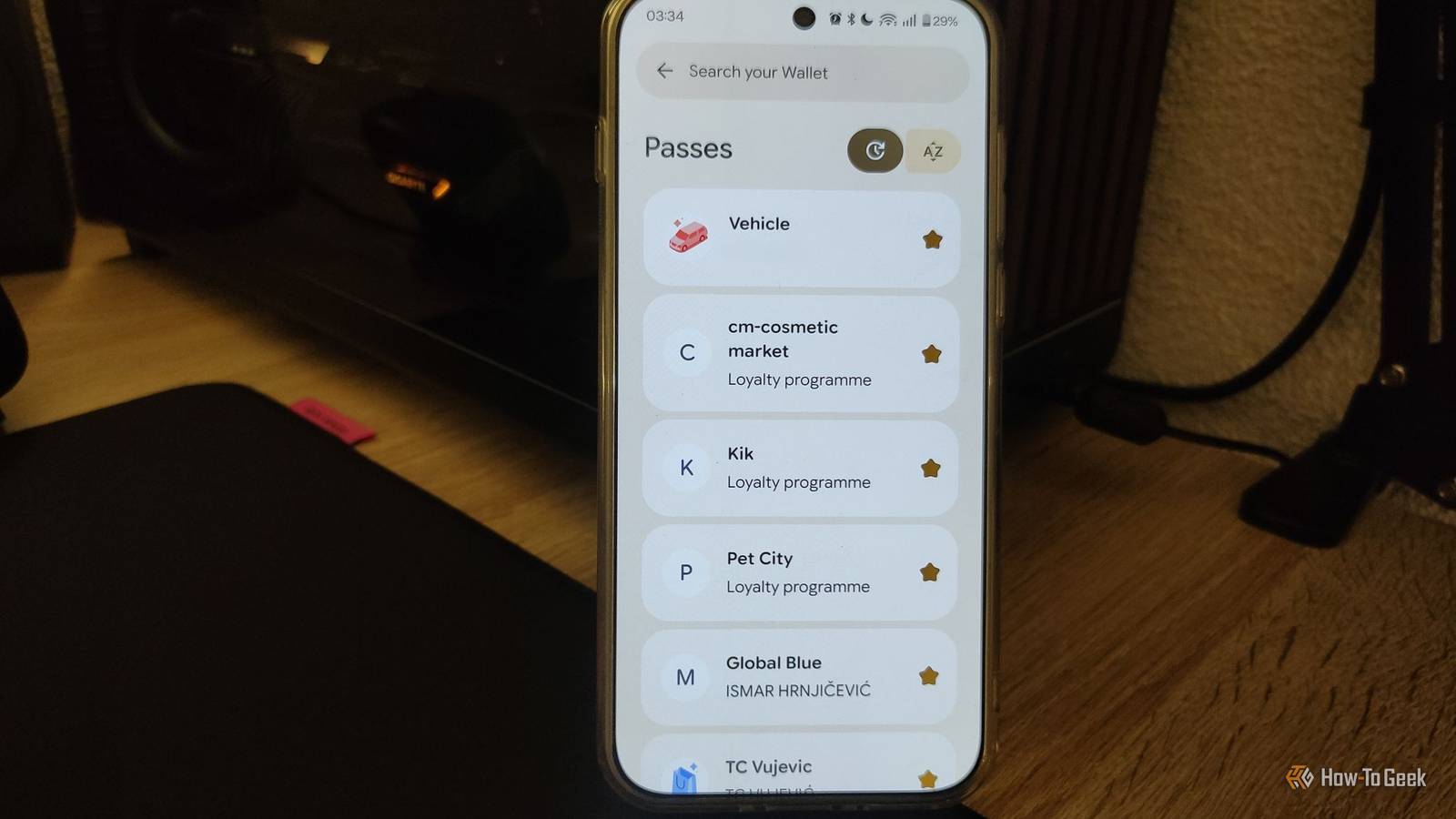
Beyond credit and debit cards, it can store everything from loyalty cards and boarding passes to tickets, documents, and more.Here are some of the most useful features you might not be using yet.Store every membership, loyalty, and gift card in one place Get rid of that bulky wallet Close Google Wallet is shockingly versatile when it comes to storing retail loyalty cards, gift cards, gym membership cards, and even event tickets.
It can even store health insurance cards and vaccination records in supported regions (which was incredibly important during the pandemic).A good rule of thumb is that if you've got some sort of physical loyalty card in your wallet, or perhaps a virtual membership card in a store's app, there's a very good chance that you can add it to Google Wallet.While you'll still need to access a store's app to unlock coupons and special offers, Google Wallet gives you one place to keep all those different loyalty cards, allowing you to quickly pull up the right one at checkout.
I can't even begin to tell you how much I love this feature: it might just be better than contactless payments.These days, it seems like every other store has a loyalty program, and I've been out of space in my physical wallet for years.I hate carrying all those plastic cards around or fumbling through apps on my phone while people are lining up behind me.
With Google Wallet, I can keep all these different cards in one place.And even if a specific retailer doesn't support Wallet integration, you can still add it manually using the Everything else option to take a photo of the card and keep it stored.Scanning the barcode or QR code at checkout might not work, but there's usually a way to enter the code manually in those cases.
There's no upper limit to how many cards you can add.The best part? You can share them.My wife and I can share all those loyalty cards we've accumulated over the years, making sure we always have easy access and neither of us has to carry duplicates.
Keep your transit passes ready for your daily commute Keep your bus and train passes within reach Many major cities have moved toward digital transit passes, with many systems also supporting Google Wallet integration.If your daily commute involves using a transit pass for a train, bus, tram, or some other form of public transportation, adding it to Google Wallet is a no-brainer.The convenience doesn't stop at just having a digital version of your pass, either.
In supported public transport systems, Google Wallet can display useful information such as your remaining balance, expiration dates, and schedule updates from the transit system.Even if a system doesn't officially integrate with Google Wallet, you can often add it manually using the Everything else option.However, how well it works and whether scanners can actually detect the pass varies from system to system.
Store your car's information for quick access Even your glove box can be digital now Google Wallet can go far beyond storing the things you typically keep in your physical wallet.One especially cool feature I've discovered is that I can store essential information about my car, including the make, model, year of manufacture, license plate number, and VIN.For a car guy like me, having this information saved in Google Wallet is incredibly convenient.
Google can automatically fill in these details whenever a website or app asks for them, similar to how it can autofill saved addresses or payment information.This means I can visit a car parts website and quickly provide my VIN without having to check the vehicle or dig through paperwork.The same is true for the license plate.
If you frequently swap cars, own multiple vehicles, or just enjoy working on your own cars, you should configure this immediately.Related 9 Things You Can Put in Your Google Wallet Besides Payment Cards Google Wallet is primarily used to digitally store your payment cards, but it can be used for so much more than that.Posts 4 By Timothy Jacob Hudson Take the stress out of flying by storing your boarding passes in Google Wallet Your boarding pass is only a swipe away Close Despite being an essential part of your travel experience, boarding passes can easily get buried deep in your inbox or force you to open a buggy airline app.
Thankfully, Google Wallet gives you an easy way to keep them handy when you need them at the gate.What's especially impressive about this feature is that Google Wallet keeps essential flight details easily accessible through notifications.I rely heavily on this whenever I travel to check my gate, boarding time, departure time, seat number, and other important details.
I've even noticed that it updates when delays happen, and while it can also provide gate change updates with some supported airlines, you should still rely on airport screens whenever possible for the most accurate and up-to-date information.Store digital versions of your ID, passport, and other documents It's better than a simple photo Storing digital versions of your ID, driver's license, passport, and other essential documents is one of the most useful things you can do with Google Wallet.It gives you a secure, easily accessible way to keep important information handy without having to dig through your gallery or search through emails when you need it.
This can be especially useful in situations where digital IDs are supported, such as some airport security checkpoints.And since you've already got your boarding pass in Google Wallet, having your travel essentials in one place can make the entire airport experience a little smoother.Another situation where having your passport information readily available can be useful is when shopping abroad and applying for a VAT refund.
Tax-free shopping providers often require passport details when filling out refund paperwork, and having the information easily accessible can save you time.Some providers even offer digital tools that make the process easier with QR codes and mobile apps.While Google Wallet adds a layer of convenience, it does not replace your physical documents in most situations.
You should still carry any required identification, driver's license, or passport with you, especially when traveling abroad or visiting places that legally require physical documents.Google Wallet isn't just a payment app—it's one of Android's most useful apps If you've only ever used Google Wallet for payments, it's time to explore what else it can do.The app can store a surprisingly wide range of documents, passes, membership cards, loyalty cards, and more.
There are even some more niche uses that I didn't cover, such as unlocking your car and opening hotel or dorm doors in supported locations through NFC.So, take a look through Google Wallet and start adding your cards and passes.You might be surprised by how much of your physical wallet can be replaced with a single app.
Related Apple Wallet Is Getting a Feature Google Wallet Has Had for Months Long overdue.Posts By Arol Wright
Read More