I’ve been running a homelab for about eight years now, and during that time I’ve used both mini PCs and NAS systems for all kinds of workloads.I’ve also gone through several generations of Mini PCs and NAS.After all that experimentation, there is one I would recommend to most people starting their first homelab.
The problem is that a mini PC and a NAS are good at very different things, even though the line between them has become increasingly blurry.Add used enterprise hardware, increasingly capable consumer mini PCs, and the growing number of DIY NAS options to the mix, and choosing where to start is not nearly as straightforward as it used to be.Mini PCs weren’t always this good The value proposition has changed This recommendation would have been harder for me to make a few years ago.
Consumer mini PCs were not always particularly compelling from a price-to-performance perspective.You could find small computers, but once you started comparing their prices with conventional desktops and laptops, the value wasn’t always obvious.For homelab users, the more interesting option was often using enterprise hardware.
I’ve personally gone down that route.I’ve used machines such as the HP T630 and HP EliteDesk 705, along with other small enterprise systems, because they offered a lot of what a homelab needed without costing much.Related I didn't expect this mini PC to replace my NAS, Raspberry Pi, and smart home hub I didn't expect this little box to become responsible for my entire house.
Posts By Ismar Hrnjicevic These machines were never particularly exciting.That was part of the appeal.You could find a used business machine with a reasonably capable processor, upgradeable memory, an SSD, and networking for relatively little money (some of them still are).
That was the economics of the homelab for a long time.The market has changed since then.Modern consumer mini PCs have become much more competitive.
You can now get surprisingly capable processors, multiple storage options, plenty of RAM, 2.5GbE networking, and good virtualization performance in machines that remain small enough to disappear behind a monitor.That makes the mini PC much easier to recommend as a first homelab machine than it once was.A NAS is still an excellent first server It just solves a different problem NAS hardware has an obvious advantage in one key area—it's desigend around storage.
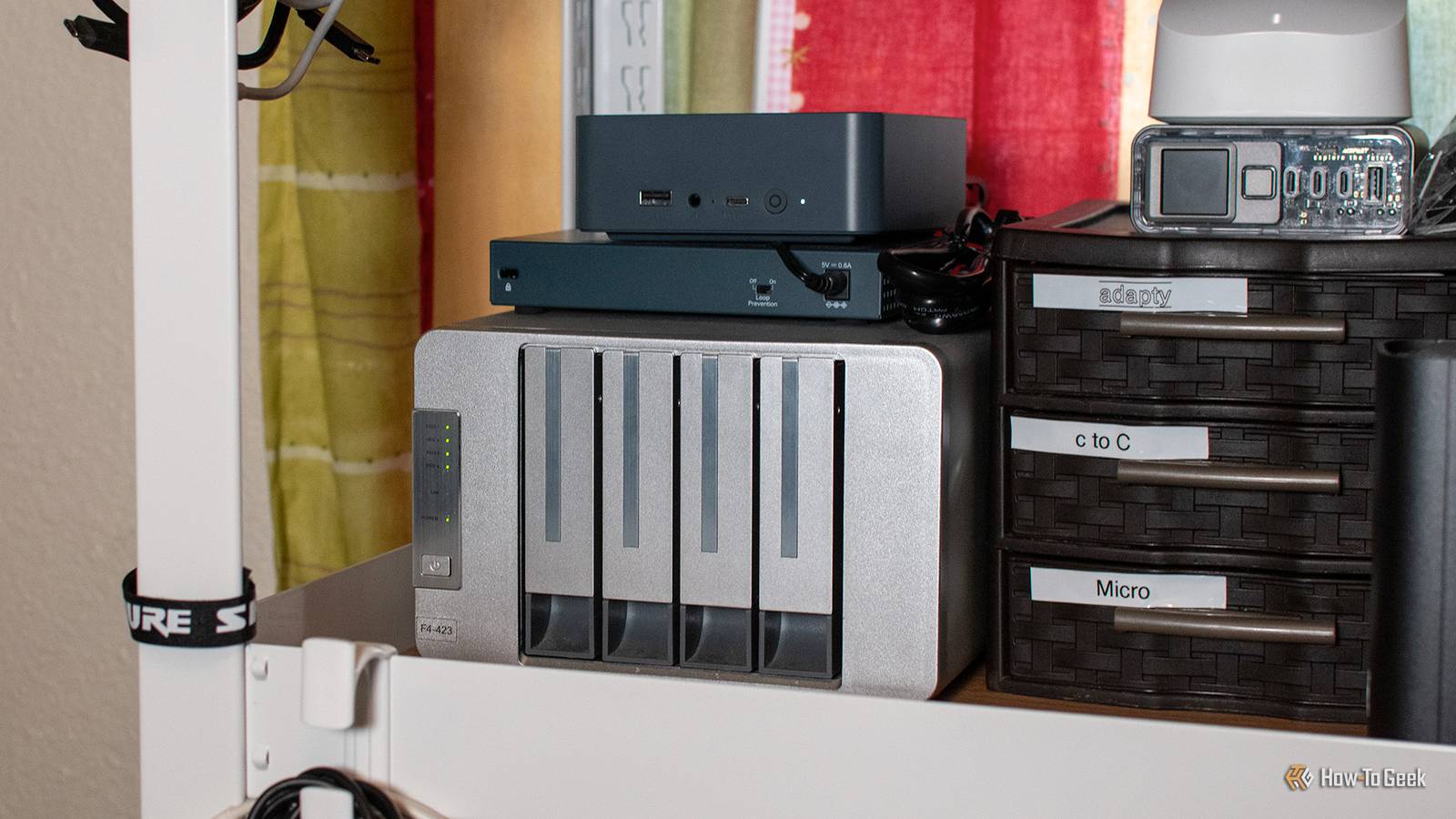
A 4-bay NAS gives you somewhere to put several hard drives, configure redundancy, create network shares, and centralize your data.Most NAS brands like Synology, QNAP, and Asustor also provide application ecosystems that can handle far more than file sharing.I have spent enough time fighting with Synology to know that I don’t want to be locked into proprietary software, and the real difference is actually how much freedom you get once you move beyond the manufacturer’s intended use.
A mini PC starts as a general purpose computer whereas a NAS starts as a storage appliance that can often do considerably more.That becomes important once you start experimenting.You see someone doing something ridiculous in their homelab, think, “I could probably do that,” and before you know it, you have spent your entire evening following a random blog post from 2019 to get a completely unnecessary service running on your network.
Related 5 Alternative NAS Operating Systems Worth Trying Sometimes Ubuntu just simply isn't enough.Posts By Patrick Campanale A mini PC gives you a bigger playground You can decide what the machine becomes A reasonably modern x86 mini PC can run Linux, Windows, BSD, Proxmox VE, or another operating system that supports its hardware.You can run Docker directly on Linux, create virtual machines, experiment with LXC, install Home Assistant, build a DNS server, host applications, experiment with Kubernetes, or turn the machine into a development environment.
You can also install Proxmox and split the machine into several independent environments.One VM can run Docker.Another can run a different Linux distro.
You can create an LXC container for another service and throw the whole thing away when you’re finished experimenting.That is the part of a homelab that I find most valuable! You’re not simply deploying applications.You’re learning how the infrastructure underneath them works.
If you break something, you can rebuild it.If you want to try another operating system, you can install it.If you decide you want to learn virtualization, the same hardware can become your virtualization server.
A NAS can do some of this, especially if you deliberately buy one with a capable processor and enough RAM.A mini PC gives you this freedom from the beginning.Close The NAS wins when storage is the priority Drive bays are difficult to replace with a mini PC There is one area where a NAS has a straightforward advantage, and that is storage.
TrueNAS recommends at least two identically sized storage devices for a basic storage pool, which allows you to create a mirror and have redundancy if one drive fails.So, in theory, a mini PC with two M.2 slots can satisfy that requirement too.The problem is that a typical mini PC does not give you the same storage capacity or expansion options as a NAS.
You might get two M.2 slots and, in some models, a 2.5-inch SATA bay.That is enough to build a small redundant storage system, but it leaves you with very little room to add drives as your storage requirements grow.There is also another limitation that is easy to overlook.
Those two M.2 slots are not necessarily equivalent, and a mini PC might support two PCIe 4.0 x4 NVMe drives, but only connect the primary slot at PCIe 4.0 x4 while limiting the second slot to something like PCIe 3.0 x2.Both drives will work perfectly well in a ZFS mirror, but the slower connection can become a bottleneck under workloads that put significant pressure on both drives.I have personally dealt with this situation, and in such cases, the hardware becomes a performance bottleneck well before ZFS pool-level optimizations can make a meaningful difference.
For a small homelab storing backups, media, or running light workloads, this may be perfectly acceptable.But if storage is the main purpose of the system, a 4, 6, or 8-bay NAS gives you far more room to build a larger pool, add drives, and expand capacity over time.That is where I would choose the NAS over the mini PC.
Related TrueNAS Scale vs Unraid: I ran both for a month, and the winner wasn't what I expected I had already picked my favorite before testing them.That turned out to be a mistake! Posts 9 By Umair Khurshid Power consumption can change the calculation An always-on server adds up Power consumption is easy to ignore when you’re comparing a $200 mini PC with a $500 NAS.It’s harder to ignore after either machine has been running continuously for a year.
Mini PCs are generally designed around low-power laptop or mobile-derived processors, and many can idle at surprisingly low power levels.A used business mini PC can also be very efficient for the amount of compute it provides.A NAS has more variables...
The NAS enclosure itself may be relatively efficient, but every additional hard drive consumes power.A 4 bay NAS with four spinning disks is going to have a different power profile from a diskless NAS or a mini PC with one NVMe SSD.Drive activity also changes consumption.
That doesn’t automatically make the mini PC cheaper to operate.If the NAS replaces several other machines and provides all of your storage, the additional power can be entirely reasonable.It’s simply another reason to think about what you actually need before buying.
For a small homelab that runs a handful of containers, a mini PC can provide a lot of computing capability without needing several hard drives spinning all day.The NAS can also be easier to manage Convenience is a legitimate reason to choose one There is another side to this argument that shouldn’t be ignored.A NAS can be considerably easier to manage.
Instead of installing an operating system, configuring Docker, setting up storage, creating network shares, and figuring out how to monitor your disks, you can often accomplish most of this through a web interface.That convenience is one of the reasons NAS platforms exist in the first place.If your goal is to have a reliable place for your family’s files rather than learn Linux administration, there’s little reason to make the project harder than necessary.
The same applies to applications.Synology and QNAP have spent years building ecosystems around their hardware.You can install applications, manage storage, configure backups, and administer the machine without necessarily needing to understand every component underneath it.
For some people, that is exactly what they want.Eventually, you may want both The mini PC can become your compute node This is where the comparison becomes much less interesting, because a mature homelab can easily have both.I personally use both and a DAS.
The mini PC can run Proxmox, Docker, virtual machines, and whatever other services you want to experiment with.The NAS can provide bulk storage, backups, media storage, and shared network storage.You can even start with the mini PC and add the NAS once you have a reason to buy one.
That’s the route I’d take because it lets your hardware requirements develop alongside your homelab.You might discover that you only need a small SSD and a handful of containers.In that case, you may never need a NAS.
Related Don't turn your old PC into a DIY homelab: This tiny board is the smarter choice Skip the old desktop PC—this $100 motherboard is the real foundation for a homelab Posts 3 By Ismar Hrnjicevic Or you might eventually accumulate several TBs of data and decide that a proper storage server makes sense.At that point, you’ll be buying a NAS because you understand why you need it rather than because every homelab guide told you to buy one.So what should a beginner buy? I’ve gone from small-form-factor PCs and refurbished enterprise machines to used mini PCs and now modern consumer mini PCs.
While used enterprise hardware is still a fantastic option on a tight budget, modern mini PCs have changed the equation.If you have the budget, I’d personally buy a new one.They are considerably more powerful and capable, especially for something like Proxmox, and you can always add a few cheap used mini PCs later if you want to build a small cluster.
If you’re not particularly interested in tinkering, though, I’d go with a NAS.I’d also suggest looking beyond the most proprietary options if you want to avoid being tied to one ecosystem, although platforms like Synology remain very attractive precisely because their software makes things such as photo management, backups, and file sharing so convenient.UGREEN NASync DXP6800 Ultra Brand UGREEN CPU Intel Core 5 120U The UGREEN NASync DXP6800 Ultra NAS has six bays that hold up to 208TB of storage — and a Core 5 120U that can handle even demanding network tasks.
See at Amazon $1450 at Ugreen Expand Collapse Beelink SER3 Mini PC CPU Ryzen 3 3200U Graphics Radeon Vega 3 The Beelink SER3 mini PC is the perfect entry-level Windows desktop for those on a budget.With a Ryzen 3 3200U processor, this desktop ships with Windows 11 Pro and 16GB of DDR4 RAM.A 500GB SSD is pre-installed (and user-upgradable), and you'll find dual HDMI ports, Ethernet, and four USB-A ports on this compact desktop.
See at Amazon Expand Collapse There is also a third option worth considering if you’re more of a data hoarder or want to experiment with redundant storage, ZFS, and storage pools.Look for DIY NAS hardware, where you’re free to install something like TrueNAS, Unraid, OpenMediaVault, or another operating system instead of being locked into the manufacturer’s software.This can be a particularly interesting option if the storage side of the homelab is what excites you.
Read More