I have the Samsung Galaxy A21s from 2020.Six years of use and many repairs later, it's still kicking.It's not in the best shape or has the best battery life, but with some management, it lasts more than a day, and even a few days on battery.
I should be upfront that it's my secondary phone now and serves as a backup to my Galaxy A35.So, it doesn't see as much usage.I take photos and shoot videos with it when my main phone needs to be in the frame.
It holds apps I rarely open.If you want to repurpose an old Android phone the same way, battery life quickly becomes the biggest headache.Even with a cooked battery, I'm happy with how long it lasts.
Here's how I'm getting so much use out of it before going for the charger.Check your battery's health before changing anything A 'Normal' result means the problem is software, not the battery If you have a worn-out battery, no amount of tweaking the settings will help that.That's why, before doing anything else, you should check what condition it's in.
On a Samsung Galaxy phone, that's straightforward with the Samsung Members app.Open the Samsung Members app.Press Diagnostics.
Press Phone diagnostics.You should see a bunch of tests.Choose Battery status.
After some checking, the app will determine your battery status: Normal, Weak, or Bad.Close Since I'm using an old phone, the software version might be old or outdated.As a result, the interface may not look the same.
Besides, Samsung Members may also look different based on location.The steps mentioned above may vary slightly but should be similar.My A21s came back as Normal.
That told me the battery drain was mostly from the software.So, that's the next thing I looked into.Find out what's draining your phone My biggest battery users were apps I never opened After I confirmed that my phone's battery was fine, I had to hunt for the real culprits.
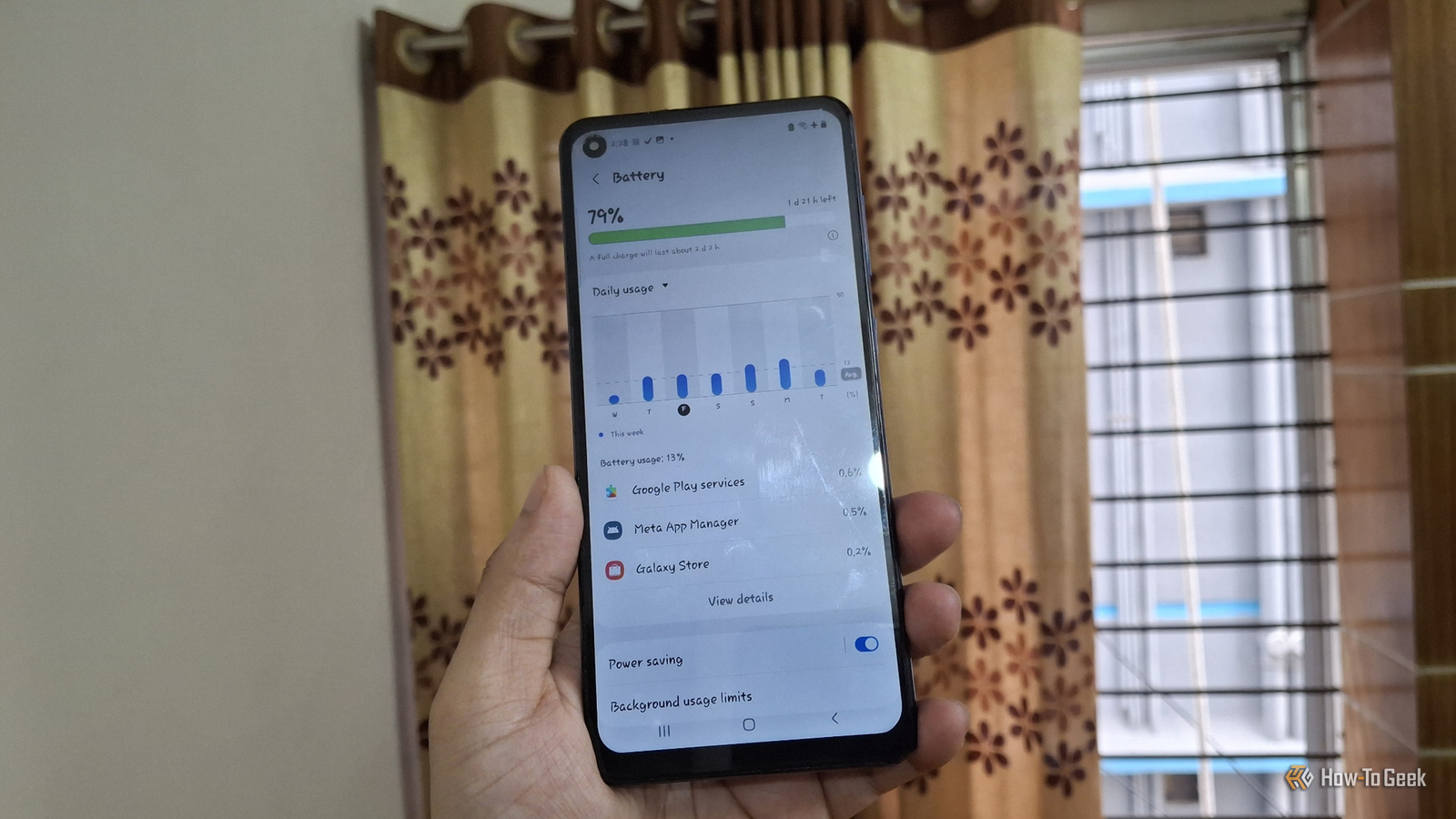
So, I went to Settings -> Battery and device care -> Battery to see which apps use the most power.The list was interesting, to say the least.It varied each day of the week depending on my usage.
The top spots always go to Google Play Services, Meta App Manager, Galaxy Store, and Google Play Store.I don't usually open any of these that much.They wake up in the background to sync data and update apps while the phone sits on my desk.
Close Here's what surprised me most, though.Samsung's own diagnostic data sharing also runs quietly in the background.In other words, your Samsung phone is draining battery to collect data, and turning off just two settings stops it.
If you want to find more details, a free battery monitor app like AccuBattery can track how fast your battery drops while the screen is off.That will give you more insights regarding your phone's battery health.Use Power saving mode for everyday tasks Samsung's built-in saver trades a little speed for longer battery life As a Galaxy phone owner, Power saving mode is the first thing I reach out for.
It stops background apps from using the network and trims a few settings that quietly eat power.On my old phone, I try to always keep it on.The quick way to turn it on is from the Quick Settings panel.
If you want to have a bit more control, head over to Settings -> Battery and device care -> Battery and tap Power saving.You can change the CPU speed and brightness decrease settings from here.Just make sure it's not turned on when you don't want to trade performance for battery life.
For example, I turn it off when taking photos or shooting videos since it will make the camera sluggish and may even result in bad takes.Related I forced my Galaxy phone to stop checking location networks and added hours to my battery life Stop your battery from silently depleting.Posts 4 By Cory Gunther Turn off the wireless features a Wi-Fi-only phone doesn't need No SIM doesn't always mean the phone stops looking for a signal I don't have a SIM card on my A21s.
So, I thought that its cellular radio just keeps quiet.I was wrong.Even without a SIM, your phone might be searching for cell towers to handle emergency calls.
The fix was simple.I turned on Airplane mode from Quick Settings.It turns off the Wi-Fi, so just turn it back on again.
I haven't done any hard math, but from my experience, I've found my phone saves a reasonable amount of charge overnight when this mode is on.Some other things I also turn off are Bluetooth and Location when I don't need them.If you want to do even more, you can also turn off Nearby device scanning by going to Settings -> Connections -> More connection settings.
Related Extremely Fast Charging Doesn’t Ruin Your Battery (But This Does) As it turns out, charging speed isn't the enemy.Posts 9 By Ismar Hrnjicevic My old Galaxy is ready whenever I need it now All of these are small and quick fixes.But when you add them up, they can significantly improve your old Samsung Galaxy phone's battery life.
When in full idle mode, my phone can last about a week, and with some light use, 3–4 days.If you don't want your phone's battery to die fast, consider using necessary precautions, like charging your phone to 80% only.
Read More