Years ago, I was excited to try Bottles and finally run Windows applications on Linux.That excitement didn't last long.I got disappointed pretty quickly and eventually switched to open-source alternatives for my Windows apps.
I haven't really looked back since.Add How-To Geek on Google Add as Preferred Source Follow on Google Discover For anyone unfamiliar with it, Bottles is a Linux application that helps you run Windows software through Wine.Instead of wrestling with Wine configurations yourself, you get a graphical interface for creating separate environments, installing dependencies, and managing Windows applications and games.
Recently, I heard people talking about Bottles' latest improvements, so I thought it deserved another fair chance.I decided to test it on Ubuntu 26.04 with a few familiar programs and games.I wasn't expecting every Windows application to magically work, but I wanted to see how much trouble I'd have getting them running.
The results were a mixed bag, to say the least.Here's my honest experience so you can decide whether Bottles is worth trying on your Linux machine.Bottles has picked up some useful improvements Two recent updates gave me a reason to give it another shot The last time I used Bottles, the interface felt dated, and the overall experience was a little sluggish.
I don't remember every detail of that attempt, but I do remember losing interest pretty quickly.Coming back to a much more polished interface was a pleasant surprise.Version 67.5 addressed issues with installing dependencies and fonts, downloading bottle templates, and managing shortcuts.
It also improved importing and restoring bottles, making it easier to move your Windows environments around without losing your files.Then came version 67.6, which added a few quality-of-life features I can appreciate.You can now move or duplicate bottles to custom locations, add notes to remember what you've configured, and sort your bottle library by name.
There are also new DPI scaling options, giving you more control over how Windows applications look on your Linux desktop.None of these changes promises that every Windows program will suddenly work perfectly.But they make Bottles feel like a more polished and thoughtfully designed tool, rather than something you have to wrestle with before you even get to your applications.
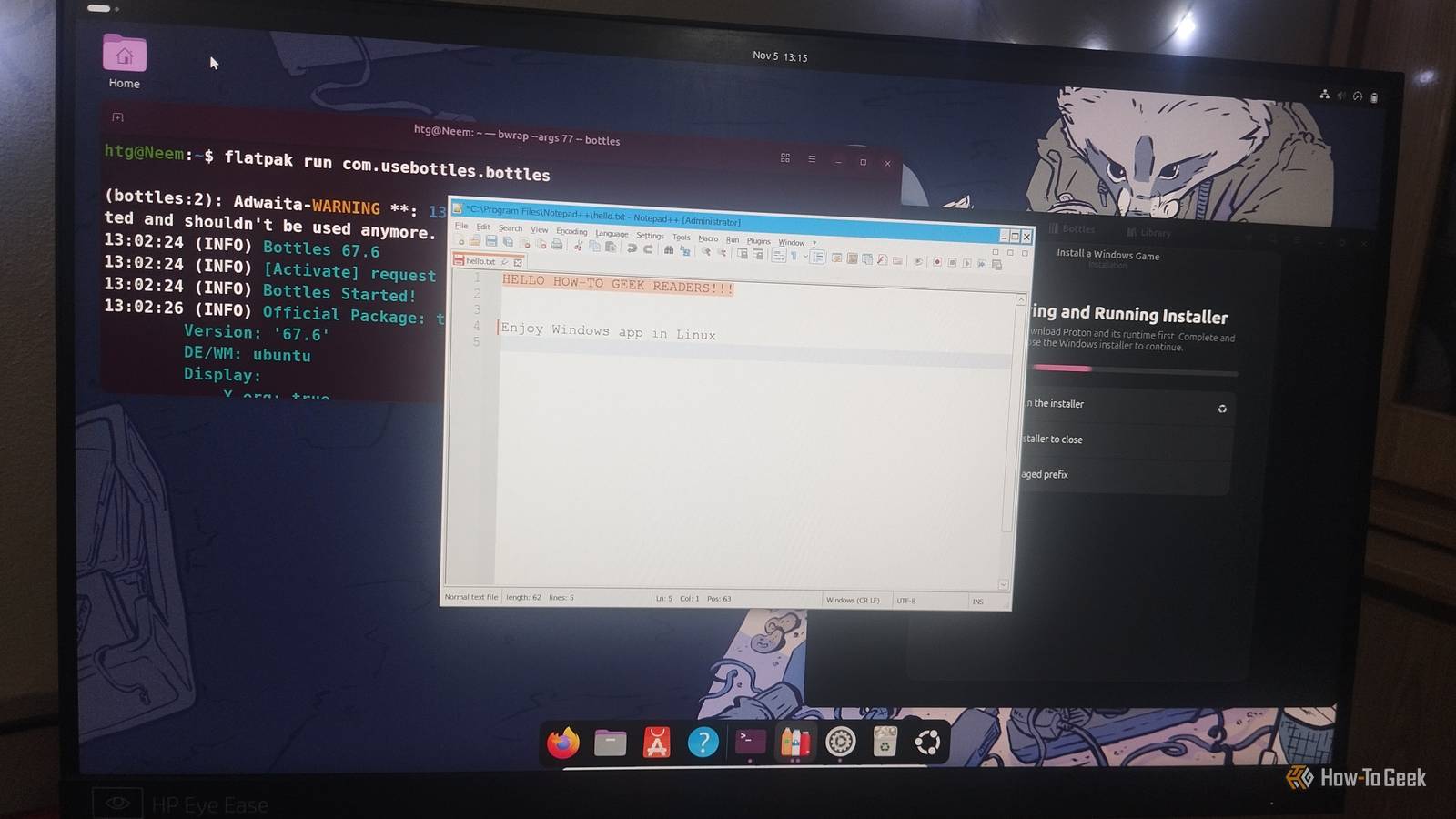
Installing Bottles on Ubuntu 26.04 Flatpak gets you up and running without much fuss I installed Bottles through Flatpak on Ubuntu 26.04.If you don't already have Flatpak installed, open the Terminal and run: sudo apt install flatpak flatpak remote-add --if-not-exists flathub https://dl.flathub.org/repo/flathub.flatpakrepo sudo flatpak update --appstream Then install Bottles and launch it: flatpak install flathub com.usebottles.bottles flatpak run com.usebottles.bottles Bottles lets you create separate environments for different types of software.I created Application bottles for Notepad++ and Paint.NET, and Games bottles for the titles I wanted to try.
I used the Soda runner for my tests.Think of each bottle as its own little Windows environment.Keeping applications separate makes it easier to manage their settings and dependencies without one program's configuration interfering with another.
My Windows application works better than expected Notepad++ and Paint.NET handled everyday tasks without much trouble Close I started with Notepad++, one of those Windows applications that has plenty of Linux users wishing it had a native version.I created an Application bottle, installed the Windows version, and opened it without any major issues.Notepad++ behaved as expected, and I could use it for my usual daily work, including writing article pitches, brainstorming ideas, and putting together first drafts.
Find and Replace, switching language modes, and working with multiple tabs all worked as expected.I also tried running a 100-line macro to see how it handled a slightly heavier task.The editor became unresponsive for a few seconds while the macro ran, but it eventually finished successfully.
It wasn't instant, but it wasn't a deal-breaker either.Paint.NET was another application I wanted to try.I installed it in a separate bottle, and it worked well in my testing.
It's an image editor with considerably more going on than a basic text editor, so getting it running was another welcome result.These tests suggest that Bottles can be a practical option when you need a particular Windows application on Linux.Two successful applications don't guarantee that every Windows program will behave the same way, but they gave me a much better first impression than I remembered.
Windows games were a different story Plants vs.Zombies and Purble Place exposed some compatibility problems Close After testing desktop applications, I moved on to games.I was curious whether Bottles could handle a couple of older Windows titles, so I tried Plants vs.
Zombies and Purble Place.I also had another game in mind, but things didn't exactly go to plan.I first tried Plants vs.
Zombies.The game launched, but the experience quickly became frustrating.Loading took an unusually long time, gameplay was painfully slow, and I eventually couldn't close the game normally.
Ubuntu became unresponsive, and I had to force a restart.It was hardly the relaxing gaming session I had in mind.Purble Place was a little more encouraging.
It launched, and I could enter its mini-games.I absolutely loved playing it again.It wasn't lagging, and I was completely swept up in nostalgia.
Unfortunately, the text rendering was a mess.The main menu text looked blurry and distorted, while some confirmation prompts displayed blank spaces or placeholder-looking text instead of readable words.I could still select Yes or No (muscle memory really does come in handy), but figuring out what I was agreeing to wasn't exactly ideal.
I tried installing additional fonts and checking the display scaling settings, but neither helped.I can't confirm whether the issue came from the game itself or something in my setup.Interestingly, Notepad++, Paint.NET, and Plants vs.
Zombies displayed text correctly, so this didn't appear to be a general font-rendering problem across Bottles.I then moved on to HoloCure: Save the Fans.Unfortunately, its installer wouldn't work in either my regular Games bottle or the UMU setup I tried.
At that point, I'd had enough experimenting for one day.None of these games gave me the experience I wanted.Plants vs.
Zombies made my system unresponsive, Purble Place had text-rendering problems, and HoloCure refused to install.Getting a game to launch is one thing; getting it to run properly is another.My testing was limited to these titles, so I'd love to hear about your Bottles gaming success stories or recommendations for games I should try.
I'm all ears! Bottles is worth another try, but it isn't magic Bottles impressed me with how well it handled Notepad++ and Paint.NET, but my gaming experience was far less successful.Plants vs.Zombies struggled badly, Purble Place had text-rendering issues, and HoloCure wouldn't install.
Your results may differ depending on your hardware, Wine runner, and the software you're trying to run.Still, Bottles has come a long way, and I'd happily use it again when I need a Windows application on Linux.Just don't expect every app or game to work perfectly.
Read More