Google Keep is where I dump everything I need to remember.Grocery items, article ideas, errands, and random thoughts all end up in different notes.Finding anything later is a whole other problem.
Add How-To Geek on Google Add as Preferred Source Follow on Google Discover I never thought I needed AI to manage my notes.I could make lists and check things off myself, right? But I’ve been using Gemini to handle more of my daily tasks, and I started wondering why I was still managing my messy Keep notes the old-fashioned way.So I gave Google Keep a brain.
I let Gemini build my lists No more typing every item myself I usually remember groceries when I’m nowhere near the kitchen, so I add them to Keep whenever I get a chance.The same goes for packing lists before a trip or random tasks I need to finish for work.That’s where Gemini comes in.
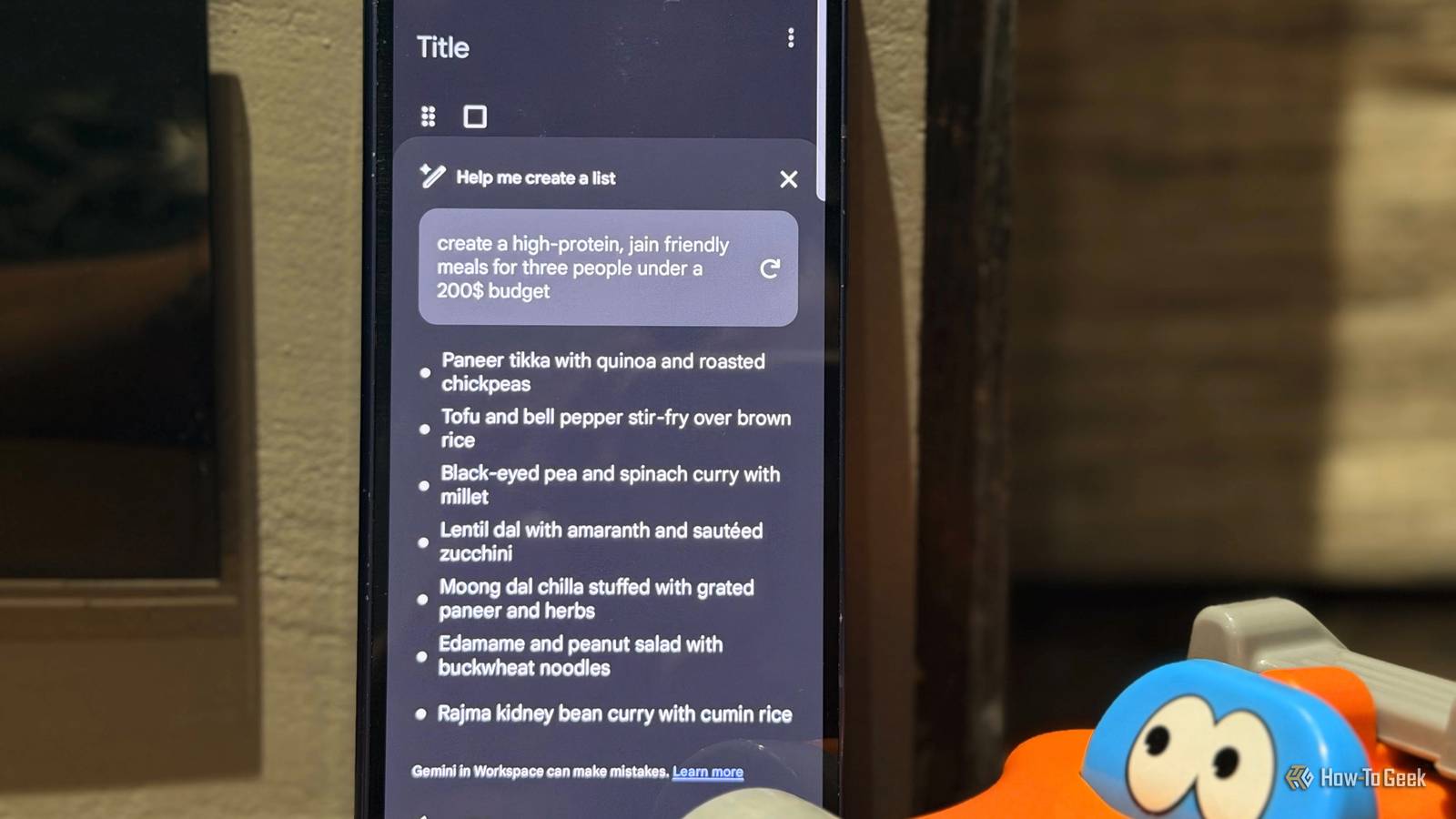
Google Keep has a feature called Help me create a list that turns my request into ready-made checklists.To try it, I open Google Keep, tap the Create (+) button, and choose Help me create a list in the bottom-right corner.Then I enter a prompt like, “Create a grocery list for a week of high-protein, Jain-friendly meals for three people under a $200 budget.” Trip planning is where I’d use this the most.
Instead of typing out every item, I just enter, “Create a packing list for a two-day family trip to Delhi with my husband in December.” Gemini can suggest essentials I might overlook, such as a jacket for cooler weather.Keep turns my prompt into a checklist I can review and save.Now, I spend less time making lists and more time getting ready for the trip.
Isn’t this amazing and hassle-free? I connected Gemini through Google Workspace My notes and AI finally work together I already use Gemini for planning and finding information, so connecting it to Google Workspace felt like the next step.It lets me bring my Google Keep notes into the conversation instead of jumping between apps to find what I need.To set it up, I open Gemini, go to Settings, select Apps, and connect to Google Workspace.
I make sure Google Keep access is enabled, then start a chat and use @Google Keep in the Gemini app.For example, I save article ideas in Keep whenever something interesting pops into my head.Later, I can ask Gemini to help me find those ideas or summarize notes before I start writing.
I can ask “@Google Keep, find the note where I saved travel details for our Delhi trip in December” instead of scrolling through all my notes.My notes are already there; now I have another way to find and use them.I stopped rebuilding my lists Gemini can add what I forgot to include Close My grocery list is never really finished.
I’ll add milk, bread, and vegetables to Google Keep, then remember guests are coming over on Saturday and I need lasagna sheets and cheese.Sometimes, I end up making a new list because it’s easier than sorting through old notes.Now, I can ask Gemini to add those missing items to my existing list.
I open the Gemini app on my Samsung Galaxy Z Fold 6, type @Google Keep, and enter, “Add lasagna sheets and cheese to my list called Weekly Groceries.” This way, I don’t have to recreate the whole list every time I remember something.I still verify that Gemini updated the correct note, but at least I don’t have to start from scratch.I turned my scattered ideas into a plan From random notes to actual progress Article ideas often pop into my head when I’m watching TV or randomly chatting with my husband.
I quickly save them in Google Keep, so I don’t forget, but later I’m left with a pile of notes on Google Maps features, Samsung settings, and Android Auto tricks.When it’s time to write my next article, choosing what to work on first can be tricky.That’s where Gemini can help.
I open the Gemini app, type @Google Keep, and enter “Find my saved notes about tech article ideas, group them by topic, and suggest which three I should work on first.Explain your choices.” Gemini can help me compare the ideas it finds and give me a starting point.I still decide what to write, but I don’t have to manually go through every note just to figure out what deserves my attention next.
Related I Use Google Keep Daily, and These 5 Features Deserve More Attention Google Keep can do more than just hold your grocery list.Posts 7 By Kabir Jain Gemini cleans up my chaos (sort of) It’s pretty amazing how AI can take a few things off my plate without taking over completely.I still like being in control of my lists, but I’m happy to hand over the boring bits.
Google has barely scratched the surface of what Gemini could do with my apps, and I’m curious about what comes next.If this is where things are now, I can’t wait to see what Google lets Gemini do next.Related I’ve used Google Keep for years, and these 5 features still surprise me Keep keeps my life together.
Posts 4 By Sanya Shah
Read More