I have a soft spot for old software Easter eggs, especially the ones that make you wonder what developers were doing when nobody was looking.Excel 97 has one of my favorites: a secret 3D flight simulator hidden inside a spreadsheet.And, yes, I went looking for a way to play it.
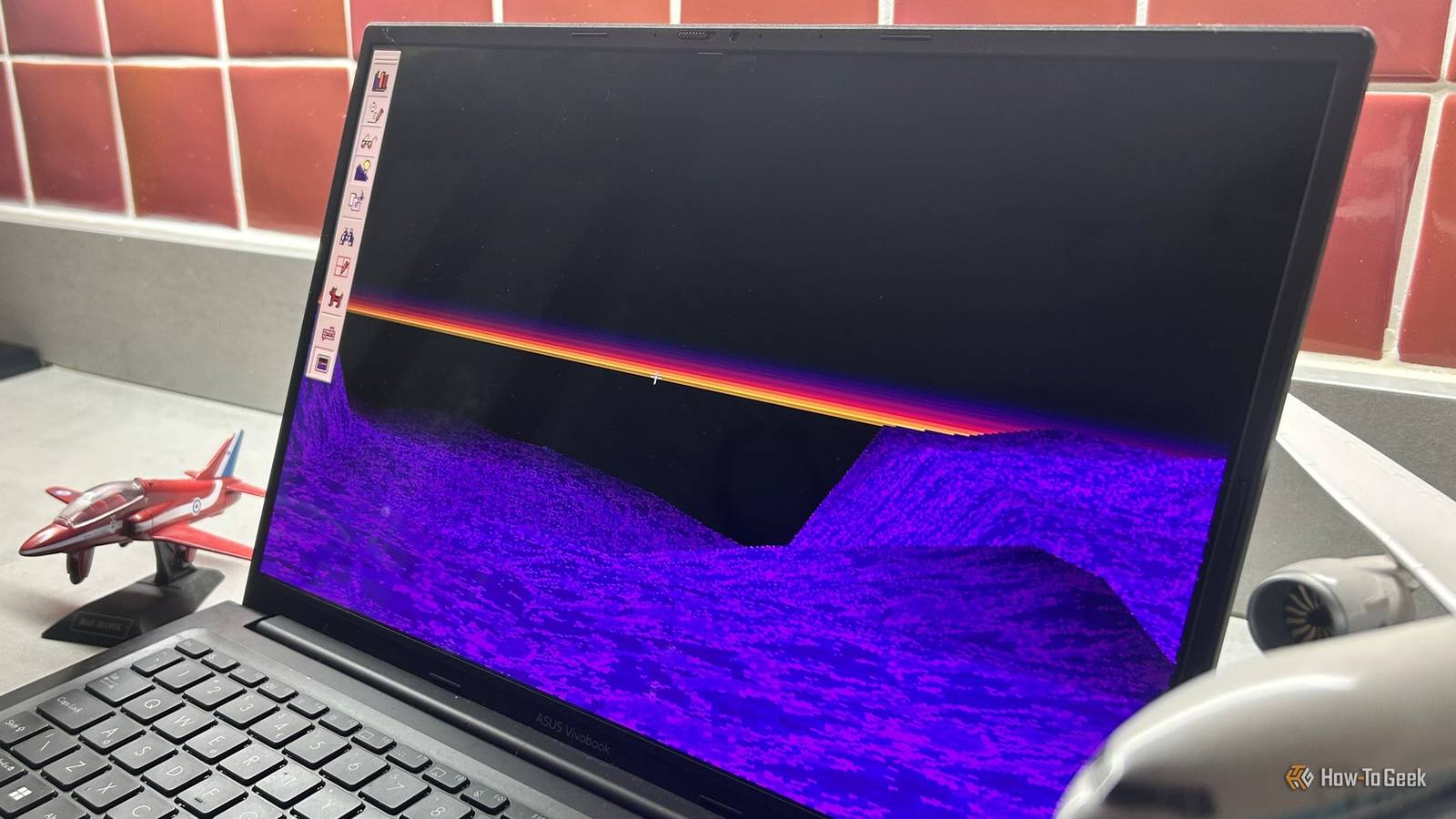
Microsoft hid a flight simulator inside Excel 97 It was one of Microsoft's strangest Easter eggs The first time you see it, the last thing you might think is "Excel." The Easter egg drops you into a strange purple 3D landscape, where you can fly around looking for a monolith containing the names of the developers who made it.It isn't exactly Microsoft Flight Simulator.No airports, instrument panels, or passenger jets.
Instead, you're essentially piloting some kind of flying machine around a surreal, blocky landscape from the depths of 1990s PC gaming.And that's exactly why I love it.Excel 97 wasn't the first Microsoft program to contain a hidden game.
Excel 95 had the Doom-inspired Hall of Tortured Souls, and Easter eggs were surprisingly common in software during this era.Someone faithfully recreated Excel's flight simulator for the web You don't need a copy of Office 97 to play it You can still experience the original Easter egg if you have a working copy of Excel 97, but you'd need the old software and a suitable setup to run it.Fortunately, there's another way to experience it today.
Jeremy Sachs, better known online as Rezmason, created a fully open-source browser-based recreation that he describes as a "faithful reproduction of that original Easter egg." You can also view the project on GitHub.Sachs reverse-engineered the original and rebuilt it for modern browsers, preserving the look and behavior of the 1997 version as closely as he could.I took Excel's secret flight simulator for a spin It is every bit as weird as I hoped Close The first thing that struck me was just how strange the landscape looks.
It's a purple, angular world stretching toward a hazy horizon, with the sort of primitive 3D graphics that probably looked incredible on a Pentium.Before I went anywhere, I started poking around the settings.Pressing T toggles true-color textures, B switches to a bird's-eye view, F makes the game fullscreen, and M turns the music on.
Naturally, I also had to try the modernized true-color version.It looks better.Much better, in fact.
The textures are smoother, and the whole thing is easier on the eyes.But I didn't like it as much.There's something slightly wrong about making a 29-year-old Excel Easter egg look good.
The chunky, limited-color graphics are half the fun.Once you smooth everything out, some of that wonderfully weird 1990s character disappears.The controls are straightforward.
Move the pointer to change direction, click the left or right mouse button to speed up or slow down, and press Space to brake.The recreation also supports touch controls if you're playing on a phone or tablet.I had absolutely no idea where I was going, but that's another part of what makes it so endearing.
There are no airports to find, no missions to complete, and no helpful instructions telling me where I should be heading.I'm just pointing a cursor at a purple landscape and hoping something interesting appears.Eventually, I started to get the hang of it.
Sort of.The landscape stretches off into the distance, with hills and valleys appearing and disappearing through the haze.Every so often, I'd convince myself I recognized something, only to realize I'd probably just flown past the same bit of terrain five minutes earlier.
Then I realized why I kept losing my bearings: I was flying through a world that repeats itself.If you keep flying in one direction, you'll eventually find yourself back where you started.It's a surprisingly effective way of making a tiny game world feel much bigger than it really is.
This was surprisingly sophisticated for 1997 The weird graphics make a lot more sense now After flying around for a while, I started to appreciate how much the developers squeezed out of a 1990s PC.The original simulator used software rendering rather than relying on the 3D graphics hardware we take for granted today.The computer's processor had to do the heavy lifting, which makes the fact that I was flying around a 3D landscape inside Excel seem even more ridiculous.
The developers had to design the landscape around those limitations.The terrain is mapped onto a 64-by-64 grid, with each square carrying information about its height and appearance.The original also used a 256-color palette, which helps explain why the graphics look so distinctive.
Once I knew how the thing was built, the graphics made a lot more sense.That short horizon isn't just part of the retro aesthetic: the game had to limit how much of the world it drew at once.The narrow field of view helped, too.
What initially looks like an arbitrary collection of strange 1990s graphics turns out to be a collection of compromises that let the whole thing run on a much older PC.Sachs has a theory about why someone would put this much work into an Excel Easter egg.He thinks it may have been a way for one of Microsoft's developers to learn GDI and DirectDraw while experimenting with real-time software rendering.
It's a pretty good explanation for why someone would put so much effort into something that nobody actually needed.Microsoft eventually stopped hiding games in its software The era of elaborate Easter eggs didn't last Excel 97 wasn't the last time Microsoft hid a game in Excel.Excel 2000 had its own 3D game, Dev Hunter, but elaborate Easter eggs like these were becoming increasingly rare.
According to Sachs, Microsoft was relatively tolerant of these hidden creations at the time, as long as they weren't directly connected to the main program.Then, in 2002, Bill Gates announced that Trustworthy Computing had become Microsoft's highest priority, with the company putting greater emphasis on security, reliability, and protecting customers' data.Trustworthy Computing is the highest priority for all the work we are doing.
Sachs sees that change in Microsoft's development culture as one reason elaborate Easter eggs disappeared.And that's what makes Excel's flight simulator so much fun to rediscover.It's a tiny snapshot of a very different era of software development, when a spreadsheet could apparently contain a secret 3D flying game just because someone thought it would be fun to make one.
The Easter egg hunt isn't over Elaborate Easter eggs in Excel might be a thing of the past, but that doesn't mean the fun has to stop.There's plenty more to find in Windows and Microsoft Office.If you're anything like me, you'll probably end up looking for more Google Easter eggs or digging into Python's hidden surprises.
After all, half the fun is finding something you weren't supposed to be looking for.
Read More