Driving is my stress-relief activity.I’m the kind of nerd who actually enjoys checking stats and reports, so naturally, I wanted to see what my driving looks like on paper.Add How-To Geek on Google Add as Preferred Source Follow on Google Discover That’s why Samsung’s new Driving Report in One UI 9 caught my eye.
It tracks my trips and driving habits instead of just showing me where I’ve been.Google Maps gets me where I need to go, but it doesn’t give me the same kind of driving breakdown.I wanted to see what Samsung could tell me about my time behind the wheel, so I gave it a try.
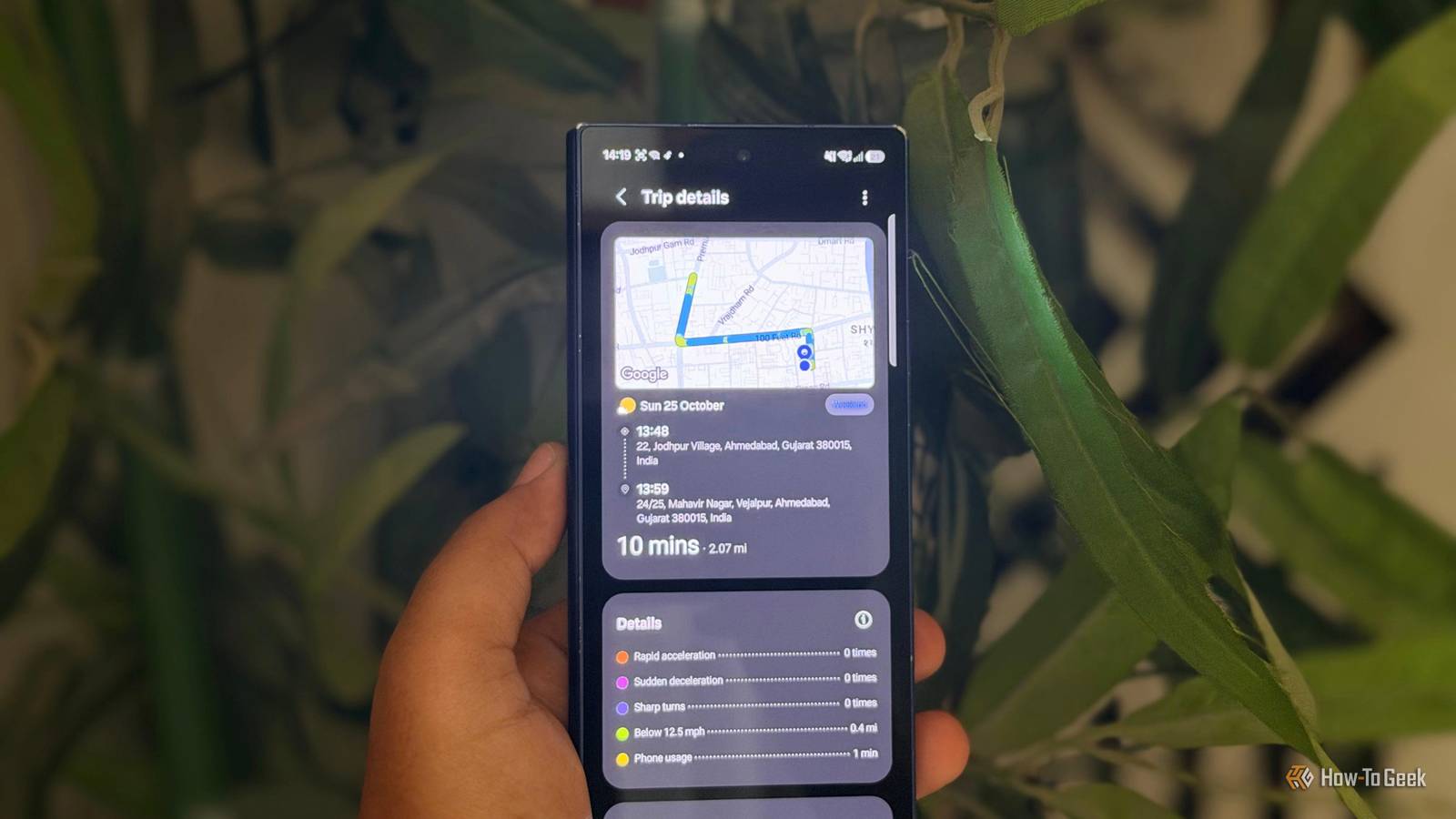
I wanted more than directions Samsung gives me a report card for driving Samsung’s Driving Report isn’t enabled by default, so you’ll need to turn it on first.After that, it starts tracking your trips whenever your Galaxy phone connects to your car via Bluetooth.The report covers the basics, including your route, timestamps, total distance, driving time, and average speed.
I like that it gives me more than just a start and end point.But the driving behavior stats are what make this feature interesting.Your Galaxy phone uses its sensors to detect rapid acceleration, sudden braking, and sharp turns during your trips.
It also tracks how much I use my phone while driving and which apps I use.Oh-oh! I might not like what those numbers say about me.Once I finish a drive, Samsung sends me a notification with the report.
I can check my weekly summary to see information about my recent trips to one place.My brother found this feature useless because he couldn’t care less about his driving stats.But I love checking numbers and reports, so having all this information about my daily drives is right up my alley.
Google Maps tells only half the story I want more than directions and traffic Google Maps already has Timeline, which saves my past journeys if Location History is enabled.I can revisit places I’ve been and see the routes I took.But Timeline focuses on where I’ve been, not how I’ve driven.
It doesn’t offer the same driving-behavior breakdown as Samsung’s Driving Report.Samsung goes a step further by tracking events such as sudden braking, rapid acceleration, and sharp turns.That’s the kind of data I actually want to check.
Of course, Google Maps is still my go-to for navigation and traffic updates.I just can’t get the same driving report from Timeline.I’d love to see Google add something similar.
Until then, this feature gives me another reason to appreciate the features built into my Galaxy phone.How to turn on Samsung’s Driving Report Check these settings before your first drive Close To turn this feature on, head to Settings -> Connected devices -> Driving report on your Galaxy phone and follow the setup prompts.Make sure your car is paired with your phone over Bluetooth and automatic trip recording is enabled.
I was curious to see what my first report would look like, so I took my usual drive to the nearest grocery store and checked the report afterward.I like that I didn’t have to remember to start recording before leaving home.Related 5 Samsung settings I change on every new Galaxy Ask me why.
Posts 1 By Sanya Shah I’m not sure everyone will like this Samsung needs your location to track every trip When I checked my Driving Report after a trip, I realized there’s one catch I wouldn’t ignore.Samsung needs access to my location all the time to track my drives.That means granting location permission isn't just about using the feature while I’m behind the wheel.
My phone can also access my location in the background.That’s a tough sell if you’re careful about your privacy.There’s also the potential battery impact to consider.
Background location tracking can use extra power, but the actual drain depends on your phone and how you use it.I enjoy checking my driving reports, but I’m not sure everyone will find them worth this trade-off.If you don’t care much about driving stats, you're probably better off leaving the feature off.
Samsung tracks my drives, but Google Maps still wins Checking my Driving Report is the last thing I do before going to bed, and I even show it to my brother whenever I get a chance.I’m hoping he’ll get curious enough to start checking his own driving stats, too.But I still prefer Google Maps for getting around.
I just wish Google would add a few driving stats to Timeline.It already saves my trips, so adding a driving report would make Timeline much more useful for people like me who enjoy looking at numbers after a drive.Samsung has shown me what I’m missing, and Google doesn’t need to reinvent the wheel here.
A few extra stats in Timeline would make me very happy.I still love you, Google Maps.Related 5 Google Maps features I wish I'd discovered sooner Because Google Maps had more to offer.
Posts By Sanya Shah
Read More