
When we launched the Arduino UNO Q board on October 7th, we knew it was something special: a dual-brain board that brings together the real-time control of a microcontroller with the power of Linux.But even we’ve been amazed by how quickly the community has embraced it, and started pushing its boundaries in wildly different directions.In just a few months, hobbyists, educators, researchers, and engineers have been exploring what’s possible when you combine accessible hardware with serious computing power.
From teaching tools to gaming experiments, 3D printing controllers to AI inference, here’s a glimpse at the incredible diversity of projects already running on Arduino UNO Q.Arduino UNO Q is a springboard for anyone’s idea – from students to engineers Scratch is a free, visual, block-based coding language designed by MIT for beginners of all ages.Arduino’s Senior Software Engineer Davide Neri was able to run it directly on Arduino UNO Q to control the physical world – LEDs, buttons, Arduino Modulino nodes, and more – with optional AI model integration.
Best of all, it’s accessible from any device via a browser, making it perfect for classrooms and beginners.Check out the project on GitHub.At the Software Freedom Kosova 2025 Conference (SFK25), Jo Hinchliffe from the FreeCAD community met Arduino Field Engineering Evangelist Julián Caro Linares and discovered that FreeCAD runs beautifully on Arduino UNO Q.
After a straightforward installation, Hinchliffe found that “FreeCAD performed really well on the device.” Read more on the FreeCAD blog.Reddit user trianburner took their Arduino UNO Q and connected it to their Tronxy X5SA Pro 3D printer running Klipper.After building a Linux driver for the CH340 USB-to-serial adapter, they reported it’s “working flawlessly!” They’re now exploring how to flash Arduino UNO Q’s onboard STM32 MCU to run the entire printer with Klipper on a single board.
See the full post on Reddit.Tishin “Titiano” Padilla, founder of VTM OS Platform, achieved something remarkable: running a 1-billion-parameter language model (Gemma 3) completely offline on Arduino UNO Q.This isn’t a cloud API call – it’s local inference with token generation and logic handled entirely by the Qualcomm Dragonwing QRB2210 processor.
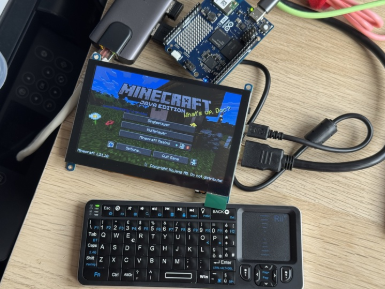
Padilla now has both architectures installed simultaneously: the Gemini API for cloud-based complex reasoning and a native, offline LLM for total autonomy and privacy.As he puts it: “This is what real Edge AI looks like.” Read his full post on LinkedIn.Gaming, gaming, and more gaming The team in Arduino’s Malmö office has been hard at… play! UX Researcher Jacob Hylén turned Arduino UNO Q into a Minecraft server with a creative twist: he replaced the Arduino IDE with a writable book in-game for programming the STM32 chip.
Using Warp AI, he wrote a script that extracts data from the book into a .ino file that’s compiled and uploaded with arduino-cli.It’s a brilliant blend of gameplay and hardware programming.Meanwhile, UX Research intern Johan Lundgren and Interaction Design/AI Gen Content specialist Karl Söderby successfully ran Super Mario 64 on the board, using about 700 MB of RAM and 40-50% CPU.
The game ran smoothly, proving Arduino UNO Q’s gaming chops.Last but not least, the classic question had to be answered: “Does it run DOOM?” Redditor magichorsie delivered the answer with DOOM3 (2004) running natively on Arduino UNO Q – complete with in-game health displayed on the board’s LED matrix.Using an App Lab app and RouterBridge, health data passes to the STM32 and displays in real-time.
Audio comes through a Bluetooth speaker, and the whole setup uses the DHEWM3 source port compiled directly on the board.See it in action on Reddit.Pick Arduino UNO Q and run with it! These projects represent just a fraction of what the community has accomplished in these first few months with Arduino UNO Q.
From educational tools that make coding accessible to experimental setups that push the limits of what a board this size can do, the diversity is inspiring.We’d love to hear what you’re building with your Arduino UNO Q.Whether it’s practical, playful, or somewhere in between – share your projects with us on Arduino Forums, Project Hub, or social media using #RunningOnUNOQ.
Your project might be featured in our next roundup or newsletter!
.

