I've been a fan of Dygma's keyboards since their very first Raise keyboard.I have used a Dygma Raise or Raise 2 for the better part of five years now, so when the opportunity came about to try out the Sonsei, I jumped at it.This uniquely portable columnar keyboard surprised me in quite a few ways.
But, at the end of the day, I really love this little keyboard, even though there's a big learning curve.Dygma Sonsei 8 Form factor Compact one-piece columnar keyboard (split-style layout, does not separate) Switch options Gateron KS-33 low-profile: Strawberry Chocolate (linear, default), Silent Red (linear), Banana Chocolate (tactile), Bamboo (clicky) Colorways Black Backlight Per-key RGB (56 individually addressable LEDs) The Dygma Sonsei is an ultra-compact 56-key keyboard that's designed to sit over your laptop's keyboard, providing you an ergonomic, programmable columnar keyboard that you can travel with.Pros & Cons Compact design sits securely on top of a laptop keyboard Gateron Strawberry Chocolate switches are surprisingly great Four programmable thumb keys per side Bazecor customization carries over from the Raise Five Bluetooth profiles plus wired mode Columnar layout takes time to relearn Doesn?t split or tent Bazecor customization requires a wired connection $279 at Dygma Expand Collapse See our process How We Test and Review Products at How-To Geek We go hands-on with every product to ensure it's worth your time and money.
Posts By Justin Duino Price and availability The Dygma Sonsei is available to purchase directly from Dygma for $279, with other add-ons available at the time of purchase.Specifications 8 Form factor Compact one-piece columnar keyboard (split-style layout, does not separate) Switch options Gateron KS-33 low-profile: Strawberry Chocolate (linear, default), Silent Red (linear), Banana Chocolate (tactile), Bamboo (clicky) Colorways Black Backlight Per-key RGB (56 individually addressable LEDs) Construction One-piece body with anodized aluminum key plate, recessed rubber feet Dampening Multiple layers of sound-absorbing material Keycaps Double-shot PBT, low profile Supported operating systems Windows, macOS, Linux, iOS, Android Hot-swappable Yes Battery capacity 2,000mAh Connectivity USB-C wired, Bluetooth (up to 5 devices) Typing angle Flat, with no tenting or tilt adjustment Software customizability Bazecor (remapping, layers, macros, RGB); configuration requires a wired connection Dimensions 299 x 140 x 18.4mm Weight 393g Price $279 Number of Keys 56 Brand Dygma Num Pad No Battery life Up to 40 days with LEDs off; 8+ hours at 100% brightness Expand Collapse The Sonsei is built to sit on top of your laptop It's a travel ergonomic keyboard first and a desk keyboard second Close The Sonsei is a very unique little keyboard—and I do mean little.I've used a lot of keyboards over the years, and I love just how compact the Sonsei is.
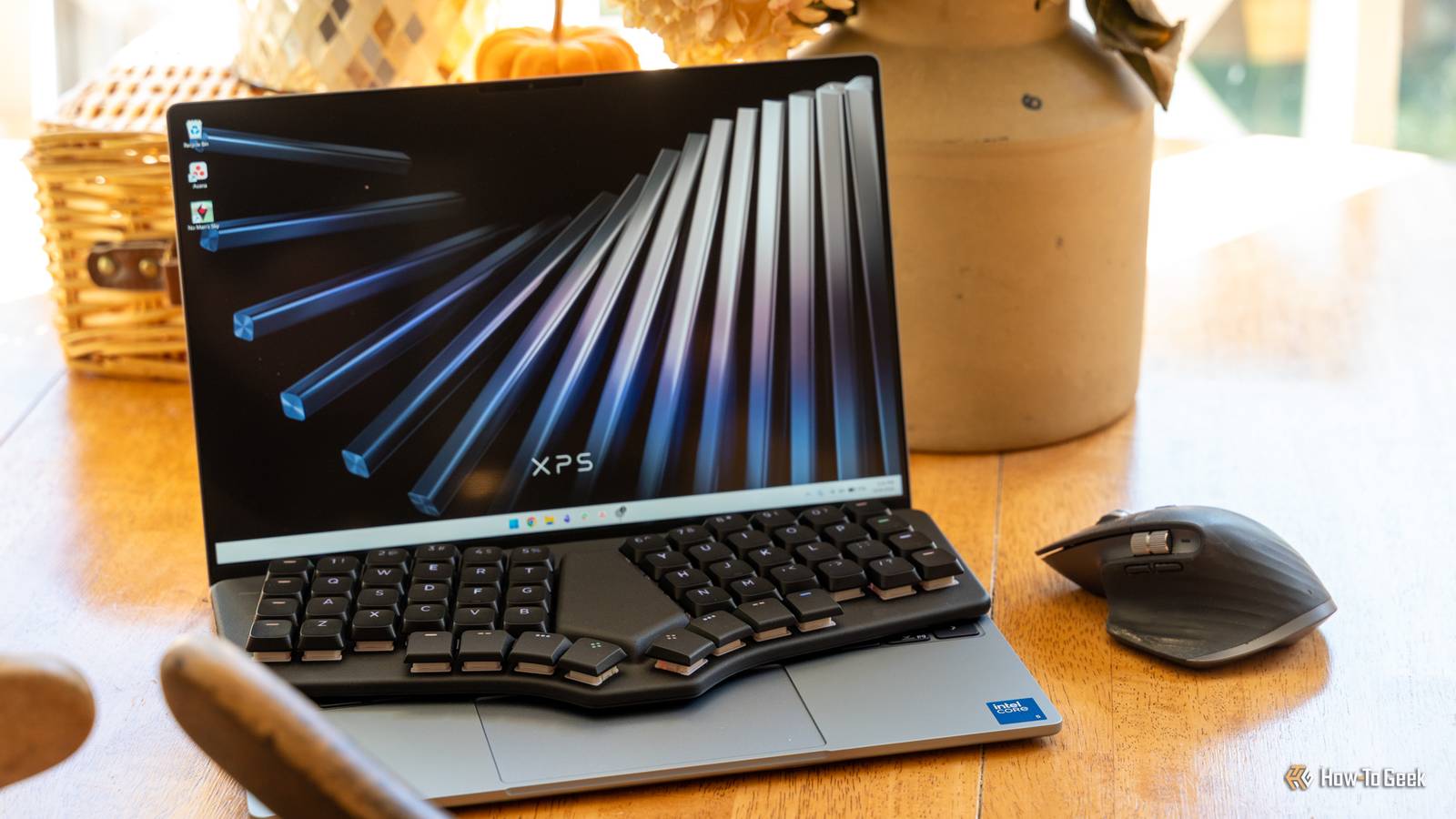
That's because Dygma designed this keyboard for a very specific reason—to sit over your laptop's existing keyboard.This keyboard was built to be portable, and I think Dygma definitely achieved it.In the marketing images, I saw the Sonsei sitting on top of a laptop keyboard and immediately thought "I've always wanted to travel with my Dygma keyboard but it's just too bulky!" Now, the Sonsei isn't exactly like my Raise 2 that I type on every day.
It's a columnar layout (which I'll dive into further into the review) and it doesn't split or tent.However, it's still a Dygma keyboard, which means it uses Bazecor just like my Raise 2, which is one of my favorite features of my Raise 2.I actually tried out using the Sonsei on my 14-inch MacBook Pro and Dell XPS 13 and it worked flawlessly.
It didn't click any keys, it cleared the trackpad, and was very stable.Of course, this will vary depending on the laptop you use, as some laptops have the keys sticking up higher than others.However, the Sonsei is also great for typing on an iPad or at the desk.
It has five Bluetooth profiles that are easy to switch between and also has a wired mode if you want to plug it in either to charge while using or just use without Bluetooth.Really, the Sonsei is a great portable keyboard.I've tried using it at my desk, and it there, but I really prefer my Raise 2 because it's tented and split, two things that the Sonsei simply can't do.
The Strawberry Chocolate switches are the star of the show I kinda wish I could put these in my Raise 2 When Dygma offered to send out a Sonsei for review, I said sure! I also didn't ask them for anything specific—I wanted to experience the Sonsei how they wanted me to.I was not disappointed.My Sonsei has the default switches, which are Gateron Strawberry Chocolate.
Though linear, which I normally hate, I absolutely love these switches.They're very satisfying to use and even have a little "thock" in my opinion.The low-profile switches don't feel like I expected at all, and that's a good thing.
However, the Sonsei is hot-swappable if you want to change them out.This goes along with the same theme that Dygma's other keyboards offer—the full ability to customize.If you know up front that you don't want the Strawberry Chocolate switches, Dygma can ship your Sonsei with Gateron Silent Red, Gateron Banana Chocolate, or Gateron Bamboo switches pre-installed for an extra cost.
Four thumb keys per side leave plenty of room to customize Bazecor works exactly like it does on the Raise One of my absolute favorite features of my Dygma Raise 2 is the thumb keys, and Dygma kept them on the Sonsei.This compact keyboard only has 56 total keys, which is about 13 shy of what my Raise 2 has.However, like the Raise 2, the Sonsei has four dedicated thumb keys on each side for a total of eight customizable keys.
Why do I love these keys so much? Well, it lets me build the keyboard for how type instead of how others type.For instance, I only have one of the eight thumb keys on my Raise 2 programmed to spacebar because that's all I need.It sits under my right thumb and that's how I hit space.
This lets me have the other seven keys for various other tasks, like a one-click copy and paste, a play/pause button, a layer shift, the command key, and a mute button.The Sonsei allows me to have this exact same functionality, though the overall layout is a bit different on the Sonsei than my Raise 2.Bazecor is still how you customize the Sonsei, which I'm very happy to see.
I've grown fond of Bazecor to customize my keyboard and am happy that Dygma stuck with it.The only annoying thing is that the Sonsei has to be plugged in over USB to customize in Bazecor.Thankfully it's USB-C, but it's still a little frustrating.
Columnar takes time, even after years on a split keyboard Staggered muscle memory is the hard part, not the keyboard Close I went into using the Sonsei thinking, "I've used Dygma keyboards for years, this won't be all that difficult to learn!" I was wrong.You see, I've been using a split Dygma keyboard for probably five years now.The key separation and tilting on the Sonsei aren't what threw me off.
It was the switch from staggered keys to columnar.If you've never heard of columnar or staggered, let me explain.Typical keyboards have the keys staggered from each other.
The top row is offset from the one below it and so on.This actually comes from the days of typewriters, where the keys couldn't be one on top of another because of the levers that handled actuating the typebars back then.Like most things, we carried the ways of analog into the digital future, and thus, the staggered layout was kept.
However, as time went on, people realized that staggered wasn't the more ergonomic layout.There are a lot of other layouts out there, but columnar is one of the more popular.It puts the keys staggered vertically instead of horizontally, leaving the keys in perfect vertical columns.
When I first moved from a standard keyboard to my Raise, it took me close to a week to adjust.I started adjusting in a few hours, and then within a day or so I was mostly adjusted, and within a week I was typing like normal.I expect the Sonsei to be very much like that, except with a bit of a longer learning curve.
Not because it's more difficult, but because, at least for me, the Sonsei isn't a daily-driven keyboard and is for traveling.So, it'll just take a bit longer for me to fully acclimate to it and be as proficient as I am on my Raise.Overall though, I do like the columnar layout and I think it'll grow on me over time.
It's just different than I'm used to.Should you buy the Dygma Sonsei? I think the Dygma Sonsei keyboard has a fairly limited market in that it's a premium keyboard with a non-traditional layout.Overall, I think the $279 keyboard is built fantastically, has awesome software, and great ergonomics.
However, it does require relearning for daily use if you don't already type columnar.I do want to say that if you're already used to columnar, then the Sonsei I think would be a fantastic ergonomic travel keyboard for you.I really have no main complaints outside of it not tenting or splitting, but I understand why Dygma left those features out in favor of a slimmer, more portable build.
However, if you are just looking for a portable keyboard that you can pick up and start using, and you've never used a columnar keyboard before, then the Sonsei might not be the best option for you then.It definitely will take some adjustment time.Dygma Sonsei 8 Form factor Compact one-piece columnar keyboard (split-style layout, does not separate) Switch options Gateron KS-33 low-profile: Strawberry Chocolate (linear, default), Silent Red (linear), Banana Chocolate (tactile), Bamboo (clicky) Colorways Black Backlight Per-key RGB (56 individually addressable LEDs) The Dygma Sonsei is an ultra-compact 56-key keyboard that's designed to sit over your laptop's keyboard, providing you an ergonomic, programmable columnar keyboard that you can travel with.
$279 at Dygma Expand Collapse
Read More