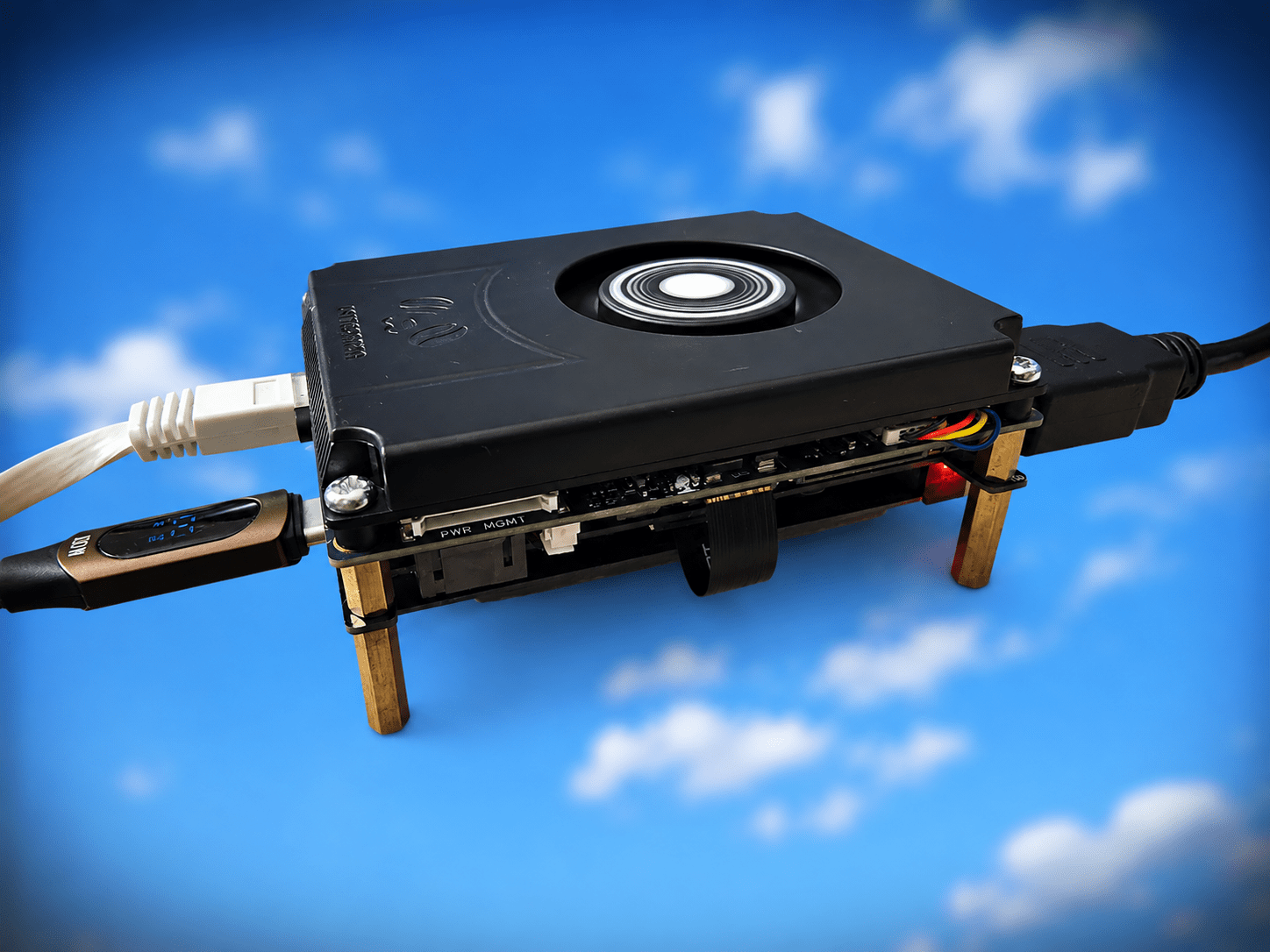
I had the original Latte Panda AGES ago and at the start of 2026, the company sent me their new(ish) Latte Panda IOTA complete with add-on extensions including a UPS board (minus batteries).M.2 M-Key expansion board, 4G board, active (fan) cooler and POE hat.All good stuff.
the IOTA name comes from their intention that the board is good for IOT projects – in which case I’m not sure why it came complete with Windows 11.Forgive the title image – I’m sick of looking at photos of my untidy desk with gadgets on it… so I took the liberty of removing the background.Anyway I’ll not bore you with the whole detailed assembly thing – others have done that by now.
Why the delay? Wel, I totally underestimated our house-move – to another home initially with no electricity or water – and that’s the least of it.Hoever I’m settled into my new office now and I figured it was about time I pulled out this N150-based board..has to be good, right? And it is.
I ran up the built-in Windows 11 which works just fine – that is after struggling for hours to get their UPS to work with some 18650 batteries I had lying around.Why the rush to use the UPS? Well, after mounting the heatsink, I tried plugging the board into one of my many USB-C power adaptors.Erm, no.
It seems the USB power input needs to be PD at 12-15 volts max.I thought all of mine did that – and at suitable current – no.Not one of them (but read on).
The alternative – a 12v input with the 4-pin connector – they didn’t give me the female side of the connector and I didn’t want to go soldering to the board.My various connectors are still in packing boxes.So, UPS it is.
I added 3 batteries and found a suitably powerful 12v supply from an old PC.Once all hooked together, I plugged in my KVM Pro, possibly the best KVM I’ve ever had – and that saved me hooking up a monitor, keyboard and mouse.After all, this was going to be a quick project.
The board came up with Windows 11 but that kept crashing every time I moved it ever so slightly.Took me an hour to figure out that the side the board was sitting on was the side with the TINY power and reset buttons protruding by just a mm or so.My bad.
Eventually I figured that out and after giving Windows and Youtube a good hammering (great) I figured it wsa time to see how well the UPS performed.With the UPS showing 100% battery charge in Windows 11, I confidently went off to do a Windows update.Half way through the board died.
Why? UPS had shut down even though my batteries were at 3.8v, 3.9v and 4v respectively.Batteries or UPS fault? Only one way to find out – I’ll have to spend 20+ euros for a replacement set from Amazon.I was fully prepared to buy a set of decent panasonics – except that Amazon.es only have brands from unknown far-eastern suppliers – nothing I recognised.
They even had one 18650 battery claiming 9600mAH – someone’s having a laugh? For now, I’m running on mains.For a while, I played with Windows 11 until the novelty wore off.After all, I have mini-PCs for that.
I decided I might use the board for Home Assistant which is currently on a mini-PC – that would free up another mini-PC.Easy to install – yes… but the IOTA has 64GB if EMMC (takes me back to my Raspberry Pi days), really a little more would be good, I thought, so having wired up the M2 expansion and having an M2 drive lying around (1TB, WAY overkill but sitting doing nothing so why not).Installing Home Assistant was SO easy.
The HA site suggested grabbing Linux (and provided a link) and I put that ISO on a handy memory stick.I did that on my PC and plugged the USB stick into the Panda.I soon had a Linux-based Panda running – and the HA site said to get the .img file for HA – again dead easy (I’m not showing off – REALLY easy) – and install it on whatever drive I wanted to use.
I figured I’d keep Windows for a rainy day and copied the img file to my M2 drive which was plugged into the Panda motherboard.All good stuff and REALLY easy thanks to excellent instructions on the HA website.In no time at all I had HAOS running on the Panda.
Transferring HA from my Mini PC wouild be a simple matter of restoring my latest HA backup to the Panda, turning off my original installation and making the Panda IP address match the original.And that ‘s when it hit me.Despite recent drastic hikes in the price or TAM etc due in part to the AI revolution, mini-PCS have shot up in price… so at first fglance, the Panda seems the sensible solution… the power of a PC in a kit form.
But then I took a look at prices – LattePanda IOTA + heatsink +decent PSU + case + M2 expansion + M2 drive… we’re looking at well 200 euros or more depending on where you buy stuff.You can STILL get a ready-made mini-PC for less than 200 euros… If you have the IOTA and are looking to give it a job – then yes – great.If you have to buy everything – then a sub-200 euros/dollars mini-PC would be my choice.
Ok, 2 days later after a break at the beach.I took the plunge and backed up my HA setup to the IOTA.THEN it hit me, my HA is on a UPS already – all I had to do was find a SUB supply that actuallyIS true PD (power delivery).
I stumbled on a GREENCELL 65W job, PD at up to 20w at 3A… and it WORKS – no more need for the UPS.I have HA up and running properly – an exact replica of my MiniPC vresion.I just had to make sur the MINIPC wsa turned of – reboot my Ethernet-based Zigbee2MQTT coordinators here and in the UK *Tailscale on the router) and of COURSE re-authenticate with Tuya (that’s a known issue people have ben griping about in the last few days) and it’s all working a treat.
I just happened to have a SUB lead with a neat OLED power display on it so I know for sure the LattePanda is using 9-11w.Just need a case that handles the LattePanda IOTA + active cooler and M2 adaptor… the official case is not cheap but I’m sure AliExpress will have something..Ok, last update for the night..
I’ve disconnected the display output and USB to the KVM – and the LattePanda is using a mere 6W according to my USB-C lead….magic..
Read More