There’s something undeniably cool about the way Hollywood portrays hackers at work.In fact, it’s actually one of the reasons I gravitated toward Linux in the first place.Of course, real-world hacking rarely looks anything like the movies, and Linux doesn’t magically turn your PC into a cybercrime command center.
That said, if you want to recreate that cinematic techno vibe on your desktop, there are a few tools that can help.Here are five of my favorites.Add How-To Geek on Google Add as Preferred Source Follow on Google Discover hollywood The fastest way to make your terminal look like a movie set The first tool for bringing those Hollywood hacker vibes to your terminal is, aptly enough, called hollywood.
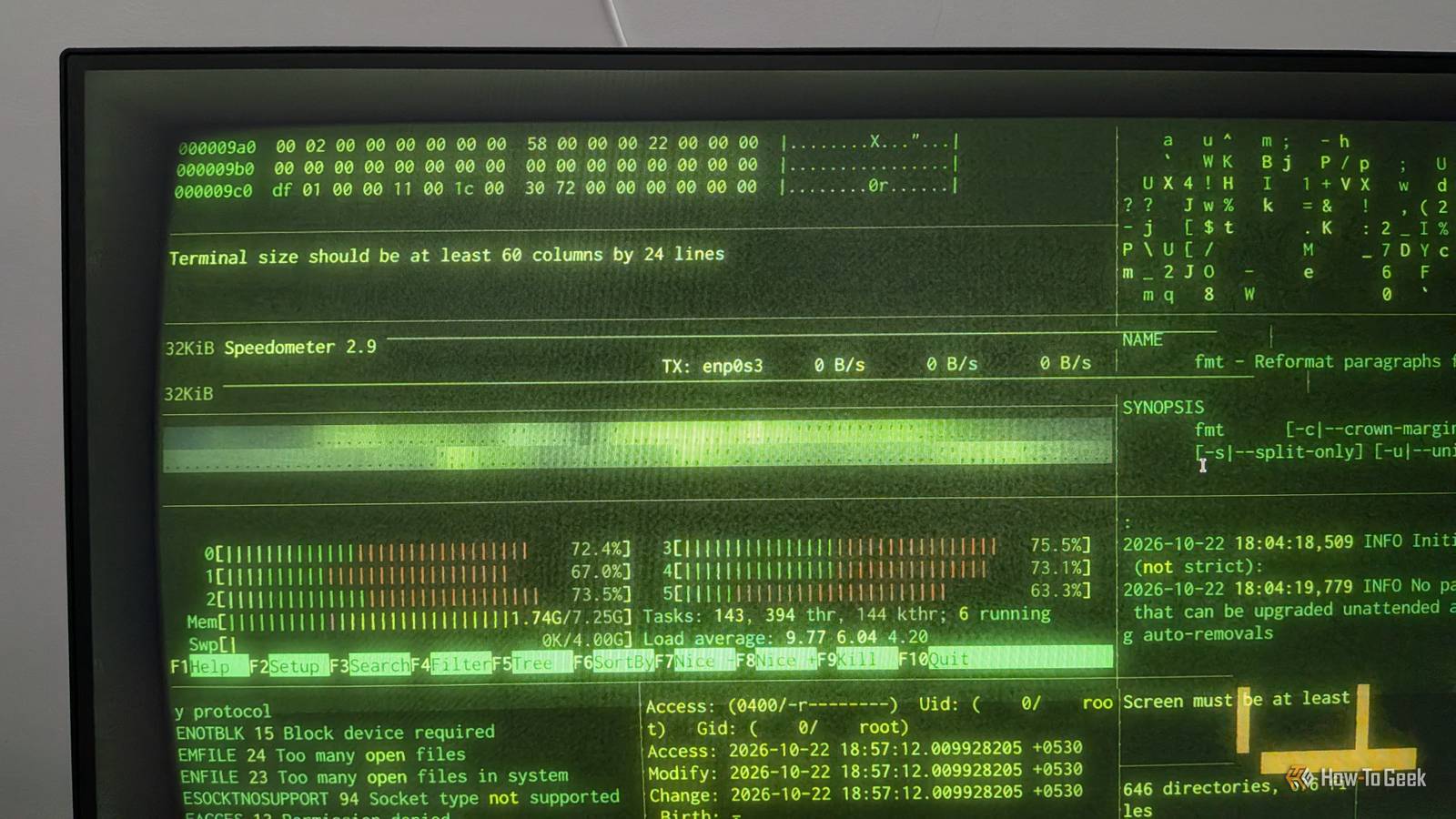
Just open your terminal, type hollywood, and press Enter.Your terminal window will split into a dynamic grid of panes, each displaying a different kind of activity, including a htop-style system monitor, network bandwidth graphs, scrolling log files, ASCII world maps, hex dumps, and colorized source code.The command cycles through 20 different widgets.
The grid layout also changes periodically, so the display never feels static.Of course, none of this represents actual hacking activity.The display is purely for show, but it does make your terminal look like you're in the middle of a serious hacking operation.
In fact, it's convincing enough that the tool has even appeared in television programming, including NBC News and CNBC.hollywood is available in the official repositories of Ubuntu and Debian, so you can install it with the following command: sudo apt install hollywood If you're using a different Linux distribution or operating system, you can also run it through Docker: docker run -it --rm cgr.dev/chainguard/hollywood Some widgets display real information from your system, including logs, network statistics, and running processes.Related These 6 Linux apps let you monitor system resources in style Track system performance, kill tasks, and more with these beautiful resource monitors.
Posts 5 By Faisal Rasool cmatrix For the most famous “hacker” visual ever The green digital rain from is probably the most iconic hacker aesthetic in pop culture, even though it has little to do with actual hacking.That said, if you want to recreate that cascading code effect in your terminal, all you need is the cmatrix command.The effect is also surprisingly configurable.
You can adjust how quickly the text falls, change its color, and even control the speed of individual columns.You can run cmatrix -h or man cmatrix to explore all the available options and customize the effect to your liking.cmatrix is available in the official repositories of most major Linux distributions, so installing it is straightforward.
Use the appropriate command for your distro: sudo apt install cmatrix ## for Debian, Ubuntu, and distros based on them sudo dnf install cmatrix ## for Fedora and Fedora-based distros sudo pacman -S cmatrix ## for Arch and Arch-based distros Related I run terminal commands on my Linux PC from my Android home screen—here's how Turn your Android phone into a powerful control panel for your Linux PC.Posts By Dibakar Ghosh nms (No More Secrets) Turn the most mundane terminal output into a big reveal In the 1992 movie , there's a cool scene in which a screen full of scrambled characters gradually “decrypts” itself into readable text.The nms (No More Secrets) command lets you recreate a similar effect in your terminal.
Simply pipe any command's output into it, press Enter, and you'll see a screen full of random, encrypted-looking characters.Press Enter again, and the characters gradually unscramble to reveal the original output.Here's an example: ls -l | nms Here, the output of ls -l is piped into nms.
The initial output will display a wall of gibberish.You press enter again, and it slowly starts unscrambling itself to show the real ls -l output.Of course, real-world encryption doesn't work like this, but it's a fun effect for impressing your friends or adding some drama to a presentation.
At the time of writing, nms isn't available in the official repositories of many Linux distributions.Fortunately, you can build and install it from source with the following commands: git clone <https://github.com/bartobri/no-more-secrets.git> cd no-more-secrets make nms sudo make install Related What Is Encryption, and How Does It Work? You've probably seen the term "encryption" used around the internet.Posts By Dave McKay genact The most convincing fake on this list Close The commands above are fun, but anyone familiar with Linux or cybersecurity will probably recognize them as fake at a glance.
If you want something more convincing, try genact.It simulates technical tasks such as cryptocurrency mining, kernel compilation, and password cracking, complete with proper terminal output that makes it look like your computer is doing the actual work.Of course, as with the other tools on the list, it’s all for show and no actual operation is running on your system.
The idea is to open a terminal window and run the command with a specific module, e.g., genact -m cryptomining.The terminal will then generate realistic-looking output that simulates a cryptocurrency mining operation.You can find all the available modules by running genact -l, or you can simply run genact without specifying any modules and it'll pick one randomly.
Open a few instances of genact side by side, and it'll look like you're running a complex hacking operation.The easiest way to install genact is through Homebrew.Here's a guide on installing Homebrew if you don't already have it on your Linux PC.
With Homebrew installed, simply run the following command: brew install genact Related The AI hacking era is here, and your smart home is the first target Smart home, smarter criminals.Posts 1 By Adam Davidson cool-retro-term This is the one that ties the whole look together Close Last but not least, we have cool-retro-term.Now, this isn’t a terminal command but rather a proper terminal emulator where you can run commands, including all the ones we just discussed.
The unique thing about this terminal is that it emulates the look of old cathode-ray tube (CRT) monitors, complete with the same phosphor glow, scan lines, and even the screen curvature of a CRT display.This probably does the most heavy lifting when it comes to creating the Hollywood hacker look, since most hacker scenes in old movies were shot on CRT monitors.It’s also highly customizable and includes different themes and effects, such as burn-in, static noise, flickering, and more.
As you can imagine, running any of the above-mentioned commands in this terminal will instantly make them look that much more cinematic.cool-retro-term is available in the official repositories of most major distros, and you should be able to install it with a simple command: sudo apt install cool-retro-term ## for Ubuntu, Debian, and distros based on them sudo dnf install cool-retro-term ## for Fedora and Fedora-based distros sudo pacman -S cool-retro-term ## for Arch and Arch-based distros You can get all of these working on Windows as well Most of the hacker-like commands I mentioned above are exclusive to Linux, apart from genact, which is cross-platform and available on Windows.That said, you can still get the Linux-exclusive tools to work on Windows by using WSL (Windows Subsystem for Linux).
It allows you to run native Linux commands on your Windows PC.Here’s a detailed guide on setting up WSL.Related How to Install the Windows Subsystem for Linux on Windows 11 Linux is easier to install than ever on Windows 11.
Posts By Chris Hoffman
Read More