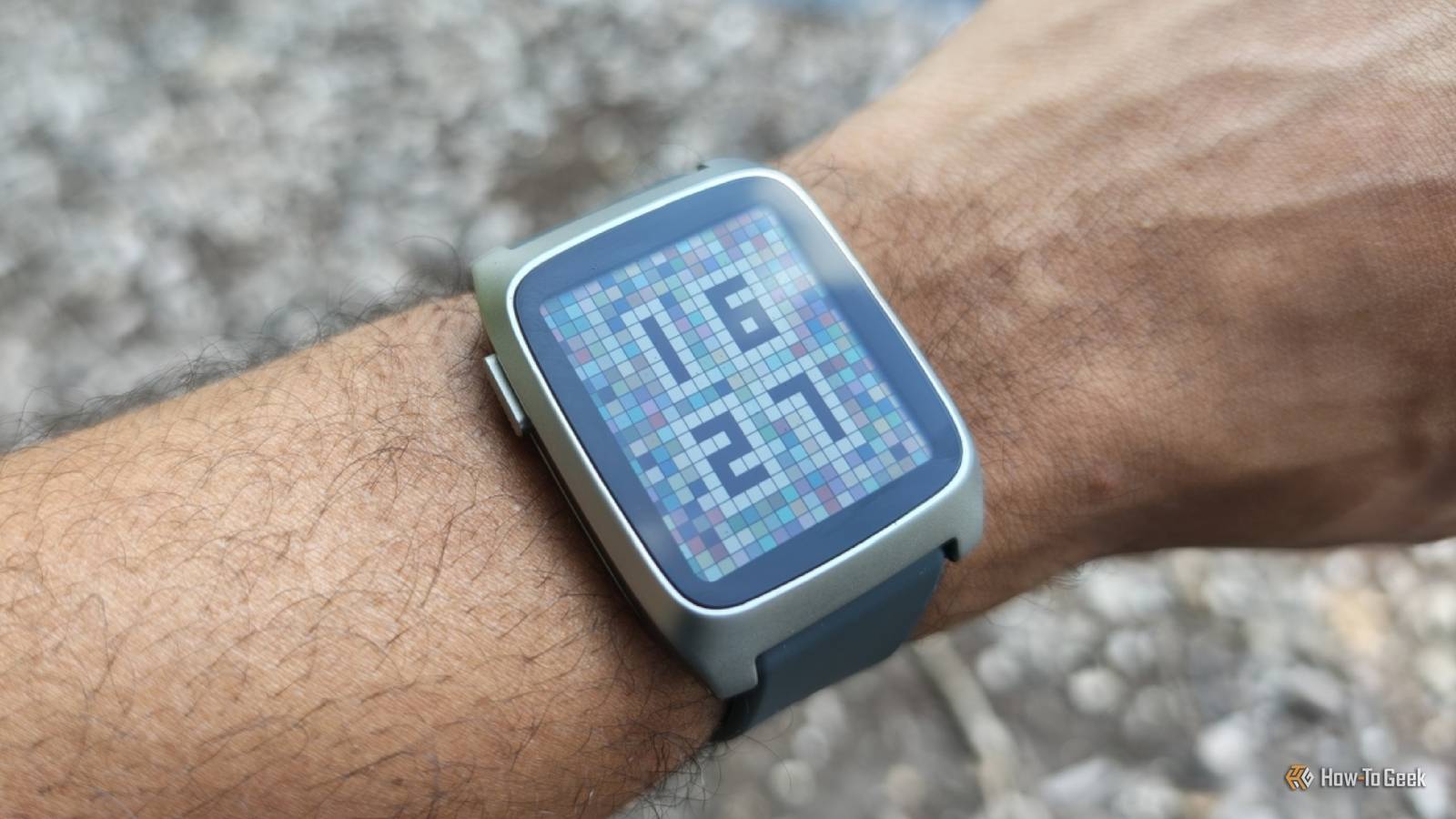
The Pebble Time 2 is the most fun I’ve ever had with a smartwatch.It’s not the prettiest.It’s not the most durable.
It’s not even packed with the most features.But this smartwatch sparks so much joy and is so genuinely useful that I haven’t wanted to part with it from the moment I put it on.Pebble Time 2 9 Brand Pebble Heart Rate Monitor Yes Pebble Time 2 is a modern, redesigned take on the original Pebble Time smartwatch.
This newer iteration has a larger screen, metal frame, heart rate monitor, and a touchscreen.It runs the open source PebbleOS and is compatible with original Pebble apps.Pros & Cons PebbleOS is delightful to use all these years later Thousands of compatible watch faces and apps Battery life measured in weeks Activity tracking is more capable than expected Screen can be hard to see compared to modern OLED screens Less durable than the competition $225 at rePebble Expand Collapse See Our Process How We Test and Review Products at How-To Geek We go hands-on with every product to ensure it's worth your time and money.
Posts By Justin Duino Price and availability The Pebble Time 2 is available directly from Pebble for $225.It comes in four colors: Black/Grey, Silver/Grey, Black/Red, and Silver/Blue.I was sent the Silver/Grey model to review.
Specifications Brand Pebble Heart Rate Monitor Yes Color Screen Yes Battery Life Up to 30 days Operating System PebbleOS Customizable Strap Yes Connectivity Bluetooth Health sensors Step, sleep, heart rate Strap size 22mm Expand Collapse Design is still the Pebble’s weakest link But the right watch face and strap can save it I owned the original Pebble smartwatch released back in 2013, and I didn't like it all that much back then.That Pebble was big, clunky, and had a monochromatic screen.It wasn't the black and white display that ruined it for me—most watches back then lacked color.
To me, the Pebble was just too ugly.It was bulkier than I liked, and the plastic build made it feel like I had a toy strapped to my wrist right as I was getting married, starting my career, and becoming an adult.I had lost interest by the time the Pebble Time came around.
In 2016, Pebble eventually sold to Fitbit, which then sold to Google.Yet, thankfully, when Pebble founder Eric Migicovsky wanted to bring the product back to life, Google agreed to open source the Pebble code rather than resign the software to eventual oblivion.The Pebble 2 Duo was a remake of the original Pebble, cramming modern tech into the original chassis.
The Pebble Time 2 is an updated redesign of the original Pebble Time.Like an HD remaster of your favorite N64 game, it looks the way you remember the game looking, not the way it actually did.The watch has a metal frame paired with plastic sides and four metal buttons.
Those buttons are a big part of what I love about this watch.The interface is designed to be navigated entirely using the three buttons on the right-hand side and the single back button on the top-left.While the Pebble Time 2 does introduce a touchscreen, it’s an optional extra that I use almost exclusively to activate the backlight.
Close The included silicon strap allows for a snug fit, but it isn’t doing the watch any favors.I actively disliked the gray color that mine came in.I wore it for a few weeks, displeased with how it looked paired with any outfit, until I eventually ordered a replacement from Amazon.
Fortunately, the Pebble Time 2 is compatible with any standard 22mm watch strap.After selecting a white, canvas strap that better suits my tastes, the watch as a whole feels elevated.It’s striking how big a difference a strap can make.
The Pebble Time 2 has a 1.5-inch rectangular screen with a 200 x 228 resolution equating to a 202 DPI.Pebble refers to the display as e-paper, but don’t mistake that for E Ink.The screen looks more like a crisp, high-resolution version of a classic digital watch.
To my surprise, the Pebble Time 2 is virtually as thin as my Samsung Galaxy Watch 8, despite looking thicker.Inside, there’s everything needed for step, sleep, and heart rate tracking.There’s a compass, a vibration motor, two microphones, and a speaker.
This is my favorite smartwatch interface It’s intuitive, packed with character, and never lags Close When I ditched my original Pebble, I transitioned to the world of Android Wear (now Wear OS) watches.Those are the only ones I’ve worn since.Modern Wear OS watches feel like smartphones for your wrist.
You swipe down from the top to access quick toggles.You swipe up to open an app drawer.Swiping left or right switches between what amounts to pages of home screen widgets.
PebbleOS is nothing like that.After all, the design is centered around buttons.Tapping the center button opens an app list where you can access music controls, settings, notifications, alarms, and all of your downloaded apps.
You change your selection using the up and down buttons.After only a few moments with the watch, I could quickly get to music controls or view notifications with just a few clicks, without even needing to look at my screen.Scrolling through the app list takes quite a while once you’ve installed more than a handful of apps.
That’s where shortcuts come in.Tapping the bottom button from your home screen opens an app.Tapping the top opens a different one.
You can open a third or fourth app by long pressing either one or the middle button.You can set shortcuts to another set of apps by pressing up or down at the same time as the back button.While I can imagine some power users maxing this out, this is more than enough for my needs.
To my surprise, the interface is actually more animated than that of a Galaxy Watch or Pixel Watch, despite the lower-resolution screen with fewer colors and the weaker processor.There are subtle animations as you select different apps.Some apps, like the default weather app, transition between screens with cartoon-like flair.
Holding down the back button activates Quiet Mode (which silences notifications) and displays a tip-toeing mouse.All throughout the interface, it’s clear that Pebble’s designers know how to laugh and let loose a little.The project is also small enough that there aren’t corporate suits in place to stamp out the cute bits.
The selection of watch faces and apps is staggering Contributions from a community that wouldn’t let their beloved watch die Close Despite a decade with no new hardware, Pebble fans held on to their existing watches and continued to produce apps.One benefit of Pebble’s interface being largely unchanged is that these apps largely all still work on the newest watches.So even though the Pebble Time 2 has only been out for a handful of months, there is already a vibrant ecosystem of software available for the watch.
Close I’ve enjoyed browsing through the downloadable watch faces, the overwhelming majority of which are free.These run the full gamut in terms of quality, with some highly polished and others clearly serving as passion projects that may only appeal to a handful of like-minded folk.Some watch faces directly mirror alternatives you find on Wear OS, like the Concentribble watch face that, while functional on the Pebble Time 2, is clearly a better fit for the upcoming Pebble Round 2.
To my surprise, despite never being a fan of the look of the digital watches in the past, I’ve found myself compelled to pay a few bucks for Lignite’s modern take on one.When you select a watch face or app, the software immediately transfers over to the watch.Since most Pebble software is small, I’ve rarely had to wait more than a few seconds for the watch face to appear and only a tad longer for apps.
It’s possible to switch watch faces directly on the Pebble Time 2, but you need the companion app on your phone to add new ones, remove existing ones, or tweak the ones that are configurable.While I find the Pebble Time 2 to be all the smartwatch I need out of the box, the third-party app selection is a world worth exploring.As someone who meditates daily, the Silent Sit app has been reason enough for me to keep the watch on my wrist, and it’s joined by other options like Breathing Meditation that offer guided breathing techniques.
I’ve also installed an app called Compass that does what you would expect, albeit with questionable accuracy.While I may get the most enjoyment from these smaller, simpler apps, that’s hardly all the watch is capable of.Close Navi App is a full-blown turn-by-turn navigation app that isn’t dependent on your phone.
Rain Radar lets you watch upcoming storms, while Star Watch lets you track the stars.Home Assistant WS brings Home Assistant controls to your wrist, and Homey Flows does the same, except for Homey.If you want to track your water intake from your wrist, you can do that.
If you want Pebble to be the home of your grocery list, it can do that too.Naturally, apps come in differing degrees of quality.Most of these are free, after all, designed to fulfill a need or want rather than to put food on the table.
While I was attracted to RemindMe’s premise of being able to turn my voice dictation into convenient reminders, the app’s text doesn’t format properly on my Pebble Time 2’s screen.In other words, while you can expect most apps to work, they might not all work well.Leave the house without giving battery life a second thought Time between charges measured in weeks, not days Charging a smartwatch every day is not anyone’s ideal, but it’s also perfectly fine.
You get into the routine of placing the watch on a charger as you go to take a shower or before you go to bed, and that’s that.I don’t mind this when I decide to wear my Samsung Galaxy Watch 8, but it also feels like a relief when I decide not to wear the watch anymore, and I’m suddenly free from that daily routine.The Pebble is in a different league, one that can outlast even many Garmin watches.
I unboxed the watch at 83% battery, and I didn’t place it on a charger until 11 days later.Then, after charging up to 100%, I didn’t charge again for another 12.I suspect my new watch face and my heavier app usage likely drained the battery faster the second time around.
Even so, the watch nearly eked out two weeks.These numbers are far short of the advertised (up to) 30 days of battery life, but that’s because I’ve used the watch with nearly all forms of tracking enabled.It’s keeping tabs on my steps, my sleep, and my heart rate.
The Pebble app specifically warns that heart rate tracking will reduce the battery life.I did not have the watch track my heart rate during activities such as walking or running, and I did not increase the polling rate beyond every 10 minutes, so there are ways to drain the watch more quickly.You can also expect to get well over two weeks of battery life by tuning health tracking down or turning it off entirely.
When the watch’s battery drops to 5%, the screen switches to an emergency power-saving mode that merely displays the time and the date.With so little battery, you won’t receive notifications or have access to any smartwatch functionality.Yet even in this state, you will still have a functional watch on your wrist, quite possibly for at least another day.
Such is how slowly the battery drains.The Pebble Time 2 is a smartwatch you can take camping or board a plane wearing without giving a thought to where you left the charger.Unless you’re leaving with a low battery or plan to be gone for weeks, it’ll be just fine.
Don’t buy this watch for fitness tracking But don’t let that stop you from buying it either On the subject of health tracking, Pebble explicitly says not to buy this watch if you primarily want a fitness tracker on your wrist.That’s not the kind of product they’re attempting to build.Nonetheless, the smartwatch exceeded the low expectations this warning left me with.
While I didn’t compare the step and sleep tracking to other wearables, the trend data was consistent and reliable enough for me to wear it with the same confidence as my Galaxy Watch.In other words, it’s good enough for me to tell which days I walked a bunch and which I didn’t.It also does a mostly accurate job of helping me gauge whether I’m sleeping as long as I’d like at night.
The features don’t compare to what you’d get from a Garmin if you’re monitoring various aspects of your workouts, but it’s adequate for those of us who are only after the basics.Should you buy the Pebble Time 2? I didn’t know what to expect from the Pebble Time 2.As I said earlier, I didn’t like mine the first time around.
Yet I’m surprised to see that I like the Pebble Time 2 more than any smartwatch I’ve worn in the many years since.This is despite all the ways in which it’s an inferior product.The screen isn’t as bright or easily viewable as modern OLEDs.
The hardware is easier to scratch.It can answer phone calls, but you’ll still need to carry out those calls on your actual phone.Yet the fact that Pebble OS feels this refreshing and feature-complete, despite changing very little during its decade in stasis, is a testament to how much Pebble got right the first time and how much the industry has gotten wrong.
A smartwatch doesn’t have to merely be an extension of your smartphone.It could just be a good standalone watch, and the Pebble is precisely that.If you’re not quite happy with every other smartwatch, then I can’t recommend the Pebble Time 2 highly enough.
Pebble Time 2 9 Brand Pebble Heart Rate Monitor Yes Pebble Time 2 is a modern, redesigned take on the original Pebble Time smartwatch.This newer iteration has a larger screen, metal frame, heart rate monitor, and a touchscreen.It runs the open source PebbleOS and is compatible with original Pebble apps.
$225 at rePebble Expand Collapse
Read More