Are you looking for some ways to tinker with your Bambu Lab 3D printer? You're in luck! Even though Bambu has made some functions a bit harder to access, there's actually a of ways to tinker with your Bambu Lab 3D printer, and here are three of my favorite projects.Bambu Lab X2D Combo The Bambu Lab X2D Combo is a mid-range 3D printer with dual-nozzle 3D printing for faster print speeds and better support printing.The nozzle reaches 300°C while the actively-heated chamber hits 65°C which is perfect for engineering-grade filaments.
The printer comes with Bambu Lab's signature ease of use, AI fail detection, and has a maximum print volume of 256 × 256 × 260 mm.The combo package comes with the AMS2 multi-material system and filament dryer.$899 at Bambu Lab Expand Collapse Bambu Lab P2S Build Volume 256x256x256mm Printing Speed 600mm/s The Bambu Labs P2S 3D printer is ready to go out of the box and can have you printing within 15 minutes.
It features up to 20-color printing with the AMS unit, has an upgraded built-in camera for remote monitoring and time lapses, and has an enclosed body for printing even high-temperature filament.$549 at Bambu Lab $549 at bhphotovideo $550 at Micro Center Expand Collapse Control your entire fleet of Bambu printers with Bambuddy LAN control doesn't have to just enable OrcaSlicer compatability While Bambu does have its own farm management software, it leaves a lot to be desired.So, the community came up with Bambuddy, and it's actually pretty phenomenal.
This isn't the first time Bambuddy has been mentioned at How-To Geek, and it definitely won't be the last.If you've never heard of Bambuddy before, it's a self-hosted printer management platform for Bambu Lab printers.If your printers are already in LAN only mode, then you'll definitely want to utilize Bambuddy as a replacement for Bambu Cloud.
While it's not a drop-in replacement, it does offer a lot of similar functionality.For starters, Bambuddy can be accessed in a web browser to start, stop, check on, or manage a print job running on any of your printers.If you want to open it up behind a reverse proxy, it supports that.
Want to leave it local only? It works that way, too.The Bambuddy interface is quite simple to use, though it's extremely powerful.The dashboard simply shows you what your 3D printers are doing in that moment.
If they're busy, available, and even what filament is loaded if an AMS is connected, Bambuddy shows it all.You can set up Bambuddy as simply or complex as you want.On the simple side, it can just monitor your 3D prints from a single web dashboard, showing you the status of your printers and giving a quick access button to the camera.
On the complex side of things, you can use Bambuddy to stage prints throughout your farm, so it automatically starts a print as soon as a new printer is ready.It can also be used as a tool to send prints to multiple printers at one time.Bambuddy is fully open source, which means you can make any modifications you want to it.
I deployed Bambuddy in my homelab for a while to test out LAN-only mode, and made a few modifications that made it easier to use.I have a close friend who runs a 70+ printer 3D printing farm who also uses (and modified) Bambuddy.He modified Bambuddy to make it so Bambuddy would send a signal to all printers to shut the internal lights off five minutes into a print.
When a print is complete, it turns the light back on, and if there's an error, it flashes the light.This allows him to look down his rows of 3D printers and see the status of every printer in the farm at a glance—something that Bambu Lab's own software would never allow you to do.Let your Bambu Lab printers control your smart home with Home Assistant Your smart home becomes smarter when paired with a 3D printer Another super fun tinkering project to do with your Bambu printers is to integrate them with Home Assistant.
When I put my Bambu printers into LAN-only mode, I wanted to be able to monitor it through a mobile app where it felt native.Bambuddy is nice as a website, but a mobile app definitely helps, and Home Assistant is here to save the day.You see, with the Bambu integration in Home Assistant, you can access basically every function of the Bambu printer in a dashboard.
I built out a custom dashboard that showed me several things, including the camera feed, what file was being printed, how long the print had left, and the temperature of the printer.I was really only using Home Assistant as a monitor for my printers, but the integration can do so much more.Let's say you have an RGB light by your printer.
It can turn green when it's ready to print, yellow when actively printing, purple when a print is completed, and flash red if there's an error.Of course, you can specify what colors you want for what action.However, the sky's the limit here.
Home Assistant is such a robust platform that it can completely extend your Bambu Lab 3D printer's capabilities.I even had Bambuddy connected to Home Assistant, and then had Home Assistant handling all my mobile notifications for me.So, I'd get a notification when a print started, status updates at 25%, 50%, 75%, and completion, and even a picture of the completed model at the end of the print.
All without using Bambu Lab's cloud once.Dry your filament and print at the same time with the SUNLU AMS Lite Heater SUNLU stepped in to save the day Close While the first two projects here focused more on tinkering that you do on the software side of things, I wanted to include one project that had to do with hardware.Everyone loves that the new AMS 2 Pro features built-in filament drying, and even the original AMS has somewhat of filament drying capabilities with moisture-absorbing pellets.
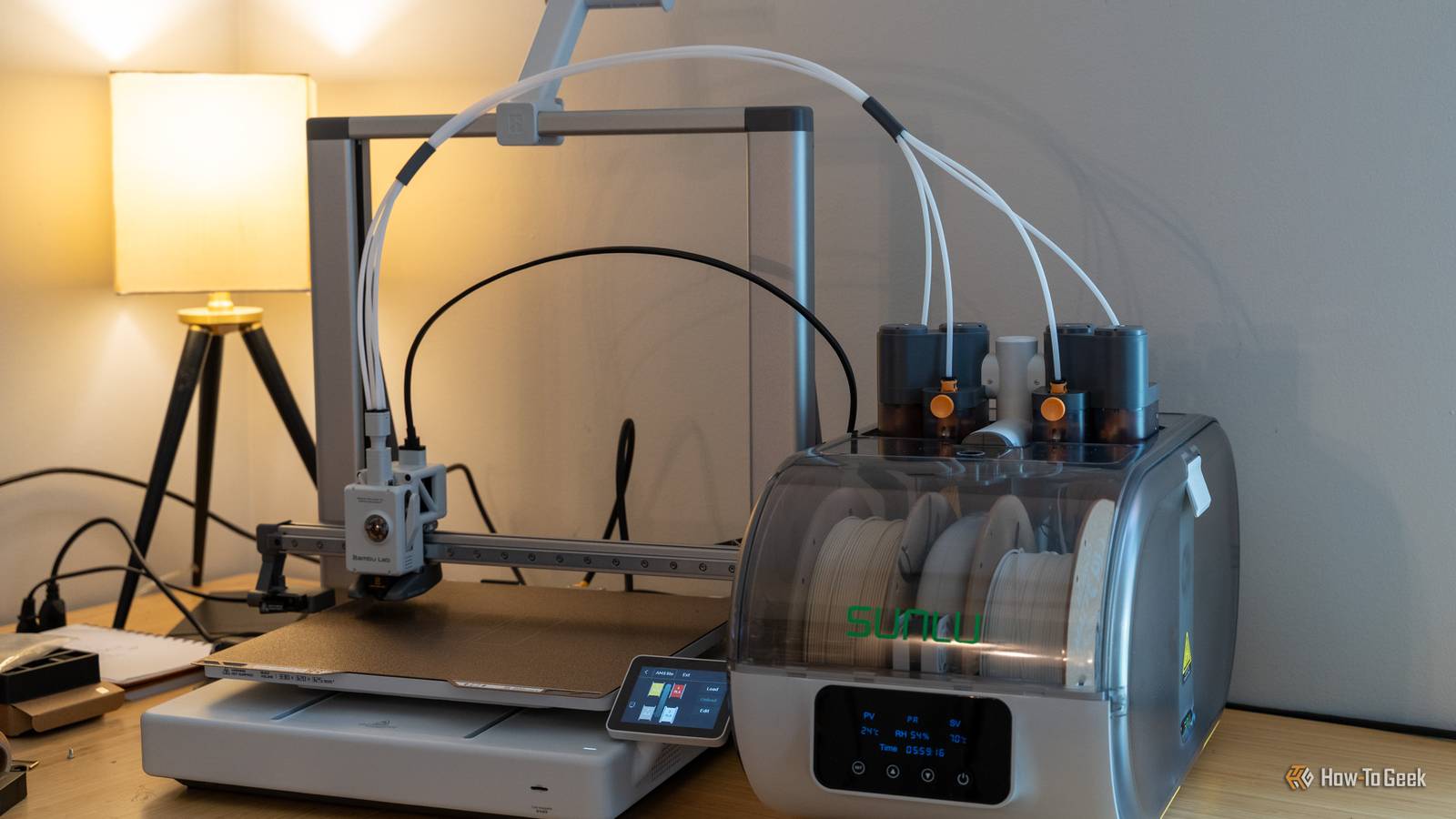
The AMS Lite, on the other hand, has been left out in the cold—pun intended.That's why SUNLU developed the AMS Lite Heater, and I think it's an absolute game changer for those who need to keep their filament dry but only have an AMS Lite.This type of tinkering is actually pretty lightweight, but the payoff is huge.
My SUNLU AMS Lite Heater only took about 15 or so minutes to install.SUNLU's installation video is straightforward and easy to follow.The nice thing is, it preserves basically all the OEM parts of the AMS Lite, and just gives it a shroud to live in.
Once you have it set up, the AMS functions as normal, and you just turn the dehumidifier on whenever you need it to.SUNLU even has a relative humidity function that will kick the system on when the relative humidity rises above a certain percent, and shut off when it falls below a certain percent.It's fairly hands-off.
Loading filament is a little more cumbersome with this setup, but if you live in a high humidity area, it'll be well worth the tradeoff.SUNLU AMS Lite Heater The SUNLU AMS Lite Heater is an accessory for all AMS Lite units.It installs in about 15 minutes and adds active filament drying to your Bambu Lab A1, A1 mini, or A2L 3D printer.
Designed with multiple modes to use, this filament dryer can run for a certain amount of time, or can function in maintenance mode to hold a specific humidity target, depending on what you want it to do.$130 at SUNLU Expand Collapse Bambu Labs A1 mini 3D Printer Build Volume 180x180x180 Printing Speed 500mm/s The Bambu Lab A1 mini 3D printer is ready to go out of the box and can have you printing within 30 minutes.Offering full-auto calibration, this compact 3D printer features a 180mm build volume and is compatible with the AMS Lite for multi-color printing.
It also features built-in vibration and flow-rate calibration, which are typically features only found on more premium printers.$299 at Bambu Lab Expand Collapse Your Bambu Lab printer has way more capabilities than you realize it does I just touched on three projects here, but there are so many other projects that you do with your Bambu Lab 3D printer.There are touchscreen conversions for the P1S/P1P, custom firmware for the X-series printers, and so much more.
So, why not set aside some time this weekend to tinker with your Bambu Lab 3D printer? It'll be a fun project, and you'll have a more usable system at the end of the day.
Read More