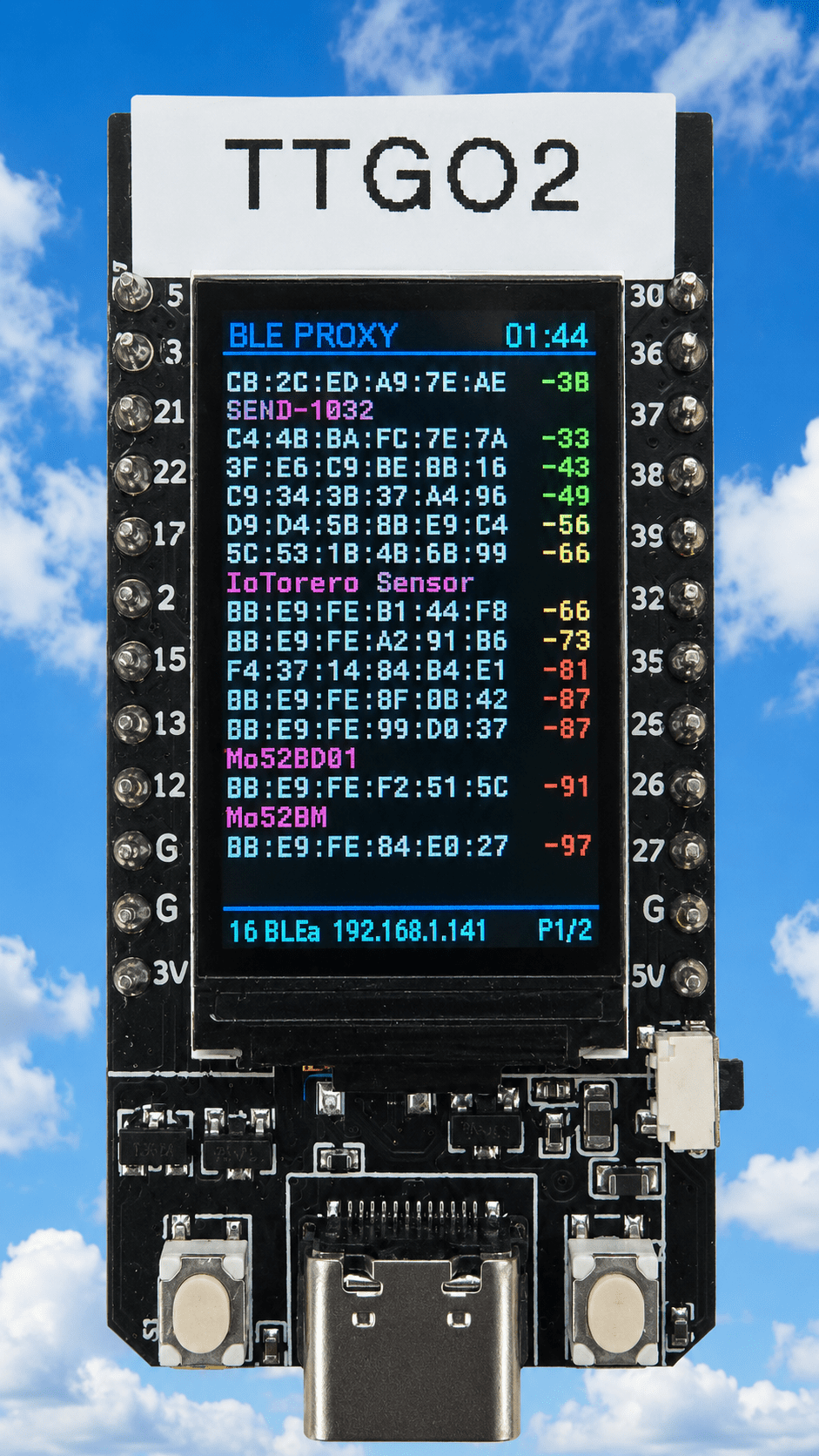
I’ve had a couple of these little TTGO T-Display boards sitting around for quite some time.They are cheap ESP32 boards with a surprisingly good little colour display, two buttons and USB-C.I originally found that one of mine was already running some very old firmware.
It was displaying the time and date and, interestingly, still connected to my WiFi.That got me thinking… I have recently been doing quite a bit with Bluetooth Low Energy, particularly using ESPHome Bluetooth proxies around the house.The T-Display has a screen which is large enough to actually show useful information, so why not turn one into a BLE scanner which also works as a Bluetooth proxy for Home Assistant? Firstly I made THIS (image on the left) using a tiny “Agrobot” board… handy for showing how many BLE devices the board can see in a rolling 120 second window – and the coding is simple enough in ESPHome (and recently updated so maybe not so simple)….
But then I re-discovered my TTGO boards and got carried away..As it turned out, the TTGO board makes a very superior and rather nice little device.The finished result The T-Display now runs ESPHome and does several jobs simultaneously: BLE scanning Bluetooth proxy for Home Assistant Displays discovered BLE devices Shows MAC addresses and advertised names Sorts devices by signal strength Colour-codes the RSSI Shows the current time Supports multiple pages Has a pause function Has a controllable display backlight Provides a simple but comprehensive ESPHome Web-UI The display is rotated into portrait mode, which turns out to be much more useful than landscape for this particular application.
With the final font size I can comfortably display around 18 devices per page depending on whether or not they broadcast names.The Display The T-Display uses a 135 × 240 colour TFT.The original idea was to use the display in landscape mode, but once I started putting BLE addresses on it, it became obvious that portrait was much better as there simply isn’t enough vertical space in landscape mode.
Turning it through 90 degrees gives us a useful list.The font is a 10-pixel Roboto Mono, which turned out to be a good compromise between readability and the number of devices we can display.Board Display RSSI Colours I wanted the signal strength to be immediately obvious without having to read every number.
The RSSI value is therefore coloured: I deliberately didn’t make −79 “bad”.A signal around there can still be perfectly usable, particularly with BLE devices, so red is reserved for genuinely weak signals.This makes it very easy to walk around the house with the display and see which devices are being heard strongly.
BLE Scanner The ESPHome BLE scanner runs continuously: esp32_ble_tracker: scan_parameters: interval: 1100ms window: 1100ms active: true Whenever an advertisement is received, the device’s: MAC address advertised name RSSI last-seen time are recorded.Devices which haven’t been heard for 120 seconds are removed.I allowed storage for up to 40 devices, although only around 18 or less are displayed on a page.
The list is sorted by RSSI, strongest first.That makes the display surprisingly useful as a portable BLE diagnostic tool.Bluetooth Proxy The important part is that the BLE scanner isn’t replacing the Bluetooth proxy.
The proxy remains active: bluetooth_proxy: active: true connection_slots: 3 So the TTGO is doing both jobs.It can be sitting somewhere in the house providing Bluetooth coverage to Home Assistant while simultaneously showing me what it can actually hear.That was really the point of the project.
I don’t just want another Bluetooth proxy hidden somewhere doing its job invisibly — I wanted to be able to see what it was doing.The Buttons There are two physical buttons on bottom of the T-Display (side button is for programming – never used in ESPHOME.A short-press changes the page: Left button → previous page Right button → next page The pages wrap around, so pressing Next on the last page takes you back to the first.
There is also a useful long-press function.Hold either button for about a second and the display freezes.Release the button and it immediately resumes.
Importantly, this only freezes the display….the BLE scanner and Bluetooth proxy continue operating in the background.That means I can stop the screen on a particular set of devices and examine it without stopping the actual Bluetooth processing.
The Backlight There was one thing I hadn’t initially considered.The TFT is bright — but leaving it illuminated 24 hours a day isn’t particularly sensible, so I added a proper ESPHome switch for the display backlight.Here it is in the increasingly useful WEBUI (ip address of the device as shown in the device footer).
The T-Display uses GPIO4 for the backlight, and the final configuration gives control of that pin to an ESPHome GPIO switch.The important part is: switch: - platform: gpio id: display_backlight name: "Display Backlight" icon: "mdi:monitor" pin: number: GPIO4 restore_mode: ALWAYS_ON The display driver itself is told not to claim the backlight pin: backlight_pin: no This gives me an ordinary ESPHome switch which can be controlled from Home Assistant or the device’s Web UI – so I can simply turn the display off when I don’t need it while leaving the BLE proxy running.ESPHome Web UI I also added the ESPHome Web Server: web_server: port: 80 log: false I don’t really need a live log on this particular device.
The useful thing is having a simple Web UI containing the Display Backlight control and lots of useful diagnostics (livesavers during development as it happens) Opening the device in a browser gives me an On/Off control for the display.That means the TTGO can be installed somewhere permanently and the screen can be controlled without having to physically touch it.Time Display The time comes from ESPHome’s SNTP component (change timezone to suit): time: - platform: sntp id: local_time timezone: Europe/Madrid The time is displayed in cyan at the top right shortly after the board powers up and gets an IP address as shown in the footer.
The device initially needs to obtain the time over the network, but once synchronised it updates normally.Two of Them Once I had the first one working, I had another identical T-Display sitting there.Why not make that one a second proxy? The second board is essentially an early version of the first – with no webUI but it has MQTT instead – useful for Home Assistant.
The only things which need to differ are the ESPHome device name and friendly name so the two boards can coexist on the network.The result is two little portable BLE monitors/proxies.Note – the friendly name appears in the webUI – the name HAS to be unique for each one.
I can put one in one room and another elsewhere and immediately see what each one is hearing (of course they need to be within range of a particular SSID – i.e.router access point).Seems to me that this is going to be rather useful when investigating Bluetooth range and coverage.
The Complete ESPHome Configuration The processor in the TTGO boards isn’t quite up to doing everything in this first set of code AND having a decent WebUI… This is the complete YAML code for the more advanced version with WebUI: # ======================================================== # WebUI 1.22 Version of my TTGO ble proxy with scrolling display # August 2026 Peter Scargill and credit to ChatGPT # ======================================================== substitutions: project_version: "1.22" esphome: name: ttgo-ble-proxy-2 friendly_name: TTGO BLE Proxy with WebUI project: name: "pete.ttgo-ble-proxy" version: "${project_version}" esp32: board: esp32dev framework: type: arduino logger: level: DEBUG api: ota: - platform: esphome password: ttgo_ota_password # ========================================================= # WEB UI # ========================================================= web_server: port: 80 log: false version: 3 # ========================================================= # WIFI # ========================================================= wifi: networks: - ssid: !secret wifi_ssid password: !secret wifi_password - ssid: !secret wifi_ssid2 password: !secret wifi_password - ssid: !secret wifi_ssid3 password: !secret wifi_password - ssid: !secret wifi_ssid4 password: !secret wifi_password - ssid: !secret wifi_ssid5 password: !secret wifi_password power_save_mode: none post_connect_roaming: true debug: sensor: - platform: wifi_signal name: "WiFi Signal" id: wifi_signal_sensor update_interval: 30s web_server: sorting_weight: 4 - platform: uptime name: "Uptime (updated every 60 seconds)" update_interval: 60s web_server: sorting_weight: 8 - platform: debug free: name: "Free Heap" web_server: sorting_weight: 7 text_sensor: - platform: wifi_info ssid: name: "WiFi SSID" id: wifi_ssid web_server: sorting_weight: 3 ip_address: name: "IP Address" id: wifi_ip web_server: sorting_weight: 2 bssid: name: "WiFi AP MAC" id: wifi_ap_mac web_server: sorting_weight: 5 - platform: template name: "Gateway" id: wifi_gateway icon: "mdi:router-network" entity_category: diagnostic update_interval: 10s web_server: sorting_weight: 6 lambda: |- esp_netif_t *netif = esp_netif_get_handle_from_ifkey("WIFI_STA_DEF"); if (netif == nullptr) { return {"----"}; } esp_netif_ip_info_t ip_info; if (esp_netif_get_ip_info(netif, &ip_info) != ESP_OK) { return {"----"}; } char gateway[16]; snprintf(gateway, sizeof(gateway), IPSTR, IP2STR(&ip_info.gw)); return {gateway}; - platform: template name: "Version" icon: "mdi:tag" entity_category: diagnostic web_server: sorting_weight: 1 lambda: |- return {"${project_version}"}; - platform: template name: "TTGO Time" id: ttgo_time icon: "mdi:clock" lambda: |- auto now = id(local_time).now(); if (!now.is_valid()) return {"Not synchronised"}; return now.strftime("%H:%M:%S"); update_interval: 1s web_server: sorting_weight: 8 # ========================================================= # TIME # ========================================================= time: - platform: sntp id: local_time timezone: Europe/Madrid on_time_sync: then: - logger.log: "SNTP TIME SYNCHRONISED" # ========================================================= # BLE TRACKER # ========================================================= esp32_ble_tracker: scan_parameters: interval: 1100ms window: 1100ms active: true on_ble_advertise: then: - lambda: |- const int MAX_DEVICES = 40; const uint32_t DEVICE_TIMEOUT = 120000; //std::string mac = x.address_str(); char mac[18]; x.address_str_to(mac); std::string name = x.get_name(); int rssi = x.get_rssi(); uint32_t now = millis(); int found = -1; // Find existing device for (int i = 0; i < MAX_DEVICES; i++) { if (id(ble_macs)[i] == mac) { found = i; break; } } // Find empty slot if (found < 0) { for (int i = 0; i < MAX_DEVICES; i++) { if (id(ble_macs)[i].empty()) { found = i; break; } } } // If full, replace oldest device if (found < 0) { uint32_t oldest = 0; found = 0; for (int i = 0; i < MAX_DEVICES; i++) { if (id(ble_last_seen)[i] < oldest || i == 0) { oldest = id(ble_last_seen)[i]; found = i; } } } // Store/update device id(ble_macs)[found] = mac; id(ble_names)[found] = name; id(ble_rssi)[found] = rssi; id(ble_last_seen)[found] = now; // Remove devices not heard for 120 seconds for (int i = 0; i < MAX_DEVICES; i++) { if (!id(ble_macs)[i].empty()) { if ((uint32_t)(now - id(ble_last_seen)[i]) >= DEVICE_TIMEOUT) { id(ble_macs)[i].clear(); id(ble_names)[i].clear(); id(ble_rssi)[i] = 0; id(ble_last_seen)[i] = 0; } } } // Count active devices int count = 0; for (int i = 0; i < MAX_DEVICES; i++) { if (!id(ble_macs)[i].empty()) { count++; } } id(ble_device_count) = count; # ========================================================= # BLUETOOTH PROXY # ========================================================= bluetooth_proxy: active: true connection_slots: 3 # ========================================================= # GLOBALS # ========================================================= globals: - id: ble_macs type: std::string[40] restore_value: no - id: ble_names type: std::string[40] restore_value: no - id: ble_rssi type: int[40] restore_value: no - id: ble_last_seen type: uint32_t[40] restore_value: no - id: ble_device_count type: int restore_value: no initial_value: "0" - id: ble_page type: int restore_value: no initial_value: "0" - id: ble_paused type: bool restore_value: no initial_value: "false" # ========================================================= # DISPLAY BACKLIGHT # # TTGO T-Display backlight = GPIO4 # # ON = illuminated # OFF = backlight off # ========================================================= switch: - platform: gpio id: display_backlight name: "Display Backlight" icon: "mdi:monitor" pin: GPIO4 restore_mode: RESTORE_DEFAULT_ON # ========================================================= # BUTTONS # # LEFT GPIO0 = previous page # RIGHT GPIO35 = next page # # Short press: # page change # # Hold for 1 second: # freeze display # # Release: # resume display # # BLE scanning and proxy continue throughout.# ========================================================= binary_sensor: # ------------------------------------------------------- # LEFT BUTTON - GPIO0 # ------------------------------------------------------- - platform: gpio id: button_left internal: true pin: number: GPIO0 inverted: true mode: input: true pullup: true # Short press = previous page on_click: - min_length: 50ms max_length: 700ms then: - lambda: |- const int MAX_DEVICES = 40; const int MAX_LINES = 17; int order[MAX_DEVICES]; int count = 0; for (int i = 0; i < MAX_DEVICES; i++) { if (!id(ble_macs)[i].empty()) { order[count++] = i; } } // Same RSSI sorting used by the display for (int i = 0; i < count - 1; i++) { for (int j = i + 1; j < count; j++) { if (id(ble_rssi)[order[j]] > id(ble_rssi)[order[i]]) { int temp = order[i]; order[i] = order[j]; order[j] = temp; } } } // Calculate pages from physical display lines int pages = 0; int pos = 0; while (pos < count) { int lines = 0; while (pos < count) { int needed = id(ble_names)[order[pos]].empty() ? 1 : 2; if (lines + needed > MAX_LINES) break; lines += needed; pos++; } pages++; } if (pages < 1) pages = 1; id(ble_page)--; if (id(ble_page) < 0) id(ble_page) = pages - 1; # Long press = pause while held on_press: then: - delay: 1000ms - if: condition: binary_sensor.is_on: button_left then: - lambda: |- id(ble_paused) = true; - component.update: ble_display - delay: 100ms - component.suspend: ble_display # Release = resume on_release: then: - if: condition: lambda: 'return id(ble_paused);' then: - lambda: |- id(ble_paused) = false; - component.resume: ble_display - component.update: ble_display # ------------------------------------------------------- # RIGHT BUTTON - GPIO35 # ------------------------------------------------------- - platform: gpio id: button_right internal: true pin: number: GPIO35 inverted: true # Short press = next page on_click: - min_length: 50ms max_length: 700ms then: - lambda: |- const int MAX_DEVICES = 40; const int MAX_LINES = 17; int order[MAX_DEVICES]; int count = 0; for (int i = 0; i < MAX_DEVICES; i++) { if (!id(ble_macs)[i].empty()) { order[count++] = i; } } // Same RSSI sorting used by the display for (int i = 0; i < count - 1; i++) { for (int j = i + 1; j < count; j++) { if (id(ble_rssi)[order[j]] > id(ble_rssi)[order[i]]) { int temp = order[i]; order[i] = order[j]; order[j] = temp; } } } // Calculate pages from physical display lines int pages = 0; int pos = 0; while (pos < count) { int lines = 0; while (pos < count) { int needed = id(ble_names)[order[pos]].empty() ? 1 : 2; if (lines + needed > MAX_LINES) break; lines += needed; pos++; } pages++; } if (pages < 1) pages = 1; id(ble_page)++; if (id(ble_page) >= pages) id(ble_page) = 0; # Long press = pause while held on_press: then: - delay: 1000ms - if: condition: binary_sensor.is_on: button_right then: - lambda: |- id(ble_paused) = true; - component.update: ble_display - delay: 100ms - component.suspend: ble_display # Release = resume on_release: then: - if: condition: lambda: 'return id(ble_paused);' then: - lambda: |- id(ble_paused) = false; - component.resume: ble_display - component.update: ble_display # ========================================================= # FONTS # ========================================================= font: - file: "gfonts://Roboto Mono" id: font_row size: 10 - file: "gfonts://Roboto" id: font_title size: 12 - file: "gfonts://Roboto" id: font_small size: 9 # ========================================================= # SPI # ========================================================= spi: clk_pin: GPIO18 mosi_pin: GPIO19 # ========================================================= # DISPLAY its an st7789v # ========================================================= display: - platform: st7789v #- platform: mipi_spi id: ble_display model: TTGO TDisplay 135x240 #model: ST7789v backlight_pin: no #dc_pin: 6 #spi_mode: mode0 rotation: 0 update_interval: 1s lambda: |- auto black = Color(0, 0, 0); auto white = Color(255, 255, 255); auto cyan = Color(0, 255, 255); auto blue = Color(0, 120, 255); auto green = Color(0, 255, 0); auto yellow = Color(255, 255, 0); auto orange = Color(255, 165, 0); auto red = Color(255, 0, 0); auto grey = Color(150, 150, 150); auto purple = Color(255, 0, 255); it.fill(black); // --------------------------------------------------- // HEADER // --------------------------------------------------- if (id(ble_paused)) { it.print(2, 2, id(font_title), cyan, "PAUSED"); } else { it.print(2, 2, id(font_title), blue, "BLE PROXY"); } if (id(local_time).now().is_valid()) { it.strftime(133, 2, id(font_title), cyan, TextAlign::TOP_RIGHT, "%H:%M", id(local_time).now()); } else { it.print(133, 2, id(font_title), cyan, TextAlign::TOP_RIGHT, "N/A"); } it.line(0, 16, 134, 16, blue); // --------------------------------------------------- // SORT DEVICES BY RSSI // --------------------------------------------------- const int MAX_DEVICES = 40; const int ROWS = 9; int order[MAX_DEVICES]; int count = 0; for (int i = 0; i < MAX_DEVICES; i++) { if (!id(ble_macs)[i].empty()) { order[count++] = i; } } // Strongest signal first for (int i = 0; i < count - 1; i++) { for (int j = i + 1; j < count; j++) { if (id(ble_rssi)[order[j]] > id(ble_rssi)[order[i]]) { int temp = order[i]; order[i] = order[j]; order[j] = temp; } } } // --------------------------------------------------- // PAGING // // Unnamed device = 1 display line // Named device = 2 display lines // // 18 display lines available between header/footer.// --------------------------------------------------- const int MAX_LINES = 17; int pages = 0; int pos = 0; while (pos < count) { int lines = 0; while (pos < count) { int needed = id(ble_names)[order[pos]].empty() ? 1 : 2; if (lines + needed > MAX_LINES) break; lines += needed; pos++; } pages++; } if (pages < 1) pages = 1; if (id(ble_page) >= pages) id(ble_page) = pages - 1; if (id(ble_page) < 0) id(ble_page) = 0; // --------------------------------------------------- // FIND DEVICES FOR CURRENT PAGE // --------------------------------------------------- int start = 0; int end = 0; pos = 0; for (int page = 0; page < id(ble_page); page++) { int lines = 0; while (pos < count) { int needed = id(ble_names)[order[pos]].empty() ? 1 : 2; if (lines + needed > MAX_LINES) break; lines += needed; pos++; } } start = pos; int lines = 0; while (pos < count) { int needed = id(ble_names)[order[pos]].empty() ? 1 : 2; if (lines + needed > MAX_LINES) break; lines += needed; pos++; } end = pos; // --------------------------------------------------- // DEVICE ROWS // --------------------------------------------------- int y = 20; for (int n = start; n < end; n++) { int i = order[n]; std::string mac = id(ble_macs)[i]; std::string name = id(ble_names)[i]; // ------------------------------------------------- // RSSI COLOUR // ------------------------------------------------- Color rssi_color; if (id(ble_rssi)[i] >= -55) { rssi_color = green; } else if (id(ble_rssi)[i] >= -65) { rssi_color = yellow; } else if (id(ble_rssi)[i] >= -79) { rssi_color = orange; } else { rssi_color = red; } char rssi_text[8]; snprintf(rssi_text, sizeof(rssi_text), "%d", id(ble_rssi)[i]); // ------------------------------------------------- // NAMED DEVICE // // MAC on first line // NAME + RSSI on second line // ------------------------------------------------- if (!name.empty()) { // MAC it.print(1, y, id(font_row), white, mac.c_str()); // RSSI after mac it.print(133, y, id(font_row), rssi_color, TextAlign::TOP_RIGHT, rssi_text); y += 11; // Keep name short enough to leave room for RSSI if (name.length() > 17) { name = name.substr(0, 17); } // NAME it.print(1, y, id(font_row), purple, name.c_str()); // Move directly to next device y += 11; } else { // ------------------------------------------------ // UNNAMED DEVICE // // MAC + RSSI on one line // ------------------------------------------------ it.print(1, y, id(font_row), white, mac.c_str()); it.print(133, y, id(font_row), rssi_color, TextAlign::TOP_RIGHT, rssi_text); // Move directly to next device y += 11; } } // --------------------------------------------------- // FOOTER // --------------------------------------------------- it.line(0, 226, 134, 226, blue); char footer[32]; snprintf(footer, sizeof(footer), "%d BLEs", count); it.print(2, 229, id(font_small), cyan, footer); std::string ip_text = id(wifi_ip).state; if (ip_text.empty() || ip_text == "0.0.0.0") ip_text = "----"; it.print(67, 229, id(font_small), cyan, TextAlign::TOP_CENTER, ip_text.c_str()); // Right-justified page indicator char page_text[32]; snprintf(page_text, sizeof(page_text), "P%d/%d", id(ble_page) + 1, pages); it.print(132, 229, id(font_small), cyan, TextAlign::TOP_RIGHT, page_text); and below – the complete code for the earlier MQTT version – note that each has it’s benefit – there is not enough RAM in the TTGO ESP32 to have all the features I want at once – So version 2 has MQTT but no WebUI and you cannot flash it wirelessly – only by serial – I’ve also made a version using a better chip which forms the NEXT blog entry with very much improved features compared to the MQTT version below.
However, these two sets of code work on the TTGO board with no hardware to wire up..(just a USB supply – and note – in the original WebUI version above – as with the later project mentioned above – you can power the device from your USB-C-equipped mobile phone and even control it with the WebUI on your phone over multiple router SSIDs..# ======================================================== # MQTT Version of my TTGO BLE proxy with scrolling display # August 2026 Peter Scargill and credit to ChatGPT # name/mac control # No webUI (to save space) # MQTT control # ttgo-ble-proxy/display/set ON or OFF # ttgo-ble-proxy/display/state - sends back state ON or OFF # ttgo-ble-proxy/display/mode MAC or NAME (+MAC) # ttgo-ble-proxy/ble - sends back recent BLE # no WiFi updating - only USB - out of ram # ======================================================== esphome: name: ttgo-ble-proxy friendly_name: TTGO BLE Proxy esp32: board: esp32dev framework: type: arduino logger: api: ota: - platform: esphome password: ttgo_ota_password # ========================================================= # MQTT # ========================================================= mqtt: id: mqtt_client broker: !secret mqtt_broker username: !secret mqtt_username password: !secret mqtt_password topic_prefix: ttgo-ble-proxy log_topic: null discovery: false on_message: - topic: ttgo-ble-proxy/display/set then: - lambda: |- if (x == "ON" || x == "on") { id(display_backlight).turn_on(); } else if (x == "OFF" || x == "off") { id(display_backlight).turn_off(); } - topic: ttgo-ble-proxy/display/mode then: - lambda: |- if (x == "NAME" || x == "name") { id(display_name_mode) = true; } else if (x == "MAC" || x == "mac") { id(display_name_mode) = false; } on_connect: then: - mqtt.publish: topic: ttgo-ble-proxy/display/state payload: !lambda |- return id(display_backlight).state ? "ON" : "OFF"; retain: true # ========================================================= # WIFI # ========================================================= wifi: networks: - ssid: !secret wifi_ssid password: !secret wifi_password - ssid: !secret wifi_ssid2 password: !secret wifi_password - ssid: !secret wifi_ssid3 password: !secret wifi_password power_save_mode: none post_connect_roaming: true text_sensor: - platform: wifi_info ssid: name: "WiFi SSID" id: wifi_ssid ip_address: name: "IP Address" id: wifi_ip # ========================================================= # TIME # ========================================================= time: - platform: sntp id: local_time timezone: Europe/Madrid # ========================================================= # GLOBALS # ========================================================= globals: # MAC = 17 characters + terminating null - id: ble_macs type: char[40][18] restore_value: no # Name = up to 20 characters + terminating null - id: ble_names type: char[40][21] restore_value: no - id: ble_rssi type: int[40] restore_value: no - id: ble_last_seen type: uint32_t[40] restore_value: no - id: ble_device_count type: int restore_value: no initial_value: "0" - id: ble_page type: int restore_value: no initial_value: "0" - id: ble_paused type: bool restore_value: no initial_value: "false" - id: display_name_mode type: bool restore_value: yes initial_value: "true" # ========================================================= # BLE TRACKER # ========================================================= esp32_ble_tracker: scan_parameters: interval: 1100ms window: 1100ms active: true on_ble_advertise: then: - lambda: |- const int MAX_DEVICES = 40; const uint32_t DEVICE_TIMEOUT = 120000; std::string mac = x.address_str(); std::string name = x.get_name(); int rssi = x.get_rssi(); uint32_t now = millis(); // ================================================= // FIND THIS MAC IN OUR DEVICE LIST // ================================================= int found = -1; for (int i = 0; i < MAX_DEVICES; i++) { if (id(ble_macs)[i][0] != '\0' && strcmp(id(ble_macs)[i], mac.c_str()) == 0) { found = i; break; } } // ================================================= // MQTT EVENT // ================================================= if (id(mqtt_client).is_connected()) { // ------------------------------------------------ // NEW DEVICE // ------------------------------------------------ if (found < 0) { char payload[180]; snprintf( payload, sizeof(payload), "{\"event\":\"new\",\"mac\":\"%s\",\"name\":\"%s\",\"rssi\":%d}", mac.c_str(), name.c_str(), rssi ); id(mqtt_client).publish( "ttgo-ble-proxy/ble", payload ); // ------------------------------------------------ // KNOWN DEVICE // ------------------------------------------------ } else { uint32_t age = now - id(ble_last_seen)[found]; if (age >= DEVICE_TIMEOUT) { char payload[180]; snprintf( payload, sizeof(payload), "{\"event\":\"rejoined\",\"mac\":\"%s\",\"name\":\"%s\",\"rssi\":%d}", mac.c_str(), name.c_str(), rssi ); id(mqtt_client).publish( "ttgo-ble-proxy/ble", payload ); } } } // ================================================= // FIND EMPTY SLOT // ================================================= if (found < 0) { for (int i = 0; i < MAX_DEVICES; i++) { if (id(ble_macs)[i][0] == '\0') { found = i; break; } } } // ================================================= // IF FULL, REPLACE OLDEST INACTIVE DEVICE // ================================================= if (found < 0) { uint32_t oldest_time = 0xFFFFFFFFUL; int oldest_slot = -1; for (int i = 0; i < MAX_DEVICES; i++) { uint32_t age = now - id(ble_last_seen)[i]; if (age >= DEVICE_TIMEOUT && id(ble_last_seen)[i] < oldest_time) { oldest_time = id(ble_last_seen)[i]; oldest_slot = i; } } if (oldest_slot >= 0) { found = oldest_slot; } } // ================================================= // STORE DEVICE // ================================================= if (found >= 0) { strncpy( id(ble_macs)[found], mac.c_str(), 17 ); id(ble_macs)[found][17] = '\0'; strncpy( id(ble_names)[found], name.c_str(), 20 ); id(ble_names)[found][20] = '\0'; id(ble_rssi)[found] = rssi; id(ble_last_seen)[found] = now; } // ================================================= // COUNT CURRENTLY ACTIVE DEVICES // ================================================= int count = 0; for (int i = 0; i < MAX_DEVICES; i++) { if (id(ble_macs)[i][0] != '\0') { uint32_t age = now - id(ble_last_seen)[i]; if (age < DEVICE_TIMEOUT) { count++; } } } id(ble_device_count) = count; # ========================================================= # BLUETOOTH PROXY # ========================================================= bluetooth_proxy: active: true connection_slots: 3 # ========================================================= # DISPLAY BACKLIGHT # ========================================================= switch: - platform: gpio id: display_backlight name: "Display Backlight" icon: "mdi:monitor" pin: GPIO4 restore_mode: RESTORE_DEFAULT_ON on_turn_on: - mqtt.publish: topic: ttgo-ble-proxy/display/state payload: "ON" retain: true on_turn_off: - mqtt.publish: topic: ttgo-ble-proxy/display/state payload: "OFF" retain: true # ========================================================= # BUTTONS # ========================================================= binary_sensor: - platform: gpio id: button_left internal: true pin: number: GPIO0 inverted: true mode: input: true pullup: true on_click: - min_length: 50ms max_length: 700ms then: - lambda: |- const int MAX_DEVICES = 40; const int MAX_LINES = 18; const uint32_t DEVICE_TIMEOUT = 120000; int pages = 1; int line_count = 0; for (int i = 0; i < MAX_DEVICES; i++) { if (id(ble_macs)[i][0] != '\0') { uint32_t age = millis() - id(ble_last_seen)[i]; if (age < DEVICE_TIMEOUT) { int required_lines = 1; if (id(display_name_mode) && id(ble_names)[i][0] != '\0') { required_lines = 2; } if (line_count + required_lines > MAX_LINES) { pages++; line_count = 0; } line_count += required_lines; } } } id(ble_page)--; if (id(ble_page) < 0) id(ble_page) = pages - 1; on_press: then: - delay: 1000ms - if: condition: binary_sensor.is_on: button_left then: - lambda: |- id(ble_paused) = true; - component.update: ble_display - delay: 100ms - component.suspend: ble_display on_release: then: - if: condition: lambda: 'return id(ble_paused);' then: - lambda: |- id(ble_paused) = false; - component.resume: ble_display - component.update: ble_display - platform: gpio id: button_right internal: true pin: number: GPIO35 inverted: true on_click: - min_length: 50ms max_length: 700ms then: - lambda: |- const int MAX_DEVICES = 40; const int MAX_LINES = 18; const uint32_t DEVICE_TIMEOUT = 120000; int pages = 1; int line_count = 0; for (int i = 0; i < MAX_DEVICES; i++) { if (id(ble_macs)[i][0] != '\0') { uint32_t age = millis() - id(ble_last_seen)[i]; if (age < DEVICE_TIMEOUT) { int required_lines = 1; if (id(display_name_mode) && id(ble_names)[i][0] != '\0') { required_lines = 2; } if (line_count + required_lines > MAX_LINES) { pages++; line_count = 0; } line_count += required_lines; } } } id(ble_page)++; if (id(ble_page) >= pages) id(ble_page) = 0; on_press: then: - delay: 1000ms - if: condition: binary_sensor.is_on: button_right then: - lambda: |- id(ble_paused) = true; - component.update: ble_display - delay: 100ms - component.suspend: ble_display on_release: then: - if: condition: lambda: 'return id(ble_paused);' then: - lambda: |- id(ble_paused) = false; - component.resume: ble_display - component.update: ble_display # ========================================================= # FONTS # ========================================================= font: - file: "gfonts://Roboto Mono" id: font_row size: 10 - file: "gfonts://Roboto" id: font_title size: 12 - file: "gfonts://Roboto" id: font_small size: 9 # ========================================================= # SPI # ========================================================= spi: clk_pin: GPIO18 mosi_pin: GPIO19 # ========================================================= # DISPLAY # ========================================================= display: - platform: st7789v id: ble_display model: TTGO TDisplay 135x240 backlight_pin: no rotation: 0 update_interval: 1s lambda: |- auto black = Color(0, 0, 0); auto white = Color(255, 255, 255); auto cyan = Color(0, 255, 255); auto blue = Color(0, 120, 255); auto green = Color(0, 255, 0); auto yellow = Color(255, 255, 0); auto orange = Color(255, 165, 0); auto red = Color(255, 0, 0); auto purple = Color(200, 150, 255); it.fill(black); // =================================================== // HEADER // =================================================== if (id(ble_paused)) { it.print(2, 2, id(font_title), cyan, "PAUSED"); } else { it.print(2, 2, id(font_title), blue, "BLE PROXY"); } it.strftime(133, 2, id(font_title), cyan, TextAlign::TOP_RIGHT, "%H:%M", id(local_time).now()); it.line(0, 16, 134, 16, blue); // =================================================== // SORT DEVICES BY RSSI // =================================================== const int MAX_DEVICES = 40; const int MAX_LINES = 18; const uint32_t DEVICE_TIMEOUT = 120000; int order[MAX_DEVICES]; int count = 0; for (int i = 0; i < MAX_DEVICES; i++) { if (id(ble_macs)[i][0] != '\0') { uint32_t age = millis() - id(ble_last_seen)[i]; if (age < DEVICE_TIMEOUT) { order[count++] = i; } } } // Strongest signal first for (int i = 0; i < count - 1; i++) { for (int j = i + 1; j < count; j++) { if (id(ble_rssi)[order[j]] > id(ble_rssi)[order[i]]) { int temp = order[i]; order[i] = order[j]; order[j] = temp; } } } // =================================================== // CALCULATE PAGE BOUNDARIES // =================================================== int page = id(ble_page); int pages = 1; int current_page = 0; int line_count = 0; int page_start = 0; int page_end = count; for (int n = 0; n < count; n++) { int i = order[n]; int required_lines = 1; if (id(display_name_mode) && id(ble_names)[i][0] != '\0') { required_lines = 2; } if (line_count + required_lines > MAX_LINES) { current_page++; line_count = 0; } if (current_page == page && line_count == 0) { page_start = n; } line_count += required_lines; if (current_page == page) { page_end = n + 1; } } pages = current_page + 1; if (pages < 1) pages = 1; if (id(ble_page) >= pages) id(ble_page) = pages - 1; if (id(ble_page) < 0) id(ble_page) = 0; // =================================================== // RECALCULATE PAGE AFTER PAGE CORRECTION // =================================================== page = id(ble_page); page_start = 0; page_end = count; current_page = 0; line_count = 0; for (int n = 0; n < count; n++) { int i = order[n]; int required_lines = 1; if (id(display_name_mode) && id(ble_names)[i][0] != '\0') { required_lines = 2; } if (line_count + required_lines > MAX_LINES) { current_page++; line_count = 0; } if (current_page == page && line_count == 0) { page_start = n; } line_count += required_lines; if (current_page == page) { page_end = n + 1; } } // =================================================== // DEVICE ROWS // =================================================== int y = 20; for (int n = page_start; n < page_end; n++) { int i = order[n]; // ------------------------------------------------- // NAME // ------------------------------------------------- if (id(display_name_mode) && id(ble_names)[i][0] != '\0') { it.print(1, y, id(font_row), purple, id(ble_names)[i]); y += 11; } // ------------------------------------------------- // MAC // ------------------------------------------------- it.print(1, y, id(font_row), white, id(ble_macs)[i]); // ------------------------------------------------- // RSSI // ------------------------------------------------- Color rssi_color; if (id(ble_rssi)[i] >= -55) { rssi_color = green; } else if (id(ble_rssi)[i] >= -65) { rssi_color = yellow; } else if (id(ble_rssi)[i] >= -79) { rssi_color = orange; } else { rssi_color = red; } char rssi_text[8]; snprintf( rssi_text, sizeof(rssi_text), "%d", id(ble_rssi)[i] ); it.print(133, y, id(font_row), rssi_color, TextAlign::TOP_RIGHT, rssi_text); y += 11; } // =================================================== // FOOTER // =================================================== it.line(0, 226, 134, 226, blue); char footer[32]; snprintf(footer, sizeof(footer), "%d BLE units", count); it.print(2, 229, id(font_small), cyan, footer); // Right-justified page indicator char page_text[16]; snprintf(page_text, sizeof(page_text), "Page %d/%d", id(ble_page) + 1, pages); it.print(132, 229, id(font_small), cyan, TextAlign::TOP_RIGHT, page_text); You’ll see those MQTT sensors by subscribing to: ttgo-ble-proxy/wifi/ssid and ttgo-ble-proxy/wifi/ip Final Thoughts What started as a pair of old TTGO boards sitting in a drawer has turned into something considerably more useful than I expected.
These devices are simultaneously: a BLE scanner, a Bluetooth proxy for Home Assistant, a signal-strength monitor and a little portable diagnostic display.And because the display is showing the actual BLE traffic being detected, it gives me something I don’t normally get from a conventional Bluetooth proxy: a visual indication of what is happening.For example, walking into another room and suddenly seeing a device move from: -52 signal level to: -74 tells me considerably more than simply knowing that the Bluetooth proxy exists.
I think these little TTGO displays are going to be rather useful for future Bluetooth experiments.Update 28/08/2026 I wanted more out of this like turning those names on and off -but as the code went beyond what you see above, we started to get wifi OTA issues (serial OTA fine) due to resource limits.I can’t believe I’ve now spent a week on this stuff.
Short break then I need to catch up on reviews… The above (version 2) code is without the WebUI and introducing MQTT to hook the board into Home Assistant, alas, there’s nowhere near enough RAM to run the WebUI and MQTT at the same time.I’ve also added multiple WiFi access point options to both sets of code – with post-connect roaming to pick the best access point.When I say WE, I mean me but remembering Terminator and Skynet – I’m being nice to ChatGPT for getting me out of a coding jam (and ignoring the times it got me INTO a jam ).
Read More