There's a meme I saw that was a little too close for comfort.It read "Marriage is basically just asking each other 'What do you want to eat?' until one of you dies." It feels like a lot of our lives are spent trying to decide what to cook, so I decided to see if I could get a local AI model to help.I built a complex meal planner, but I wanted something simple Sometimes you just need to know what to cook with what you have This is a problem that I'd already tried to solve using Claude.
I built a meal planner that allows me to pick three meals, and Claude chooses two more meals from a selection of recipes that are intended to minimize the amount of waste.If there are leftover ingredients from the first three meals, then the system tries to use up as many of these as possible with the final two meals of the week.On the whole, the system works pretty well.
Unfortunately, life isn't perfect, and it's rarely the case that every single leftover ingredient gets used up when making the other two meals.At the end of the week, there are usually still some ingredients left in the fridge that need using up.My meal planner doesn't cover weekends, since we're not always at home, so I wanted a way to take a look at what was in the fridge and then get some recipe ideas that would use up some or all of those ingredients.
This was something that I was pretty sure even a small AI model would be able to handle.Related I self-host my own private ChatGPT with this tool Running your own AI isn't only easy, it is a lot more cost effective if you already have a gaming PC.Posts 2 By Nick Lewis I wanted the system to run locally An LLM running in Ollama does the thinking If you use a cloud-based LLM such as Claude, Gemini, or ChatGPT, you can already use these chatbots to suggest recipes based on what's in the fridge.
The results are usually reasonably good, but I wanted to try to build something that ran locally instead of constantly sending the contents of my fridge to an AI company.I run some smallish local models in Ollama on my mini PC, and while they are slow to run on my modest hardware, they can be reasonably capable.I decided to see if I could build something that used a local LLM to match what was left in the fridge with my list of favorite recipes and suggest meals that we could cook to use up those ingredients.
Since I already had my recipes uploaded into the Grocy self-hosted grocery management system, I knew that it should be possible to compare the ingredients for these recipes with the contents of my fridge and find the best matches.Beelink S13 PRO CPU Celeron FCBGA1264 3.6GHz Graphics Integrated Intel Graphics 24EUs 1000MHz The Beelink Mini S13 Pro desktop PC is a ultra-compact computer powered by the Intel N150 processor.Shipping with 16GB of DDR4 RAM and a 500GB SSD, this micro desktop is perfect for a variety of workloads.
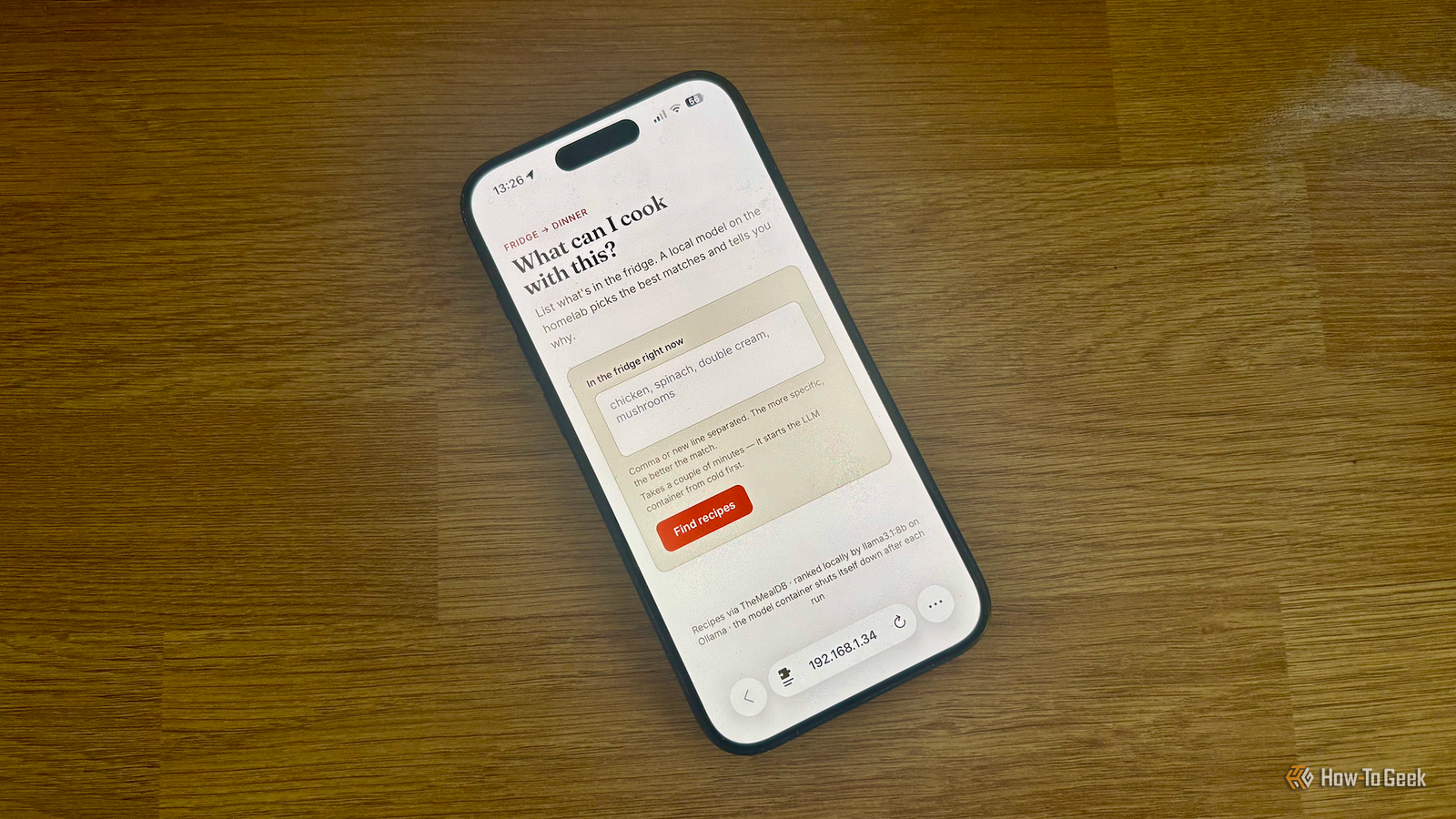
From running simple server programs to replacing your old PC, the Beelink S13 Pro is up to the task. Memory 16 GB DDR4 Storage 500GB Operating System Windows 11 Home Dimension 4.52 x 4 x 1.54 inches USB Ports 4 $299 at Amazon Expand Collapse I used n8n to run the automation I'd already built similar workflows The process involved multiple steps, including listing what was in the fridge, comparing the ingredients to my recipes, returning suggested recipe options, and providing the full ingredient lists and step-by-step instructions.I've used the n8n automation software for similar multi-step projects in the past, and I knew that I could use n8n to pass requests to Ollama, so it seemed like the perfect fit.My first version involved entering the food from my fridge into a web interface, and then using the local LLM to compare those ingredients with my recipe collection to find optimal matches.
However, I quickly hit a snag.The pool of recipes was too small to find good matches, with the results often only matching on a single ingredient.I really wanted to find meals that used up as many of the leftover ingredients as possible, so I scrapped the idea of using my recipe list from Grocy, and instead switched to using TheMealDB, a recipe database with a free API.
This meant that the LLM could now search through a significantly larger selection of recipes.The results aren't perfect, but they're good enough It's not fast, but it is helpful After switching to TheMealDB, the results were far better.The LLM will often return recipes that use many or all of the ingredients in my fridge.
By default, it returns five recipes, and I can select any of the recommendations to see the full ingredient list and step-by-step instructions.Deals Score Deals on Mini PCs, Storage & Home Lab Gear Find discounts on compact PCs, extra RAM, SSDs, and networking gear to power local AI, automation, and self-hosted services.Browse offers on computers, peripherals, storage, and accessories to upgrade your home lab while saving money.
Deals Explore Computers & Work Setup Deals The results aren't always perfect.The suggestions often require additional ingredients that I may not have, and sometimes the LLM suggests replacing a key ingredient with something completely unsuitable that's in my fridge.On the whole, however, there are usually two or three good suggestions that use up much of what I have in the fridge.
Since the LLM is running on a mini PC with no dedicated GPU, the response isn't fast.The whole thing usually takes about three minutes to run from start to finish.While this is far slower than a cloud-based chatbot, which can return suggestions in a matter of seconds, it's not a major issue; I'm willing to wait three minutes for some good recipe suggestions.
A local LLM can do more than you may think When I first tried running a local LLM, it felt painfully slow compared to modern AI chatbots.However, the speed of response often isn't an issue.It's very satisfying to be able to generate useful meal suggestions completely locally, with everything running on my own hardware.
Read More