I’ve had a couple of these little TTGO T-Display boards sitting around for quite some time.They are cheap ESP32 boards with a surprisingly good little colour display, two buttons and USB-C.I originally found that one of mine was already running some very old firmware.
It was displaying the time and date and, interestingly, still connected to my WiFi.That got me thinking… I have recently been doing quite a bit with Bluetooth Low Energy, particularly using ESPHome Bluetooth proxies around the house.The T-Display has a screen which is large enough to actually show useful information, so why not turn one into a BLE scanner which also works as a Bluetooth proxy? As it turned out, it makes a rather nice little device.
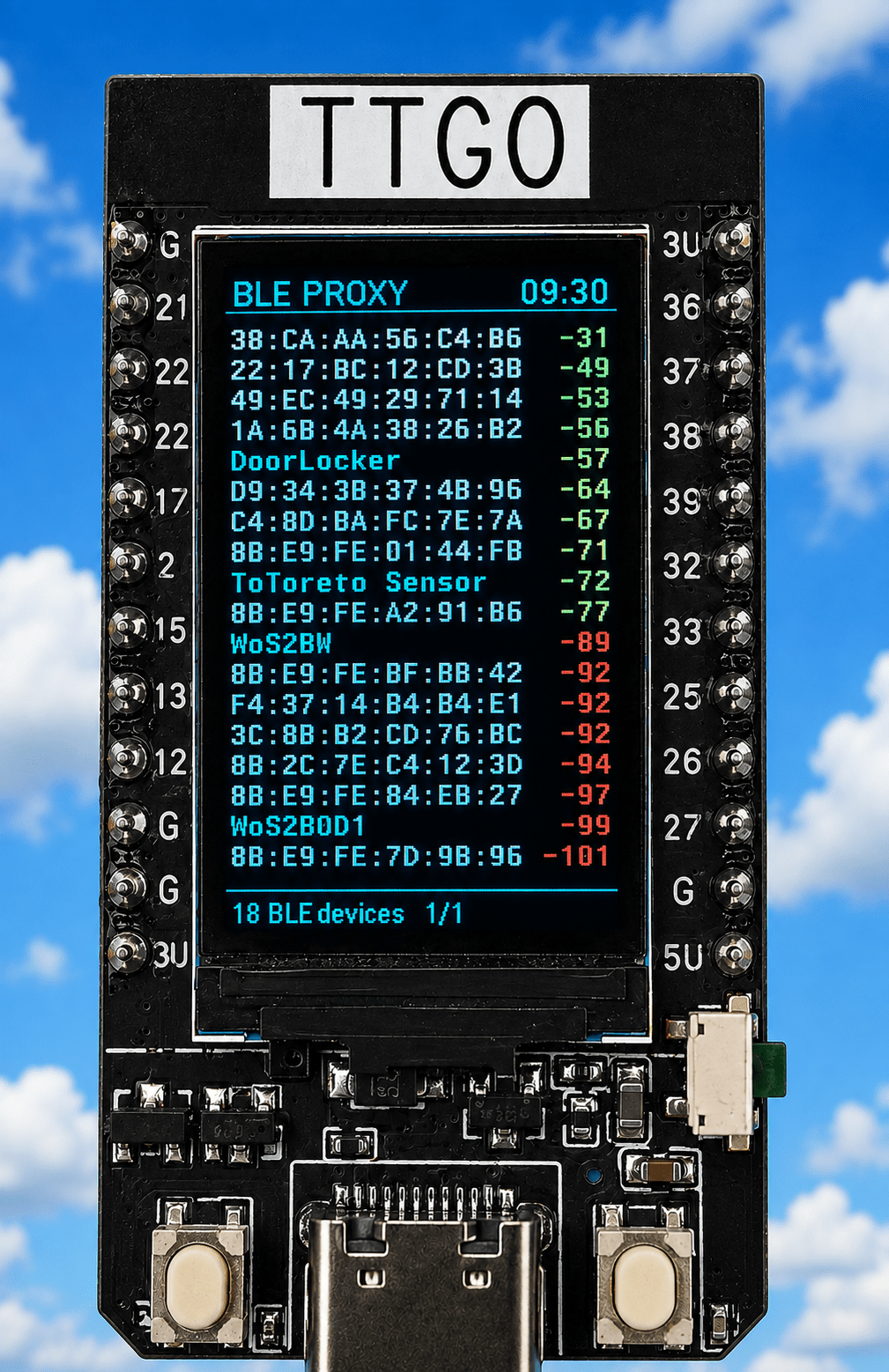
The finished result The T-Display now runs ESPHome and does several jobs simultaneously: BLE scanning Bluetooth proxy for Home Assistant Displays discovered BLE devices Shows MAC addresses and advertised names Sorts devices by signal strength Colour-codes the RSSI Shows the current time Supports multiple pages Has a pause function Has a controllable display backlight Provides a simple ESPHome Web UI The display is rotated into portrait mode, which turns out to be much more useful than landscape for this particular application.With the final font size I can comfortably display 18 devices per page.The Display The T-Display uses a 135 × 240 colour TFT.
The original idea was to use the display in landscape mode, but once I started putting BLE addresses on it, it became obvious that portrait was much better.There simply isn’t enough vertical space in landscape.Turning it through 90 degrees gives us a useful list: The font is a 10-pixel Roboto Mono, which turned out to be a good compromise between readability and the number of devices we can display.
RSSI Colours I wanted the signal strength to be immediately obvious without having to read every number.The RSSI value is therefore coloured: I deliberately didn’t make −79 “bad”.A signal around there can still be perfectly usable, particularly with BLE devices, so red is reserved for genuinely weak signals.
This makes it very easy to walk around the house with the display and see which devices are being heard strongly.BLE Scanner The ESPHome BLE scanner runs continuously: esp32_ble_tracker: scan_parameters: interval: 1100ms window: 1100ms active: true Whenever an advertisement is received, the device’s: MAC address advertised name RSSI last-seen time are recorded.Devices which haven’t been heard for 120 seconds are removed.
I allowed storage for up to 40 devices, although only 18 are displayed on a page.The list is sorted by RSSI, strongest first.That makes the display surprisingly useful as a portable BLE diagnostic tool.
Bluetooth Proxy The important part is that the BLE scanner isn’t replacing the Bluetooth proxy.The proxy remains active: bluetooth_proxy: active: true connection_slots: 3 So the TTGO is doing both jobs.It can be sitting somewhere in the house providing Bluetooth coverage to Home Assistant while simultaneously showing me what it can actually hear.
That was really the point of the project.I don’t just want another Bluetooth proxy hidden somewhere doing its job invisibly — I wanted to be able to see what it was doing.The Buttons There are two physical buttons on the T-Display.
A short press changes page: Left button → previous page Right button → next page The pages wrap around, so pressing Next on the last page takes you back to the first.There is also a useful long-press function.Hold either button for about a second and the display freezes.
Release the button and it immediately resumes.Importantly, this only freezes the display.The BLE scanner and Bluetooth proxy continue operating in the background.
That means I can stop the screen on a particular set of devices and examine it without stopping the actual Bluetooth processing.The Backlight There was one thing I hadn’t initially considered.The TFT is bright — but leaving it illuminated 24 hours a day isn’t particularly sensible.
So I added a proper ESPHome switch for the display backlight.Here it is in the WEBUI (ip address of the device).The T-Display uses GPIO4 for the backlight, and the final configuration gives control of that pin to an ESPHome GPIO switch.
The important part is: switch: - platform: gpio id: display_backlight name: "Display Backlight" icon: "mdi:monitor" pin: number: GPIO4 restore_mode: ALWAYS_ON The display driver itself is told not to claim the backlight pin: backlight_pin: no This gives me an ordinary ESPHome switch which can be controlled from Home Assistant or the device’s Web UI – so I can simply turn the display off when I don’t need it while leaving the BLE proxy running.ESPHome Web UI I also added the ESPHome Web Server: web_server: port: 80 log: false I don’t really need a live log on this particular device.The useful thing is having a simple Web UI containing the Display Backlight control.
Opening the device in a browser gives me an On/Off control for the display (apart from power usage, these displays don’t last forever so leaving the display on 24/7 is probably not a good idea).That means the TTGO can be installed somewhere permanently and the screen can be controlled without having to physically touch it.Time Display The time comes from ESPHome’s SNTP component: time: - platform: sntp id: local_time timezone: Europe/Madrid The time is displayed in cyan at the top right.
The device initially needs to obtain the time over the network, but once synchronised it updates normally.Two of Them Once I had the first one working, I had another identical T-Display sitting there.Why not make that one a second proxy? The second board is essentially an exact copy of the first.
The only things which need to differ are the ESPHome device name and friendly name so the two boards can coexist on the network.The result is two little portable BLE monitors/proxies.Note – the friendly name appears in the webUI – the name HAS to be unique for each one.
I can put one in one room and another elsewhere and immediately see what each one is hearing (of course they need to be within range of a particular SSID – i.e.router access point).Seems to me that this is going to be rather useful when investigating Bluetooth range and coverage.
The Complete ESPHome Configuration This is the complete configuration: # ======================================================== # Version1 of my ble proxy with scrolling display # August 2026 Peter Scargill and credit to ChatGPT # ======================================================== esphome: name: ttgo-ble-proxy friendly_name: TTGO BLE Proxy esp32: board: esp32dev framework: type: arduino logger: api: ota: - platform: esphome # ========================================================= # WEB UI # ========================================================= web_server: port: 80 log: false # ========================================================= # WIFI # ========================================================= wifi: ssid: !secret wifi_ssid password: !secret wifi_password # ========================================================= # TIME # ========================================================= time: - platform: sntp id: local_time timezone: Europe/Madrid # ========================================================= # BLE TRACKER # ========================================================= esp32_ble_tracker: scan_parameters: interval: 1100ms window: 1100ms active: true on_ble_advertise: then: - lambda: |- const int MAX_DEVICES = 40; const uint32_t DEVICE_TIMEOUT = 120000; std::string mac = x.address_str(); std::string name = x.get_name(); int rssi = x.get_rssi(); uint32_t now = millis(); int found = -1; // Find existing device for (int i = 0; i < MAX_DEVICES; i++) { if (id(ble_macs)[i] == mac) { found = i; break; } } // Find empty slot if (found < 0) { for (int i = 0; i < MAX_DEVICES; i++) { if (id(ble_macs)[i].empty()) { found = i; break; } } } // If full, replace oldest device if (found < 0) { uint32_t oldest = 0; found = 0; for (int i = 0; i < MAX_DEVICES; i++) { if (id(ble_last_seen)[i] < oldest || i == 0) { oldest = id(ble_last_seen)[i]; found = i; } } } // Store/update device id(ble_macs)[found] = mac; id(ble_names)[found] = name; id(ble_rssi)[found] = rssi; id(ble_last_seen)[found] = now; // Remove devices not heard for 120 seconds for (int i = 0; i < MAX_DEVICES; i++) { if (!id(ble_macs)[i].empty()) { if ((uint32_t)(now - id(ble_last_seen)[i]) >= DEVICE_TIMEOUT) { id(ble_macs)[i].clear(); id(ble_names)[i].clear(); id(ble_rssi)[i] = 0; id(ble_last_seen)[i] = 0; } } } // Count active devices int count = 0; for (int i = 0; i < MAX_DEVICES; i++) { if (!id(ble_macs)[i].empty()) { count++; } } id(ble_device_count) = count; # ========================================================= # BLUETOOTH PROXY # ========================================================= bluetooth_proxy: active: true connection_slots: 3 # ========================================================= # GLOBALS # ========================================================= globals: - id: ble_macs type: std::string[40] restore_value: no - id: ble_names type: std::string[40] restore_value: no - id: ble_rssi type: int[40] restore_value: no - id: ble_last_seen type: uint32_t[40] restore_value: no - id: ble_device_count type: int restore_value: no initial_value: "0" - id: ble_page type: int restore_value: no initial_value: "0" - id: ble_paused type: bool restore_value: no initial_value: "false" # ========================================================= # DISPLAY BACKLIGHT # # TTGO T-Display backlight = GPIO4 # # ON = illuminated # OFF = backlight off # ========================================================= switch: - platform: gpio id: display_backlight name: "Display Backlight" icon: "mdi:monitor" pin: GPIO4 restore_mode: ALWAYS_ON # ========================================================= # BUTTONS # # LEFT GPIO0 = previous page # RIGHT GPIO35 = next page # # Short press: # page change # # Hold for 1 second: # freeze display # # Release: # resume display # # BLE scanning and proxy continue throughout.# ========================================================= binary_sensor: # ------------------------------------------------------- # LEFT BUTTON - GPIO0 # ------------------------------------------------------- - platform: gpio id: button_left internal: true pin: number: GPIO0 inverted: true mode: input: true pullup: true # Short press = previous page on_click: - min_length: 50ms max_length: 700ms then: - lambda: |- const int MAX_DEVICES = 40; const int ROWS = 18; int count = 0; for (int i = 0; i < MAX_DEVICES; i++) { if (!id(ble_macs)[i].empty()) { count++; } } int pages = (count + ROWS - 1) / ROWS; if (pages < 1) pages = 1; id(ble_page)--; if (id(ble_page) < 0) id(ble_page) = pages - 1; # Long press = pause while held on_press: then: - delay: 1000ms - if: condition: binary_sensor.is_on: button_left then: - lambda: |- id(ble_paused) = true; - component.update: ble_display - delay: 100ms - component.suspend: ble_display # Release = resume on_release: then: - if: condition: lambda: 'return id(ble_paused);' then: - lambda: |- id(ble_paused) = false; - component.resume: ble_display - component.update: ble_display # ------------------------------------------------------- # RIGHT BUTTON - GPIO35 # ------------------------------------------------------- - platform: gpio id: button_right internal: true pin: number: GPIO35 inverted: true # Short press = next page on_click: - min_length: 50ms max_length: 700ms then: - lambda: |- const int MAX_DEVICES = 40; const int ROWS = 18; int count = 0; for (int i = 0; i < MAX_DEVICES; i++) { if (!id(ble_macs)[i].empty()) { count++; } } int pages = (count + ROWS - 1) / ROWS; if (pages < 1) pages = 1; id(ble_page)++; if (id(ble_page) >= pages) id(ble_page) = 0; # Long press = pause while held on_press: then: - delay: 1000ms - if: condition: binary_sensor.is_on: button_right then: - lambda: |- id(ble_paused) = true; - component.update: ble_display - delay: 100ms - component.suspend: ble_display # Release = resume on_release: then: - if: condition: lambda: 'return id(ble_paused);' then: - lambda: |- id(ble_paused) = false; - component.resume: ble_display - component.update: ble_display # ========================================================= # FONTS # ========================================================= font: - file: "gfonts://Roboto Mono" id: font_row size: 10 - file: "gfonts://Roboto" id: font_title size: 12 - file: "gfonts://Roboto" id: font_small size: 9 # ========================================================= # SPI # ========================================================= spi: clk_pin: GPIO18 mosi_pin: GPIO19 # ========================================================= # DISPLAY # ========================================================= display: - platform: st7789v id: ble_display model: TTGO TDisplay 135x240 backlight_pin: no rotation: 0 update_interval: 1s lambda: |- auto black = Color(0, 0, 0); auto white = Color(255, 255, 255); auto cyan = Color(0, 255, 255); auto blue = Color(0, 120, 255); auto green = Color(0, 255, 0); auto yellow = Color(255, 255, 0); auto orange = Color(255, 165, 0); auto red = Color(255, 0, 0); auto grey = Color(150, 150, 150); it.fill(black); // --------------------------------------------------- // HEADER // --------------------------------------------------- if (id(ble_paused)) { it.print(2, 2, id(font_title), cyan, "PAUSED"); } else { it.print(2, 2, id(font_title), blue, "BLE PROXY"); } it.strftime(133, 2, id(font_title), cyan, TextAlign::TOP_RIGHT, "%H:%M", id(local_time).now()); it.line(0, 16, 134, 16, blue); // --------------------------------------------------- // SORT DEVICES BY RSSI // --------------------------------------------------- const int MAX_DEVICES = 40; const int ROWS = 18; int order[MAX_DEVICES]; int count = 0; for (int i = 0; i < MAX_DEVICES; i++) { if (!id(ble_macs)[i].empty()) { order[count++] = i; } } // Strongest signal first for (int i = 0; i < count - 1; i++) { for (int j = i + 1; j < count; j++) { if (id(ble_rssi)[order[j]] > id(ble_rssi)[order[i]]) { int temp = order[i]; order[i] = order[j]; order[j] = temp; } } } // --------------------------------------------------- // PAGING // --------------------------------------------------- int pages = (count + ROWS - 1) / ROWS; if (pages < 1) pages = 1; if (id(ble_page) >= pages) id(ble_page) = pages - 1; if (id(ble_page) < 0) id(ble_page) = 0; int start = id(ble_page) * ROWS; int end = start + ROWS; if (end > count) end = count; // --------------------------------------------------- // DEVICE ROWS // --------------------------------------------------- int y = 20; for (int n = start; n < end; n++) { int i = order[n]; std::string display_name = id(ble_names)[i]; // No advertised name? Use MAC if (display_name.empty()) { display_name = id(ble_macs)[i]; } // Leave room for RSSI if (display_name.length() > 17) { display_name = display_name.substr(0, 17); } it.print(1, y, id(font_row), white, display_name.c_str()); // ------------------------------------------------- // RSSI COLOUR // // >= -55 GREEN // -56 to -65 YELLOW // -66 to -79 ORANGE // < -79 RED // ------------------------------------------------- Color rssi_color; if (id(ble_rssi)[i] >= -55) { rssi_color = green; } else if (id(ble_rssi)[i] >= -65) { rssi_color = yellow; } else if (id(ble_rssi)[i] >= -79) { rssi_color = orange; } else { rssi_color = red; } char rssi_text[8]; snprintf(rssi_text, sizeof(rssi_text), "%d", id(ble_rssi)[i]); it.print(133, y, id(font_row), rssi_color, TextAlign::TOP_RIGHT, rssi_text); y += 11; } // --------------------------------------------------- // FOOTER // --------------------------------------------------- it.line(0, 226, 134, 226, blue); char footer[48]; snprintf(footer, sizeof(footer), "%d BLE devices %d/%d", count, id(ble_page) + 1, pages); it.print(2, 229, id(font_small), cyan, footer); COMPLETE YAML HERE…..Final Thoughts What started as an old TTGO board sitting in a drawer has turned into something considerably more useful than I expected.
It is simultaneously: a BLE scanner, a Bluetooth proxy, a signal-strength monitor and a little portable diagnostic display.And because the display is showing the actual BLE traffic being detected, it gives me something I don’t normally get from a conventional Bluetooth proxy: a visual indication of what is happening.For example, walking into another room and suddenly seeing a device move from: -52 to: -74 tells me considerably more than simply knowing that the Bluetooth proxy exists.
I think these little TTGO displays are going to be rather useful for future Bluetooth experiments.
Read More