NVMe M.2 SSDs have gone up in price drastically over the past few months, leaving many desktop PC users struggling to find enough space for their games, media, and backups.Unfortunately, even if you can afford another NVMe SSD in this economy, your motherboard might not have a spare M.2 slot that you could put it in.But before you start considering a motherboard upgrade, take another look at your motherboard.
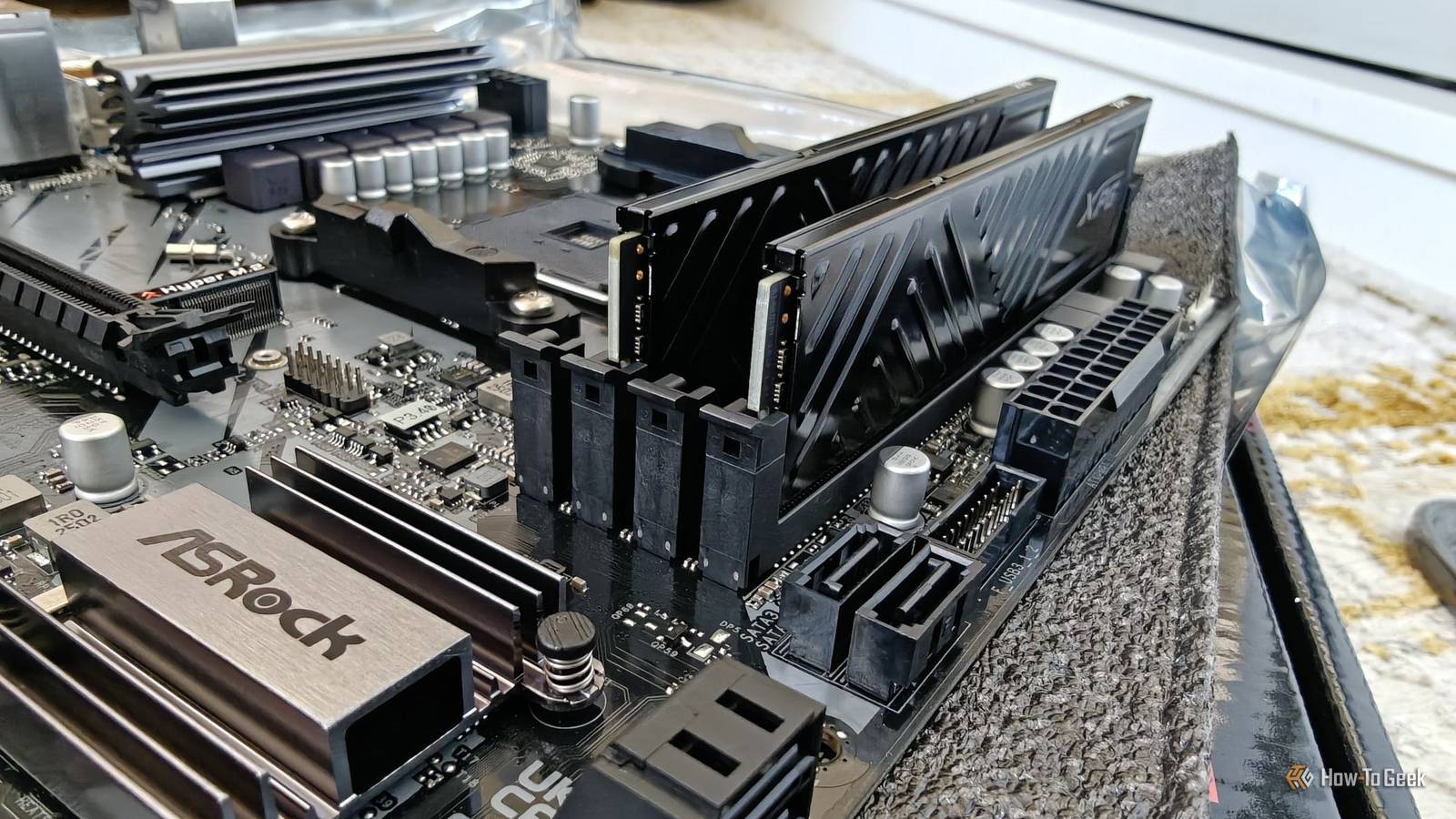
Chances are, you'll find an "ancient" storage connection sitting there that you haven't used in years: the humble SATA port.SATA is one of the most convenient ways to expand your PC's storage Plug and play Close Serial AT Attachment, which most of us know as SATA, is an old interface standard that was introduced in 2000.It modernized the older PATA interface for connecting storage devices such as HDDs, SSDs, and optical drives.
SATA III is the latest revision of the interface.It came all the way out in 2009.This is remarkable because it remains widely supported across all mainstream motherboards in 2026, despite the industry's shift toward much faster PCIe-based storage.
Because SATA has been around for so long, it's still an extremely common standard for connecting internal HDDs, SSDs, and optical drives.Chances are, your PC already has everything you need to add another drive: a SATA data cable that connects it to the motherboard and a 15-pin SATA power connector from the PSU.Even if you're missing the latter, Molex-to-SATA adapters are readily available for a few bucks.
So, chances are you have all the right ingredients you need in your PC right now to add a massive multi-terabyte HDD or SSD by hooking it up with a cheap SATA III cable.The only caveat is that you also need to have physical space to mount your 2.5-inch or 3.5-inch drive in your PC.Fortunately, most desktop cases have mounting points for either.
Once the drive is connected, you just need to format it through Disk Management, and it's good to go.Just like that, your constrained 1TB internal SSD can be quickly supplemented by a massive 8TB HDD, giving you a lot of extra headroom.SATA isn't the outdated bottleneck you think it is Old doesn't mean slow Few will disagree with me when I call SATA III old—it was released 17 years ago, which should be considered ancient by modern technology's standards.
Try using an iPhone 3GS for a few minutes to see what I mean.Despite its age, SATA is a surprisingly capable storage interface.It has a theoretical maximum speed of 6Gbps, which translates to 600MB/s (4.8Gbps) after 8b/10b encoding.
Of course, the real-world speed is a bit lower at around 550MB/s, which is a limit that high-end SATA SSDs can easily reach.That might sound painfully slow when comparing it against the neck-breaking 14.9GB/s max speeds that PCIe 5.0 NVMe can achieve, but it's still plenty of bandwidth for many everyday storage tasks.To put things into perspective, at a 550MB/s transfer rate, transferring a 100GB game would theoretically take just over three minutes.
Of course, real-world transfers would be considerably slower, but moving files between your main NVMe SSD and a secondary SATA SSD would still be plenty fast, and it's not something you probably do often anyway.The important thing is that SATA SSDs shine at fast file access.They can deliver the same low-latency responsiveness you expect when opening folders on a modern machine.
They're also surprisingly capable for gaming.TechSpot ran tests in 2020 and found that SATA SSDs were only a few seconds slower than PCIe 4.0 NVMe SSDs in most games.In smaller indie titles with fewer assets, that advantage disappears almost completely, making it harder to justify the price premium that NVMe SSDs typically command.
Related Don't throw away your old SATA SSD: Turn it into an external drive for $10 SSD prices are out of control: Why your 'obsolete' SATA drive is a goldmine Posts 1 By Goran Damnjanovic SATA makes perfect sense for hard drives as a cheap, flexible mass-storage upgrade The best place for bulk storage While SATA SSDs make sense when you're on a budget and still need fast storage, if we're being brutally honest, the ancient interface is ultimately a bottleneck for faster SSDs.However, the same can't be said for traditional HDDs.Mechanical hard drives are much, much slower than flash storage by design, which actually makes them a perfect candidate for SATA.
A typical 7,200 RPM consumer hard drive can achieve sustained transfer speeds of roughly 150 to 250MB/s, which isn't even close to the SATA 6Gb/s limit.Even enterprise drives aren't necessarily fast enough to saturate SATA.For example, Seagate's 15,000 RPM Enterprise Performance 15K ST300MP0006 advertises sustained transfer rates of up to 300MB/s.
It's a SAS drive rather than SATA, but that figure is still well below what a SATA SSD can push.And the capacity-per-dollar gap can be enormous.A 2TB WD Black SN7100 currently costs around $310, while an 8TB Seagate BarraCuda can be found for around $250.
Now, I'm not saying they're even close to being the same, because they're not.But if you need a massive storage drive for a media library, backups, and downloads, it's hard to beat the value of a traditional spinning-platter drive.If you strictly need more storage for games and found a good deal on a SATA SSD, pick that up instead.
Assuming you have an unoccupied 3.5-inch drive bay in your desktop, installing one only takes a few minutes, thanks to the ever-lasting prevalence of SATA.The one caveat is that you need to check which SATA ports to use on your motherboard.Some models share resources between specific SATA ports and a secondary M.2 slot, meaning installing an M.2 SSD can disable certain SATA ports.
So, definitely check your motherboard manual to see which SATA ports remain available.SATA is here to stay While it would be easy to dismiss SATA as just another legacy interface like PS/2 or VGA that somehow managed to stick around, the truth is that it remains one of the best, cheapest, and easiest ways to upgrade a desktop PC's storage.It's a surprisingly resilient protocol that survived because the storage devices it connects remain more affordable than NVMe SSDs.
And because SATA has been around for so long, there's also no shortage of used SATA HDDs and SSDs available for surprisingly little money, provided you're willing to take the risk that comes with buying used storage.Related SATA SSDs aren’t dead—this is where they still beat NVMe drives Practical strategies for repurposing SATA SSDs as fast external drives and bulk storage on a budget.Posts By Sydney Butler
Read More