Spotify has quietly had a very impressive start to the new year.Over the last three months, the streaming service has released a handful of genuinely great features.The most recent update is headed to Wear OS devices, and it makes the app nicer to look at and easier to control.
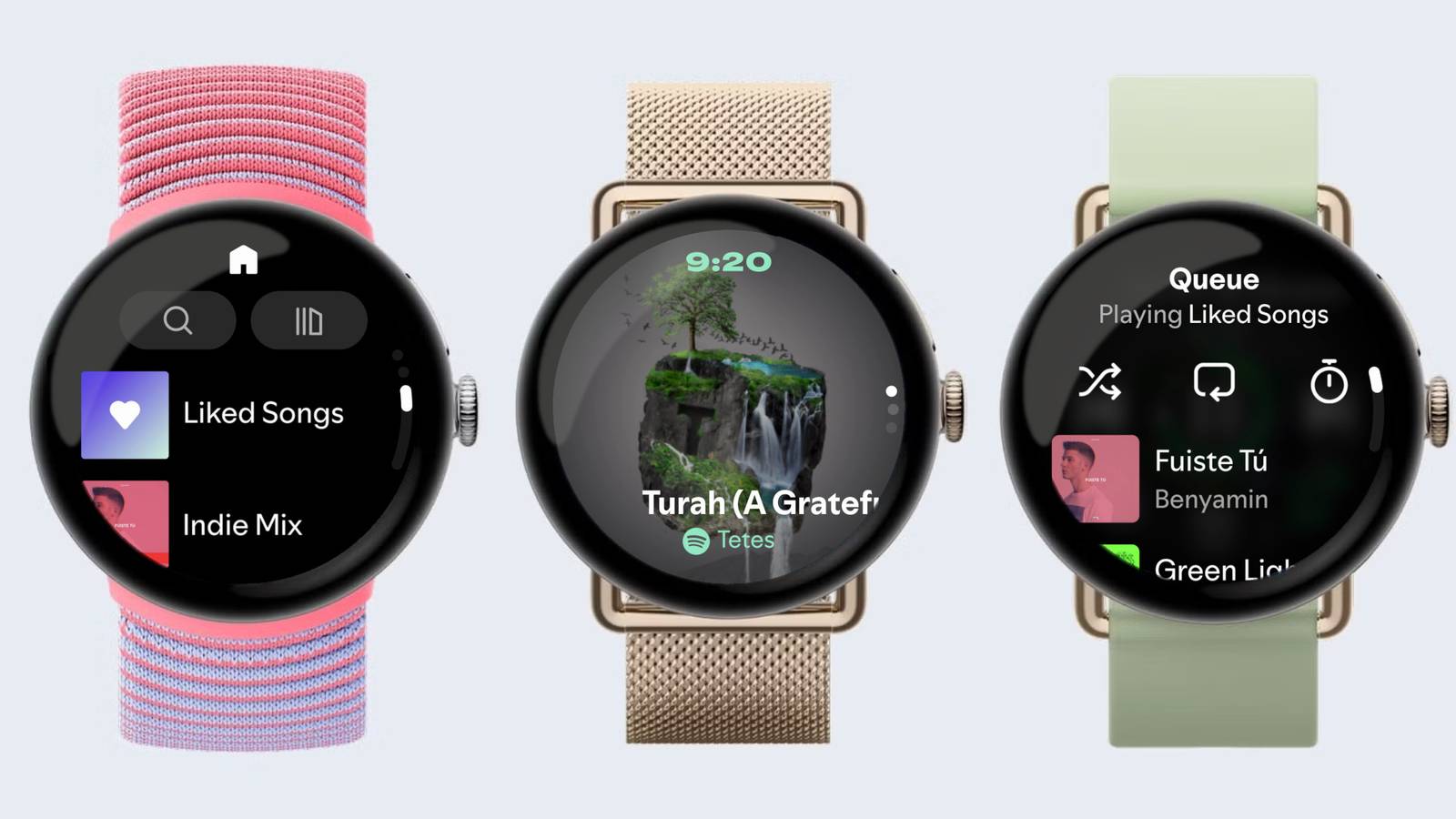
Last month, Spotify began testing a new UI for its Wear OS app, and that revamped design is now rolling out.The horizontal swiping between screens has been replaced by vertical swipes.It starts with a new “Music First” mode, which can be accessed with a swipe down from the playback controls.
This screen removes all the buttons and puts an emphasis on the album artwork.However, it’s not just a pretty display.The Music First mode also includes gestures so you can control your music while still being able to see the album artwork.
Simply tap the screen to play/pause and double-tap to skip tracks.Swiping up from the playback screen brings you “Home” with shortcuts to search and your library.It also includes your liked songs playlist and other “Made for You” discovery content.
The playback screen also includes an “Essentials” button, which brings up your queue, shuffle/repeat controls, and the sleep timer.Subscribe to our newsletter for Spotify and streaming feature coverage Keep up with Spotify-focused coverage by subscribing to the newsletter.We break down feature changes - like Wear OS UI updates, audiobook tools, and discovery tweaks - with clear explanations and analysis so you understand what each update changes for listeners.
Get Updates By subscribing, you agree to receive newsletter and marketing emails, and accept our Terms of Use and Privacy Policy.You can unsubscribe anytime.This update comes hot on the heels of a nifty feature that allows you to sync audiobook progress with real books by scanning pages, powerful new “Prompted Playlists,” larger group chats (yes, that’s a thing), and popularity charts for audiobooks.
However, Spotify has also increased Premium prices yet again—you win some, you lose some.Spotify says this update is rolling out "over the coming days." Related Every Spotify subscriber should change these settings now Just got on the Spotify Premium or Free subscription plan? Before you start creating playlists and liking songs from your favorite artists, there are a few settings that you should enable and adjust for a better listening experience.Spotify may be releasing new features frequently, but these core features will carry your streaming on its back.
Whether you prefer the Spotify mobile or desktop app, you can adjust (most of) these features in your settings.Here's all you need to know.Posts 3 By T.M.
Amrita
Read More