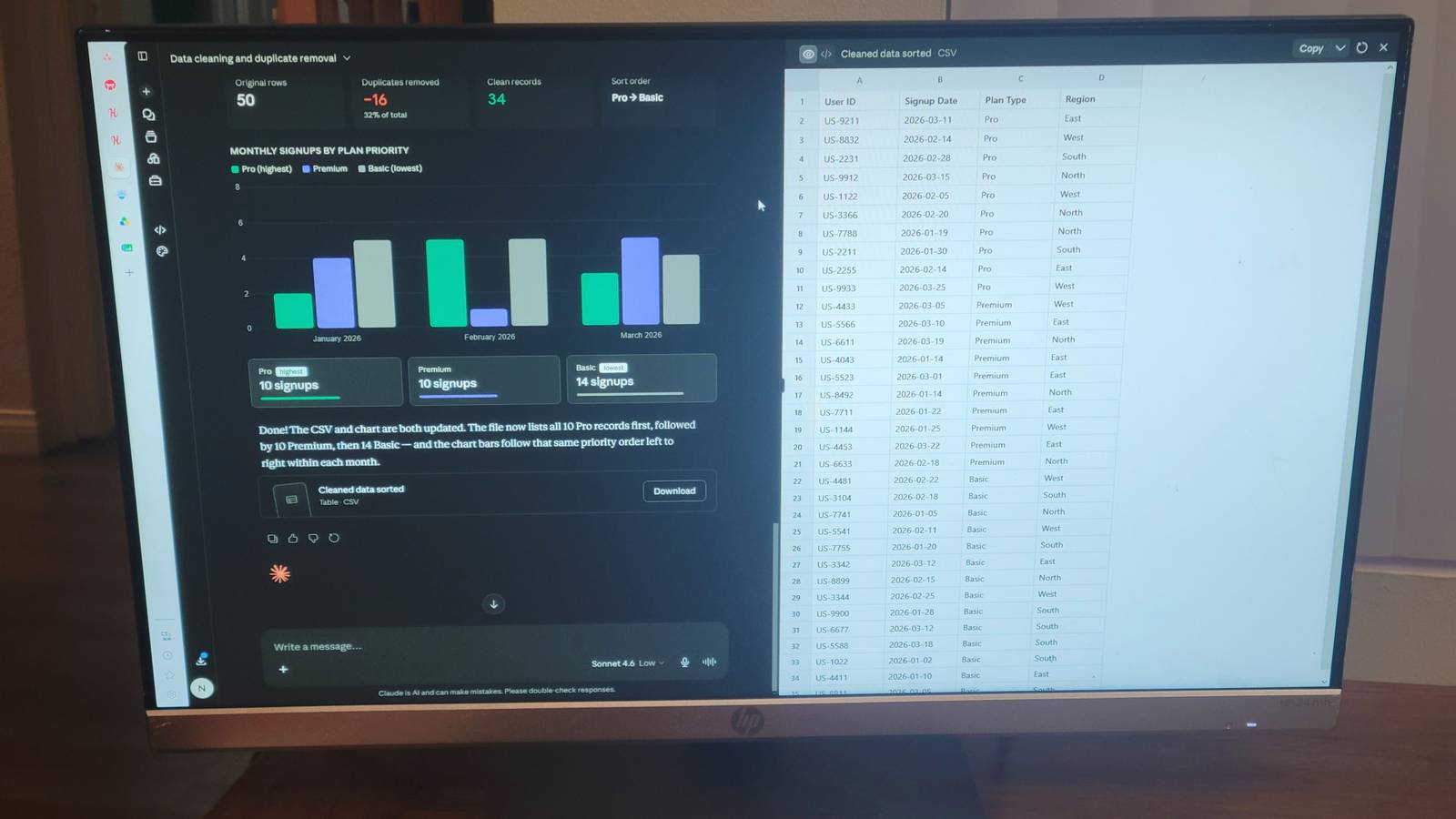
Cleaning massive, disorganized spreadsheets or parsing through thousands of lines of raw server logs is annoying.You can do it yourself, make a program to do it, or you can just give it to Claude and ask it to fix your problems.Claude has a built-in execution canvas that handles smaller tasks.
It's a sandboxed processing environment that lives right inside your chat window, so you can drop in files and use plain language to make the fixes you need.This is one of the ways Claude works better than usual.Claude is a lot more reliable than you would think Claude has a built-in canvas that builds apps and visuals from text I like Claude's no-code interface because it means anyone can work with it without knowing how to code.
Instead of opening a terminal or writing SQL queries, you just describe what you want, and the interface handles the rest.This works because there's a full code execution engine running directly inside the chat window.You describe a goal in plain English, making sure to be specific about what you want, and the system writes and runs the code behind the scenes.
You end up seeing the result in the chat, usually exactly as you wanted it.You don't have a Python environment to configure, no matplotlib syntax to remember, and no pandas documentation to dig through.It is great for people who have a simple project to get through and just want to see a final result, or those who want to see a prototype of their idea before they build it.
Luckily, this is better than many other AI code builders, because it lets you see what you're asking for.When you send a message, Claude figures out what's needed and runs everything inside a secure sandboxed container.You never see a terminal.
You never deal with dependency errors.The background work happens entirely out of sight.I am pretty used to asking for code, copying it into my editor, running it, hitting an error, pasting the stack trace back into the chat, and doing it all over again.
The new interface is much better.This isn't a good way to have it teach you how to code, like the regular chatbot interface, but it's a good way to have code written.Claude runs its own code, reads its own error logs, fixes what broke, and keeps going until it has something worth showing you.
If a data pipeline fails mid-run or a chart doesn't render correctly, Claude patches it on its own before you ever see the result.Using it is pretty simple Drop your files into the chat to get instant results You can drag your data files straight into Claude's chat window to handle them.It handles messy Excel spreadsheets, CSVs, JSON, plain text server logs, and PDFs.
You can do up to twenty files per conversation, thirty megabytes each.Once they're uploaded, just describe what you want done in plain English.You don't need to wrangle boilerplate code, import libraries, or build regex patterns just to parse a log file.
Tell it to clean up a disorganized marketing spreadsheet, pull specific error codes from a server log, or merge several data sources into one table.It might feel like cheating, but it's writing the same code you would; you're just not the one typing it.Then, Claude hands your instructions off to a built-in code execution engine running quietly in the background.
Depending on the task, it'll use either a JavaScript environment with libraries like PapaParse and Lodash, or a Python container stocked with pandas, numpy, matplotlib, and friends.It writes, runs, and debugs the scripts itself.You never touch a dependency or a config file.
I used to lose hours to pandas type errors alone.Having something else handle that execution loop is a huge relief.When it's done, the results come back to you directly in the browser.
I've seen many charts and heat maps, but I have had it just make a clean spreadsheet, a formatted one, or just a proper CSV.From there, you can keep modifying it.You can filter by date range, tweak a chart's styling, and reshape the data.
The whole thing lets you clean spreadsheets, parse logs, and convert file formats without reading or writing a single line of Python.This isn't the perfect answer You still need to watch out for token limits and logic bugs While Claude's no-code environment is genuinely useful, it would be a lie to say it is perfect.The biggest limitation is the data size.
The system seems to have issues with large datasets that are larger than its context window, which means it may only partially process what you've uploaded.So you want to avoid heavy Excel spreadsheets, server logs, or text-heavy PDFs.These eat through the available memory fast.
When that memory fills up, the system doesn't stop and tell you; it just quietly starts dropping the oldest information to make room for new inputs.This means it forgets earlier files or parameters.If you're trying to analyze hundreds of thousands of rows, the model might only work through a portion of them, producing skewed or incomplete results unless you've pre-segmented the data yourself.
Data privacy is another issue you should take seriously.Uploading company files to a public cloud environment can conflict with corporate compliance policies.Things that you upload are processed on external servers and may be retained for 30 days or longer if your settings allow the data to be used for model training.
That's a serious problem for organizations subject to GDPR, HIPAA, or SOC 2.It's easy to assume these tools are locked down by default, but they're not.You have to check to be sure.
Unless your organization is running through an Enterprise tier with Data Processing Agreements and Zero Data Retention in place, dragging a sensitive spreadsheet into the chat window is a potential data breach.Then there's the subtler issue of hallucinated logic.Claude can generate code that runs without errors but gets the business logic completely wrong.
You've got to really be careful with bigger projects.It can miss what you need and ignore it because it didn't trigger an error.All of this means you can't treat the AI as a black box that you just trust.
You have to review what it produces and adjust it where you can.Don't use this for every big thing, just little ones Relying entirely on AI for every workflow isn't the right move.Token limits can cause context issues with heavy datasets, and uploading proprietary company data to a public cloud carries real security risks.
If your organization deals with highly sensitive financial records or massive data volumes, a local dev environment is still the better call.That said, if you need to quickly prototype dashboards or clean up messy spreadsheets without wrestling with dependencies, Claude is one of the fastest ways to get it done Claude Price $20 Claude is an AI assistant made by Anthropic. It can assist with a wide range of tasks—writing, coding, analysis, research, and more. Unlike a search engine, Claude reasons through problems conversationally, making it useful as a thinking partner rather than just an information retrieval tool.See at Claude Expand Collapse
Read More