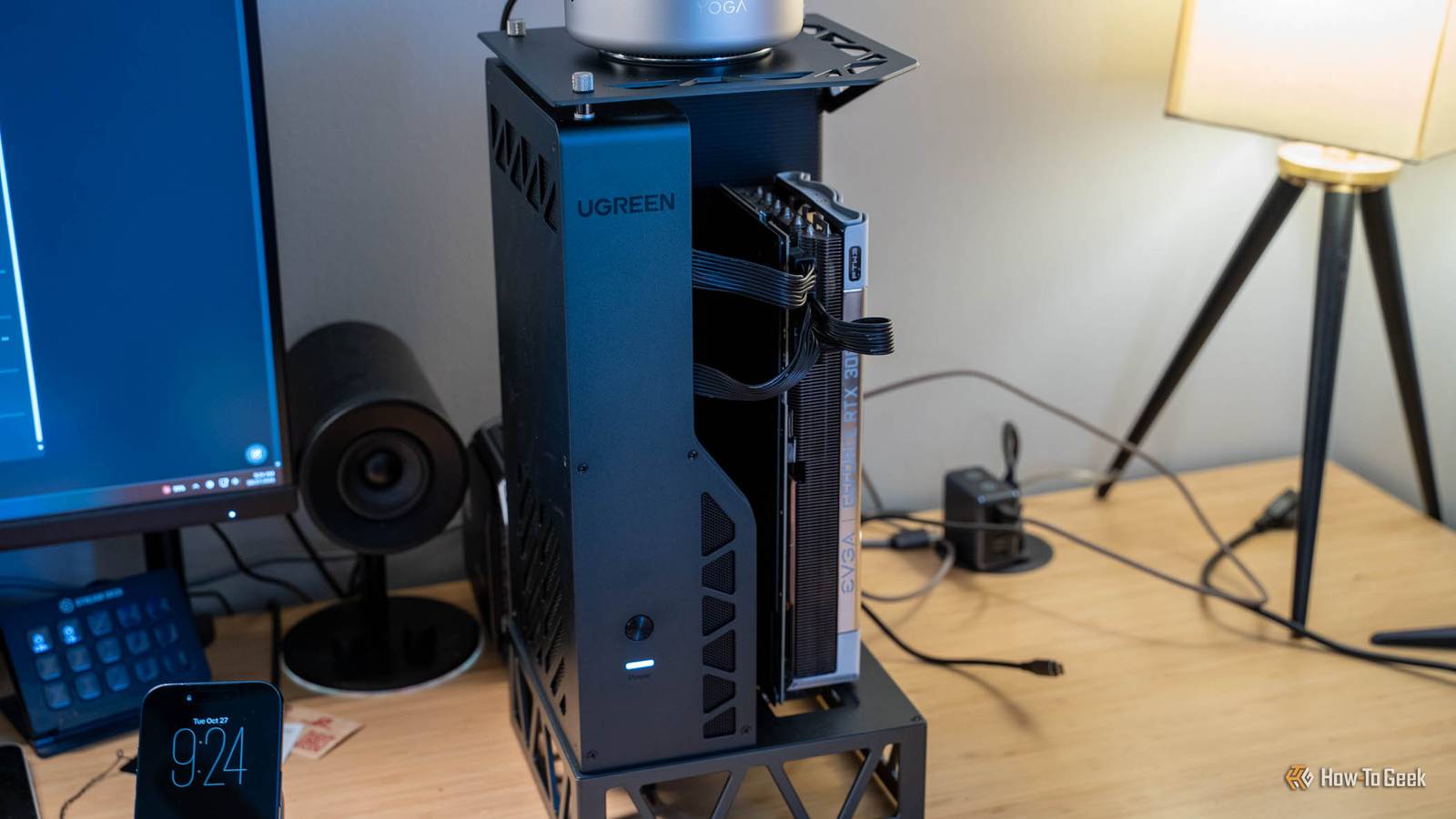
My RTX 3080 now spends most of its life switched off, and that’s exactly how I want it.For years, I’ve wanted my mini PC to game like a desktop without bringing back a desktop’s heat, noise, and footprint, and USB4 finally makes that practical.Ugreen’s LinkStation eGPU Dock puts a full-size graphics card on the end of a single cable, and after a few weeks of plugging it in only when it’s time to play, it’s become my favorite PC gaming accessory.
Add How-To Geek on Google Add as Preferred Source Follow on Google Discover Ugreen LinkStation eGPU Dock 8 Brand Ugreen GPU Included No GPU Max Power 850W GPU Max Size Up to 4 slots wide The Ugreen LinkStation eGPU Dock is designed to deliver desktop-class performance to any USB4- or OCuLink-enabled system.With an 850W power supply capable of driving the most power-hungry graphics cards on the market, the LinkStation includes four standard 8-pin PCIe power connectors as well as the newer 16-pin ATX 3.1 connector required by GPUs like the RTX 50-series. Pros & Cons Sets up in under 10 minutes Built-in 850W power supply with 12V-2x6 and 8-pin connectors Hot-plugging gives you on-demand GPU power USB4 and OCuLink in one dock Premium all-metal chassis $500 is a lot for an enclosure Ports sit on the bottom of the unit Performance depends heavily on the host?s USB4 implementation $500 at Ugreen See at Amazon Expand Collapse See Our Process How We Test and Review Products at How-To Geek We go hands-on with every product to ensure it's worth your time and money.Posts By Justin Duino Price and availability The Ugreen LinkStation eGPU Dock is available to purchase for $500 direct from Ugreen and Amazon.
Specifications Brand Ugreen GPU Included No GPU Max Power 850W GPU Max Size Up to 4 slots wide External Power Required Normal 3-pin power cable required Ports USB4 and OCuLink Expand Collapse The Ugreen LinkStation sets up in minutes And it supports almost every modern graphics card on the market Close There is little to assemble with the Ugreen LinkStation.It comes basically ready to go out of the box, and I was up and running in under 10 minutes.Mine came with a single set of PCIe power cables stuck out of the side already.
My RTX 3080 has three 8-pin power connectors, so I unscrewed the side panel of the LinkStation to find that there was another pair of 8-pin connectors hiding in there.In addition to that, there is also a 12V-2x6 (16-pin) ATX 3.1 connector in the same compartment coming out of the power supply, making this eGPU compatible with essentially all graphics cards up to the RTX 5090.Speaking of the power supply, the Ugreen LinkStation has an 850W power supply pre-installed and ready to go.
The entire chassis is made of metal and feels extremely premium, too.The power button is right on the front (though there is still a power switch on the PSU itself) and the status light is actually really handy.When the status light is orange, that means that the eGPU is either powering up or not connected.
When it’s white, the connection has been made to your computer.The cables all come out of the bottom of the unit.That’s where the power supply is, as well as the USB4 port.
I would have liked to have seen the USB4 port on the back, but that’s my only nitpick of this entire system.In my review, I’m going to focus on using the eGPU dock to add an external graphics card to my PCs, but that’s not all this dock can do.Really, this is just an external PCIe interface for your computer that connects over USB4 or OCuLink.
That means you could use it for something like a capture card, networking card, or anything else that either won’t fit in your PC case or just can’t connect to your mini PC any other way.This eGPU gives a small PC a big graphics upgrade Desktop-class graphics are just a plug away Over the years, I’ve had all different sizes of gaming PCs.I started with a normal ATX system back in around 2014, moved to eATX in 2016, back to ATX after that, to mITX in 2020, and then back to eATX after that.
So, it’s safe to say I have used all form factors possible for my computer.That is, until I got a mini PC.I absolutely love how small mini PCs are, but they aren’t all that great at gaming.
Take the Yoga Mini 11 as an example.I love that little system and the built-in Intel Arc B390 is actually fairly beefy for the size of system it is, but it still doesn’t have the performance that I’d like.That market is exactly what the Ugreen LinkStation eGPU Dock is designed for.
This eGPU has both OCuLink and USB4 on it to plug into a wide range of systems.I tested it with three different USB4 systems (sadly I don’t have anything with OCuLink on hand to test it with) to see how the performance stacked up across all of them.I’m actually surprised at how much extra juice the Ugreen LinkStation added to the mini PCs I plugged it into.
It was able to turn a system that could game decently into a system that could game amazingly, all over a simple USB4 connection.My Strix Halo system already has a pretty solid graphics card in it with the Radeon 8060S, so the 3080 won't be a big upgrade there.However, the Lenovo Yoga Mini 11 saw some sizable gains by adding the 3080 over USB4.
For example, the Yoga Mini was able to (surprisingly) hit 55 FPS on low settings at 4K in Forza Horizon 5, and 37 FPS in Forza Horizon 6 using the integrated Arc B390 graphics card.With the RTX 3080 over USB4, it hit 123 FPS on low in Forza Horizon 5 and 73 FPS in Forza Horizon 6.Bumping up to the extreme preset in both games, frame rates jumped from 29 to 71 FPS in Forza Horizon 5, and 20 to 40 FPS in Forza Horizon 6.
I keep my 3080 switched off until it's time to play Plug it in, swap the display cable, and game Two reasons I wanted to switch away from a big desktop to a mini PC were the heat and noise it generates.My main gaming desktop for the past few years has been a Ryzen 9 7900X with an RTX 3080.It’s big, noisy, and puts out a of heat when gaming.
But it also puts out a decent amount of heat at idle, too.A mini PC takes up a fraction of the footprint, uses barely any power at idle, and hardly produces any heat by comparison.My problem with mini PCs was always that they couldn’t game all that well.
I wanted a way to have on-demand gaming power when I needed it, but tuck it away when I didn’t.The Ugreen LinkStation works in that exact way.Because it’s USB4, it actually supports hot plugging.
This means that the LinkStation can be plugged into a Windows mini PC with the system on and everything just spins right up.Now, I do have to swap my HDMI or DisplayPort cable over to the GPU once I do that, but that’s not a big deal.I’m able to keep the LinkStation powered off when I don’t need it, and then I power it on when I do.
Having on-demand gaming power is something that I never expected to have, but I am so glad that I do.There are some games or programs that might need a reboot to fully utilize the eGPU, but most of the stuff I tested it with worked just fine with simply plugging it in.I even tested the LinkStation with an NVIDIA GPU on my ACEMAGIC M1A PRO+ AMD Strix Halo mini PC with the Radeon 8060S GPU in it and it worked perfectly without having to use DDU.
I just plug the eGPU with my RTX 3080 in when I need it, and unplug it when I don’t.Whenever I do plug the LinkStation in, though, my 3080 springs to life—heat and all.Since the LinkStation is completely open on basically all sides, there's fantastic airflow and the 3080 is able to keep itself cool without much hassle.
But, there's also nothing to block the noise.So, it'll be as loud as your GPU is.The power supply is quite quiet though, which is really great.
I heard no whine from the PSU and the chassis never heated up.On a good USB4 link, you keep most of a desktop 3080 I'm surprised just how close the comparison is with PCIe Close Something I was immediately curious about was the performance comparison between using the GPU in a PCIe slot compared to using it in the LinkStation.Native PCIe has about 6.4 times more bandwidth (at PCIe 4.0 x16) than USB4 does.
In my testing of the actual bandwidth, it was about 3.3GB/s over USB4 compared to 26.9GB/s over PCIe, so about eight times more bandwidth.This means there will be a huge performance loss, right? Wrong.Let’s compare the Ryzen 9 7900X desktop with my RTX 3080 hooked up over PCIe to my Ryzen AI Max+ 395 Strix Halo system with the RTX 3080 in the LinkStation hooked up over USB4 with gaming performance.
Also, for all images or benchmarks mentioned elsewhere in the review, I ran every game at 4K using in-game presets with no upscaling or frame generation of any kind.In Forza Horizon 5, a fairly solid benchmark game for me, the Strix Halo system over USB4 saw 132 FPS on low, 114 FPS on high, and 77 FPS on extreme.The Ryzen 9 7900X system with PCIe saw 196 FPS on low, 160 FPS on high, and 106 FPS on extreme.
Forza Horizon 6 is a much newer and more demanding game, and the spread was somewhat similar.The Strix Halo system via USB4 saw 76 FPS on low, 63 FPS on high, and 41 FPS on extreme, while the Ryzen 9 7900X desktop over PCIe saw 118 FPS on low, 84 FPS on high, and 63 FPS on extreme.These numbers are much closer than I expected them to be.
I know that the RTX 3080 is an older GPU, but it still goes to show just how little difference there is in the performance for some titles.Your USB4 port matters more than your graphics card My desktop's USB4 ports didn’t actually give me the full experience As I said, I tested the Ugreen LinkStation with three different systems: a Ryzen Strix Halo mini PC, my Ryzen 9 7900X desktop, and the Lenovo mini PC.All of the systems were able to make a USB4 connection with the LinkStation.
However, my desktop (with the ASRock X670E Taichi motherboard) made a link at half speed.This meant that the performance was quite degraded compared to the other systems.Running 3DMark’s Time Spy hid this difference because it also reports CPU performance mixed with GPU performance.
However, in real-world games, the difference is quite staggering.I tested all systems using 3DMark’s PCI Express Feature Test to test the bandwidth that the eGPU was able to deliver over USB4, and I saw on average 3.2 to 3.3GB/s of bandwidth between the Strix Halo and Lenovo mini PCs.However, because my X670E Taichi motherboard only linked up at half speed, it saw just 1.5GB/s transfer speed.
All three systems are labeled USB4 with 40Gb/s connection capabilities, but not all systems performed the same.This isn’t the fault of the Ugreen LinkStation, either, as I used the exact same cable for each test.I believe it has to do with the hardware and drivers on the system, and the Intel Thunderbolt controller that is used on the X670E Taichi motherboard specifically.
How does that limit translate to performance? Quite sizable, actually.The Ryzen 9 7900X system (the X670E Taichi) only hit 53 FPS in Forza Horizon 5 on the low preset.That’s a fraction of the 132 FPS that the Strix Halo system hit, and the 123 FPS that the Lenovo hit.
I wish there was a hard and fast rule I could tell you to follow to make sure that you can connect with a full 40Gb/s connection on the LinkStation, but I’ve not been able to solidify it sadly.Should you buy the Ugreen LinkStation eGPU Dock? The Ugreen LinkStation eGPU Dock is not cheap by any means.At $500, it’s a sizable investment to say the least.
However, it does a great job at connecting a graphics card to any USB4-enabled system.I particularly love how it supports hot-plugging so I can just have on-demand gaming performance sitting on my desk that produces zero heat when I don’t need it, and is ready at a moment’s notice when I do.If you’re looking to boost the performance of your mini PC and make it into a better gaming system without buying a whole new computer, I think the Ugreen LinkStation is absolutely perfect for you.
It does the job well, and there’s even an OCuLink port for a faster (64Gb/s) connection if you have a system that supports it.If you have a desktop that has a PCIe slot, I would skip it for gaming.It just doesn’t provide an experience that’s materially the same as or better than PCIe, so I would stick with that.
Just put your GPU in the PCIe slot.However, for other PCIe-enabled devices (like capture cards), the eGPU would be fantastic.Ugreen LinkStation eGPU Dock 8 Brand Ugreen GPU Included No GPU Max Power 850W GPU Max Size Up to 4 slots wide The Ugreen LinkStation eGPU Dock is designed to deliver desktop-class performance to any USB4- or OCuLink-enabled system.
With an 850W power supply capable of driving the most power-hungry graphics cards on the market, the LinkStation includes four standard 8-pin PCIe power connectors as well as the newer 16-pin ATX 3.1 connector required by GPUs like the RTX 50-series. $500 at Ugreen See at Amazon Expand Collapse
Read More