Your router is essentially a tiny, underpowered computer optimized to handle a wide variety of tasks, such as Wi-Fi management, routing, DHCP, and, of course, DNS forwarding.Although routers are impressively efficient for their size and price, they're still working with extremely limited resources, so the more work you can offload to other devices, the more resources the router has for other tasks.Since my ultra-cheap Wi-Fi 7 router is already just about keeping up with my modest network, I decided to give it a hand by using my NAS to handle DNS forwarding instead—and the difference was immediately noticeable.
How I realized my router was struggling with DNS Something clearly felt off When your DNS is causing problems with your internet connection, it can be surprisingly hard to pinpoint.Bandwidth can appear fine on internet speed tests, and the Wi-Fi signal is strong, but every device you use feels like it hesitates a little before eventually loading an app or webpage.The first real sign that something was wrong with my DNS setup was the initial delay I was experiencing on my computer, which uses a wired connection.
When I first booted up my computer and opened Chrome, websites sometimes wouldn't load for several seconds, then suddenly everything would appear at once.I noticed that visiting new websites and those I haven't visited in a while took particularly long.This was happening every single time I opened my web browser after not using it for a while, even when no other device was using any bandwidth.
In fact, I noticed that this behavior didn’t just appear on my computer—my phone and laptop were affected too.Apps I haven't opened in a few hours appeared to be broken for a few seconds before the actual loading would even begin.But by far the biggest headache were my smart home devices.
I have a bunch of cheap Wi-Fi-controlled smart bulbs around my apartment, and for no apparent reason, some bulbs would occasionally appear offline in Google Home even when the internet was working just fine.I initially blamed my cheap, outdated TP-Link Wi-Fi 5 router for all these problems, so when I saw a $50 Mercusys Wi-Fi 7 router on sale, I figured I could just upgrade to the latest and greatest technology, and it would fix my issue.The new router offered three times the combined maximum bandwidth, yet it somehow appeared to make my internet connection even worse.
Admittedly, that could be a placebo, but it certainly didn't improve the delay.TP-Link Dual-Band BE3600 Wi-Fi 7 Archer BE230 Brand TP-Link Wi-Fi Bands 2.4GHz, 5GHz The TP-Link BE3600 gives you next-gen Wi-Fi 7 performance at a budget price, delivering fast, reliable coverage with multi-gig ports and a powerful quad-core CPU.With strong antennas, EasyMesh support, and modern features like MLO and HomeShield, it’s an easy future-proof upgrade for any home.
$120 at Amazon Expand Collapse So, after doing some research, I realized that DNS was the likely culprit.I immediately replaced the Cloudflare DNS I was relying on with Google’s DNS, just in case my particular ISP didn’t play nicely with Cloudflare’s 1.1.1.1.That didn't help either, pushing me to take further action.
Offloading DNS made my network more responsive and reliable My router's processor is no match for my laptop NAS Since my cheap router had to handle DNS resolving for some 15 to 20 devices that were connected to it at any given moment, I realized that I could offload that part of its workload to my laptop NAS instead.The laptop in question has an old i5-7200U and 4GB of RAM, which is ancient by modern standards, but in terms of networking hardware, it's orders of magnitude more powerful than my router's weak processor and tiny amount of slow RAM.So, I realized that I could just take the DNS resolving off my router's back by letting my NAS process those back-to-back DNS queries each time I opened a bunch of websites at once.
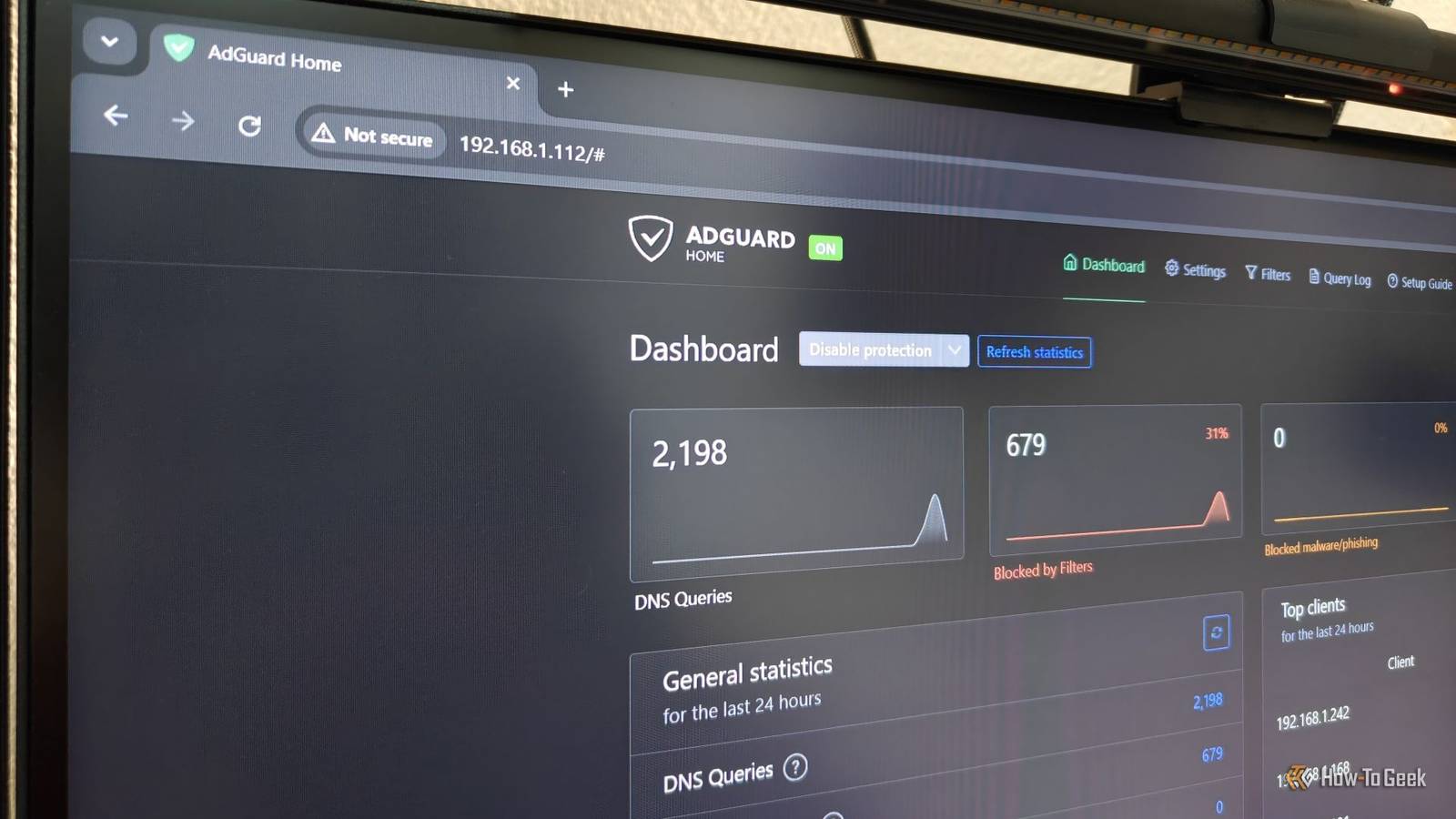
To achieve this, I installed AdGuard Home through Docker, which only took a few minutes to set up.AdGuard Home is essentially a self-hosted DNS server that manages my local network, then forwards requests to public upstream servers to connect to the outside world.This offloads all that processing work from my router to my NAS, allowing my router to focus on its other important tasks.
Plus, the massive increase in RAM capacity means my DNS server can cache thousands of domain lookups, making repeated visits to websites feel instantaneous.Another advantage of this setup is that AdGuard Home uses a sinkhole to block various things like ads, trackers, malware, and other junk, reducing the DNS requests on a typical network by 30–40%.It can even block smart home chatter from devices like your smart TV.
All this accumulates into even less work for my NAS and router.Related Your ISP logs every website you visit through DNS—these are the only 2 alternatives I trust Unprotected DNS requests mean someone could easily spy on you.Changing your DNS is almost as easy as doing nothing, so why wait? Posts 10 By Graeme Peacock That sounds all fine and dandy, but did it actually improve my browsing? Absolutely.
My first instinct was to open Wikipedia, as that's a website I visit relatively infrequently, and each time I do, it takes several seconds to load.With the upgraded DNS, it became instantaneous.Even when I load up five different websites simultaneously, there's simply no delay like there used to be.
Frankly, it's hard to put it into words without experiencing it yourself.Routers shouldn’t have to do everything Separating network tasks is an easy way to improve your home network One of the biggest takeaways I learned from taking on this little project was that your router doesn’t have to do all of the networking heavy lifting.If you’ve got an underpowered router, the biggest upgrade you can make for your network isn’t a better and bigger router—it’s a simple DNS server.
Self-hosted tools like Pi-hole and AdGuard Home are surprisingly lightweight and can run on almost any hardware, like a Raspberry Pi or an old mini PC.You could even go a step further by using AdGuard Home or Pi-hole as a DHCP server, and if you’re feeling particularly adventurous, you could build your own router and use your actual router as a simple wireless access point.Related Your DNS server knows every website you visit—here's why Google's 8.8.8.8 is different 8.8.8.8 offers more than just a simple alternative—there are potentially privacy benefits, too.
Posts 35 By Nick Lewis
Read More