I've used Excel for long enough to know that it isn't the first tool I'd reach for when I want to draw a picture, plan a room, or design a craft project.But a blank worksheet has helped me get creative, have a bit of fun, and sometimes even solve a problem faster than I could with a piece of paper or a dedicated app.Once you stop thinking of Excel as just somewhere to enter data, its grid becomes a surprisingly useful playground.
Here are five satisfyingly unusual things you can do with a blank Excel sheet.The beauty is that none of them requires VBA, complicated formulas, or advanced Excel skills.All you need is a bit of creativity.
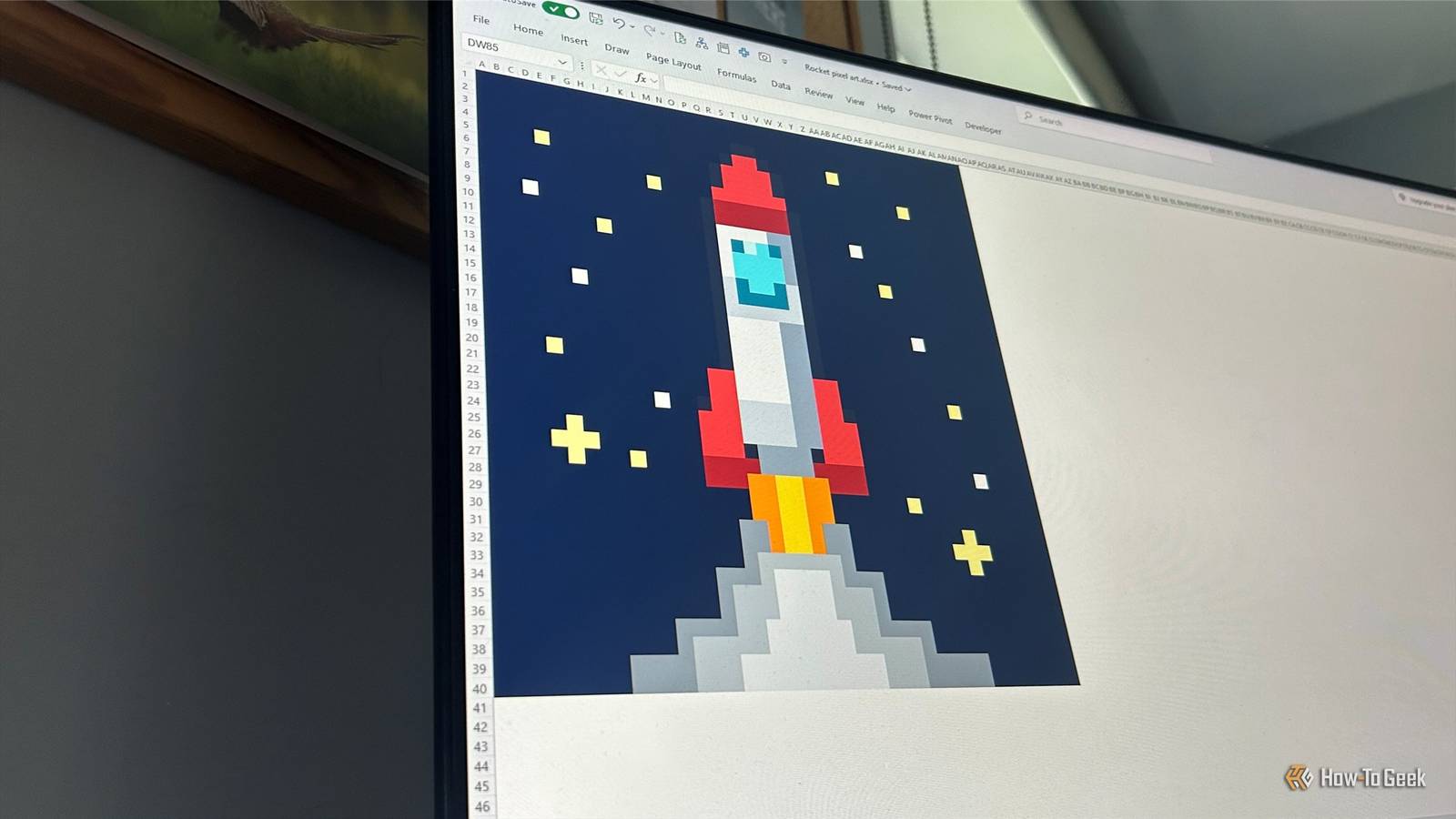
Create Excel pixel art The retro art studio hiding in Excel Close A worksheet is already divided into millions of tiny rectangles, so it doesn't take much imagination to see the cells as pixels.Make them square, then start coloring them to build your picture one cell at a time.I created a 40-by-40 retro rocket-launch scene, with a star-filled sky, rocket, flames, and smoke.
It took a while to get everything looking the way I wanted, but watching the picture emerge from a completely empty worksheet made it worthwhile.Double-click the Format Painter to keep it active, then click the relevant cells to apply the same formatting.That makes it much quicker to build larger areas of your pixel art without repeatedly going back to your original cell.
Once I was happy with the artwork, I hid the gridlines.That final step made a big difference, turning what had clearly been a worksheet into something that looked much more like actual pixel art.Use Excel as a measuring grid Excel's secret interior-design mode One of my favorite uses for a blank worksheet is turning it into a giant piece of graph paper.
Set the scale so that each cell represents 1cm, 10cm, or a meter, then use the grid to work out whether things will fit where you want them to.I like to fill planned areas with a single character, such as a period, so Excel can count the selected cells in the status bar and help me estimate distances quickly.I used this to plan my lounge before buying new furniture, so I could see that everything would fit and work together before spending any money.
I've made the mistake of assuming something would fit, only to discover that my mental measurements were far more optimistic than reality.I also use the same method when planning my garden, home office, garage, and pretty much anything else I can draw from above.When your virtual floor plan gets too large to see comfortably, select the whole area and click View > Zoom to Selection.
Excel fills the window with your canvas, after which you can zoom back in manually to inspect the finer details.Create a stop-motion animation Excel just wants to be a flipbook Excel worksheets can double as animation frames if you're willing to put in a little setup work.I drew a simple dog using shapes, then duplicated the worksheet several times and made tiny changes to its position on each copy.
There's even a little surprise in the middle: on the fifth frame, the dog stops and looks directly at me before carrying on with its walk.Cycle through the worksheets quickly, and the separate still images turn into a surprisingly convincing little animation.Ctrl+Page Down and Ctrl+Page Up let me move between worksheets without reaching for the mouse.
With the frames arranged in order, repeatedly pressing the shortcut turns the workbook into a basic flipbook.There's something wonderfully silly about making an Excel workbook animate a dog, and that's why I love it so much.Design a board game board Your spreadsheet just became game night Excel's grid was already a board before I did anything to it.
Square up the cells, add borders and colors, and you've got a playing surface.From there, add shapes for pieces, counters, obstacles, or anything else the game needs.I've used Excel's grid to sketch board layouts and test ideas before committing anything to cardboard.
It's particularly handy when I want to move spaces around, try different configurations, or change the size of the board without starting again from scratch.Group related shapes together once you've created them.That lets you move an entire collection of game pieces or board elements as one object, rather than having to reposition everything individually.
I wouldn't build the next Monopoly in Excel, but if I suddenly have an idea for a board game, I know exactly where I'll be sketching it out.Plan a crochet pattern Excel discovered its crafty side Close Crochet colorwork is built around patterns of stitches, so Excel's grid makes a surprisingly useful canvas for designing one.I created a 30-by-30 chart, with each square representing a stitch, then used cell formatting to build a repeating cream, navy, and coral diamond-and-chevron pattern.
The 10-by-10 motif took a while to nail down, but once I did, I just stamped it across the rest of the grid.The finished chart looks much more like a crochet pattern than a spreadsheet, despite consisting entirely of formatted cells.I could then take the finished pattern and use it as the blueprint for the actual crochet project.
Excel may have just found itself a rather unexpected new job.Excel has always been a little weird If you're thinking this is all a bit unusual, it's actually only the beginning.Microsoft's developers have been sneaking surprisingly fun things—including a hidden flight simluator—into Excel for decades.
So the next time you open a blank Excel worksheet, maybe don't start by asking what you're supposed to put in it.Instead, see what you can build with it.
Read More