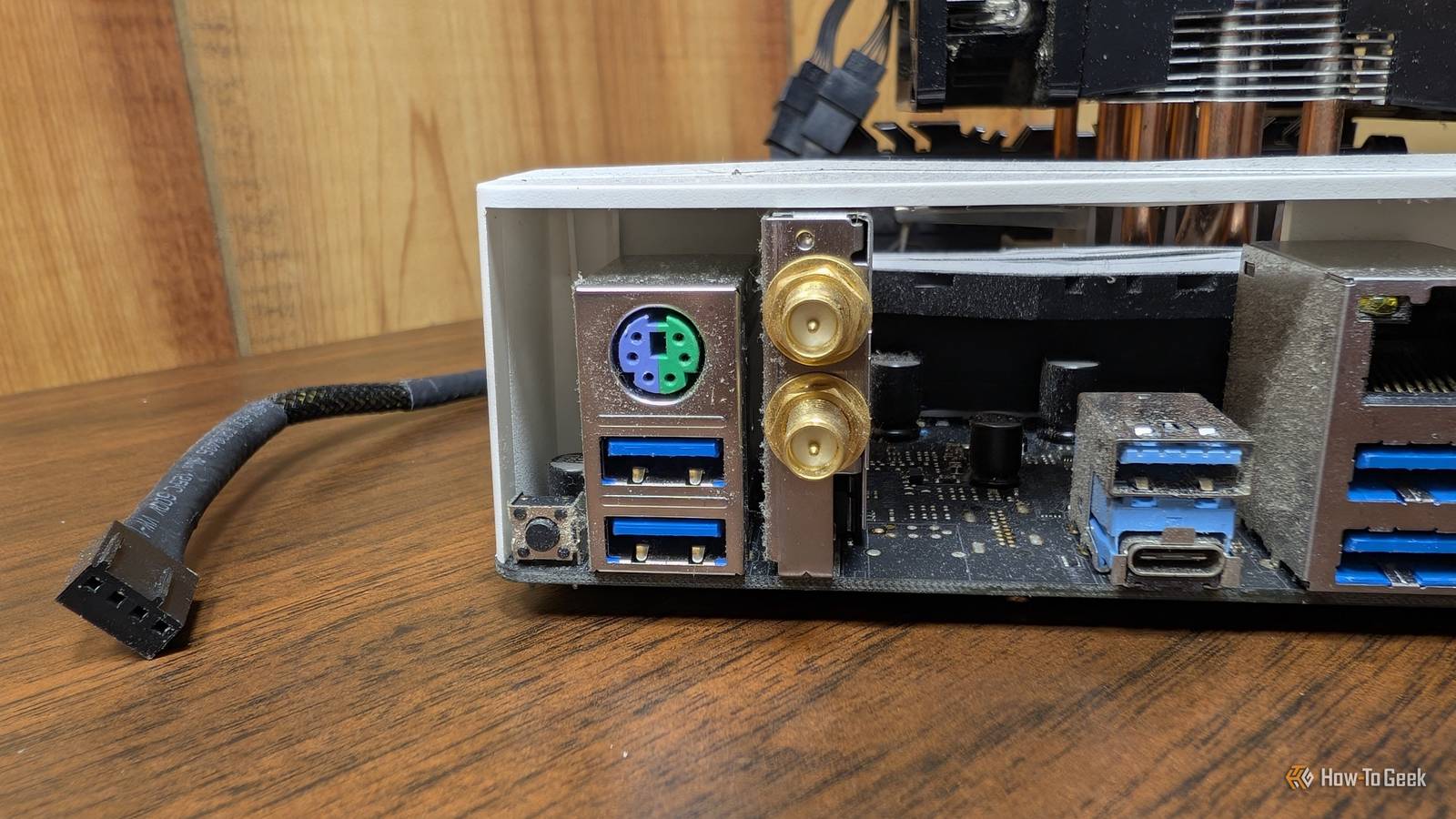
We've spent the better part of the last couple of decades phasing out legacy computer ports in favor of newer standards.While VGA and DVI are largely a thing of the past now, why is it that some rather expensive motherboards still carry that ancient six-pin PS/2 port for connecting keyboards and mice when most peripherals have switched to USB? PS/2 and USB connect the same peripherals in very different ways PS/2 has far less going on under the hood Close I'm sure that most of us who were around computers in the 90s and early 2000s still fondly remember the old reliable purple and green PS/2 ports that we used to connect our ancient keyboards and mice.The port had been available for much longer than that, though, as it launched all the way back in 1987, when it was first introduced on the IBM Personal System/2, which the PS/2 port derives its name from.
Although it looks a bit like an analog port (think: VGA) with its 6-pin design and tubular shape, it's actually a digital cable, with each pin dedicated to one task: data, clock, power, and ground.Over time, this old port largely got replaced by the universal digital rectangular port that we call USB.You're probably well aware that USB can connect a lot more than just keyboards and mice like PS/2, which helps explain why it displaced the old port so quickly.
PS/2, in contrast, could only do keyboards, mice, barcode scanners, KVM switches, and a handful of other fairly simple input devices.This is because they work in fundamentally different ways: PS/2 talks to the motherboard's keyboard-controller hardware, which is typically part of the Super I/O chip.Super I/O chips handle a variety of low-level motherboard functions, including hardware monitoring, fan control, and legacy interfaces like PS/2.
There's a lot of detail that we could talk about here, but the most interesting aspect of this setup is that PS/2 works on a hardware interrupt basis — pressing a key or button on the peripheral causes the PS/2 controller to assert an interrupt, forcing the CPU to stop its current calculations and handle the incoming data before continuing.This, of course, happens in a fraction of a millisecond, which is impossible to notice.In contrast, USB is managed directly by the USB host controller, which can be found directly on the CPU or on the motherboard chipset.
All devices share a bus, so they can't just interrupt the CPU on a whim.Instead, the host controller periodically asks the connected devices for new data, which is what we refer to as polling.At a polling rate of 1,000Hz, the USB host controller checks an interrupt endpoint 1,000 times a second.
PS/2 still has some advantages, but they're mostly for enthusiasts Its advantages are almost unnoticeable in everyday use PS/2 has a few relatively niche advantages that help explain why it hasn't disappeared from modern motherboards just yet, though it's usually a single combined port for the keyboard or mouse instead of two separate ports.The most obvious one is that plugging a keyboard into a combined PS/2 port frees up a USB port on the rear for another device.It also doesn't require you to install any drivers; it's about as plug-and-play as it gets.
Another big advantage is true N-key rollover support, meaning every single key gets registered when pressed simultaneously.Many modern gaming keyboards support this too now, but USB's standard boot protocol can only register six simultaneous non-modifier keypresses.This was the reason why many RPG gamers like myself preferred this old-school port, as those games sometimes require a lot of simultaneous keypresses that occasionally failed to register on USB keyboards.
But the real advantage is PS/2's independence.Because it generates a hardware interrupt when sending a signal, the device can remain functional in situations where USB completely fails.It's particularly useful for extreme overclocking scenarios that can cause instability, driver lockups, and crashes.
It's a reliable way to navigate the BIOS, adjust clock speeds and voltages, save the settings, and hopefully navigate to a successful benchmark.That helps explain why PS/2 is often found on high-end boards like the Gigabyte B850 GAMING WIFI6 and ROG Maximus Z790 Apex rather than budget and mid-range variants.There are some exceptions, though.
For instance, the low-end ASUS PRIME H610M-K D4 has a PS/2 keyboard/mouse combo port, which could be useful in some institutions where legacy hardware and peripherals still need to be supported.Related Don't Be Fooled by the Latest Gimmick in PC Gaming Hardware More USB snake oil.Posts 7 By Ismar Hrnjicevic USB has PS/2 beaten in almost every other way It's simply more convenient and better for modern hardware So we went over the advantages; let's now focus on the drawbacks of PS/2 compared to USB.
For starters, it doesn't support hot-swapping.If you tried unplugging a keyboard or mouse while the PC is turned on, the sudden spike or short-circuit could potentially fry the port and, if you were super unlucky, take the Super I/O chip with it.Thankfully, modern motherboards have fuses that prevent this from happening, but if you ever use this port, never try to hot-swap it.
It's also a major bottleneck for modern high-performance mice and magnetic keyboards, as it's capped at a hard 200Hz packet ceiling, which feels sluggish on a high-refresh-rate display.PS/2 has become obsolete without becoming useless PS/2 is in a uniquely weird situation in the PC world.For the vast majority of people, it's obsolete, as they don't even have a keyboard or mouse to plug into it.
However, it solves a specific problem for a small percentage of hardcore enthusiasts who want to overclock their systems to the absolute maximum.And for those who have a collection of vintage keyboards and mice they enjoy, it means not having to resort to admitting defeat and using a USB adapter.Related 2.4GHz vs Bluetooth: Which Wireless Technology Is Better? 2.4GHz is great as long as you don't lose that tiny dongle.
Posts 6 By Ismar Hrnjicevic
Read More